Do not input private or sensitive data. View Qlik Privacy & Cookie Policy.
Skip to main content

Announcements
Qlik and ServiceNow Partner to Bring Trusted Enterprise Context into AI-Powered Workflows. Learn More!

NPrinting connection fails due to QlikView Desktop HTTP tunneling errors

No ratings
cancel
Showing results for 
Search instead for 
Did you mean: 
Frank_S
Support
Support

NPrinting connection fails due to QlikView Desktop HTTP tunneling errors

Last Update:

Jun 4, 2021 2:44:42 PM

Updated By:

Frank_S

Created date:

Apr 28, 2021 5:58:55 PM

Not able to perform a successful connection verification in NPrinting Feb 2020 when making a QVP connection
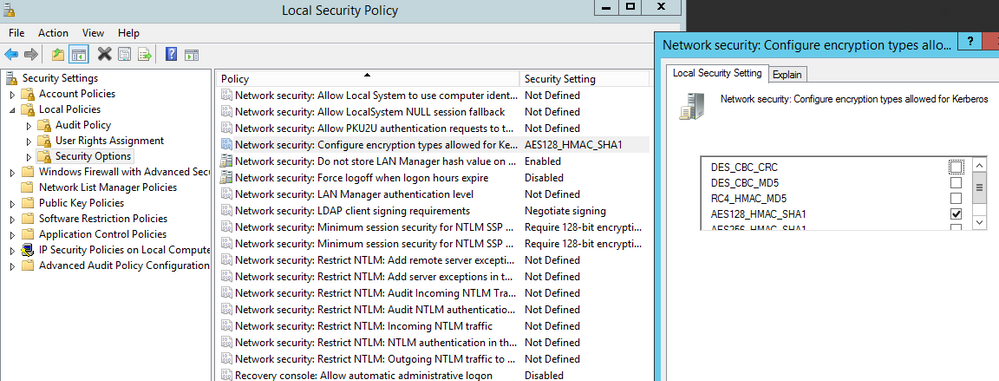
QVP connection encounters a tunneling error resulting from the setting shown below:

servlet.ImageServer.png

Environment

NPrinting Feb. 2020

Resolution

  • Verify that port 4747 is open for communication
  • Remove any local security policy which restricts QlikView desktop communication.
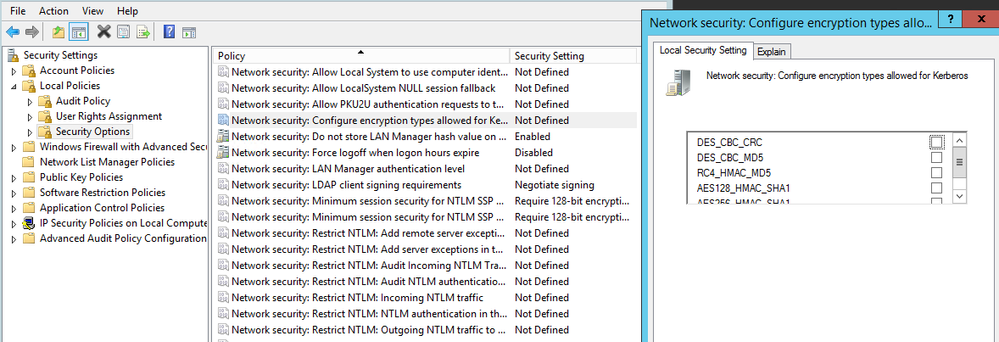
  • In this case, remove the checkbox show and switch the policy so that it is 'undefined'


servlet.ImageServer2.png


Cause

  • Change made to default active directory policy which cause inference with NPrinting Connection success via the QlikView desktop


Related Information:

Version history
Last update:
‎2021-06-04 02:44 PM
Updated by: