Unlock a world of possibilities! Login now and discover the exclusive benefits awaiting you.

- Qlik Community
- :
- All Forums
- :
- QlikView
- :
- Need more info on MetaScanner application
- Subscribe to RSS Feed
- Mark Topic as New
- Mark Topic as Read
- Float this Topic for Current User
- Bookmark
- Subscribe
- Mute
- Printer Friendly Page

- Mark as New
- Bookmark
- Subscribe
- Mute
- Subscribe to RSS Feed
- Permalink
- Report Inappropriate Content
Need more info on MetaScanner application
Hi Experts
I am started using MetaScanner Application, I have downloaded this application from this site only.
Want to know few things as below, these values are present at set up tab.
Environment : this should be 'Dev or Prod' or name of the server ?
RelativePath
File Root Path
vServerFlag
ServerLogPath
vPubFlag
QVPRpath
QVPLogPath
MetaPath
AuditLogPath
Br
Anta
- Tags:
- qlikview_deployment

 matt_crowther
- Mark as New
- Bookmark
- Subscribe
- Mute
- Subscribe to RSS Feed
- Permalink
- Report Inappropriate Content
From my limited use of the Meta Model so far:
Environment : this should be 'Dev or Prod' or name of the server ? - Free format description of your scanned environment.
RelativePath - Folder Path relative to Meta .qvw location
File Root Path - QVS Root Folder location
vServerFlag - 1 if you're scanning a server 0 if not
ServerLogPath - Folder path of where your server logs are exported to
vPubFlag - Flag to signify the server has publisher installed (same as vServerFlag)
QVPRpath - Relate to Publisher?
QVPLogPath - Pulisher logs path?
MetaPath - Not entirely sure.
AuditLogPath - Location of Audit Logs
Apologies I can't be definitive but I've only had a breif look at the model so far; I find looking at the load script usually gives away some clues.
All the best,
Matt - Visual Analytics Ltd
@QlikviewBI

 ekech_infomotio
- Mark as New
- Bookmark
- Subscribe
- Mute
- Subscribe to RSS Feed
- Permalink
- Report Inappropriate Content
I had similar problems and got the metascanner working by following the directions here:
http://community.qlik.com/message/182892#182892
Greetings,
Edgar
- Mark as New
- Bookmark
- Subscribe
- Mute
- Subscribe to RSS Feed
- Permalink
- Report Inappropriate Content
Hi
Thanks for this link. I have one query in this link that value of "MetaPath=" should be location of MetaScanner application or not?
Br
Anta
ekech_infomotio
- Mark as New
- Bookmark
- Subscribe
- Mute
- Subscribe to RSS Feed
- Permalink
- Report Inappropriate Content
in this Path I found some QVDs, probably containing information about the QVWs found by the MetaScanner
calender.qvd
filelist.qvd
QVWFields.qvd
QVWTables.qvd
SOE.QVD
TableLineage.qvd
I loaded them into a new application and got the following Datamodel:
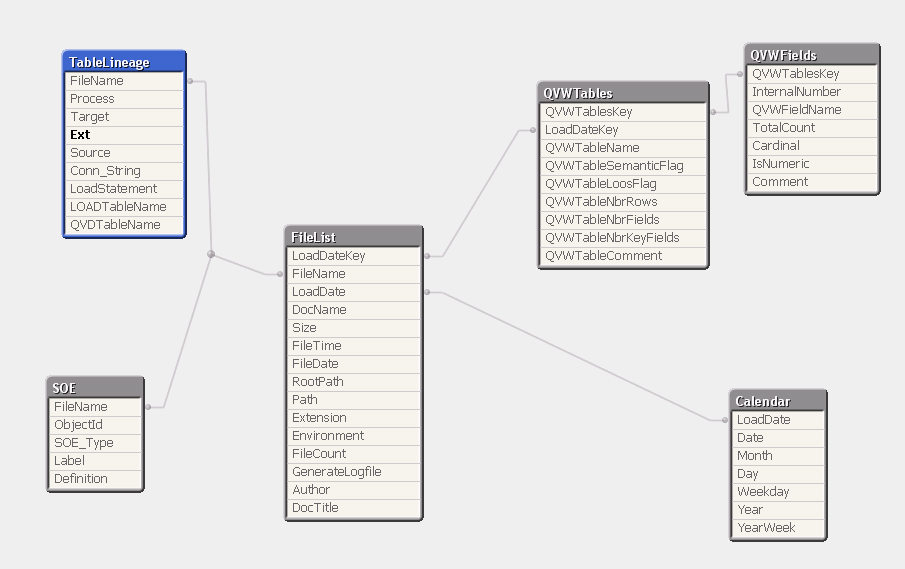
one level higher I found all the QVDs containing the MetaData from XMLs and LOGs
- Mark as New
- Bookmark
- Subscribe
- Mute
- Subscribe to RSS Feed
- Permalink
- Report Inappropriate Content
Hi Matthew
as per your reply, I have set the variables and its working fine. First time, I have tried for 1 folder only. Now I want to read more than 1 say there is one main folder as 'Documents' inside that there are other folders like 'XYZ','ABC' and 'PQR'.
When I try to read these sub folders, I am able to read QVW files bt when I look for there details I can see only SESSION SUMMARY details.. 
I am suing QV10 SR3, other QVW files(present in sub folders) are in previous format. is it one of the reason?
Please comment.
Br
Anta