Unlock a world of possibilities! Login now and discover the exclusive benefits awaiting you.

- Qlik Community
- :
- Forums
- :
- Groups
- :
- Industry and Topics
- :
- Scalability
- :
- Re: Qlik Sense Scalability Tools
- Subscribe to RSS Feed
- Mark Topic as New
- Mark Topic as Read
- Float this Topic for Current User
- Bookmark
- Subscribe
- Mute
- Printer Friendly Page
- Feature this Topic

 Daniel_Larsson
- Mark as New
- Bookmark
- Subscribe
- Mute
- Subscribe to RSS Feed
- Permalink
- Report Inappropriate Content
Qlik Sense Scalability Tools
This package (referred to as Qlik Sense Scalability Tools) contains a complete set of tools for easy creation, execution and analysis of load/performance tests.
This tool is now deprecated and will not receive any further updates, please use the Qlik Sense Enterprise Scalability Tools instead.
Supported versions of Qlik Sense: all 2020, all 2021, 2022-aug
Included parts are:
- Standalone application for creating and executing a simulation script
- Documentation on how to use the package
- Regression analyzer
- Benchmarking package
- App evaluator package
QlikView and Qlik Sense documents to help analyze result and log files (previously included in this package) can be found here :https://community.qlik.com/docs/DOC-15451
Troubleshooting
For help to troubleshoot connection problems, please review Appendix A of the documentation or Connection Troubleshooting Tips
Change log
v5.17.0
- Add support for Qlik Sense May 2022 release
- Add support for Qlik Sense Aug 2022 release
v5.16.0
- Add support for Qlik Sense Feb 2022 release
v5.15.0
- Add support for Qlik Sense Nov 2021 release
v5.14.0
- Add support for Qlik Sense Aug 2021 release
(See Readme.txt for changes in earlier versions of the tool.)
Your use of Qlik Sense Scalability Tool will be subject to the same license agreement between you and Qlik for your Qlik Sense License. Qlik does not provide maintenance and support services for the Qlik Sense Scalability Tool, however please check QlikCommunity for additional information on use of these products.
- Tags:
- Group_Documents
- load testing
- load_testing
- performance
- performance_&_scalability
- performance_testing
- scalability
Daniel_Larsson
- Mark as New
- Bookmark
- Subscribe
- Mute
- Subscribe to RSS Feed
- Permalink
- Report Inappropriate Content
Rohit Kumar wrote:
Hi Daniel,
Is there any change when we deploy scalability tool for shared persistence, i.e apps are executing or reloading on separate scheduler node and load on separate proxy nodes ?
As long as the tool is connected towards a proxy which will load balance towards the correct Sense nodes, then no.
Daniel_Larsson
- Mark as New
- Bookmark
- Subscribe
- Mute
- Subscribe to RSS Feed
- Permalink
- Report Inappropriate Content
Dinesh Dasari wrote:
Having issues similar to the above ones, getting a "Failed to get app structure: Failed to to connect to app. Error: Failed to connect to application" when doing an "App strcture... Connect to app".
Have tried both header and NTLM. No luck getting the app structure. Please help. thanks
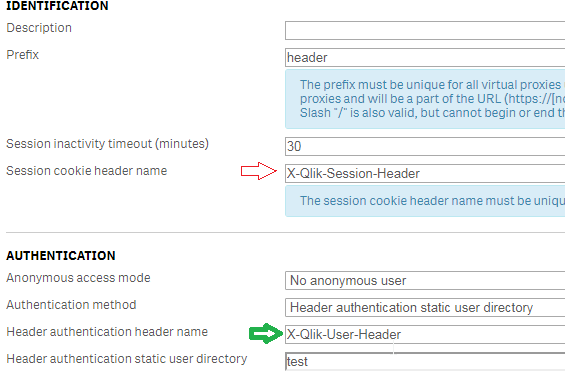
The name suggest you are using the wrong headname, please make sure you are using the authentication header name.

- Mark as New
- Bookmark
- Subscribe
- Mute
- Subscribe to RSS Feed
- Permalink
- Report Inappropriate Content
Hi Daniel,
Thanks for the input.
Executor gets stuck at finishing the logs status.
19:16:35 Workers:1 Errors:0 Warnings:0 Requests:0 Sessions:1
Execution end time reached, disposing (May take up to 600 seconds)
19:16:36 Workers:1 Errors:0 Warnings:0 Requests:0 Sessions:0
Test Execution Finished.
WarningCount: 0
ErrorCount: 0
Finishing writing logs...
Log file has following entries.
2017-10-23 19:16:11.4585+02:00 DEBUG Executor: Starting SDKExerciser process...
2017-10-23 19:16:55.3440+02:00 ERROR Timeout when trying to open named piped towards pid 8484
2017-10-23 19:21:55.3738+02:00 WARN Executor: Process pid<8484> not cancelled, force kill
I don't see any process running either on server or client machine with ID 8484
- Mark as New
- Bookmark
- Subscribe
- Mute
- Subscribe to RSS Feed
- Permalink
- Report Inappropriate Content
Hi Daniel,
Same error even after changing it to header name (X-Qlik-User-header).
- Mark as New
- Bookmark
- Subscribe
- Mute
- Subscribe to RSS Feed
- Permalink
- Report Inappropriate Content
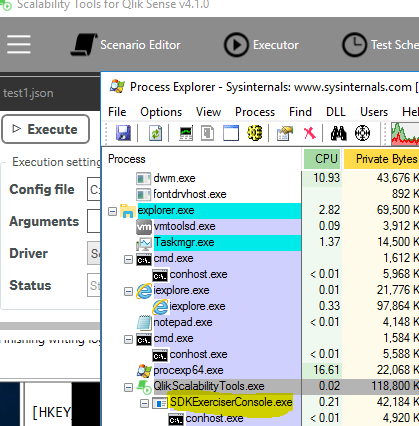
It looks to be SDKExerciserConsole.exe PID that is getting terminated right after executing the script.
Daniel_Larsson
- Mark as New
- Bookmark
- Subscribe
- Mute
- Subscribe to RSS Feed
- Permalink
- Report Inappropriate Content
Yes, what the executor does is run SDKExerciserConsole.exe in the background, after execution it will stop, "Finishing writing logs..." is the last entry it writes before the status switches to stopped. Since the execution finishes without error we know your settings seem correct for at least one user. Likely you will be able to run test as long as you are able to build a scenario. You can try switching to the SheetChangerWorker temporarly and runnuing one execution of this. This worker doesn't require a scenario and only switches to each sheet in the app twice (normally used to determine caching effect).
Animesh Kumar wrote:
2017-10-23 19:16:55.3440+02:00 ERROR Timeout when trying to open named piped towards pid 8484
This error comes from the connect to app logic, for some reason your system seem to either not allow this connection, or it takes too long time (>60s). There's several ways to get the object id's and one more way to get the app structure for building a scenario. Please try the suggestion from this post: https://community.qlik.com/docs/DOC-8878#comment-49793
Daniel_Larsson
- Mark as New
- Bookmark
- Subscribe
- Mute
- Subscribe to RSS Feed
- Permalink
- Report Inappropriate Content
Dinesh Dasari wrote:
Hi Daniel,
Same error even after changing it to header name (X-Qlik-User-header).
Well it needs of course to be whatever name you wrote in Header authentication header name. Could you also please try the suggestions I've written to Animesh Kumar https://community.qlik.com/docs/DOC-8878#comment-63170
- Mark as New
- Bookmark
- Subscribe
- Mute
- Subscribe to RSS Feed
- Permalink
- Report Inappropriate Content
Hi Daniel,
Thanks for the suggestion.
I tried command line option, but it does not generate a json file in the end.
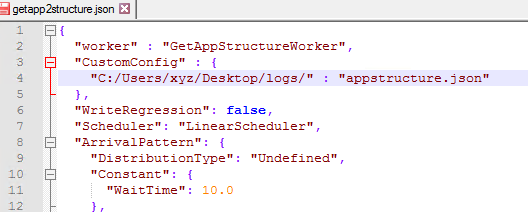
Change in existing json file:
Execution of above file:

Log file gets created but command does not create a new json file "appstructure.json". Please check if this custom config is supported in Sep, 2017 release
-------------------log file-------------------
Time Ticks Level ResponseTime VirtualUser SessionName AppName Action Label ActionId ObjectId ObjectType Recieved Sent Details MessageType Error RequestsSent Stack
2017-10-25 00:07:17.9544+02:00 963152866900 SCENARIO APPID {"LogDir":"C:/Users/xyz/Desktop/logs/","ConfigName":"getapp2structure","UserNamePrefix":"Exerciser","ConcurrentUsers":1,"Iterations":1,"RampupDelay":10.0,"Server":"qliksenseserver","App":"APPID","Port":null,"SSL":false,"Scenario":null,"Worker":5,"AfterIterationWaitTime":0,"AfterIterationWait":0,"Scheduler":1,"WsTimeout":300000,"ExecutionTime":1,"AppMode":0,"InstanceNumber":1,"NewUserForEachIteration":false,"VirtualProxyPrefix":"ptest","HeaderName":"ptest-sense-header","ConnectionType":1,"ArrivalPattern":{"DistributionType":0,"Constant":{"InstanceNumber":1,"WaitTime":10.0},"Uniform":{"InstanceNumber":1,"Min":1.0,"Max":10.0},"Exponential":{"InstanceNumber":1,"Lambda":0.1,"MaxValue":300.0},"Poisson":{"InstanceNumber":1,"Lambda":4.0,"MaxValue":300.0},"Pareto":{"InstanceNumber":1,"Scale":2.0,"Shape":20.0,"MaxValue":300.0},"LogNormal":{"InstanceNumber":1,"Mu":0.0,"Sigma":0.25,"MaxValue":300.0}},"ReUseSelections":true,"UsernameFilePath":"","WriteRegression":false,"UserList":["xyz@domain"],"UserCreationMethod":3,"Version":"13.1.2.0","CustomConfig":{"C:/Users/xyz/Desktop/logs/":"appstructure.json"},"Cloud":null,"AllowUntrustedCertificate":false,"NumberOfRandomSheets":1,"NumberOfRandomObjects":10,"DefaultTimerDelay":{"Action":"TimerDelayItem - Uniform(12.5:2.5)","Param1":12.5,"Param2":2.5,"Distribution":1,"Label":"","State":null,"Disabled":false},"SessionAppFromTemplate":false} Config
2017-10-25 00:07:17.9856+02:00 963152910944 SCENARIO APPID 1950865 Ticks freq
2017-10-25 00:07:17.9856+02:00 963152911057 SCENARIO APPID Starting test towards Uri: ws://qliksenseserver/ptest StartTest
2017-10-25 00:07:17.9856+02:00 963152911093 SCENARIO 1 UsersLoadedFromList
-------------------
Daniel_Larsson
- Mark as New
- Bookmark
- Subscribe
- Mute
- Subscribe to RSS Feed
- Permalink
- Report Inappropriate Content
Animesh Kumar wrote:
Hi Daniel,
Thanks for the suggestion.
I tried command line option, but it does not generate a json file in the end.
Change in existing json file:
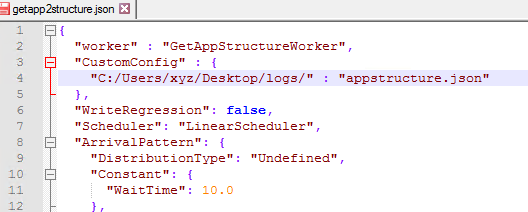
Hi filepath is a json key, you should not write your path there. File name and optional path should be in the value field.
e.g.
"CustomConfig" : {
"filepath" : "appstructure.json"
}
will create the file appstruture.json in the same folder as the sdkexerciserconsole.exe , if you want to use a complete filepath write the entire filepath in the value field including the filename, but don't change the key field.

 rohitk1609
- Mark as New
- Bookmark
- Subscribe
- Mute
- Subscribe to RSS Feed
- Permalink
- Report Inappropriate Content
HI Daniel,
One quick question, I don't have Qlik View license to run QVD Generator and ServerMetaFetcher files. Can you please help me if there are any Qlik Sense files out there, so I can use it for my ST purpose ?