Unlock a world of possibilities! Login now and discover the exclusive benefits awaiting you.

Recent Documents
-
How To Delete Data Files and Datasets from Qlik Cloud Hub and Data Spaces
Method 1: From the Data Sources Open the Qlik Analytics Service Select Catalog Pick your Space Click Space Details then Select Data Files from the... Show MoreMethod 1: From the Data Sources
- Open the Qlik Analytics Service
- Select Catalog
- Pick your Space
- Click Space Details then
- Select Data Files from the context menu
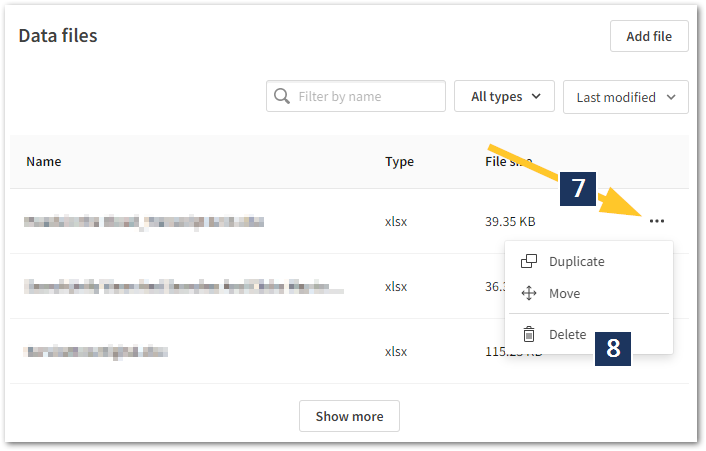
- Locate the data you wish to delete
- Click the ellipses to open the next menu
- Click Delete
- Alternatively, add /data at the end of the URL.
Method 2: From the Data Load Editor
- Open the App with a connection to the data files you wish to edit
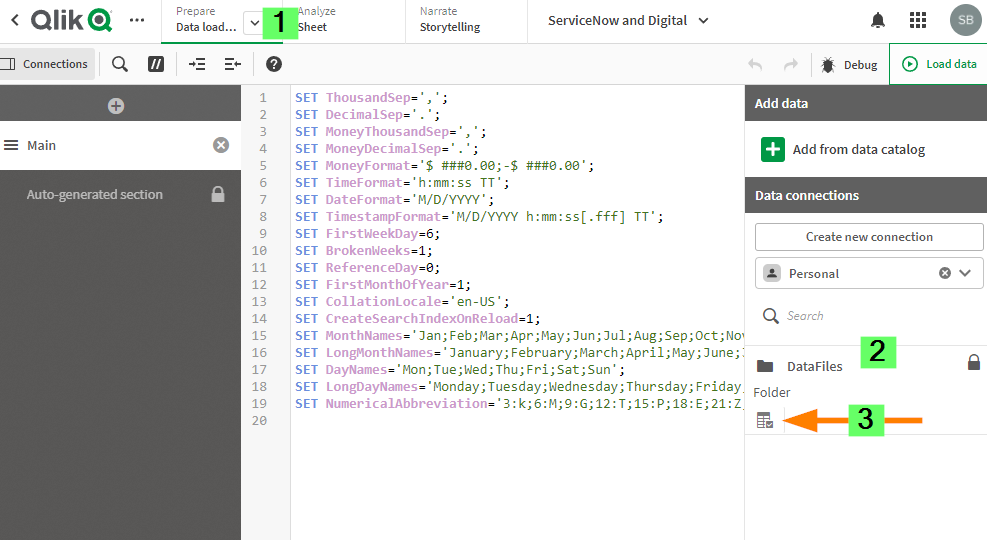
- Go to Data Load Editor
- On the Right Side of the Data Load Editor under add data section select your data space.
- Click on the table icon under datafiles.
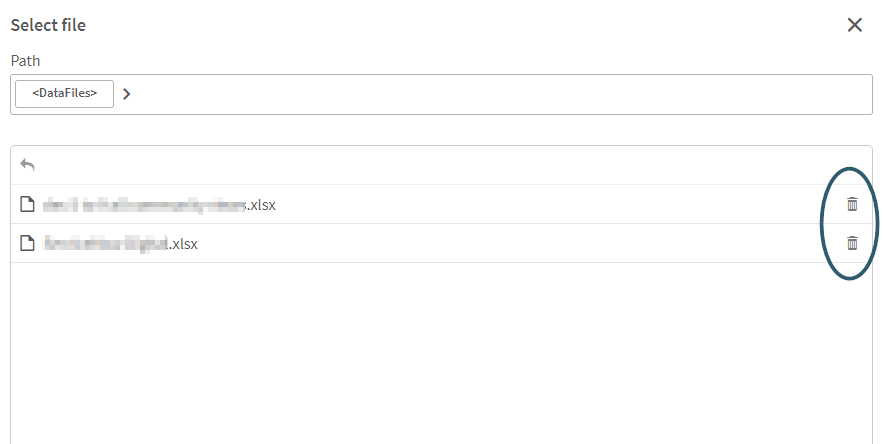
- select the Delete option on the right side of each file that you want to delete.
Environment
The information in this article is provided as-is and to be used at own discretion. Depending on tool(s) used, customization(s), and/or other factors ongoing support on the solution below may not be provided by Qlik Support.
-
Qlik Talend Cloud: Illegal Argument popup when creating new Snowflake connection
When using Key Pair authentication and creating a new Snowflake connection, you might encounter the following error: Illegal Argument Resolution The ... Show MoreWhen using Key Pair authentication and creating a new Snowflake connection, you might encounter the following error:
Illegal Argument
Resolution
The provided private key file (.p8) is not in the correct format, or the key file password is invalid.
To get the actual error, install SnowSQL utility in the Linux machine where the Qlik Data Movement gateway is installed and try to connect to the same account:
snowsql -a <account> -u <username> --private-key-path <path to file/rsa_key.p8>This will provide the exact error on why the connectivity is failing and assist in identifying which root cause applies.
Cause
Environment
- Qlik Talend Cloud
-
Qlik Replicate: Errors Due to Unsupported SQL Server Versions
Starting from Qlik Replicate versions 2024.5 and 2024.11, Microsoft SQL Server 2012 and 2014 are no longer supported. Supported SQL Server versions in... Show MoreStarting from Qlik Replicate versions 2024.5 and 2024.11, Microsoft SQL Server 2012 and 2014 are no longer supported. Supported SQL Server versions include 2016, 2017, 2019, and 2022. For up-to-date information, see Support Source Endpoints for your respective version.
Attempting to connect to unsupported versions, both on-premise and cloud, can result in various errors.
Examples of reported Errors:
- Qlik Replicate 2024.5 accessing Microsoft Azure SQL Server 2014
[SOURCE_CAPTURE ]W: Table 'dbo'.'tableName' has encrypted column(s), but the 'Capture data from Always Encrypted database' option is disabled. The table will be suspended (sqlserver_endpoint_capture.c:157) - Qlik Replicate 2024.11 accessing Microsoft SQL Server 2014
[SOURCE_UNLOAD ]E: RetCode: SQL_ERROR SqlState: 42S02 NativeError: 208 Message: [Microsoft][ODBC Driver 18 for SQL Server][SQL Server]Invalid object name 'sys.column_encryption_keys'. Line: 1 Column: -1 [1022502] (ar_odbc_stmt.c:4067)
Cause
The system view sys.column_encryption_keys is only available starting from SQL Server 2016. Attempting to query this view on earlier versions results in errors.
Reference: sys.column_encryption_keys (Microsoft Docs)
Resolution
Upgrade your SQL Server instances to a supported version (2016 or later) to ensure compatibility with Qlik Replicate 2024.5 and above.
Internal Investigation ID(s)
00375940, 00376089
Environment
- Qlik Replicate versions 2024.5, 2024.11, and higher
- Microsoft SQL Server 2014, 2012, and lower (unsupported)
- Qlik Replicate 2024.5 accessing Microsoft Azure SQL Server 2014
-
Qlik Sense Data Connectors are missing
Qlik Sense Connectors are missing from the Data source except few REST connectors. Resolution Solution 1 Repair Qlik Sense with the Qlik Sense Setup ... Show MoreQlik Sense Connectors are missing from the Data source except few REST connectors.
Resolution
Solution 1
Repair Qlik Sense with the Qlik Sense Setup file (identical version).
Solution 2
- Obtain a copy of the folder "C:\Program Files\Common Files\Qlik\Custom Data\" from a different, but working Qlik Sense Enterprise on a Windows environment (identical version). A test installation can be set up to obtain it.
- Replace the files/folders with the copied version. This action needs to be carried out on all nodes if it is a multi-node environment.
Solution 3
Encryption keys:
- Verify if the Encryption keys are present in the User's directory.
- Check if you have multiple encryption keys stored in the User's directory.
- Delete and recreate the Encryption keys using Setting an encryption key
Encryption keys will be stored in either "C:\Users\{sense service user}\AppData\Roaming\Qlik\QwcKeys\" Or "C:\Users\{sense service user}\AppData\Roaming\Qlik\Keys\"
Cause
- The Connector folders or executables are corrupted or deleted.
- Connector folders or executables are being scanned and removed from their path. Therefore, it is mandatory to exclude Qlik folders if any scanning software is present on Qlik Sense Windows machines. For more information about exclusions, please refer to the document titled Qlik Sense Folder And Files To Exclude From Anti-Virus Scanning
- Encryption Keys are either deleted or corrupted.
Related Content
An error occurred / Failed to load connection error message in Qlik Sense - Server Has No Internet
Environment
-
tS3Connection fails after upgrading Qlik Talend Studio to R2025-08 or later
After upgrading Qlik Talend Studio to patch R2025-08 or later, jobs using the tS3Connection or tS3List components fail with the error: Exception in co... Show MoreAfter upgrading Qlik Talend Studio to patch R2025-08 or later, jobs using the tS3Connection or tS3List components fail with the error:
Exception in component tS3List_1
java.lang.IllegalStateException: Connection pool shut downResolution
An additional change with the new SDK version is how the AWS "region" is handled. In Qlik Talend Studio R2025-07 and earlier, the Region and Endpoint field is shown as a dropdown below.
Using the DEFAULT value works for most cases:
With the new SDK 2.x, the region field is less flexible. The region must explicitly be defined to work correctly. To resolve connectivity issues after upgrading, it is best to explicitly define the AWS region used under the new Region text field:
Additional Information
- For all AWS regions, see: AWS service endpoints
- We recommend also reviewing all details for tS3Connection in our help documentation as per tS3Connection | help.qlik.com
Cause
With the release of R2025-08, Qlik Talend Studio migrated AWS component dependencies from Amazon Web Services SDK version 1.x to SDK version 2.x. This move was prompted by SDK 1.x having reached end of life as of December 31, 2025.
The Amazon DynamoDB, Amazon SQS, and Amazon S3 components were all updated. For the full release notes, see R2025-08 Talend Studio 8.0 - New Features.
Environment
- Qlik Talend Studio
-
Qlik Replicate and DB2 for iSeries source: Check if a receiver has been detached
When using IBM DB2 for iSeries as a source in Qlik Replicate, the task may report a warning if journal receiver numbers are not continuous. A typical ... Show MoreWhen using IBM DB2 for iSeries as a source in Qlik Replicate, the task may report a warning if journal receiver numbers are not continuous.
A typical warning message looks like:
[SOURCE_CAPTURE ]W: Journal entry sequence '2026' was read from journal receiver 'APSUPDB.QSQJRN0118'. The previous entry was read from receiver 'APSUPDB.QSQJRN0116'. Check if a receiver has been detached. (db2i_endpoint_capture.c:1836)
Resolution
Qlik Replicate reports this condition as a warning only. There is no impact on task execution or data integrity:
- The task continues to run normally
- No journal entries are lost
- No data inconsistency is introduced
This warning can be safely ignored unless accompanied by other errors or abnormal task behavior.
Cause
On the IBM DB2 for iSeries side, 'Check if a receiver has been detached' can occur if, for example, the process is holding or locking the journal. This temporarily prevents the system from creating or attaching the next journal receiver. In such cases, a receiver number may be allocated but never successfully created, resulting in a gap in the receiver numbering.
This behavior is normal on IBM i and does not indicate a defect. The system assigns journal receiver numbers, but sequential continuity is not guaranteed. IBM i only guarantees that receiver numbers increase monotonically, not that every number will exist.
Internal Investigation ID(s)
00420963, 00423959
Environment
- Qlik Replicate
- IBM DB2 for iSeries all versions
-
Qlik Replicate: DB2 LUW as target via ODBC errors
Using DB2 LUW (ODBC) as a target with a replication of a text column, the following error may be encountered: [TARGET_APPLY ]T: RetCode: SQL_ERROR Sql... Show MoreUsing DB2 LUW (ODBC) as a target with a replication of a text column, the following error may be encountered:
[TARGET_APPLY ]T: RetCode: SQL_ERROR SqlState: 42846 NativeError: -461 Message: [IBM][CLI Driver][DB2/AIX64] SQL0461N A value with data type "SYSIBM.LONG VARGRAPHIC" cannot be CAST to type "SYSIBM.TIMESTAMP". SQLSTATE=42846 [1022502] (ar_odbc_stmt.c:2864)
Resolution
The May 2026 version of Qlik Replicate contains a native DB2 LUW endpoint capable of processing the datatype correctly to prevent the error.
Workaround
Remove any tables that have multiple Text columns.
Internal Investigation ID(s)
SUPPORT-8188
Environment
- Qlik Replicate
-
Qlik Analytics: Partial reloads failing when Applymap() is used. In-application ...
A partial reload fails when Applymap() is used in a load statement that is not part of the partial reload itself. This affects any partial reloads. Th... Show MoreA partial reload fails when Applymap() is used in a load statement that is not part of the partial reload itself.
This affects any partial reloads.
This limitation can block the distribution list import in In-application reporting. In fact, when a distribution list is added by uploading a source file, a new section (Distribution List) is automatically generated in the application’s load script, and a partial reload for this session starts automatically.
If Applymap() is used anywhere in the application script, the partial reload fails, and the recipient list can't be imported.
Resolution
This is currently considered expected behavior in Qlik Sense Enterprise on Windows and Qlik Cloud Analytics. There are possible workarounds to address partial reload failures.
If the problem is limited to In-application reporting, it is possible to run a full reload of the application from the HUB once the Distribution List session is generated in the app script. Notice that this may cause a consumption of resources that can be charged to the tenant.
A more general workaround is to conditionally ensure that certain operations are limited to the partial reload only, using a schema like this in the script:
if IsPartialReload() then
*****
here the script involving mapping and Applymap()
*****
else
***
the rest of the script
***
endif;
A similar approach is to use the partial reload prefix on the mapping table like:
"Mapping add LOAD".It may be necessary to work with conditions for operations like "drop field" in this case, dependent on whether the referenced field exists or not in the given reload context.
Here are two example scripts showing two possible methods.
Method One:
if IsPartialReload() then
Replace Load 'IsPartial' as Status autogenerate 1;
else
Load 'IsNormal' as Status autogenerate 1;
// Load mapping table of country codes:
map1:
mapping LOAD *
Inline [
CCode, Country
Sw, Sweden
Dk, Denmark
No, Norway];
// Load list of salesmen, mapping country code to country
// If the country code is not in the mapping table, put Rest of the world
Salespersons:
LOAD *,
ApplyMap('map1', CCode,'Rest of the world') As Country
Inline [
CCode, Salesperson
Sw, John
Sw, Mary
Sw, Per
Dk, Preben
Dk, Olle
No, Ole
Sf, Risttu
] ;
// We don't need the CCode anymore
Drop Field 'CCode';
endif;
Partial_reload_Data:
Add only LOAD * inline [
Salesperson, CCode
Pierre, Sw
Viggo, Sw ];Method Two:
if IsPartialReload() then
Replace Load 'IsPartial' as Status autogenerate 1;
else
Load 'IsNormal' as Status autogenerate 1;
end if;

// Load mapping table of country codes:
map1:
mapping add LOAD *
Inline [
CCode, Country
Sw, Sweden
Dk, Denmark
No, Norway
] ;

// Load list of salesmen, mapping country code to country
// If the country code is not in the mapping table, put Rest of the world
Salespersons:
LOAD *,
ApplyMap('map1', CCode,'Rest of the world') As Country
Inline [
CCode, Salesperson
Sw, John
Sw, Mary
Sw, Per
Dk, Preben
Dk, Olle
No, Ole
Sf, Risttu
] ;

// We don't need the CCode anymore
if not IsPartialReload() then
Drop Field 'CCode';
end if;

Partial_reload_Data:
Add only LOAD * inline [
Salesperson, CCode
Pierre, Sw
Viggo, Sw ];
Cause
This behavior is due to a known limitation in Qlik Sense Enterprise on Windows and Qlik Cloud Analytics.
Internal Investigation ID(s)
QB-5181
Environment
- Qlik Sense Enterprise on Windows
- Qlik Cloud Analytics

-
Qlik Cloud: Unable to load data as date format using Google Drive and Spreadshee...
When connecting to the Google Drive Spreadsheet connector, some date values are fetched as text. For example, there is a date table like the following... Show MoreWhen connecting to the Google Drive Spreadsheet connector, some date values are fetched as text.
For example, there is a date table like the following:
In the Data Load editor:
However, in the fetched results, the first two columns are returned as text:
Resolution
This is working as designed when using the Google Drive and Spreadsheet connector.
Two possible workarounds exist.
Use the Qlik Google Drive connector
- Upload the spreadsheet to the Google Drive as an XLSX file, and use the Qlik Google Drive connector instead.
- Use Select Data to fetch the data
Change the DateFormat in the load script
- In the default script, you can find the following parameter set.
- Change the format "M/DD/YYYY" to what you want to load, which is the same format as the spreadsheet.
- Reload the script, and you will see the data is fetched in the proper date format.
Internal Investigation ID(s)
SUPPORT-8842
Environment
- Qlik Cloud
- Upload the spreadsheet to the Google Drive as an XLSX file, and use the Qlik Google Drive connector instead.
-
Qlik Replicate and Hana source endpoint: How to handle DECIMAL CS_DECIMAL_FLOAT ...
When using SAP HANA as a source in Qlik Replicate, Qlik Replicate does not fully handle the DECIMAL CS_DECIMAL_FLOAT datatype by default. This can lea... Show MoreWhen using SAP HANA as a source in Qlik Replicate, Qlik Replicate does not fully handle the DECIMAL CS_DECIMAL_FLOAT datatype by default. This can lead to a loss of precision during replication.
For example, the value 345.56 in Hana replicated as 345 in Google BigQuery, a generic File target, or other target endpoints.
Assume we have a table defined as below:
create column table JOHNW.TESTDEC (
      ID integer not null primary key,
      name varchar(20),
      dec1 DECIMAL(38,4) CS_FIXED,
      dec2 DECIMAL CS_DECIMAL_FLOAT);

INSERT INTO johnw.testdec VALUES (1,'test',234.45,345.56);
Resolution
There are two possible solutions.
- Use a VIEW with explicit casting, then replicate the VIEW instead of the original table in Qlik Replicate task:
CREATE OR REPLACE VIEW johnw.testdec_view2 AS
SELECT
 id,
 name,
 dec1,
 CAST(dec2 AS DECIMAL(30,4)) AS dec2
FROM johnw.testdec;
This ensures a fixed scale is applied before replication.
This workaround works for a Full Load ONLY task.
- Use source_lookup()
Adding a column with datatype NUMERIC(30,4), the expression is:
source_lookup('NO_CACHING','JOHNW','TESTDEC','DEC2','ID=:1',$ID)You may combine this with a CAST to enforce the desired precision or any other formatting.
This workaround is effective for both Full Load and Change Processing; however, it requires the source to have a primary key or a unique index.
The advantage is that no changes are needed in the source HANA database.
Cause
The DEC2 column is not a standard fixed DECIMAL.
- CS_FIXED → fixed precision/scale (e.g., DECIMAL(38,4))
- CS_DECIMAL_FLOAT → floating decimal (variable scale)
Qlik Replicate cannot handle it correctly by default in the current versions.
Environment
- Qlik Replicate all versions
- SAP Hana all versions
- Use a VIEW with explicit casting, then replicate the VIEW instead of the original table in Qlik Replicate task:
-
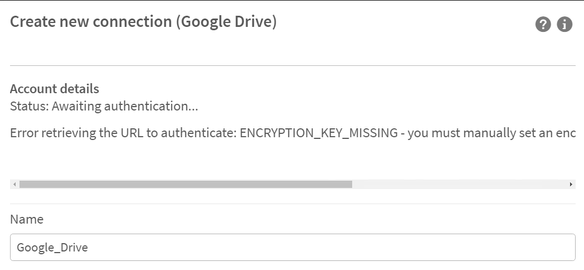
Qlik Sense Enterprise on Windows: Error retrieving the URL to authenticate: ENCR...
Some connectors require an encryption key before you create or edit a connection. Failing to generate a key will result in: Error retrieving the URL t... Show MoreSome connectors require an encryption key before you create or edit a connection. Failing to generate a key will result in:
Error retrieving the URL to authenticate: ENCRYPTION_KEY_MISSING - you must manually set an encryption key before creating new connections.
Environment
Qlik Sense Desktop February 2022 and onwards
Qlik Sense Enterprise on Windows February 2022 and onwards
all Qlik Web Storage Provider Connectors
Google Drive and Spreadsheets MetadataResolution
PowerShell demo on how to generate a key:
# Generates a 32 character base 64 encoded string based on a random 24 byte encryption key
function Get-Base64EncodedEncryptionKey {
$bytes = new-object 'System.Byte[]' (24)
(new-object System.Security.Cryptography.RNGCryptoServiceProvider).GetBytes($bytes)
[System.Convert]::ToBase64String($bytes)
}

$key = Get-Base64EncodedEncryptionKey
Write-Output "Get-Base64EncodedEncryptionKey: ""${key}"", Length: $($key.Length)"
Example output:
Get-Base64EncodedEncryptionKey: "muICTp4TwWZnQNCmM6CEj4gzASoA+7xB", Length: 32
Qlik Sense Desktop
This command must be run by the same user that is running the Qlik Sense Engine Service (Engine.exe). For Qlik Sense Desktop, this should be the currently logged-in user.
Do the following:
-
Open a command prompt and navigate to the directory containing the connector .exe file. For example:
"cd C:\Program Files\Common Files\Qlik\Custom Data\QvWebStorageProviderConnectorPackage"
-
Run the following command:
QvWebStorageProviderConnectorPackage.exe /key {key}
Where {key} is the key you generated. For example, if you used the OpenSSL command, your key might look like: QvWebStorageProviderConnectorPackage.exe /key zmn72XnySfDjqUMXa9ScHaeJcaKRZYF9w3P6yYRr
-
You will receive a confirmation message:
Info: Set key. New key id=qseow_prm_custom.
Info: key set successfully!
Qlik Sense Enterprise on Windows
The {sense service user} must be the name of the Windows account which is running your Qlik Sense Engine Service. You can see this in the Windows Services manager. In this example, the user is: MYCOMPANY\senseserver.
Do the following:
-
Open a command prompt and run:
runas /user:{sense service user} cmd. For example:runas /user:MYCOMPANY\senseserver
-
Run the following two commands to switch to the directory containing the connectors and then set the key:
-
"cd C:\Program Files\Common Files\Qlik\Custom Data\QvWebStorageProviderConnectorPackage"
-
QvWebStorageProviderConnectorPackage.exe /key {key}
Where {key} is the key you generated. For example, if you used the OpenSSL command, your key might look like: QvWebStorageProviderConnectorPackage.exe /key zmn72XnySfDjqUMXa9ScHaeJcaKRZYF9w3P6yYRr
-
-
You should repeat this step, using the same key, on each node in the multinode environment.
-
Encryption keys will be stored in: "C:\Users\{sense service user}\AppData\Roaming\Qlik\QwcKeys\"
For example, encryption keys will be stored in "C:\Users\QvService\AppData\Roaming\Qlik\QwcKeys\"
Always run the command prompt while logged in with the Qlik Sense Service Account which is running your Qlik Sense Engine Service and which has access to all the required folders and files.
Cause
This security requirement came into effect in February 2022. Old connections made before then will still work, but you will not be able to edit them. If you try to create or edit a connection that needs a key, you will receive an error message: Error retrieving the URL to authenticate: ENCRYPTION_KEY_MISSING) - you must manually set an encryption key before creating new connections.
Related Content
-
-
QlikView reload error: connector connect error bundled QVConnect not found.
After upgrading to QlikView September 2025 IR, scheduled Publisher reload tasks fail with the following error: Error: Connector connect error: Bundled... Show MoreAfter upgrading to QlikView September 2025 IR, scheduled Publisher reload tasks fail with the following error:
Error: Connector connect error: Bundled QVConnect not found.
The same .qvw document can be reloaded successfully using QlikView Desktop.
Resolution
The issue is caused by QCB-33101, which has been resolved in QlikView September 2025 SR1. Upgrade to the latest available version.
See QlikView September 2025 Release Notes for details.
Internal Investigation ID(s)
QCB-33101
Environment
- QlikView
-
Integrating Salesforce CDC with Qlik Talend Studio or Talend Streaming
Is it possible to integrate Salesforce Change Data Capture (CDC) with Qlik Talend Studio or Talend Streaming? Not directly. Salesforce Change Data Cap... Show MoreIs it possible to integrate Salesforce Change Data Capture (CDC) with Qlik Talend Studio or Talend Streaming?
Not directly. Salesforce Change Data Capture (CDC) enables real-time event-driven integration by publishing data changes (create, update, delete, undelete) from Salesforce objects, which Talend Streaming alone does not natively support.
To consume Salesforce CDC events and integrate them with Talend Streaming, use Talend ESB. It can be deployed as an integration layer to receive CDC events and forward them to downstream streaming or messaging systems.
The typical process flow will be as follows:
- Salesforce publishes CDC events for enabled objects
- Talend ESB subscribes to Salesforce CDC using Apache Camel Salesforce components
- Talend ESB processes and routes events
- Events are delivered to Talend Streaming or another streaming or messaging system
This architecture enables near real-time data processing while keeping Talend Streaming decoupled from Salesforce-specific connectivity.
Talend ESB Capabilities for Salesforce CDC
Talend ESB leverages Apache Camel, including the Salesforce Camel component, to support CDC-based integrations.
Key capabilities include:
- Subscribing to Salesforce CDC events
- Event-driven message routing
- Integration with messaging systems and streaming platforms
- Reliable mediation and transformation of CDC events
For detailed documentation, see:
- Salesforce CDC integration with Talend ESB
- Apache Camel components available in Talend ESB (including Salesforce)
Licensing Requirements
To use Talend ESB/Runtime, you must have a Premium or Enterprise subscription. Talend default licenses, such as Data Integration, do not include Talend ESB/Runtime. See Qlik Talend Cloud® Plans and Pricing for Talend Data Integration and ESB pricing details.
If you are uncertain what your subscription includes, contact your Qlik account representative.
In summary
To integrate Salesforce CDC with Talend Streaming:
- Talend Streaming alone is not sufficient
- Talend ESB is required to consume Salesforce CDC events
- Talend ESB uses Apache Camel Salesforce components
- A Premium or Enterprise license is mandatory
- This approach ensures a scalable, event-driven integration architecture aligned with Talend’s supported capabilities.
Need more direct help? Contact your Qlik account representative for technical and architecture guidance.
Environment
- Qlik Talend Studio
- Talend ESB
-
Qlik Replicate using existing SQL Server target view for replication
By default, Qlik Replicate reads primary keys from source tables and creates target tables using those same keys. If you want to use an existing view ... Show MoreBy default, Qlik Replicate reads primary keys from source tables and creates target tables using those same keys. If you want to use an existing view that doesn’t share the same key columns, you can modify the replication process to define matching key columns and adjust the task settings to prevent it from reloading the target table.
In table transformations, use Set Key Columns > Use transformation definition to ensure the key columns match the target view.
But using Views as the target (instead of a table) will result in this error, as indexes cannot be applied to views.
[TARGET_LOAD ]E: RetCode: SQL_ERROR SqlState: 42000 NativeError: 1939 Message: [Microsoft][ODBC Driver 18 for SQL Server][SQL Server]Cannot create index on view 'PPHTRAN' because the view is not schema bound. Line: 1 Column: -1 [1022502] (ar_odbc_stmt.c:5083)
Resolution
Target views behave differently from tables, but an internal parameter can be used to trigger a manual query. To achieve this, add the $info.query_syntax.create_index internal parameter and value to the SQL Server target endpoint.
- Go to the Endpoint connection
- Switch to the Advanced tab
- Click Internal Parameters
- Add the following:
- Parameter: $info.query_syntax.create_index
- Value: select 1
The SELECT 1 query itself has no effect, but it overrides the task behavior, preventing it from attempting to create a new unique index on the view, which is not supported.
For more information about Internal Parameters, see Qlik Replicate: How to set Internal Parameters and what are they for?
Internal Investigation ID(s)
SUPPORT-9276
Environment
- Qlik Replicate
-
Qlik Replicate version 2025.11.0.285: SQL Server source read failures
Qlik Replicate 2025.11.0.285 could not read transaction logs properly for the SQL Server source endpoint, causing the following error: [SOURCE_CAPTURE... Show MoreQlik Replicate 2025.11.0.285 could not read transaction logs properly for the SQL Server source endpoint, causing the following error:
[SOURCE_CAPTURE ]E: Bad Envelope : Lsn=00695591:01394baa:0009,operation=5,TxnId=0006:91821bb4,Tablename=COMMIT,PageId=0000:00000000,slotId=3,timeStamp=2026-02-25T06:20:03.890,dataLen=0, LCX=99, >Invalid data context / LCX Code encountered for TXN operation. [1020203] (sqlserver_log_processor.c:350) 00001580: 2026-02-25T07:35:09 [SOURCE_CAPTURE ]E: Internal error (specific information not available) [20014]
Resolution
Upgrade to Qlik Replicate 2025.11.0.437 to resolve the read issue for the transaction logs.
Internal Investigation ID(s)
SUPPORT-8946
Environment
- Qlik Replicate
-
Data connections in Qlik Sense not visible in Data Load Editor or ErrorCode 1104...
ErrorCode.11041 occurs when opening up an AppErrorCode.11043 occurs when creating a Database connection in the data load editor.The two symptoms will ... Show MoreErrorCode.11041 occurs when opening up an App
ErrorCode.11043 occurs when creating a Database connection in the data load editor.
The two symptoms will correlate with the Qlik Sense system having a restricted or no internet connection.Qlik connectors are cryptographically signed for authenticity verification. The .NET framework verification procedure used for this signing includes checking OCSP and Certificate Revocation List information, which are fetched from an online resource if the system doesn't have a cached local copy. These requests will timeout due to a lack of access to online resources in environments with restricted, slow or no internet connection. Due to the authenticity check failure, the connector will not run, and the app reload fails.
Resolution:
Edit the .Net Framework's machine.config file
- Stop all QS services on all nodes
- Edit C:\Windows\Microsoft.NET\Framework64\v4.0.30319\config\machine.config
Change (or add) the <runtime/> tag to reflect:
If the <runtime> section looks different, modify it to:<runtime> <generatePublisherEvidence enabled="false"/> </runtime><runtime> <OTHER CONFIGURATION="YOU VALUES"> <...> <generatePublisherEvidence enabled="false"/> </runtime> - Save machine.config
- Repeat on all nodes (if applicable)
- Start services on all nodes
NOTE1: Changes to machine.config affects all software using the .NET framework feature.
NOTE2: 3rd party connectors might be compiled for 32-bit platforms.
In such case repeat steps above for the 32-bit version of the machine.config file;
C:\Windows\Microsoft.NET\Framework\v4.0.30319\config\machine.config
-
Qlik Replicate: Microsoft SQL Server 2025 release and native JSON datatype suppo...
Previous versions of Microsoft SQL Server do not support a dedicated JSON data type. For later versions, Microsoft announced the introduction of a nat... Show MorePrevious versions of Microsoft SQL Server do not support a dedicated JSON data type.
For later versions, Microsoft announced the introduction of a native JSON data type (along with JSON aggregate functions). This new data type is already available in Azure SQL Database and Azure SQL Managed Instance, and is included in SQL Server 2025 (17.x).
SQL Server 2025 (17.x) became Generally Available (GA) on November 18, 2025.
At this time, the current Qlik Replicate major releases 2025.05/2025.11 do not support SQL Server 2025 or its native JSON data type yet.
Environment
- Qlik Replicate all versions
- SQL Server 2025 on-premises
- Azure SQL Database and Azure SQL Managed Instance (which share the same engine as SQL Server 2025)
Common Errors Observed if the table contains a JSON column in SQL Server 2025
SQL Server endpoint with SQL Server 2025 as the source
During the endpoint connection ping test, you may encounter:
SYS-E-HTTPFAIL, Unsupported server/database version: 0.
SYS,GENERAL_EXCEPTION,Unsupported server/database version: 0MS-CDC endpoint with Azure SQL Database as the source
Since the Azure SQL Database version is always 14.x, the version check succeeds. However, Azure SQL DB already uses the SQL Server 2025 kernel, the task later fails during runtime with:
[SOURCE_CAPTURE ]T: Failed to set ct table column ids for ct table with id '1021246693' (sqlserver_mscdc.c:2968)
[SOURCE_CAPTURE ]T: Failed to get change tables IDs for capture list [1000100] (sqlserver_mscdc.c:3672)
[SOURCE_CAPTURE ]E: Failed to get change tables IDs for capture list [1000100] (sqlserver_mscdc.c:3672)Resolution
No workaround can be provided until support has been introduced.
According to the current roadmap, support for SQL Server 2025 and the native JSON data type is planned for the upcoming major release: Qlik Replicate 2026.5.
No date or guaranteed timeframe can yet be given. The support planned for 2026.5 is an estimate.
Internal Investigation ID(s)
00419519
-
Qlik Replicate: How to find MongoDB stream position
To start replication from a specific point in time on a MongoDB source, you will need to identify the oplog stream position (BSON Timestamp) correspon... Show MoreTo start replication from a specific point in time on a MongoDB source, you will need to identify the oplog stream position (BSON Timestamp) corresponding to your target time and configure it in your Qlik Replicate task.
This article outlines the options available to you.
Prerequisites
- The MongoDB oplog is a capped collection, and entries are overwritten over time. Ensure your target timestamp is still within the current oplog window before attempting to start from it.
- Query the primary node or a secondary with sufficient oplog retention.
- The Qlik Replicate MongoDB user requires read access to local.oplog.rs.
Finding the stream position
Option One: Query the oplog directly (Recommended)
Connect to the primary node via mongosh and run:
db.getSiblingDB('local').oplog.rs.find().sort({ $natural: -1 }).limit(1).pretty()This returns the most recent oplog entry. Look for the ts field in the output:
{
"ts": Timestamp(1741600200, 1),
"op": "i",
...
}The ts value is your stream position. The first number is Unix epoch seconds; the second is the ordinal increment.
Option Two: Query the oplog by target timestamp
If you know the specific time you want to start from, you can filter the oplog directly to find the closest entry:
var t = new Timestamp(Math.floor(new Date("2026-03-10T11:30:00Z").getTime() / 1000), 1);
db.getSiblingDB('local').oplog.rs.find({ ts: { $gte: t } }).limit(1).pretty()
Replace the date string with your target time. This returns the first oplog entry at or after that timestamp, giving you the exact ts value to use.
Option Three: Use rs.status() for orientation
The rs.status() command returns the current replication position (optimeDate and optime.ts) for each replica set member:
rs.status()
This is useful for cross-referencing a wall-clock time to an approximate oplog position. Once you have an approximate position, use option two to pinpoint the exact ts value.
Option Four: Let Qlik Replicate log it for you
Start the task normally (without specifying a position) and allow Qlik Replicate to connect to the MongoDB oplog. Qlik Replicate will log the current stream position it reads from in the task log output, in the exact format it expects. You can then use that as a reference and template for entering positions manually in future tasks.
This is the safest way to confirm the correct position format for your version of Qlik Replicate before attempting a manual entry.
Configuring the stream position in Qlik Replicate
Once you have your stream position value:
- Open your task and click the Run drop-down > Advanced Run Options
- Under Tables are already loaded. Start processing changes from:, select Source change position (e.g. SCN or LSN):
- Enter the stream position in the format Qlik Replicate expects
Note: We recommend using option four first to confirm the exact position format your version of Qlik Replicate expects for MongoDB, as this can vary. Entering the value in an incorrect format will cause the task to start from an unintended position.
Environment
- Qlik Replicate
-
Qlik Talend Cloud: Too many bad authentication attempts! Too many bad authentica...
Connecting to an SFTP server using username and password authentication fails with the error: Too many bad authentication attempts! com.jcraft.jsch.JS... Show MoreConnecting to an SFTP server using username and password authentication fails with the error:
Too many bad authentication attempts!
com.jcraft.jsch.JSchException: 11 Too many bad authentication attempts!Resolution
The issue is caused by the password containing a backslash (\). A backslash is treated as a control or escape character and must be escaped accordingly. If not handled correctly, a control or escape character in a password can cause connection or authentication errors.
Either remove the backslash (\) or replace it with a double backslash (\\) to escape it properly.
Example:
Previous, failing password: Test\123
Updated password: Test\\123Environment
- Qlik Talend Cloud
- Qlik Talend Data Integration
-
Qlik Replicate and Qlik Talend Cloud: How to get LSN for DB2 LUW source
To start replication from a specific point in time on a DB2 LUW source, you will need to identify the LSN (Log Sequence Number) corresponding to your ... Show MoreTo start replication from a specific point in time on a DB2 LUW source, you will need to identify the LSN (Log Sequence Number) corresponding to your target timestamp and configure it in your Qlik Replicate task.
There are several ways to obtain the LSN depending on your environment and access level.
Prerequisite
Ensure the DB2 archive logs covering your target LSN range are still retained and accessible on the server. If those logs have been pruned or moved off the system, Qlik Replicate will not be able to read from that position, and the task will error out.
How to obtain the LSN
Option One: db2pd (Recommended)
Run the following on the DB2 server to list active log files with their LSN ranges and timestamps:
db2pd -db <DBNAME> -logs
Sample output:
Log File First LSN Last LSN Timestamp
S0001234.LOG 0x000123456789 0x000123ABCDEF 2026-03-10-11.30.00Locate the log file whose timestamp range covers your desired start time and note the First LSN for that file. Convert the hex value to decimal before entering it into Replicate (e.g., 0x000123456789 = 1251004137353).
Option Two: db2flsn Utility
If you know the specific log file number and offset, you can translate it to an LSN using the db2flsn command-line utility:
db2flsn -db <DBNAME> -lsn <log_file_number>/<offset>
This is useful when you already know which log file corresponds to your target time. Convert the resulting hex LSN to decimal before entering it into Replicate.
Option Three: SQL Query (Current LSN)
To retrieve the current active LSN directly from the database:
SELECT CURRENT_LSN FROM SYSIBMADM.SNAPDB;
This returns the LSN at the moment the query is executed. Use this if you want to start replication from approximately "now" with a precise LSN anchor rather than relying on the task default. Convert the hex value to decimal before use.
Option Four: Let Qlik Replicate log it for you
By design, Qlik Replicate does not support starting CDC from a specific timestamp for a DB2 LUW source endpoint. This is a documented limitation in the Qlik Replicate User Guide.
However, when a DB2 LUW CDC task is first created and started, Replicate internally generates a file named DB2LUW_TIMESTAMP_MAP (a SQLite database) in the task's data folder. This file continuously maps processed LSN values to their corresponding timestamps each time the task runs. As a result, it provides a workaround to approximate a timestamp-based start position — by identifying the LSN that corresponds to the desired point in time and using that LSN to resume the task.
The only prerequisite for this approach is that the DB2 transaction logs covering the target time period must still be available and accessible on the source server.
Configuring the LSN in Qlik Replicate
Once you have your LSN value:
- Open your task and click the Run drop-down > Advanced Run Options
- Under Tables are already loaded. Start processing changes from:, select Source change position (e.g. SCN or LSN):
- Enter the LSN in decimal format (e.g., 1251004137353)
DB2 tools typically display LSN values in hexadecimal. Please ensure you convert to decimal before entering the value in Qlik Replicate; the task will start from an incorrect log position.
Environment
- Qlik Replicate
- Qlik Talend Cloud