Unlock a world of possibilities! Login now and discover the exclusive benefits awaiting you.

- Qlik Community
- :
- Blogs
- :
- Technical
- :
- Design
- :
- Fiscal Year

.png "Former Employee") hic
hic
- Subscribe to RSS Feed
- Mark as New
- Mark as Read
- Bookmark
- Subscribe
- Printer Friendly Page
- Report Inappropriate Content
A fiscal year other than the calendar year implies a number of additional requirements in the QlikView app: The most obvious is that the year used in all charts and reports must correspond to the fiscal year which runs over a different set of dates than the calendar year.
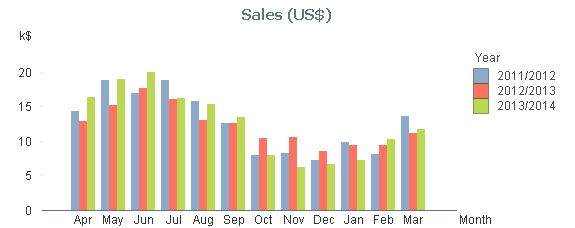
Further, the notation sometimes changes: You probably want to display years as ‘2012/2013’ instead of just the year number.
Also, other fields, e.g. Month and Week must be assigned to the fiscal year as well as the calendar year.
Finally, the sort order of field values changes in some cases. E.g. you want to sort the months using the first financial month as the first month: [Apr..Mar] instead of [Jan..Dec]. (Compare with the month order in the graph and the list box.)
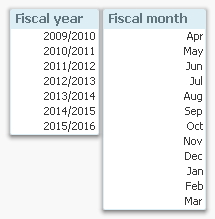
There is a very simple way to achieve this in QlikView: Just add the necessary fields in the master calendar and use these in all situations where you need a calendar field. There are many ways that this can be done, but my suggested solution is the following:
- Create a variable that contains the month number of the first month of the fiscal year. Assuming that April is the first month of your fiscal year, this variable should get the value ‘4’.
- Create numeric values of the necessary fields. Usually the number of the fiscal year is defined by its end, so (again using April as the first month) April 2013 belongs to the fiscal year ‘2014’.
- Create dual values of the necessary fields.
The script for creating fiscal year and fiscal month then becomes:
Set vFM = 4 ; // First month of fiscal year
Calendar:
Load Dual(fYear-1 &'/'& fYear, fYear) as FYear, // Dual fiscal year
Dual(Month, fMonth) as FMonth, // Dual fiscal month
*;
Load Year + If(Month>=$(vFM), 1, 0) as fYear, // Numeric fiscal year
Mod(Month-$(vFM), 12)+1 as fMonth, // Numeric fiscal month
*;
Load Year(Date) as Year, // Your standard master calendar
Month(Date) as Month,
…
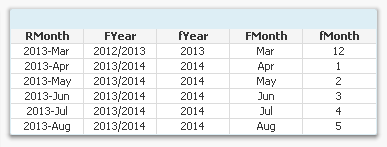
Other fields, like week, day, etc. can also be created in a similar way.
A comment on the field naming: In this script I use lowercase ‘f’ as prefix for the numeric values and uppercase ‘F’ for the dual values. In real life you may want to just have the dual fields (no numeric duplicates) and name these differently, e.g. just ‘Year’ and ‘Month’. If you do, you must also rename the original calendar year and calendar month accordingly.
The bottom line is anyway that you can solve this problem just by adding a couple of lines in you master calendar. No set analysis is needed. And no complex chart expressions are needed.
Simplicity.
You must be a registered user to add a comment. If you've already registered, sign in. Otherwise, register and sign in.