Unlock a world of possibilities! Login now and discover the exclusive benefits awaiting you.

Product Innovation
By reading the Product Innovation blog, you will learn about what's new across all of the products in our growing Qlik product portfolio.
Support Updates
The Support Updates blog delivers important and useful Qlik Support information about end-of-product support, new service releases, and general support topics.
Qlik Academic Program
This blog was created for professors and students using Qlik within academia.
Community News
Hear it from your Community Managers! The Community News blog provides updates about the Qlik Community Platform and other news and important announcements.
Qlik Digest
The Qlik Digest is your essential monthly low-down of the need-to-know product updates, events, and resources from Qlik.
Qlik Learning
The Qlik Learning blog offers information about the latest updates to our courses and programs, as well as insights from the Qlik Learning team.
Recent Blog Posts
-
爆速公開!Qlik ユーザーミートアップ開催報告
お申し込みに対する参加率がなんと 90%を超え、福岡、大阪、名古屋、静岡など遠方からもご参加されるなど、ユーザー皆様の熱い期待の中、2025年第1回 Qlik ユーザーミートアップが開催されました。 -
Complete your Qlik Nation challenges in Qlik Community
Introducing an easy way for you to engage, earn points and rank up. -
Making Better Decisions with Data (Even in the Age of AI)
Today, artificial intelligence can look through millions of pieces of data in just a few seconds. This helps companies identify patterns, make predictions, and work more efficiently. AI is changing how we use data. It's no longer just about looking at what happened in the past. Now, it helps us plan, test ideas, and find new opportunities. However, even with all this technology, one thing remains true: we still need to ask the right questions. Wi... Show MoreToday, artificial intelligence can look through millions of pieces of data in just a few seconds. This helps companies identify patterns, make predictions, and work more efficiently. AI is changing how we use data. It's no longer just about looking at what happened in the past. Now, it helps us plan, test ideas, and find new opportunities.
However, even with all this technology, one thing remains true: we still need to ask the right questions. Without good questions, data won’t help us make good decisions.
-
Upcoming Qlik Sense Client-Managed Mobile Release iOS 1.31.1: Deploying with Mic...
Updated: Release Date added (26th June 2025) and note added regarding the error users will encounter if they update before the redirect URI is configured. Updated: Android Release Date added (16th July 2025) Hello Qlik admins, This post is intended for customers who use the Qlik Sense Client-Managed mobile app with Microsoft Intune policy management practices as described in Azure app registration for Qlik Sense Client-Managed Mobile. Qlik antici... Show MoreUpdated: Release Date added (26th June 2025) and note added regarding the error users will encounter if they update before the redirect URI is configured.
Updated: Android Release Date added (16th July 2025)
Hello Qlik admins,
This post is intended for customers who use the Qlik Sense Client-Managed mobile app with Microsoft Intune policy management practices as described in Azure app registration for Qlik Sense Client-Managed Mobile.
Qlik anticipates the release of the Qlik Sense Client-Managed Mobile app version 1.31.1 for iOS on June 26th. With this release comes an update to the integrated Microsoft Intune version to 20.5.0, which will also update the Microsoft authentication protocol in use.
What action do I need to take?
Many devices will automatically update the mobile app build in the background. To prepare for the update and to continue utilizing Microsoft Intune/Entra policy management of the Qlik Sense Client-Managed Mobile app, pre-configure the new redirect URI msauth.com.qlik.qliksense.mobile://auth in your Azure portal.
If a client is updated and the redirect URI has not been configured, the end user will see the error Failed to authenticate using OAuth. See Qlik Sense Client Managed mobile app on iOS: Failed to authenticate using OAuth for details.
- Log in to the Azure Portal, go to App registrations and view All applications
- Locate and open the Qlik Sense Mobile app registration
- In Manage, open the Authentication menu, then scroll to Mobile and desktop application Redirect URIs
- Click Add URI and add msauth.com.qlik.qliksense.mobile://auth
- Click Save, refresh the page, and verify the new Redirect URI is recorded under iOS / macOS Redirect URIs
Qlik supports only the current mobile app version in the app store. The end user migration to the new app is at the discretion of the customer; however, it is recommended all users upgrade immediately.
It is possible for users to continue Intune governance control with old and new mobile app versions.
Note that removing the old redirect URI (qliksense-intune://com.qlik.qliksense.mobile) for the mobile app versions before 1.31.1 will result in the old app no longer retrieving a policy from the Intune/Entra tenant.
How do I set up the mobile client with Microsoft Azure and Intune?
For instructions on how to set up the Qlik Sense Client-Managed Mobile client with Microsoft Azure and Intune, see Add an Azure app registration for Qlik Sense Client-Managed Mobile | help.qlik.com. These instructions will be updated on the initial release of Qlik Client Managed mobile version 1.31.1.
What about the Android app?
The Android version of the Client-Managed Mobile app has been updated on the 16th of July.
Thank you for choosing Qlik,
Qlik Support -
Data Disign Duel - 第 5 回 Qlik データソン -
今年で 5 回目となる Qlik データソンに参加してみませんか? 今回のテーマは「デザイン」だけ!個人でもチームでも、センスとアイデアを存分に発揮して、Qlik Sense で魅せるダッシュボードを作成してください。もちろん、初心者のご参加も大歓迎です!アワード受賞者には豪華賞品も!お申し込みは、7/11(金)17:00 まで受付中です。奮ってご参加ください! 詳細・お申し込みはこちら 【課題】 Qlik Sense の豊富なビジュアライゼーション機能を最大限に活用して、色、形、サイズ、配置、効果などを工夫して、チャートなどのオブジェクトやシートを作成してください。 Qlik が用意したサンプルアプリ、またはご自身で用意したオリジナルアプリを用いて、Qlik Sense のシートやオブジェクトをいかに効果的に「魅せる」かを競うものです。 今回のコンテストは会期期間中に各自で作業いただき、提出締切までに成果物を提出していただきます。 【対象者】 Qlik ユーザー Qlik ... Show More今年で 5 回目となる Qlik データソンに参加してみませんか?
今回のテーマは「デザイン」だけ!個人でもチームでも、センスとアイデアを存分に発揮して、Qlik Sense で魅せるダッシュボードを作成してください。もちろん、初心者のご参加も大歓迎です!アワード受賞者には豪華賞品も!お申し込みは、7/11(金)17:00 まで受付中です。奮ってご参加ください!
詳細・お申し込みはこちら
【課題】
- Qlik Sense の豊富なビジュアライゼーション機能を最大限に活用して、色、形、サイズ、配置、効果などを工夫して、チャートなどのオブジェクトやシートを作成してください。
- Qlik が用意したサンプルアプリ、またはご自身で用意したオリジナルアプリを用いて、Qlik Sense のシートやオブジェクトをいかに効果的に「魅せる」かを競うものです。
- 今回のコンテストは会期期間中に各自で作業いただき、提出締切までに成果物を提出していただきます。
【対象者】
- Qlik ユーザー
- Qlik パートナー
- これから Qlik を利用予定の方
【開催概要】
申込締切:7/11(金)17:00
成果物締切:7/18(金)17:00
投票期間:7/23(水)- 8/1(金)17:00(参加者による Web 投票および Qlik 審査員による審査)
授賞式:8/7(木)17:00 - 19:30(東京の某会場とオンライン配信のハイブリッド式)※ 6/19(木)以降、参加申込者を順次作業用テナントにご招待します。招待メールが届いたら作業を開始いただけます。
※ 本イベントの詳しい概要・作業用テナントへのログイン方法・注意事項などは、以下「詳細・お申し込みはこちら」のリンクからご確認ください。
詳細・お申し込みはこちら -
Viz for Deck: 数字の視覚化アイデア
テーブルに軸と数値だけでは味気ないと思ったことはないですか?ちょっと工夫すると下の図のような表現が可能です。計算以外で使用する関数は、Repeat, Chr, num だけです。 メジャーの数式に3つの要素を含めています。2つ目の列の案件数には下記の数式を設定しています。 1行目の chr() は、指定された整数に対応する Unicode 文字 (コード ポイントとも呼ばれる) を返します。09608 は■を示しています。Repeat関数は、指定された文字列を、2 番目の引数で指定された回数分繰り返した文字列を返しますので、案件IDの数だけの■が返ってきます。Unicode は https://symbl.cc/ 等のサイトで調べることができます。 2行目は単純にハイフンが5つ返ってきます。3行目はハイフンのあと、実際の案件数に書式を設定しています。 これらを & で連結して図のような表現になります。 3列目の案件金額は桁が大きいので、そのまま■を出すとかえってみづらいため、10... Show Moreテーブルに軸と数値だけでは味気ないと思ったことはないですか?ちょっと工夫すると下の図のような表現が可能です。計算以外で使用する関数は、Repeat, Chr, num だけです。
メジャーの数式に3つの要素を含めています。2つ目の列の案件数には下記の数式を設定しています。
1行目の chr() は、指定された整数に対応する Unicode 文字 (コード ポイントとも呼ばれる) を返します。09608 は■を示しています。Repeat関数は、指定された文字列を、2 番目の引数で指定された回数分繰り返した文字列を返しますので、案件IDの数だけの■が返ってきます。
Unicode は https://symbl.cc/ 等のサイトで調べることができます。2行目は単純にハイフンが5つ返ってきます。
3行目はハイフンのあと、実際の案件数に書式を設定しています。これらを & で連結して図のような表現になります。
3列目の案件金額は桁が大きいので、そのまま■を出すとかえってみづらいため、10,000,000で割った金額を使用しています。
あまり数値のばらつきが大きくない場合に有効な表現だといえます。
Happy Dueling !
** 過去の記事 **

-
Qlik Cloud Analytics: 'When data is refreshed' reload schedule option removed
Qlik Cloud Analytics launched enhanced self-service scheduling capabilities on April 14th, 2025. Details about the new self-service scheduling functionality can be found in Scheduling data refreshes with tasks. These new capabilities allow users to create multiple tasks to schedule refreshes of apps, scripts, and data flows. This replaces a self-service scheduling system offering one schedule per analytics asset. In addition, the When data is ref... Show MoreQlik Cloud Analytics launched enhanced self-service scheduling capabilities on April 14th, 2025. Details about the new self-service scheduling functionality can be found in Scheduling data refreshes with tasks.
These new capabilities allow users to create multiple tasks to schedule refreshes of apps, scripts, and data flows. This replaces a self-service scheduling system offering one schedule per analytics asset.
In addition, the When data is refreshed configuration option has been removed. This option enabled users to automatically run reload schedules when dependent datasets generated by Qlik Talend Data Integration projects were updated.
Existing reload schedules (now organized as tasks) configured with the When data is refreshed option continue to function as they normally do. However, creating new tasks with this option or configuring it for existing tasks is not currently possible.
You can read more about the original implementation of the new self-service scheduling functionality in What's New in Qlik Cloud: Self-Service Scheduling – Task Chaining & Multi-Task Support.
Thank you for choosing Qlik,
Qlik Support -
Watch Q&A with Qlik: Qlik Sense Enterprise on Windows!
Don't miss our previous Q&A with Qlik! Hear from our panel of experts to help you get the most out of your Qlik experience. SEE RECORDING HERE
-
Qlik Sense SaaS Mobile app update version 1.176.0: Incorporating additional secu...
Hello Qlik admins, The Qlik Sense Mobile SaaS mobile client (version 1.176.0 and later) now incorporates additional defense-in-depth security features that help ensure mobile devices meet various compliance standards. If the operating environment is found to deviate from these standards, access may be restricted and an alert issued. Please ensure that your organization’s mobile OS and network configurations are maintained in line with industry be... Show MoreHello Qlik admins,
The Qlik Sense Mobile SaaS mobile client (version 1.176.0 and later) now incorporates additional defense-in-depth security features that help ensure mobile devices meet various compliance standards. If the operating environment is found to deviate from these standards, access may be restricted and an alert issued. Please ensure that your organization’s mobile OS and network configurations are maintained in line with industry best security practices.
If the client detection feature determines the app is being opened on a compromised device, a message will display indicating the identified condition and the mobile app will not open.
Please note that no root or jailbreak detection method can guarantee 100% accuracy, as threat techniques continue to evolve. While false positives may occasionally occur, our detection mechanisms are implemented in accordance with industry-recognized security best practices.
Thank you for choosing Qlik,
Qlik Support -
Qlik Cloud 5月の新機能
2025年5月にリリースされた Qlik Cloud の主な新機能をご紹介します。 下記も合わせてご参照ください。 Qlik TECH TALK セミナー:What's New In Qlik ~ 2025年5月リリース最新機能のご紹介 ~
-
Partition Evolution @Iceberg
Partition Evolution - Only Iceberg makes this possible Partitioning is one of the most critical aspects of optimizing query performance in big data systems. Traditionally, partitioning strategies are set when a table is created, and altering them later is nearly impossible without costly data migration. Apache Iceberg, however, introduces partition evolution, enabling seamless changes to partitioning strategies without rewriting existing data. Th... Show MorePartition Evolution - Only Iceberg makes this possible
Partitioning is one of the most critical aspects of optimizing query performance in big data systems. Traditionally, partitioning strategies are set when a table is created, and altering them later is nearly impossible without costly data migration. Apache Iceberg, however, introduces partition evolution, enabling seamless changes to partitioning strategies without rewriting existing data. This blog explores how partition evolution in Apache Iceberg revolutionizes data partitioning.
-
How AI is transforming Analytics
AI-powered analytics tools now enable data scientists to automate routine tasks such as data preprocessing and anomaly detection, freeing up time for more strategic analysis. With the power of AI, businesses can process millions of data points in seconds, producing insights that would have previously taken weeks or even months to generate. -
Pivot Table Enhancements
In this blog post, I will cover some enhancements that have been made to the Pivot table. The Pivot table is like a Straight table in that it takes multiple dimensions and measures, but what makes it stand apart from the Straight table is that the columns and rows can be reorganized providing various views and subtotals. The Pivot table can be found in the Qlik Visualization bundle under Custom objects. The styling option c... Show MoreIn this blog post, I will cover some enhancements that have been made to the Pivot table. The Pivot table is like a Straight table in that it takes multiple dimensions and measures, but what makes it stand apart from the Straight table is that the columns and rows can be reorganized providing various views and subtotals. The Pivot table can be found in the Qlik Visualization bundle under Custom objects.
The styling option continues to improve, giving the developer flexibility in styling the header, dimension, measure, total and null values in the chart. Text and background colors can be adjusted based on an expression as well. Rows can be indented, which I like because it looks more compact and takes up less space on the left.
Indented
Not indented
As you can see in the images above, a row can be presented as a link by changing the Representation to Link and adding a URL.
Indicators can also be added to cells alongside the text to call the user’s attention to something. For example, in the image below, a red yield indicator is shown when the sales value is less than 1,000 and a green dot is shown when the sales value is greater than 20,000.
Right-to-left support is available in the Pivot table as well for those who read right-to-left.
This setting can easily be toggled in the Settings of an app in the Appearance section.
While in view mode, rows and columns can be expanded or collapsed by either clicking the – or + sign or by opening the menu and selecting collapse or expand. From the menu, the sort order, search and selections can also be set.
Another enhancement of the Pivot table is the ability to use a cyclic dimension for the rows or columns. In the Pivot table below, a cyclic dimension with 3 fields (Category Name, Product and Product Name) is used for the rows. Notice that only one field of the cyclic dimension is visible at a time.
From the Pivot table, the cyclic dimension can be changed by opening the menu and selecting the desired dimension. To learn more about cyclic dimensions, check out one of my previous blog post.
Try out the Pivot table (found in the Visualization bundle) the next time you are developing an app to make use of the new enhancements. Check out Qlik Help for more information on the Pivot table and take a look at the What’s New app to see the Pivot table used in this blog post.
Thanks,
Jennell
-
Viz for Deck: ダッシュボードの色を切り替える
Qlik Sense では自動でダッシュボードの色を変えることができます。例えば昼と夜、ダッシュボードを開く時間によって色を変更することができます。シートアクションとLocaltime関数と変数を使って簡単に設定ができます。もちろんスイッチで切り替えることもできます。アプリは Qlik Showcase でご覧いただけます。ここでは設定方法をご説明します。 1. 色を切り替えるためのスイッチとなる変数を作成します。 0 が昼モード、1 が夜モードとしています。 2. シートのスタイル指定で背景画像を設定します。 3. シート全体の大きさのレイアウトコンテナを作成し、スタイル指定で背景色に[数式を使用]で if 文で色を設定します。ここでは、変数 vTime が 0 の時は透明、そうでないときは半透明の黒を指定しています。 4. 同様にチャートの背景や要素の色も if を使って設定します。今回のアプリでは、チャートの背景は vTime が 0 の時は半... Show MoreQlik Sense では自動でダッシュボードの色を変えることができます。例えば昼と夜、ダッシュボードを開く時間によって色を変更することができます。シートアクションとLocaltime関数と変数を使って簡単に設定ができます。もちろんスイッチで切り替えることもできます。
アプリは Qlik Showcase でご覧いただけます。ここでは設定方法をご説明します。1. 色を切り替えるためのスイッチとなる変数を作成します。
0 が昼モード、1 が夜モードとしています。2. シートのスタイル指定で背景画像を設定します。
3. シート全体の大きさのレイアウトコンテナを作成し、スタイル指定で背景色に[数式を使用]で if 文で色を設定します。ここでは、変数 vTime が 0 の時は透明、そうでないときは半透明の黒を指定しています。
4. 同様にチャートの背景や要素の色も if を使って設定します。
今回のアプリでは、チャートの背景は vTime が 0 の時は半透明の白、1 の時は半透明の黒を設定しています。チャートの要素はそれぞれ、明るいオレンジやブルーと、濃いめの赤や紺を設定しています。
チャートによって少し色を変えたり、ColorMix関数を使用したりしています。5. ダッシュボードを開く時間によって色を変更するために、シートアクションを設定します。
ここでは朝5時よりあと18時になるまでは vTime に 0 (昼)、そうでなければ 1 (夜)を設定しています。6. 任意に色を切り替えられるように、昼用と夜用のボタンを作成し、vTime を変更できるようにします。
フォントの色には数式が使用できないので、昼と夜のどちらのモードでも読める色にする注意が必要です。
遊び心のあるダッシュボードの作り方をご紹介しました。お試しください。
-
June is Here: Fresh Updates & Summer Vibes in the Community
June enhancements on the Qlik Community -
Turning Theory into Impact: How Thomas More University Empowers Students with Re...
At Thomas More University, Belgium’s largest university of applied sciences, students are doing more than studying data—they’re learning how to apply it to real-world challenges. With over 22,000 students and a strong emphasis on applied learning, the university partners with the Qlik Academic Program and local consultancy EpicData to provide hands-on analytics experience that prepares students for tomorrow’s data-driven world. -
Fresh Look, Same Great Community: New Artwork on Qlik Community!
We’re excited to share a fresh update to the Qlik Community! -
Discovering qlik-embed: Qlik’s new library for Embedding Qlik Sense in web apps
In previous posts on the Design blog, we've explored various ways for embedding Qlik Sense analytics. These have ranged from straightforward iFrames to more complex approaches like the Capabilities API, as well as more recent tools such as Nebula.js and Enigma.js. Today, we’re going to be taking a quick look at a new library from Qlik called qlik-embed, but before diving into it, I would like to clarify that this library is currently in public pr... Show MoreIn previous posts on the Design blog, we've explored various ways for embedding Qlik Sense analytics. These have ranged from straightforward iFrames to more complex approaches like the Capabilities API, as well as more recent tools such as Nebula.js and Enigma.js.
Today, we’re going to be taking a quick look at a new library from Qlik called qlik-embed, but before diving into it, I would like to clarify that this library is currently in public preview and at the time of writing this blog, frequent updates as well as breaking changes are prone to happen (you can read more about that on qlik.dev or follow the Changelog for updated https://qlik.dev/changelog)
So what exactly is qlik-embed?
qlik-embed is a library for easily embedding data and analytics interfaces into your web apps while overcoming some of the concerns that usually arise when embedding content from one software application to another such as third-party cookies, cross-site request forgery, content security policy etc..
The library is designed to work with web apps from simple plain HTML ones to more modern frameworks like React etc.. That is in fact made easier since whichever qlik-embed flavor you use, the configuration options, the methods, and the properties will be similar.
If you are already embedding Qlik Sense content into your web applications, you can learn about the various reasons why qlik-embed would be a better solution on qlik.dev (https://qlik.dev/embed/qlik-embed/qlik-embed-introduction#why-qlik-embed-over-capability-api-or-nebulajs)
Web Components:
qlik-embed makes use of web components which are basically custom HTML elements in the form of <qlik-embed> </qlik-embed> HTML tags that allow you to configure properties of the content you’re embedding
You can find all supported web-components here:
How to quickly get started?
Before getting started, it’s worth noting that there are several ways to connect qlik-embed web components to Qlik.
More information about Auth can be found here:
- Connect qlik-embed: https://qlik.dev/embed/qlik-embed/connect-qlik-embed
- Best Practices: https://qlik.dev/embed/qlik-embed/qlik-embed-auth-best-practice
You can connect to qlik-embed in these ways:
- Qlik Cloud API keys (cookie-less)
- Qlik Cloud OAuth2 clients (cookie-less)
- Qlik Cloud interactive login (cookies)
- Qlik Sense Enterprise Client Managed interactive login (cookies)
- None (This is a more advanced option and requires handling authenticated requests using a custom authorization backend proxy - learn more about that here: https://qlik.dev/authenticate/jwt/jwt-proxy/)
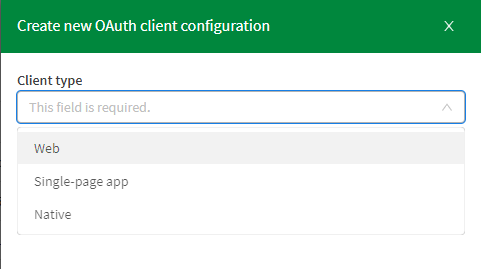
In this post, we’re going to use OAuth2 Single-page-app from the Qlik Cloud tenant Management Console under oAuth:
Example using HTML Web Components:
Reference page: https://qlik.dev/embed/qlik-embed/qlik-embed-webcomponent-quickstartFirst thing we need to do is add a <script> element in the <head> tag to configure the call to the qlik-embed library and set up the attributes relevant to the connection we choose.
<script crossorigin="anonymous" type="application/javascript" src="https://cdn.jsdelivr.net/npm/@qlik/embed-web-components" data-host="<QLIK_TENANT_URL>" data-client-id="<QLIK_OAUTH2_CLIENT_ID>" data-redirect-uri="<WEB_APP_CALLBACK_URI>" data-access-token-storage="session" > </script>- data-host is the URL to your Qlik Cloud tenant. For example https://example.us.qlikcloud.com/
- data-client-id is the client ID for the single-page application OAuth2 client registered for this web application.
- data-redirect-uri is the location of the web page the OAuth2 client will call back to when authorization requests are made from your web application to your Qlik tenant. This web page should be added to your web application.
web-component:
<qlik-embed ui="classic/app" app-id="<APP_ID>"></qlik-embed>oauth-callback.html:
<!DOCTYPE html>
<html lang="en">
  <head>
    <meta charset="utf-8" />
    <script
      crossorigin="anonymous"
      type="application/javascript"
      data-host="<QLIK_TENANT_URL>"
      src="https://cdn.jsdelivr.net/npm/@qlik/embed-web-components/dist/oauth-callback.js"
    ></script>
  </head>
</html>
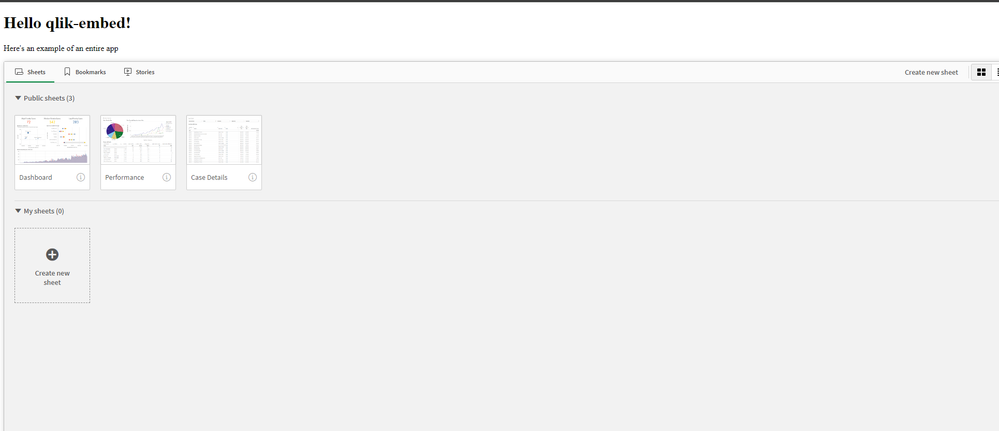
You can fork the full example here and change the “Tenant URL” and the rest of the attributes to your own tenant after creating the OAuth SPA config: https://replit.com/@ouadielim/qlik-embed-HTML-Web-Components#index.html
result:
Example using React:
In React, you can use qlik’s embed-react library package: npm install @qlik/embed-react (https://www.npmjs.com/package/@qlik/embed-react)
Then, you can import QlikEmbed and QlikEmbedConfig from @qlik/embed-react. React’s context is used to pass in the hostConfig that you configure to point to your Qlik Cloud Tenant (host) and use the OAuth 2 config (clientId). The redirect URI needs to point to a page which is similar to what we did above in HTML web components.
import { QlikEmbed, QlikEmbedConfig } from "@qlik/embed-react";

const hostConfig = {
  host: "<QLIK_CLOUD_TENANT>",
  clientId: "<CLIENT_ID>",
  redirectUri: "https://localhost:5173/oauth-callback.html",
  accessTokenStorage: "session",
  authType: "Oauth2",
};
const appId = "<APP_ID>";
const sheetId = ""; // sheet id or empty string

export default () => (
  <QlikEmbedConfig.Provider value={hostConfig}>
	<div className="container">
      <h1>Qlik Embed with React</h1>
	      <div className="selections-bar">
        <QlikEmbed ui="analytics/selections" appId={appId} />
      </div>
      <div className="viz">
        <QlikEmbed ui="classic/app" app={appId} sheet={sheetId} />
      </div>
      <div className="viz">
        <QlikEmbed ui="analytics/chart" appId={appId} objectId="hRZaKk" />
      </div>
	  </div>
  </QlikEmbedConfig.Provider>
);
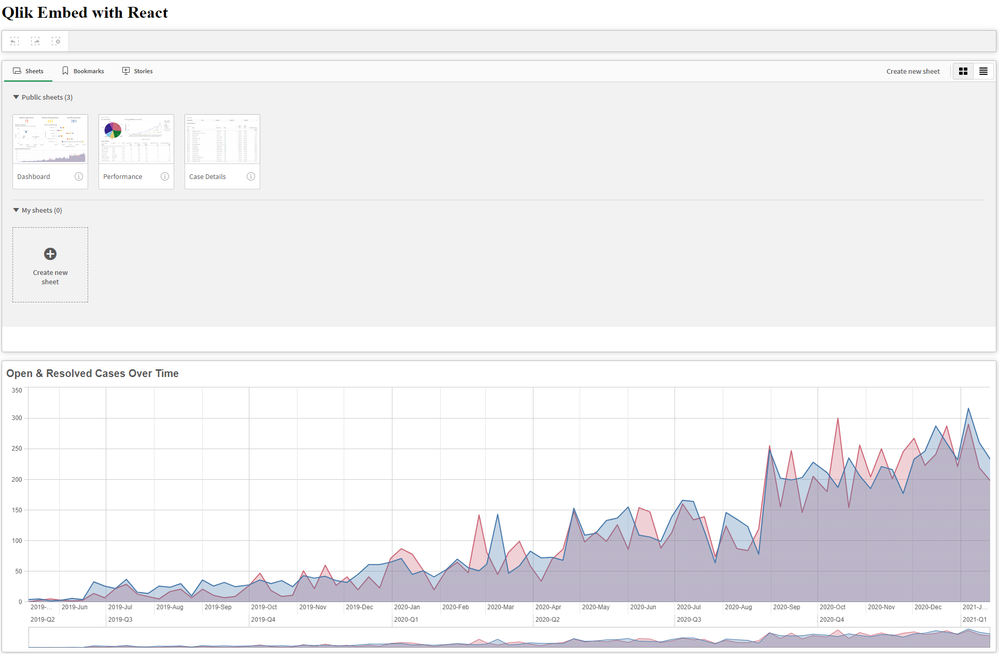
You can clone the full React example here: https://github.com/ouadie-limouni/qlik-embed-react
result:
Limitations ?
There are a few limitations to qlik-embed as it continues to develop into a more stable and robust library - you can read more about those on qlik.dev: https://qlik.dev/embed/qlik-embed/qlik-embed-limitations
Like I mentioned at the very beginning, qlik-embed is new and evolving quickly, I invite you to test it to get familiar with it early and stay tuned for more updates and bug fixes as they come out using the Changelog page.
I hope you found this post helpful, please let me know in the comments below if you have any questions!
Thanks
- Ouadie -
Watch Q&A with Qlik: Analytics App Development!
Watch our latest Q&A with Qlik! Pull up a chair and listen to our panel of experts as they help you get the most out of your Qlik experience. Our Qlik experts offer creative solutions to your analytics demands and answer your visualization questions. WATCH HERE
-