Unlock a world of possibilities! Login now and discover the exclusive benefits awaiting you.

Analytics & AI
Forums for Qlik Analytic solutions. Ask questions, join discussions, find solutions, and access documentation and resources.
Data Integration & Quality
Forums for Qlik Data Integration solutions. Ask questions, join discussions, find solutions, and access documentation and resources
Explore Qlik Gallery
Qlik Gallery is meant to encourage Qlikkies everywhere to share their progress – from a first Qlik app – to a favorite Qlik app – and everything in-between.
Qlik Community
Get started on Qlik Community, find How-To documents, and join general non-product related discussions.
Qlik Resources
Direct links to other resources within the Qlik ecosystem. We suggest you bookmark this page.
Qlik Academic Program
Qlik gives qualified university students, educators, and researchers free Qlik software and resources to prepare students for the data-driven workplace.
Recent Blog Posts
-
We are spending trillions on AI data centers, but are we teaching people to unde...
Artificial intelligence is changing our world at lightning speed. Everywhere we look, new tools and technologies are being built to make things smarte... Show MoreArtificial intelligence is changing our world at lightning speed. Everywhere we look, new tools and technologies are being built to make things smarter and faster.
A recent New York Times article, What Wall Street Sees in the Data Center Boom, shows just how massive this transformation is. Trillions of dollars are being invested in data centers, the “brains” that power AI. But the article also reminds us that all this progress comes with a cost: higher energy and water use, pressure on local communities, and even the risk of a financial bubble if this growth is not sustainable.
Reading it made me stop and think: Are we investing as much in understanding data as we are in building it?
Here at Qlik, we believe technology alone doesn’t make the world better, people do. And people can only make good decisions with data if they know how to read it, question it, and use it responsibly.
That’s what the Qlik Academic Program is all about. We want every student and educator, no matter where they are or what they teach, to have the chance to learn how to use data to solve real problems.
Imagine if every student learning about AI today also asked:
-
How can we make technology that helps the planet, not harms it?
-
Are we designing systems that serve everyone or just a few?
-
What does it mean to use data responsibly in a world driven by algorithms?
Those questions are where true innovation begins.
As the article points out, many companies are now rethinking how technology can drive progress that truly benefits everyone. That’s the same vision behind our Academic Program: to democratize knowledge, bridge the data gap, and empower people everywhere to use analytics for social good.
The AI revolution will be defined not only by algorithms and data centers, but by how wisely we use the data we already have.
Let’s make sure we are building not just the infrastructure for machines, but the understanding for humankind.
The Qlik Academic Program helps make this possible, giving educators, students, researchers, and universities everywhere free access to Qlik Sense, online training, and certifications to use data ethically and effectively.
💡 Join our global community for free: Qlik Academic Program: Creating a Data-Literate World
-
-
Want to know how data literate you are?
Data is everywhere. Every decision, every process, every strategy is powered by it. But here’s the challenge: 👉 What if we don’t know how to interpr... Show MoreData is everywhere. Every decision, every process, every strategy is powered by it. But here’s the challenge:
👉 What if we don’t know how to interpret the data in front of us?
👉 What if we can’t tell the story behind it?That’s where Data Literacy comes in: the ability to read, work with, analyze, and communicate with data—regardless of role, skill level, or tools.
Improving your data literacy means:
✔ Asking better questions.
✔ Interpreting insights with confidence.
✔ Taking informed actions that drive impact.Yet…
📊 Only 24% of business decision-makers feel confident using data.
📊 Just 32% of executives are considered data literate.
📊 Among young people, only 21% are data literate.✨ Want to know how data literate you are?
Take this free assessment: The Data Literacy Project
-
Qlik Introduces AI Improved Search with Semantic Search
Soon Qlik will introduced semantic search for Qlik Analytic apps. These improvements in the search feature will allow users to find applications by na... Show MoreSoon Qlik will introduced semantic search for Qlik Analytic apps. These improvements in the search feature will allow users to find applications by name or description using natural language search. What does semantic search mean? Semantic search allows a user to search for apps using context and intent to gain further useful results. Please keep in mind that a semantic search will only apply to app names and the descriptions, so make sure to describe your apps accurately for best results.
How can we put semantic searches to use? Maybe I want to find apps that contain information on mortgages. Before with Qlik, if I searched ‘mortgage’ in my search bar, I would get zero results.
Now with the improved search feature, I can use semantic search by clicking ‘Show more results’, to do a secondary search, powered by AI to look through my app catalog for results that may not contain the word ‘mortgage’, but words that are related to or relevant to mortgages. Below you will see that semantic search has found an additional app, ‘Consumer Bank 360’.
Semantic search uses AI to connect mortgages, and banks, giving you a relevant result.
Now we can take things a bit further. Maybe I want to explore my apps that are not only named after sports, but sports related as well. I can simply use natural language to query ‘sports related’. Before, I would receive zero results, but with the semantic search, I am given three results.
AI has connected that football and basketball are sports, returning the College Football Stats and 2021 NCAA Bracket Mania apps, but also recognized that that Recreation Equipment Sales app maybe also have information tied to sports.
These are great use cases, but that isn’t the extent of what semantic search brings to the table. Now the search feature can find results not only based on a few keyword matches, but now we can find results using a natural language search. For example, I could search using a full sentence, and return results based on that question. Here we’ve asked, ‘Can you give me information on Medical sales?’. And we’re returned apps that are related to medical sales.
Semantic search will soon be available in your own tenant. Be on the lookout for the updated ‘Show more results’ button so you can test out semantic search for yourself!
-
Qlik Talend Cloud and Qlik Stitch: Upcoming new NetSuite REST Connector
Hello Qlik Talend Cloud and Qlik Stitch admins, Oracle has announced that starting with the NetSuite 2026.1 release, SOAP web services will no longe... Show MoreHello Qlik Talend Cloud and Qlik Stitch admins,
Oracle has announced that starting with the NetSuite 2026.1 release, SOAP web services will no longer be supported. You can read the official announcement in SOAP Web Services endpoint release and support policy changes (community.oracle.com).
To ensure a smooth transition and prevent any disruption to your data workflows, Qlik is actively developing a new NetSuite connector that leverages the REST API for Qlik Talend Cloud and Qlik Stitch.
As we move closer to the release, Qlik will keep you informed of:
- The targeted launch date of the new REST connector
- A recommended migration plan to help you prepare
- Details on the deprecation timeline for our existing SOAP-based connector
We’re committed to making this transition seamless and will provide all necessary guidance to support your migration.
Thank you for choosing Qlik,
Qlik Support -
Automating Management Summaries from Any Qlik Dashboard
Automating Management Summaries from Any Qlik Dashboard GINQO This showcase demonstrates how to generate a management summary from any Qlik dash... Show MoreAutomating Management Summaries from Any Qlik DashboardGINQO This showcase demonstrates how to generate a management summary from any Qlik dashboard using Qlik Cloud Analytics, Qlik Application Automation, and Qlik Reporting Services. The workflow extracts chart data, processes it using any chosen AI model, and generates a report by combining the data, visuals, and commentary into a newsletter.
Discoveries
This automation uncovers a new way to leverage Qlik dashboards, not just for interactive analysis, but as a data storytelling engine. Key discoveries include: The ability to transform any visualization into a management-ready summary using Qlik Application Automation. Streamlining insight delivery by connecting analytics directly to narrative reporting. Demonstrating how Qlik’s automation and reporting layers can replace manual interpretation and formatting.
Impact
This solution has both operational and strategic impact. It eliminates manual report generation, saving hours of analyst time per cycle, and leaders receive real-time summaries derived from dashboards. Bottom line: Faster insights, less effort, and higher business alignment.
Audience
Business Leaders & Executives Data & BI Developers Analytics Managers / PMs
Data and advanced analytics
While this project focuses on automation and reporting, it lays the foundation for AI-assisted analytics.
-
How OData APIs Ensures Your Trusted Data Products are Consumable Everywhere
Today, we’re excited to introduce OData-compliant API access for Qlik Data Products. Every Qlik Talend Cloud data product published to the data market... Show MoreToday, we’re excited to introduce OData-compliant API access for Qlik Data Products. Every Qlik Talend Cloud data product published to the data marketplace with this newly released capability can now be securely accessed through an OData API endpoint, making it easier than ever to consume trusted data across your entire ecosystem.
Quick OData Protocol RefresherThe Open Data Protocol (OData) was conceived at Microsoft around 2007 as a novel way to bring uniformity and power to the then-emerging landscape of RESTful APIs. Its goal was to create a standard, HTTP-based protocol for creating and consuming queryable web services, much like JDBC or ODBC provided standardized access to databases. After its initial versions (1.0 through 3.0), Microsoft turned the technology over to the OASIS (Organization for the Advancement of Structured Information Standards) consortium. This transition led to its adoption and formal standardization as OData Version 4.0 in 2014, and it has since been approved as an ISO/IEC International Standard, cementing its status as a platform-independent, globally recognized best practice for data integration across a vast ecosystem of applications and platforms.
Turning Data Products into VALUE with APIsData and analytics teams can activate OData API access for one or more datasets in a data product. This creates API endpoints that can be consumed programmatically in BI tools like Microsoft Power BI, Tableau, or Excel, enterprise apps such as Salesforce, or even integrated into custom workflows and agentic AI experiences.
API Endpoint Activation
For example, take a Logistics & Shipping data product that contains datasets on orders, deliveries, suppliers, and shippers. When this data product is made available through an OData API, it delivers three key benefits -
Seamless Integration
Business teams can integrate the data product directly into their business workflow tools to track delivery KPIs, or into non-Qlik dashboards for enhanced supply chain visibility — all without any additional custom connectors.Inspect the API endpoints that are activated
Obtain the GET endpoint to access the table within the data product
Faster time to insightsWith OData API endpoints, analysts and developers can query and filter data products directly — but the impact is even greater when combined with tools like Qlik Automate using the API Key connector.
Configure the API Connector in Qlik Automate to leverage the OData API
For example, in a Logistics & Shipping data product, delivery details can be fetched via the FACT_DELIVERY GET API and used to auto-trigger workflows like customer alerts or ops notifications.Run the automation and see the listed results
Secure and governed access
API endpoints respect the same data governance, access controls policies, and permissions applied to the data products, ensuring the logistics data remains consistent and compliant across every touchpoint — from BI dashboards and custom business workflows to operational AI agents monitoring delivery anomalies.
ConclusionOData APIs broaden the reach of trusted data products beyond the native Qlik platform. Now, trusted data products can be securely consumed using third-party tools, enterprise apps, and AI agents — without extra connectors. This means seamless integration, faster time to insights, and governance at scale — turning what was once a scavenger hunt into effortless access. It’s a leap forward in our vision: making trusted data products instantly consumable anywhere, by anyone, in the tool of their choice.
To learn more, check out our documentation and grow the consumption of your data product with an OData API endpoint.
-
Knowledge Nuggets 2025Q3
Knowledge Nuggets 2025Q3 Insight Consulting The app showcases and organizes recent community contributions, serving as an additional learning re... Show MoreKnowledge Nuggets 2025Q3Insight ConsultingThe app showcases and organizes recent community contributions, serving as an additional learning resource.Discoveries
Top contributors and topics
Impact
Serves as a additional learning resource
Audience
Qlik Developers and other stakeholders
Data and advanced analytics
Serves as a additional learning resource
-
Get to Know our Expert Instructors!
This month we would like to introduce you to Michael Alegado. Michael is based out of Philadelphia and is our most tenured instructor here at Qlik! He... Show MoreThis month we would like to introduce you to Michael Alegado. Michael is based out of Philadelphia and is our most tenured instructor here at Qlik! He enjoys enabling students with the tools they need to gain the most out of the products Qlik has to offer
1. How long have you been with Qlik?
15 years now.
2. How did you become an instructor?
I have been in the training world for over 40 years. I started by training users on an insurance reporting system but also developed e-learning software as well as training project management and sales. Most of my training was around computer systems but I also performed soft skills training as well.
3. What do you love about teaching Qlik courses?
The Qlik software is a great product, so being able to enable people to learn how to use it and seeing their excitement is very gratifying.
4. How has the new platform helped you in leading your courses?
The fact that the training environment is in the same location as the manual makes things easier and is also much easier to enroll people.
5. What are your favorite features on the new platform?
The RDP delivery option of the training environment.
6. What is your favorite course to teach?
I really enjoy teaching Data Modeling for Qlik Sense – but at the end of the three days I’m exhausted!
If you’re in the AMER or EMEA regions, be on the lookout for Michael’s Live Instructor Webinars and register. We know you'll be in for an amazing experience!
Happy Learning!
-
Connector Factory - July, August & September 2025 releases
Qlik Talend 40 new Qlik Talend Cloud connectors We’re continuing to expand the connectivity of Qlik Talend Cloud with the addition of more applicatio... Show MoreQlik Talend
40 new Qlik Talend Cloud connectors
We’re continuing to expand the connectivity of Qlik Talend Cloud with the addition of more applications that can now be used as a data source. These connectors will help companies eliminate the lengthy development time associated with custom connectors as well as accelerate user access to a wider variety of sources. The new connectors are for:
- AdRoll: Digital marketing platform for retargeting, display ads, and marketing automation.
- Amplitude: Product analytics powering user behavior insights and digital product growth.
- AppsFlyer: Mobile attribution and marketing analytics for accurate and performance measurement.
- BigCommerce: Cloud-based platform for building and scaling online retail or ecommerce stores.
- Braintree: Payment processing platform for accepting online and mobile payments globally.
- Campaign Monitor: Email marketing platform for personalized campaigns, automation, and analytics.
- Chargebee: Subscription billing, invoicing, and revenue management for SaaS and e-commerce.
- Chargify: Subscription billing for SaaS businesses, focusing on recurring revenue streams.
- Clubspeed: Venue management software for go-kart tracks, activity centers, and entertainment venues.
- Codat: API platform connecting business financial data to software and service providers.
- Deputy: Workforce management for scheduling, timesheets, tasking, and employee communications.
- Freshdesk: Customer support helpdesk with ticketing, knowledge base, and automation features.
- FrontApp: Shared inbox software for team email collaboration, support, and productivity.
- GitLab: DevOps lifecycle platform with Git repository, CI/CD, and project tracking.
- Google Campaign Manager (formerly DoubleClick Campaign Manager): Ad management and reporting platform for display and video campaigns.
- Google Search Console: Tool monitoring websites’ search presence, performance, and health.
- Harvest Forecast: Resource planning and scheduling tool for teams and projects.
- Heap: Product and web analytics platform with automatic data capture and actionable insights.
- HelpScout: Customer service platform offering shared inboxes and helpdesk ticketing tools.
- hubspot: All-in-one CRM with integrated marketing, sales, customer service, and automation tools.
- intacct: Cloud-based financial management and accounting software for growing and midsize businesses.
- Invoiced: Accounts receivable automation for invoicing, payments, and collections workflow.
- Iterable: Cross-channel marketing automation for personalized campaigns and audience engagement.
- Kustomer: Omnichannel customer service CRM for intelligent support conversations and tracking.
- Lever: Talent acquisition suite for applicant tracking and recruiting pipeline management.
- Listrak: Digital marketing automation for email, SMS, and e-commerce personalization.
- Looker: Business intelligence and analytics platform for data exploration and dashboards.
- Mailshake: Email outreach for sales, PR, and marketing campaigns with automation tools.
- Onfleet: Route planning and last-mile delivery management software for logistics operations.
- Oracle Eloqua: Oracle’s B2B marketing automation for campaign management and lead nurturing.
- Oracle NetSuite Analytics: Analytics platform for NetSuite ERP business data reporting and insights.
- Ordway: Automated billing and revenue management platform for subscription and usage-based businesses.
- Pepperjam: Affiliate and partner marketing technology, now branded as Ascend by Partnerize.
- Referral SaaSquatch: SaaS platform for running customer referral and loyalty programs.
- SaaSOptics: Subscription management and financial analytics for SaaS business metrics.
- Salesforce Marketing: Marketing cloud for email, social, mobile, and customer journey automation.
- Toggl: Simple time tracking tool for individuals or teams to boost productivity.
- UJET: Cloud contact center software combining voice, chat, and app support channels.
- UserVoice: Customer feedback, idea management, and support ticketing platform.
- X Ads (Twitter Ads): Advertising tool to create, manage, and analyze campaigns on X (formerly Twitter).
Qlik Analytics
New version of Direct Access gateway
The Qlik Data Gateway - Direct Access allows Qlik Sense SaaS applications to securely access behind the firewall data, over a strictly outbound, encrypted, and mutually authenticated connection.
We recently released Direct Access gateway 1.7.6 and 1.7.7 which, in addition to bug fixes, introduced the following enhancements:
- File (via Direct Access gateway) connector: Restricting file system access to specific spaces
- Support for applying changes without requiring a gateway restart
- Oracle (via Direct Access gateway) connector: Support for the Oracle TNS Names connection method
- Allowing connections to localhost using the REST (via Direct Access gateway) connector
- Support for the SAP Report connector
- Support for Direct Access gateway with Qlik Cloud Government DoD
- Alleviating latency caused by DNS resolution
- Configuring connector startup parameters
- Configuring connector startup
- Requesting load slots asynchronously
- New location for the installation logs
SAP Report Connector
- Now supports Qlik Cloud Government and Qlik Cloud Government – DoD in addition to Qlik Cloud and the Direct Access Gateway
New AI-related connectors
- Amazon Bedrock – Converse API
- Google AI – Gemini
Qlik Automate (Formerly Qlik Application Automation)
Updated Connectors
- Shared Automations now supported in Qlik Cloud Government and Qlik Cloud Government – DoD
- The Qlik Predict connector in Qlik Automate has been extended with a set of new capabilities and blocks that can be used to generate predictions and analyze the key features that influence the predicted outcome
- Block Search in the Qlik Automate Editor- return results for comments, blocks and connectors that are part of the automation
- Add export and import app blocks to the QCS connector
- Add a Raw API List request block to the Talend Cloud connector
- Variables & weight can now be set on reload blocks
- The Qlik Talend Cloud connector now supports Webhooks
-
Qlik Sense and Vulnerability “CVE-2025-7783” in NPM Library form-data
Hello Qlik Users, In mid-July 2025, a vulnerability was disclosed in the NPM library form-data (GitHub Security Advisory). Qlik became aware of this i... Show MoreHello Qlik Users,
In mid-July 2025, a vulnerability was disclosed in the NPM library form-data (GitHub Security Advisory). Qlik became aware of this issue through its standard Secure Development Lifecycle (SDL) processes.
Following an internal review, Qlik R&D and Security teams identified that potentially vulnerable versions of the form-data library were included in some installations of Qlik Sense Enterprise for Windows. However, due to the specific way Qlik utilizes this library, the conditions required for exploitation are not met.
Although the vulnerability was determined to be non-exploitable within Qlik Sense, customers who prefer to upgrade to a version that includes the patched form-data library can do so by installing one of the following releases:
- May 2025 Patch 6
- November 2024 Patch 18
- May 2024 Patch 24
Note: An earlier version of this information was mistakenly published indicating that this CVE was directly related to Qlik Sense for Windows.
Thank you for choosing Qlik,
Qlik Global Support -
Qlik Sense Qualification Exams - 2024 Update
Qlik Education is pleased to announce the Business Analyst and Data Architect Qualification Exams have been updated. After completing the Business Ana... Show MoreQlik Education is pleased to announce the Business Analyst and Data Architect Qualification Exams have been updated.
After completing the Business Analyst or Data Architect courses or taking the Create Visualizations with Qlik Sense or the Data Modeling for Qlik Sense training, consider earning a Qlik Sense Qualification.
What is a Qualification Exam?
Qualification exams enable you to validate your fundamental level of Qlik Sense skills. The Qlik Sense Business Analyst Qualification is earned after developing an application and completing a multiple-choice exam which tests your fundamental and applied knowledge. A Qlik Sense Qualification Certificate and digital badge will be awarded with a minimum passing score of 70%.
How do I access the Qualification Exams?
Visit the Qlik Sense Business Analyst or Qlik Sense Data Architect Learning Plans --> Qualification Tab to access exams.
What do I receive after I pass?
After you receive a passing score, you will be awarded a certificate and digital badge for sharing on social sites. You will also receive notification from Credly platform that you have earned a digital badge. Credly allows you to manage your badges from Qlik and other professional organizations so you can easily share your badges on social media sites. You will need to simply accept the badge and click the share button or download the badge and certificate to keep for your records. You can even add their badges to your email signature!
Questions? Feedback?
Contact Education@qlik.com
-
XJTL University's innovative use of Qlik Academic Program
At the XJTL University in China, participants worked on a business scenario to prepare for a business case to develop and challenge their assumptions ... Show MoreAt the XJTL University in China, participants worked on a business scenario to prepare for a business case to develop and challenge their assumptions at different stages. Participants were divided into project teams and discussed assumptions in virtual rooms. Project teams collected, interpreted, analyzed various forms of internal and external data, and presented their results in the form of digital artifacts (visual dashboards of performance indicators) to a Judge Panel using Qlik Sense.
Qlik Sense was used as the primary authoring tool. Its application supported cognition and social interaction across different stages of the learning process. Thanks to the Qlik Academic Program offered by Qlik, Qlik Sense was made available to all students at XJTLU, enabling wide access to these innovative learning practices.
To read more about this project and its findings, please visit: https://www.learningmall.cn/en/ceie/project-based-learning-on-learning-mall-on-data-analytics-using-qlik-sense-(technological-authoring-tool-application).htmlOther source: https://www.learningmall.cn/
If you wish to leverage the Qlik Academic Program in your University/ Educational Institution, please visit: qlik.com/academicprogram
-
Watch Q&A with Qlik: Qlik Cloud Analytics Administration!
Don't miss our previous Q&A with Qlik! Pull up a chair and chat with our panel of experts to help you get the most out of your Qlik experience. SE... Show MoreDon't miss our previous Q&A with Qlik! Pull up a chair and chat with our panel of experts to help you get the most out of your Qlik experience.

-
BBC Best Paid Presenters 2025
BBC Best Paid Presenters https://www.bbc.co.uk/news/articles/c15wxgjn9xjo R M Using layout container to reproduce BBC Chart Discoveries... Show MoreUsing layout container to reproduce BBC ChartDiscoveries
How to use layout container, tree map and buttons to build a Dashboard
Impact
As a concept it can be used to show Sales
Audience
Everyone
Data and advanced analytics
New way of showing data
-
Straight Table
The straight table, included in the Visualization bundle, has all the table properties that we are used to as well as many new features. These new fea... Show MoreThe straight table, included in the Visualization bundle, has all the table properties that we are used to as well as many new features. These new features make it easier for developers to create a straight table and it gives users the ability to customize straight tables in the apps they view. The straight table is ideal when you want to provide detailed data – the raw data. While you do not want to have too many columns (ten or less columns are ideal for the best performance), a straight table can have many columns (dimensions and measures).
As previously mentioned, the straight table can be added to a sheet from the Qlik Visualization bundle. This means developers will need to open the advanced options to add the straight table to their sheet(s) and make edits. Once the straight table is added to a sheet, developers can add columns – either fields and master items or custom expressions. One of the new features that developers can take advantage of to build tables quickly is the ability to add more than one dimension and/or measure at once. Simply select the dimensions and measures you would like to add to the table and then click the Add button.
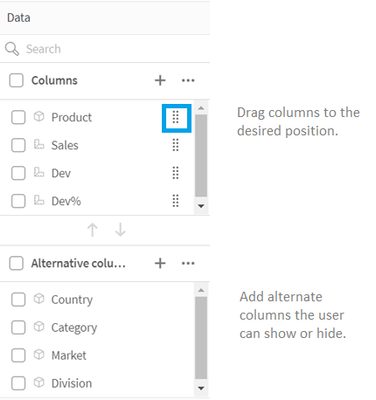
Once columns are added to the table, they can be dragged as needed to the desired position/order. Developers also can add alternate columns to the straight table. These columns can be dimensions and/or measures. These alternates columns will be available to users to customize the straight table if chart exploration is enabled. This is a great new feature because the user does not need edit permissions to modify the straight table. Users can add and/or remove columns based on their analysis. Being able to add columns as needed also improves performance since the straight table does not need to display all the columns, all the time. Loading the straight table with the minimum columns needed will decrease the load time.
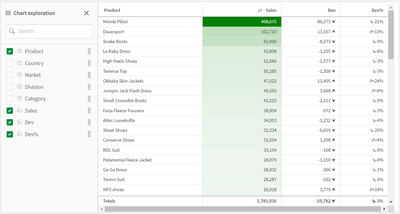
Chart exploration allows users, who are in analysis mode, to add and remove columns from the straight table they are viewing by checking or unchecking them in the Chart exploration panel (see image below). Any users viewing the sheet can customize the straight table. Users cannot see layout changes made by other users using the app, unless they opt to share the visualization or create a public bookmark with the layout saved.
Another new feature for developers is the ability to set the column width. By default, the column width is set to Auto, but developers can set it to Fix to content, Pixels or Percentage. Pagination is another new feature that can be enabled in a Straight table. With pagination, a specified number of rows are displayed at once and the user can navigate through the pages using arrows or selecting the page.
Many of the properties for the straight table are familiar but the new ones are moving the straight table to a new level. Learn everything you need to know about the straight table in Qlik Help and add one to your next app. Also check out the SaaS in 60 video for a quick video overview:
Thanks,
Jennell
-
Unlocking Opportunities with Online Resources in Data Analytics
One of the biggest advantages of online resources is flexibility. Students and educators can explore complex concepts like data visualization, predict... Show MoreOne of the biggest advantages of online resources is flexibility. Students and educators can explore complex concepts like data visualization, predictive modeling, or AI at their own pace—whether that means diving deep into an entire course or spending just a few minutes learning a new technique. This adaptability makes it easier than ever to fit professional skill-building into busy schedules.
Beyond flexibility, online resources open doors to practical, hands-on learning. Interactive labs, guided exercises, and real-world datasets allow learners to move beyond theory and immediately apply what they’ve learned. This not only builds confidence but also strengthens career readiness by bridging the gap between classroom knowledge and industry needs.
Employers today are increasingly looking for candidates who can prove their skills. That’s why qualifications, micro-credentials, and badges earned through online platforms carry real weight in the job market. They provide tangible evidence of what students can do—something a traditional transcript doesn’t always capture.
The Qlik Academic Program brings these benefits together by offering free access to Qlik Sense analytics software, self-paced e-learning modules, interactive challenges, and industry-recognized qualifications. With these tools, students don’t just learn about analytics—they experience it. Professors, meanwhile, gain ready-to-use teaching materials and the option of guest lectures or workshops to enrich their courses.
Online resources are more than convenience; they are enablers of opportunity. For students, they mean future-ready skills. For educators, they mean enhanced teaching impact. For both, they mean being part of a global, data-literate community.
Explore the possibilities for yourself: www.qlik.com/academicprogram
-
【オンデマンド配信】DX - 建設業界の迅速な経営・現場判断の実現に向けて
前回の第一回では「DX:建設業界の IT 課題と解決の方向性」と題し、建設業界特有の課題を考察した上で、複合検索条件検索の可能性を探りました。第二回では、一度マクロな視点で日本が置かれているデジタル変革の外観を押さえつつ、DX を進めるためにはどのようなマインドセットを持てば良いか、キーパーソンは誰... Show More前回の第一回では「DX:建設業界の IT 課題と解決の方向性」と題し、建設業界特有の課題を考察した上で、複合検索条件検索の可能性を探りました。
第二回では、一度マクロな視点で日本が置かれているデジタル変革の外観を押さえつつ、DX を進めるためにはどのようなマインドセットを持てば良いか、キーパーソンは誰か?をまず見ていきます。その上で、生成 AI など最新技術を活用し、複雑な条件下でも最適な情報を即座に抽出・活用し、進捗管理やリスク低減、迅速な経営・現場判断の必要性に対し、どのように支援できるのかを考察します。※ パソコン・タブレット・スマートフォンで、どこからでもご視聴いただけます。
今すぐ視聴する -
エージェンティック AI が企業ソフトウェアの未来である理由(Qlik Blog 翻訳)
本ブログは "From Static to Adaptive: Why Agentic AI is the Future of Enterprise Software" の翻訳です。 著者:Sean Stauth 今年前半、私は EMEA、APAC、米国を横断し、グローバルなエージェンティック A... Show More本ブログは "From Static to Adaptive: Why Agentic AI is the Future of Enterprise Software" の翻訳です。
著者:Sean Stauth
今年前半、私は EMEA、APAC、米国を横断し、グローバルなエージェンティック AI ワークショップシリーズを主導するという特別な機会に恵まれました。ロンドンからシンガポール、ムンバイに至るまで、業界や大陸を越えた企業が、AI 時代におけるソフトウェアの可能性を再考する様子を間近で見てきました。そして確信を持って言えます。エージェンティック AI の時代が到来したのです。
これらのイベントでは、企業向け AI の進化——予測 AI から生成 AI、そして現在のエージェンティック AI ——を探求しました。エージェンティック AI とは、環境の変化を自律的に感知し、複雑な状況を推論し、意思決定を行い、それに基づいて行動するソフトウェアです。絶えず変化するビジネス状況に適応し続けるのです。これまでの進化はいずれも変革的でしたが、今まさに踏み込もうとしているこの進化ほど、根本的にゲームを変えるものはありません。
では、なぜエージェンティック AI がゲームチェンジャーなのか?
簡潔に言えば、ソフトウェアを「より賢く」するだけでなく、初めて「適応可能」にするからです。静的でルールベースのソフトウェアだけでは、新たに生じる企業の課題を単独で解決できません。
基盤モデルの能力が爆発的に拡大しています。数年前と比べ、より高速で、より低コスト、指数関数的に知能化が進んでいます。つまり戦略的価値はもはやモデル自体にあるのではなく、その応用方法にあるのです。その価値は技術の応用——垂直的・領域特化型で、動的なワークフローに最適化された形——に宿ります。推論や意思決定といった能力は新たな知能層を形成し、ツールやリソースを直接呼び出せるようになりました。これらは全て、ビジネス上重要なアプリケーションやワークフローを直接対象としています。これらは従来の決定論的ルールベースシステムではありません。AI によって駆動・調整される、知能的で自律的なシステムなのです。
この変革は、企業が問うべき課題を再定義し、エンタープライズソフトウェアの可能性を拡大しています。ビジネスは常に高速で競争が激しく、複雑でした。労働市場、消費者行動、流通チャネルといった経済的現実は絶えず変動しています。企業は今、「より迅速に対応できるか」「先手を打てるか」「静的なソフトウェアから、ビジネスと共に進化する動的なシステムへどう移行するか」などの根本的な問いを自らに投げかけています。
そしてこの新たな機会が業界を活性化させています。
エージェンティックシステムの力
世界で最も競争が激しく、複雑で規制の厳しい業界の一つである金融サービス分野の顧客との対話から、実例をご紹介しましょう。
このお客様は世界最大級かつ最も多様な消費者市場の一つにサービスを提供しています。顧客基盤は世代や所得層、都市部と地方、異なる目標・嗜好・金融リテラシーレベルにまたがります。同時に、激しい競争、変化する消費者期待、絶えず進化する規制環境やパートナー環境を乗り切らねばなりません。
同社は製品革新、市場投入戦略の実行、変化する労働市場と労働力需要という三つの圧力に同時に直面しています。
- 製品面では、明確な価値提案と高い利益率を備えたサービスを継続的に特定・検証・改良する必要があります。しかし競合他社が対抗策を打ち出す中、顧客の変化(時には週単位)に合わせて製品を進化させねばなりません。新製品は革新性を保ちつつ利益目標を達成しなければなりません。
- 営業面では、グローバル銀行、地域パートナー、社内直販部隊を巻き込んだマルチチャネル戦略を管理しています。各チャネルは異なる要求、財務的リターン、市場圧力があります。同時に競合他社も同様の販売チャネルで優位性を確立しようとしています。これにより、販売インセンティブの最大化、価値提案の証明、関係拡大への絶え間ないプレッシャーが生じています。
- 人材面では、高い離職率環境が継続的な再教育、知識の喪失、営業実行のばらつきを招いています。営業リーダーは予測不可能性の高い環境で業績目標を達成しなければなりません。
この世界は静止しません。競争、離職、需要シグナル、パートナー間の摩擦、変動するリスクエクスポージャーが絶えず流動する生きたシステムなのです。ダッシュボードも、単一の予測モデルも、人間が構築したワークフローも追いつけません。
エージェンティック AI へ
まさにこの領域でエージェンティック AI が真価を発揮するのです。
単一システムや硬直したワークフローではなく、それぞれが特定の役割を持ち自律的かつ協調的に行動する知能エージェントのネットワークを想像してみてください。それはデジタル生態系のように、絶えず感知し、学び、行動する存在なのです。
エージェンティック AI のビジョンは、主要なワークフローを一連のエージェントに分解することにあります。各エージェントは特定のタスク群を担当し、明確な指標で成果を評価されます。これらは複合 AI システムであり、単純なチャットボットや回答プロンプトよりもはるかに強力です。各エージェントは、目的特化型 LLM や特定タスク向け小型言語モデル(SLM)、オーケストレーションワークフロー、ナレッジベースなど、複数の基盤モデルを包含し得ます。
このお客様のシナリオにおけるエージェントの例は以下の通りです。
マーケティングエージェント:セグメントとチャネルを横断した需要シグナルの変化を検知し、顧客獲得とブランド認知の最適化を図る。顧客獲得単価(CAC)、チャネル効率、リードから有望案件への転換率で測定。
収益最適化エージェント:価格設定と需要シグナルを新製品機能と統合し、リアルタイム価格設定・バンドリング・プロモーション戦略を通じて収益とマージンを最大化。機能採用率、販売数量、取引当たり収益で測定。
営業生産性エージェント:リアルタイム商談データと行動シグナルに基づき営業担当者に次善の行動とジャストインタイム研修を推奨。営業担当者の効果性向上、オンボーディング、定着率向上を目的とする。評価指標:担当者別ノルマ達成率、営業サイクル速度、担当者育成期間、離職率等
リスク管理エージェント:不正検知シグナル、市場変動、ポートフォリオ動向のリアルタイムデータを統合し、成長と規制・財務リスクのバランスを最適化。評価指標:損失率、リスク調整後リターン、その他コンプライアンス指標
カスタマーサービスエージェント:マーケティング、製品、営業部門からの構造化データと非構造化データを統合し、カスタマーサービス担当者やエンドユーザーに重要な情報を提供することで、ロイヤルティ向上と顧客離脱率低減を推進。顧客維持率、ネットプロモータースコア(NPS)、通話解決時間によって測定。
各エージェントは独自の領域で動作可能ですが、真のブレイクスルーはこれらのエージェントが自律的かつ協調的に行動する接続されたマルチエージェントシステム(MAS)を形成した時に実現します。連携して調整されることで、組織は戦略を積極的に適応させ、より迅速に革新し、顧客生涯価値を最大化できるのです。
ビジネス機能横断でエージェントが連携するマルチエージェント・エコシステムを構築すること - これがお客様の長期ビジョンです。
- マーケティングエージェントは需要変動を検知し、収益エージェントに新価格設定のテストを指示します。
- 収益エージェントはリスクエージェントと連携し、コンプライアンスと安全な成長を確保します。
- 営業エージェントはこの知見を活用して提案をカスタマイズしコンバージョン率を向上させ、カスタマーサービスエージェントは実世界のインサイトをマーケティングや製品開発にフィードバックします。
こうした創発的アーキテクチャは静的なスクリプトに従う必要はありません。学習し、連携し、適応するのです。それはダイナミックで生きているシステムを形成し、支えるビジネスそのものを映し出します。
確かに複雑だ。そして確かに、これが未来だ。
このビジョンは野心的かつ未来志向です。しかし同時に、現代の企業がまさに必要としているものであり、多くの企業が今日プロトタイプ開発を始めています。
この金融サービス顧客は一夜にしてこれを導入しているわけではありません。Qlik の支援のもと、段階的に構築を進めています。なぜなら、これらのシステムには新たな思考、新たなツール、新たなデータ基盤が必要だからです。
この旅における Qlik の役割
エージェンティック AI の領域は急速に進化しており、先進企業は今こそ行動すべき時だと認識しています。Qlik のビジョンは、お客様にとって不可欠な「信頼できるデータ基盤」と「強力なエージェンティック AI 体験」という2つの基盤に焦点を当てています。
Qlik は、完全かつ独立したエンドツーエンドのデータ分析プラットフォームを擁する独自の立場にあります。当社の目標は、エージェンティック AI 基盤を構築することです。これは、文脈を理解し、タスクを推論し、行動を起こすために連携するインテリジェントエージェントのネットワークです。これには、人間のような意思決定とタスク実行を反映したアシスタントやエージェントが含まれます。
当社の生成 AI アシスタント「Qlik Answers」は、このエコシステムの自然言語インターフェースとして機能します。Qlik プラットフォーム内で利用可能なだけでなく、埋め込み可能な顧客構築型アシスタントとしても利用できます。ユーザーは Qlik Answers を通じて、データからの洞察、プラットフォーム内でのガイダンス、主要タスクやワークフローの自動化を実現できます。また顧客は、特定の業務課題を解決するため、運用ワークフローへ容易に展開・組み込めるドメイン特化型アシスタントを構築可能です。
これらのアシスタントは、分析、自動化、非構造化データ、異常検知、データパイプライン、生産性支援など多岐にわたる専門エージェント群で構成される当社のエージェンティックフレームワークを活用します。独自のスーパーバイザーエージェントがこれらを統括し、意図を解釈、タスクを分解、エージェント間での実行を調整します。
最も重要なのは、Qlik 内で AI エージェントを活用するだけでなく、あらゆる AI エージェントがデータや分析計算を必要とする際の信頼できる情報源となるプラットフォームを構築している点です。Qlik は組織におけるエージェンティックデータインテリジェンス層として機能し、システムやベンダーを横断するエージェントが信頼できるインサイトを要求・アクセス・活用することを可能にします。MCP や A2A といった標準規格をサポートすることで、あらゆるサードパーティエージェントがQlik の独自の力を活用し、自社全体で最良の結果を生み出せます。
この変革が業界や地域を超えて展開される様子を半年観察した結果、一つ明らかになったことがあります。
静的なシステムでは対応しきれない。そして未来は、学習し、適応し、協働するソフトウェアのものとなるでしょう。
そしてエージェンティック AI こそが、その未来への道筋なのです。
組織がダイナミックなAI駆動システムを構築する方法についてお考えなら、ぜひ私たちにご相談ください。
-
【オンデマンド配信】金融業界向けレガシーシステムを「負債」から「資産」へ
金融業界のメインフレームは、長年の事業を支える重要なシステムである一方、DX 推進のボトルネックとなりがちです。しかし、Vanguard 社の事例は、メインフレームを「負債」ではなく「資産」に変える道筋を示しています。同社は、Qlik Replicate を用いたリアルタイムなデータレプリケーション... Show More金融業界のメインフレームは、長年の事業を支える重要なシステムである一方、DX 推進のボトルネックとなりがちです。しかし、Vanguard 社の事例は、メインフレームを「負債」ではなく「資産」に変える道筋を示しています。同社は、Qlik Replicate を用いたリアルタイムなデータレプリケーションにより、メインフレームの安定性を維持しつつ、データをクラウド上で自由に活用する環境を構築しました。このアプローチは、コスト削減とイノベーションを両立させ、データドリブン経営を実現する、金融機関にとって現実的な解決策となり得ます。
※ パソコン・タブレット・スマートフォンで、どこからでもご視聴いただけます。
今すぐ視聴する -
Round Two! More September Updates on the Qlik Community
Hello Qlik Community, We’re excited to bring you more fresh September updates designed to make navigating and exploring the Qlik Community even better... Show MoreHello Qlik Community,
We’re excited to bring you more fresh September updates designed to make navigating and exploring the Qlik Community even better. Here’s what’s new:
A More Modern Look for Discussion Tabs
We’ve refreshed the tabs you see across Qlik Community forums: Answered, Unanswered, Unsolved, and Solved. These tabs now feature a more modern, sleek look to help you find the content you’re looking for faster.
Introducing the Qlik Community Tour
Today we’re officially launching our Community Tour, a guided experience tailored for new members. This tour walks newcomers through key areas of the Qlik Community, helping them discover where to ask questions, find resources, and connect with others. It’s a quick, interactive way for new users to get familiar with everything our Community offers. This is just the beginning, we’ll be rolling out additional waves of the Community Tour over time to cover even more areas and features, so stay tuned for future releases!
If you’ve tried out the new tabs or taken the Community Tour, we’d love to hear your thoughts! Share your feedback in the comments below to help us continue improving.
Your Qlik Community Managers,
Melissa, Sue, Jamie, Nicole, Tammy, Caleb, and Brett
@Melissa_Potvin @Sue_Macaluso @Jamie_Gregory @nicole_ulloa @Tammy_Milsom @Brett_Cunningham