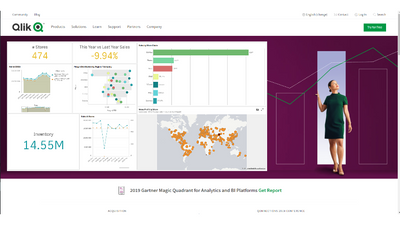
Hey guys - it's been a while since I created a Qlik Sense in 60...so I'm back with a little feature that I just stumbled upon while creating some demonstrations using the Qlik Sense April 2019 release, Embed Sheet. If you found it before I did, be sure to share how you used it and what you did and perhaps did not like. This feature was taken from a single configurator that was available in the Qlik Sense Developer Hub and now brought front and center so you can easily grab those analytics for other means. Take just 60 seconds to learn how you can embed your Qlik Sense analytics in blog posts, social media and other applications.
To learn a bit more about this feature, check out our help document and help video.
Enjoy!
Regards,Mike TaralloFollow me on Twitter
...View More
Hey guys - I wanted to spend a few minutes covering our new Associative Insights that we just released yesterday in Qlik Sense April 2019. To keep it short and sweet we combined the power of our Cognitive and Associative engines to surface hidden insights within your data. While performing selections and analyzing your data you can jump into Associative Insights and spot the gray or unrelated data immediately and then continue explore it further to uncover new insights.
The Associative Engine identifies the data values that are unrelated to your selections, and the Cognitive Engine analyzes the unrelated values and brings the most significant insights forward possibly revealing new discoveries and prompting new questions.
I’m going to show you a very simple, yet practical example to prove to you how powerful this is.
In case you missed it, check out what's new in our blog and video on the latest release Qlik Sense April 2019.
Let me know what you think in the comments below, we want to hear from you!
Sample Qlik Sense attached below.
Regards,
Mike TaralloFollow me on Twitter
...View More
I was parsing data with a colleague when I learned about the TextBetween function. It is a simple function that can be used in a chart or in the script to return the character(s) that are between two delimiters you specify. Here is the syntax from Qlik Help:TextBetween(text, delimiter1, delimiter2[, n])The first parameter, text, is the input string. Delimiter1 is the first character to search for in the text while delimiter2 in the second character to search for in the text. The last parameter, n, is optional and is used to search for a specific delimiter pair. Let’s look at some examples.The chart expression below returns 1234. The TextBetween function finds the first open parenthesis and the first close parenthesis and returns the text that is between them.Now if the text included multiple sets of data in parentheses, I can use the chart expression below to get the text in the third parentheses set.This chart expression returns 3456 because I have set the fourth parameter to 3 in the TextBetween function which means I want the text between the third delimiter pair (the third pair of parentheses).TextBetween can also be used in the script. In the script snippet below, I load 3 products into a table named Temp. Then I parse the Product field using TextBetween to create another field in the Products table named Product Code.The result is a table like this:In the past, I would have approached this parsing exercise differently. I would have used a combination of functions like the index function and the mid function to parse out the product code. Using the TextBetween function is so much easier, cleaner and more straight-forward. I cannot believe it took me this long to learn about it but I am glad I know about it now.Thanks,Jennell
...View More
Today I have the pleasure of introducing Nick Akincilar as our guest blogger.
Nick is a Principal Pre-Sales Solutions Architect based in the Philadelphia area with over 20 years of experience in bothpre-sales and technical roles. Nick’s expertise ranges from data & analytics, to business workflow automation & coding, within various verticals markets. He truly enjoys the challenge of being the liaison between executives, business users & technical teams. Nick loves tech and is passionate about helping large organizations become more effective using all of their data through the power of modern analytics. We appreciate his valuable contribution to the Qlik Desigbn Blog. Thank you Nick!
In this multi-part blog, Nick shares some areas where self-service analytics deployments fail and how Qlik's analytic platform addresses them. Take it away Nick!
Self Service Analytics
Have you ever try to do something thinking you knew how, but ended up failing in the end? This is frequently what happens when self-service BI is implemented based purely on past SQL, Reporting and traditional BI experiences.
As a principal BI solutions architect, it is part of my job to listen to companies looking at self-service BI including educating them on what I have learned from listening to others, especially on what can go wrong!
Self-service analytics is a way to allow business users & data analysts to answer their own questions by giving them access to various data sets and intuitive tools that can blend, filter & visualize these data sets. If you are planning to roll out a self-service analytics project to a large user base then read the attached PDF document that covers areas where self-service BI within larger scales can and will fail when using traditional query-based solutions.
Have a comment or question? Post it below and Nick or myself will be happy to address it for you.
...View More
Hey guys thanks for taking the time to watch these videos on our new Qlik Insight Bot™. Since we just announcedthe general availabilityof the Qlik Insight Bot- I am happy to share this quick product tourthat will walk you through a brief introduction on some of the various operations and capabilities available.
In summary, the Qlik Insight Bot™ offers AI-powered conversational analytics for your Qlik Sense environment. We have always been taught that working with analytics means interacting visually with dashboards and charts or data visualizations. - But, what if you could just talk to your analytics directly and get the answers you need, instantly? That's where the Qlik Insight Bot™ comes in; integrating with Qlik Sense® and through popular messaging and collaboration tools that you work with everyday. (Skype, Slack, Microsoft Teams). The Qlik Insight Bot™ providesaccess to more people so they can make data-driven decisions, simply by ... well, having a conversation. The Qlik Insight Bot™ engages users in meaningful dialog, inviting casual users not just to ask questions, but to discover and explore a depth of insight behind answers.
Watch this brief promo to quickly see it in action and learn more:
Watch the Product Tour to get some deeper knowledge on how it works:
Regards,Mike Tarallo - follow me on TwitterQlik
...View More
In this video I walk you through the power and unique capabilities of our Global Smart Search tool. Global Smart Search is a search tool available in Qlik Sense which brings back all of your values, fields AND their relationships. It is especially handy to use when you don't really understand the data model, but have an idea of what you are looking for. Since it is part of our Associative Difference and one part of many that makes Qlik unique - it helps you explore your data freely without restrictions and helps you uncover hidden insights. Watch and learn what I discovered.
Tell me how you are using Global Smart Search in the comments below.Resources:
Qlik Help Topic
Associative Difference
Regards,Mike TaralloQlik
...View More
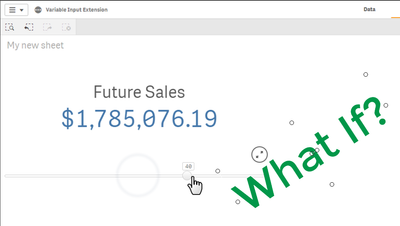
The Qlik Sense November 2018 release was delivered with a great selection of components contributed by our valued partners and Qlik employees. These Qlik certified components help increase user interaction and simplify navigation in your Qlik Sense apps. Many users I have spoken with love the ability to create What-If scenarios to view potential estimates and see how their metrics are affected. In this video I walk you through a simple scenario using the Variable Input object, represented as a slider, which you should be able to apply to more complex and sophisticated expressions.
Take a moment and think of the possibilities, look under the hood. Data visualization alone is insufficient. Data analytics is NOT just about presenting data = anyone can do that; it's about finding answers and exploring data freely without restriction and uncovering hidden relationships; ONLY Qlik can do that!
Enjoy.
Variable Input Extension
Here is a simple use case that helps me identify an acceptable profit margin when costs increase and pricing of items fluctuate using the same approach.
eBay Profit Margin Estimator
To learn more about this an other great Visualization and Dashboard Bundle objects check out these resources:• https://www.youtube.com/watch?v=WDecjpF0btc&list=PLkRFvjyuHFvJ5p8f7SMoNOW343TpsLE0u• https://www.youtube.com/channel/UCFxZPr8pHfZS0n3jxx74rpA/videos
Regards,
Mike Tarallohttps://twitter.com/mtaralloQlik
...View More
I’m introducing today the Qlik Bracket Challenge, a new interactive data-driven application created by Qlik. The idea is simple, you register (+18 years old & US only), complete a bracket by picking the teams you think will win each match-up, and then you submit your bracket before the first game of the tournament starts.The objective of the game is to accumulate the most points by correctly selecting the “winning pick” for each of the sixty-three match-ups, the winner takes home $100,000.As we see things here at Qlik, to make a good decision, whether business related or not, having the right information is crucial. That’s why we like to make data accessible for you when you need it most. For the Qlik Bracket Challenge, we partnered with STATS to offer you data to support your picks, right when you need it.The muscle of Qlik Bracket Challenge is Qlik Core, our analytics development platform that is built around our powerful Associative engine and Qlik-authored open source libraries. Qlik Core has let us build, extend and deploy fast, delivering at massive scale within our cloud environment.From all eligible entries received, the winner ($100,000 prize) will be determined based on their ability to accurately select the winning teams and accumulate the most points during the 2019 NCAA Men's Basketball Tournament.https://bracketchallenge.qlik.comI hope you enjoy it,Arturo
...View More
(SAMPLE Qlik Sense APP ATTACHED)
Once again Qlik takes the stage at theGartner BI Bake Off, along with other vendors - Thoughtspot, Tableau and PowerBI. The Gartner BI Bake Off is an annual tradition at the Gartner Data Analytics Summit that puts vendors face to face to showcase their various strengths and capabilities using a provided, publicly available data set. This event is hosted by Gartner's VP Research (BI) -Cindi Howson whom originally founded this event when with BI Scorecard.
This year's data centers around loneliness; made availablefrom the Kaiser Family Foundation andThe Economist. Our own Josh Good took the reignsto present Qlik's awesomeease of use and data driven differentiators - that only Qlik can provide. Check out the video below to learn more about what he presented.
Please leave your comments below, we'd love to hear from you.
What is covered in the video:
• Look and Feel / Insight Bot / Insight Advisor (4 mins) - Start• Dashboard Design, Analysis, Data Storytelling (5 mins) 4:53 • Data Preparation (3 mins) 9:58 • Reporting, Sharing Distribution (3 mins) 13:28• Governance (3 mins) 16:23 • Cool Innovation (Associative Insights) (3 mins) 19:41
Regards,
Mike TaralloFollow me on Twitter for immediate Qlik updates and insights!
...View More