Unlock a world of possibilities! Login now and discover the exclusive benefits awaiting you.

- Qlik Community
- :
- Support
- :
- Support
- :
- Knowledge
- :
- Support Articles
- :
- Qlik NPrinting Designer cannot find a supported re...
- Subscribe to RSS Feed
- Mark as New
- Mark as Read
- Bookmark
- Subscribe
- Printer Friendly Page
- Report Inappropriate Content
Qlik NPrinting Designer cannot find a supported reporting template editor

 Frank_S
- Mark as New
- Bookmark
- Subscribe
- Mute
- Subscribe to RSS Feed
- Permalink
- Report Inappropriate Content
Qlik NPrinting Designer cannot find a supported reporting template editor
Oct 1, 2026 9:13:34 AM
Jun 2, 2017 3:07:58 PM
When opening the Qlik NPrinting Template Editor, the following error is displayed:
Qlik NPrinting can't find a supported template editor for the file .... Object reference is not set to an instance of an object.
This article covers the most common root causes and solutions for this error.
Review the Qlik NPrinting Designer system requirements before proceeding: Requirements | Qlik NPrinting
Content
- Root Causes and Solutions
- Operating system resolution and display scaling settings
- Qlik NPrinting Designer system requirements are not met
- Outdated Qlik NPrinting Server, Engine, or Designer
- Microsoft Office is not correctly installed or associated
- Faulty or corrupted Microsoft Office or Qlik NPrinting installation
- Incorrect Microsoft Office registry keys
- Missing or incorrect registry keys for embedding
- Anti-virus software interference
- Unsupported setup
- Insufficient account privileges
- Qlik NPrinting Designer is not installed on the C: drive
- 32-bit version of Microsoft Office
Are you having trouble repairing or uninstalling MS Office? Please see the attached help article from Microsoft: "Microsoft Support and Recovery Assistant"
Root Causes and Solutions
The following are the most common root causes of this error. Review each cause, and apply the matching solution.
Operating system resolution and display scaling settings
The operating system's advanced scaling or resolution setting is not set to 100%, or another resolution-related setting needs adjusting.
Review Qlik NPrinting Designer preview fails, doesn't open, or other template editor issues, and follow all the suggested solutions.
Qlik NPrinting Designer system requirements are not met
Verify that the setup meets the system requirements. See System requirements for Qlik NPrinting Designer for details.
- Note: Virtualized desktops where Qlik NPrinting Designer is installed, such as Citrix deployments, are not supported.
- Note: A locally installed copy of Microsoft Office is required. Web-based versions are not supported. See Is Office 365 supported in Qlik NPrinting Designer, and are there any known issues or incompatibilit....
Outdated Qlik NPrinting Server, Engine, or Designer
Verify that the Qlik NPrinting installation is up to date, and that the Designer, Server, and Engine are all on the same version. Keep the Qlik NPrinting installation up to date at all times.
Microsoft Office is not correctly installed or associated
Verify that Microsoft Office opens correctly on the machine running Qlik NPrinting Designer. If an Office file extension is not associated with the correct program, see How to change which program opens a file to resolve the issue.
Faulty or corrupted Microsoft Office or Qlik NPrinting installation
Try the following steps in order:
- Repair the Microsoft Office installation.
- Restart the machine.
If this does not resolve the issue:
- Uninstall Qlik NPrinting Designer.
- Download the Qlik NPrinting Designer version that matches the Qlik NPrinting Server version.
- Uninstall Microsoft Office.
- Restart the machine.
- Reinstall Microsoft Office, then reinstall Qlik NPrinting Designer.
- Restart the machine again.
Incorrect Microsoft Office registry keys
Missing or incorrect registry keys for embedding
See Qlik NPrinting Designer: can't find a supported reporting application.
Anti-virus software interference
See Qlik NPrinting Server and Designer antivirus folder exclusions.
Unsupported setup
Verify the following:
- Qlik NPrinting Designer installation requirements, including the .NET requirements, are met.
- A supported, locally installed copy of Microsoft Office is used. Do not install a web-based version of Microsoft Office — this is not supported. See Is Office 365 supported in Qlik NPrinting Designer, and are there any known issues or incompatibilit.... Virtualized (Citrix) and cloud versions of Microsoft Office are not supported by any version of Qlik NPrinting.
- Microsoft Office is correctly licensed.
To resolve this:
- Modify the setup to match the system requirements.
- Install a supported copy of Microsoft Office, and license it.
- Install Qlik NPrinting Designer.
Alternative solution, if the previous steps don't resolve the issue:
- Completely remove Microsoft Office and Qlik NPrinting Designer.
- Caution: delete and re-create the Windows user profile for the Windows account. Back up all desktop files, and all data in the Documents and Public folders, before proceeding.
- Once the new profile is created, install a supported version of Microsoft Office and Qlik NPrinting Designer, then restart the machine and test again.
Note: Deleting a Windows user profile permanently removes all files and folders associated with that profile. Back up the desktop files and folders before proceeding.
Insufficient account privileges
Qlik NPrinting Designer is installed with an account that has insufficient installation privileges.
See Dedicated Qlik NPrinting service account configuration.
Qlik NPrinting Designer is not installed on the C: drive
Qlik NPrinting Designer must be installed on the C:\ drive.
Reinstall Qlik NPrinting Designer on the C:\ drive.
32-bit version of Microsoft Office
A 32-bit version of Microsoft Office is installed. Use a 64-bit version of Microsoft Office where possible.


 RajaDumpa
- Mark as Read
- Mark as New
- Bookmark
- Permalink
- Report Inappropriate Content
Hi Frank,
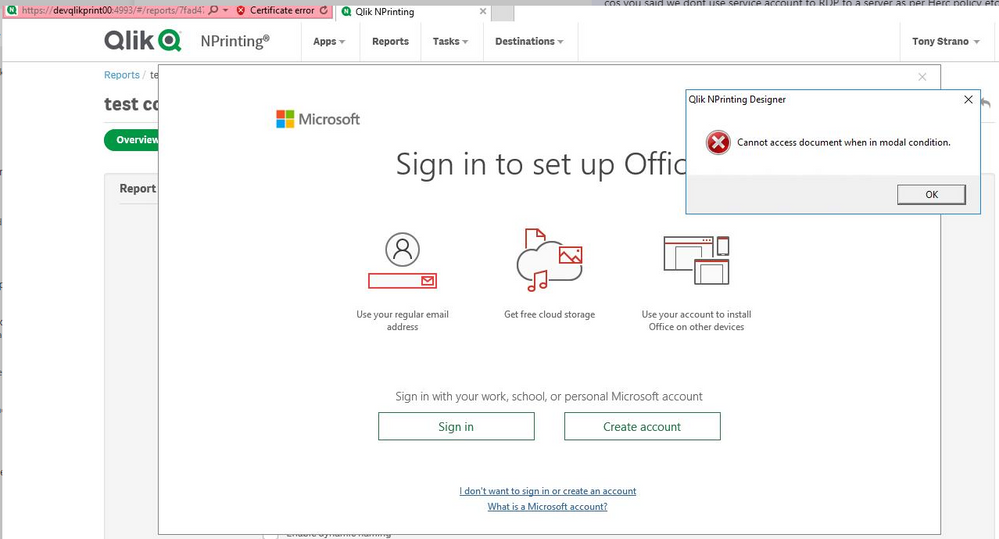
Based on our call, the issue is resolved in our scenario post performing an 'Online repair " of the MS Office 365. After rebooting the server , it didn't fix the issue right away but later part of the day, when we logged in , MS office prompted for login credentials and it was fixed as seen below.
The template had some error, but when closed and opened, it worked just fine.

 sheavero
- Mark as Read
- Mark as New
- Bookmark
- Permalink
- Report Inappropriate Content
Hi All,
We have performed a repair of MS Office 365, but the error is still appearing when attempting to open the template editor. It is not recommended that we roll back as the update policy for Microsoft is company wide. Any recommendations?
RajaDumpa
- Mark as Read
- Mark as New
- Bookmark
- Permalink
- Report Inappropriate Content
@sheavero : I can understand the difficulty of rolling back Group Policy as most organizations don't support that. One other option that I can think of is to Un-install Office 365 and re-install a MS office 2010, 2012, or 2016 standalone versions.
@Frank_S : Frank, can you advice if a client's N-Printing server/ Designer versions (> 2020 or 2021) can support standalone MS Office Versions ? Will they effect the current excel templates that were designed via Office 365 versions ?
 mikedeee
- Mark as Read
- Mark as New
- Bookmark
- Permalink
- Report Inappropriate Content
Just checking to see if there is an ETA for a permanent fix on the October 7 bug as we have had one user causualty caused by an Office 365 reinstall.
Our corporate security does not allow falling back Office 365 versions without moving mountains and stand alone versions are also locked out completely. We don't have repair available, only reinstall, which only comes in the form of the newest version of Office 365.
Our path must be be nPrinting and nPrinting Designer upgrades, but that one will need a Qlik heads up on possible issues brought on by that process.
SHurleySteward
- Mark as Read
- Mark as New
- Bookmark
- Permalink
- Report Inappropriate Content
I am also in the same situation of being unable to roll back my Office 365 installation nor install a different version of Excel. An ETA for a fix would be helpful.
 Ryan_Lessig
- Mark as Read
- Mark as New
- Bookmark
- Permalink
- Report Inappropriate Content
I have the same situation related to the Oct 7 bug. We cannot roll back O365 or install stand alone versions per company policy.
RajaDumpa
- Mark as Read
- Mark as New
- Bookmark
- Permalink
- Report Inappropriate Content
Hi All,
Please try with Un-installing N print Designer and re-install and perform Full repair of the MS office 365 and re-boot the machine. This solved our issue.
If you cannot repair, try asking for a one-off case permission from your Cloud Windows teams to enable that feature. Without a repair, there is no possible solution.
 andregas
- Mark as Read
- Mark as New
- Bookmark
- Permalink
- Report Inappropriate Content
Hello All,
In my case helped the following actions:
- https://community.qlik.com/t5/Knowledge/Qlik-NPrinting-can-t-find-a-supported-template-editor-for-th... --> pay attention to use your paths, don't copy them from the guide but define them from your version and architecture of installed Office.
- Set Windows resize screen at 100%.
- Open Regedit and delete the key "Options" from [HKEY_CURRENT_USER\Software\Microsoft\Office\<version>\<application>\] where application could be Word, Excel or PowerPoint (the three Office programs used by NP Designer) and version is the number version of your Office (e.g. 15.0 is Office 2013, 16.0 is Office 2016, etc...)
For the last point if you find the value "RenderForMonitorDpi" try to delete it instead to delete the entire key, otherwise I suggest to delete the key.
Let me know if it helped.
SHurleySteward
- Mark as Read
- Mark as New
- Bookmark
- Permalink
- Report Inappropriate Content
Still can't repair and am trying to get our company to roll us back to an earlier version of 365 MSO. In the meantime, our IT department has started to push 365 MSO Version 2109 Build 16.0.14430.20292 - 64-bit. This still causes the NPrinting template error. This problem will only get worse for us as more developers are forced onto the newer version of 365 MSO.
 Ruggero_Piccoli
- Mark as Read
- Mark as New
- Bookmark
- Permalink
- Report Inappropriate Content
Hi,
Check the article with the suggested settings that solve in many cases https://community.qlik.com/t5/Qlik-NPrinting-Documents/Qlik-NPrinting-Designer-cannot-find-a-support...
Best Regards,
Ruggero