Unlock a world of possibilities! Login now and discover the exclusive benefits awaiting you.

Product Innovation
By reading the Product Innovation blog, you will learn about what's new across all of the products in our growing Qlik product portfolio.
Support Updates
The Support Updates blog delivers important and useful Qlik Support information about end-of-product support, new service releases, and general support topics.
Qlik Academic Program
This blog was created for professors and students using Qlik within academia.
Community News
Hear it from your Community Managers! The Community News blog provides updates about the Qlik Community Platform and other news and important announcements.
Qlik Digest
The Qlik Digest is your essential monthly low-down of the need-to-know product updates, events, and resources from Qlik.
Qlik Learning
The Qlik Learning blog offers information about the latest updates to our courses and programs, as well as insights from the Qlik Learning team.
Recent Blog Posts
-
Mapping as an Alternative to Joining
Some time ago I wrote a blog on Mapping functions and described how they can be used to replace or modify field values when you run the script. But how do you know when to map versus join the data in your data model? Mapping works well when you need to look up a single value in another table. For instance, you may have a products table with product data like the table below and you want to add the product category name to that table.The produc... Show MoreSome time ago I wrote a blog on Mapping functions and described how they can be used to replace or modify field values when you run the script. But how do you know when to map versus join the data in your data model? Mapping works well when you need to look up a single value in another table. For instance, you may have a products table with product data like the table below and you want to add the product category name to that table.
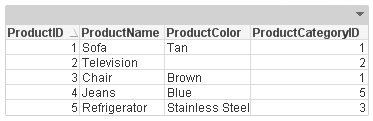
The product category name is in another table that looks like this:
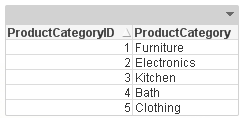
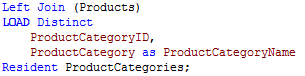
Now you can add the ProductCategory field to the Products table by doing a join and that would work fine but you can also add the ProductCategory field by simply mapping.
Using a join:
Using a map:
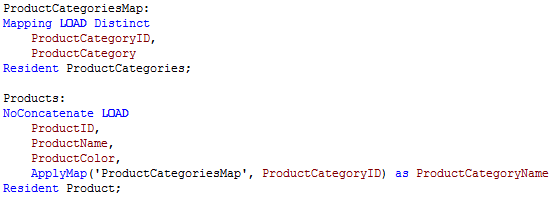
Since we only want to add one value to the Products table, mapping is a safer option. With this small sample data, either will work but sometimes when you have a large data set, you have be cautious when using joins. You need to watch out for new records being added to the table as a result of the join thus potentially changing calculations.
While both a join and a map can work to combine data from two tables, in cases where only one value needs to be added, choose to map. It is an easier approach and it reduces the chance of errors being made in your data model. Now I am not saying that joins are bad and should not be used because that is not the case at all. I am simply stating that mapping should always be used versus a join when you only need one value.
Thanks,
Jennell
-
Angularjs and Capabilities API - Memory management and "qv-collapsed-listbox-del...
In my previous post i explained how to use my template and build a website with Angular js and the Qlik Sense's Capabilities API.Creating a website with Angular and the Capabilities APIWhen we build controllers with Angular and creating bindings among objects, on navigation, Angular is doing a very good job on managing the controllers, directives, services etc, but it does not handle properly the bindings from Qlik Sense. Thus, how ever many cont... Show MoreIn my previous post i explained how to use my template and build a website with Angular js and the Qlik Sense's Capabilities API.
Creating a website with Angular and the Capabilities API
When we build controllers with Angular and creating bindings among objects, on navigation, Angular is doing a very good job on managing the controllers, directives, services etc, but it does not handle properly the bindings from Qlik Sense. Thus, how ever many controllers and pages you may have, the objects that you have called with app.getObject(), are still there. That is why when you make a selection in one object and you navigate to another page, you get the "Error: [$compile:ctreq] Controller 'qv-collapsed-listbox-delegated-open', required by directive 'ngClass', can't be found!" error.
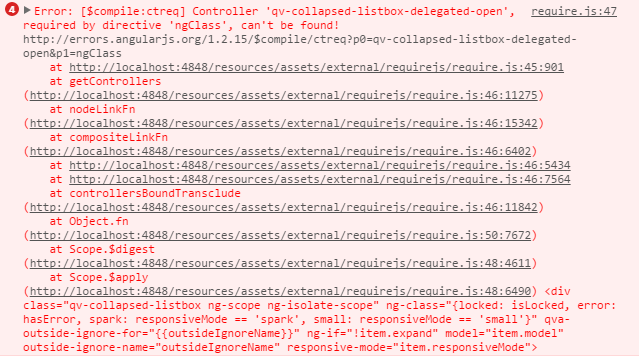
Even though this does not affect the user experience, its still an error. Furthermore, if you have a large website with many object, as we usually do in our Demo and Best Practices Team, then this becomes a problem because there is memory allocation on each of the objects that were created with app.getObject().
Trying to solve it was a trivial process, since there is no documentation on how to destroy the objects. What I have done is, after the app.getObject() put a then(model), put the models into an array of objects and manage them on every page change. So I destroy all of them before I call $location with model.close() and then assign the new ones after the route has completed loading the new template and controller.
Let me explain the code change. I assume that you have already read on how to use the template Creating a website with Angular and the Capabilities API
- Define the object array holder in our app.js
var me = {
  obj: {
       qlik: null,
       app: null,
       angularApp: null,
       model: [],
  }
};
- In the html, put the usual code instead of the directive previously used. In dashboard.html replace L30 with this
<div class="qvobject" data-qvid="a5e0f12c-38f5-4da9-8f3f-0e4566b28398" id="a5e0f12c-38f5-4da9-8f3f-0e4566b28398"></div>
- In our controller dashboard.js, replace L23 with the object array that we will call for binding,
me.objects = ['a5e0f12c-38f5-4da9-8f3f-0e4566b28398'];
- In the same file, under the events, add the new function
me.getObjects = function () {
  api.getObjects(me.objects);
}
- Now lets add the two functions in the API service. We need one function to create the objects and another one to destroy them
  me.getObjects = function (obj) {
       var deferred = $q.defer(),
       promises = [];


       angular.forEach(obj, function(value, key) {
            app.obj.app.getObject(value, value).then(function(model){
                 app.obj.model.push(model);
                 deferred.resolve(value);
            });
            promises.push(deferred.promise);
       });
       return $q.all(promises);
  };


  me.destroyObjects = function () {
       var deferred = $q.defer();
       var promises = [];
       if (app.obj.model.length >= 1) {
            angular.forEach(app.obj.model, function(value, key) {
                 value.close();
                 deferred.resolve();
                 promises.push(deferred.promise);
            });
            app.obj.model = [];
            return $q.all(promises);
       } else {
            deferred.resolve();
            return deferred.promise;
       }
  };
- Finally, on every page change, call destroy objects and then move to the new page
  api.destroyObjects().then(function(){
       $location.url('/' + page);
  });
Make sure to check the latest code on
Git: https://github.com/yianni-ververis/capabilities-api-angular-template
Qlik Branch: http://branch.qlik.com/#/project/56b4a40140a985c431a64b08
-
Are New Technologies Making Us Lazy?
Check out the new blog post by Kevin Hanegan (Qlik VP Knowledge & Learning) where he analysis what the digital revolution, data illiteracy, and cord cutters have in common."This is a debate which has been going on for years. Do advances in technology make us lazy and require less use of our brains? On the surface, you would think so, but after looking a bit deeper, I would argue it just requires us to continuously learn and acquire new knowledge... Show More
Check out the new blog post by Kevin Hanegan (Qlik VP Knowledge & Learning) where he analysis what the digital revolution, data illiteracy, and cord cutters have in common.
"This is a debate which has been going on for years. Do advances in technology make us lazy and require less use of our brains? On the surface, you would think so, but after looking a bit deeper, I would argue it just requires us to continuously learn and acquire new knowledge".
To read more visit, Are New Technologies Making Us Lazy? | Qlik

-
One App to rule them all
2 years ago I was certain that the tablet craze would not reach the business world.I was convinced that our smart phones were too small and limited to provide any real business value.I was wrong. Dead wrong.Since then we have stopped talking about mobile or desktop, instead we talk about software. We expect the software we use to work everywhere, anytime and on any device.Luckily QlikView makes it easy for us; the AJAX-client works just as well i... Show More2 years ago I was certain that the tablet craze would not reach the business world.
I was convinced that our smart phones were too small and limited to provide any real business value.
I was wrong. Dead wrong.
Since then we have stopped talking about mobile or desktop, instead we talk about software. We expect the software we use to work everywhere, anytime and on any device.
Luckily QlikView makes it easy for us; the AJAX-client works just as well in the browser as it does on a tablet or even on a smartphone.
However every device comes with its own screen real estate so if we optimize our apps for a desktop experience our tablet users will be less than pleased and vice versa. Technically the app would work on all devices but if you were on an iPad perhaps the buttons should be a tad bit bigger, the width and maybe the length of the app smaller and so on.
So how do we achieve this without having to deploy one app optimized for every device/screen?
Not only would that be a maintenance nightmare but it would also scale horrible as we would potentially have to load the same application twice into the working memory.
ClientPlatform() to the rescue!
ClientPlatform() returns a string containing the platform the user is using, see table below.
With this information we could switch between a dashboard optimized for a desktop experience and a tablet experience depending on the device the user is using at the time within the same QlikView application.
For example using WildMatch(ClientPlatform(),'*mobile*') = 1 in a Show Condition would enable the sheet or object for mobile devices but it would be hidden for a desktop user.
Now we can design our apps to cater for a perfect user experience regardless of which device the user is using.
If you own an iPad you can see it in action by visiting our demo site and browse to the Pro Golf app which will change look and feel between a desktop and an iPad.
This is a few examples on what the ClientPlatform() can return.
Browser
ClientPlatform()
Internet Explorer <VersionNumber>
browser.MSIE <VersionNumber>
Google Chrome
browser.chrome
Firefox <VersionNumber>
browser.gecko <VersionNumber>
iPad
browser.safari.mobile
Android Tablet
browser.android

-
Qlik Community MVP Program Launch
Hello Qlik Community Members, We are happy to announce the launch of our Qlik Community MVP (Most Valued Participants) Program where we recognize the top contributors in Qlik Community.Our 2015 MVP group Gysbert WassenaarManish KachhiaMassimo GrossiJagan MohanMarco WedelMarcus SommerYuri NicolettPeter CammaertRob WunderlichJonathan DienstBill MarkhamClever AnjosCelambarasan AdhimulamRalf BecherSteve DarkOleg TroyanskyOur MVP are comprised of thos... Show More
Hello Qlik Community Members,
We are happy to announce the launch of our Qlik Community MVP (Most Valued Participants) Program where we recognize the top contributors in Qlik Community.
Our 2015 MVP group
Our MVP are comprised of those who have accumulated the most points over time by posting content, helping other members and reinforcing the positive culture here in Qlik Community.If you’re new to Qlik Community these are the members you want to ‘follow’ in your activity streams so you can see the approach they take when solving problems. You may also bookmark their postings to stay current on Qlik solutions and relevant BI information.
You can visually recognize any Qlik Community MVP member by the green
 icon next to their name on content feeds or when you mouse over their profile. We will be sharing more information in the coming months around the program as well as featuring these members and their expertise.
Please join me in congratulating and recognizing them for all of their contributions and hard work to help make Qlik Community a top resource for Qlik Partners, Customers and BI Researchers.
Best Regards,
Qlik Community Management Team

-
Fan traps and Chasm traps
In data modelling and in Business Intelligence there is something called connection traps. These are inconsistencies in the data model that sometimes cause problems. This blog post is about describing the fan trap and the chasm trap and how these should be handled in a Qlik data model.
-
Dislike gauge charts? You may want to give them a second chance
Gauge charts were used widely in dashboards and analytical apps a few years ago, and they still are, but when was the last time you saw a nice looking dashboard using one of those old fashion speedometers?If you are an experienced QlikView user/dev, you may be familiar with Gauge charts styles as shown in the picture below. Today I would like you to explore with me how QlikView can help you to turn a boring gauge into something different.Let´s st... Show MoreGauge charts were used widely in dashboards and analytical apps a few years ago, and they still are, but when was the last time you saw a nice looking dashboard using one of those old fashion speedometers?
If you are an experienced QlikView user/dev, you may be familiar with Gauge charts styles as shown in the picture below. Today I would like you to explore with me how QlikView can help you to turn a boring gauge into something different.
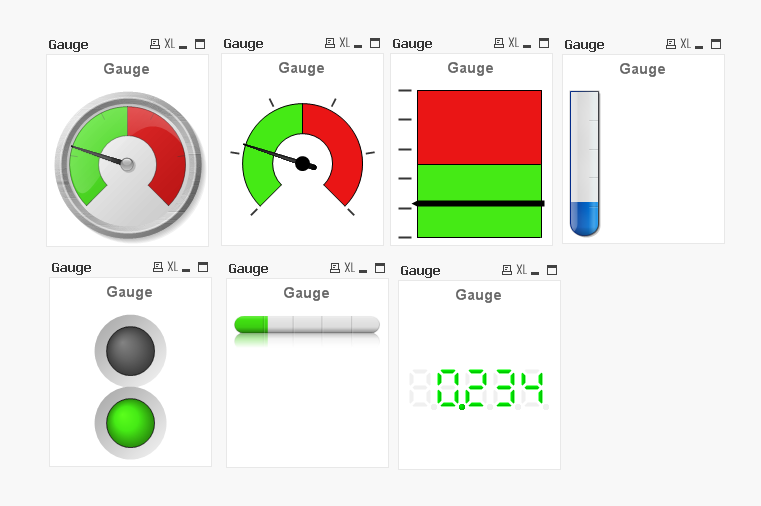
Let´s start with a simple question, what do the following charts have in common?
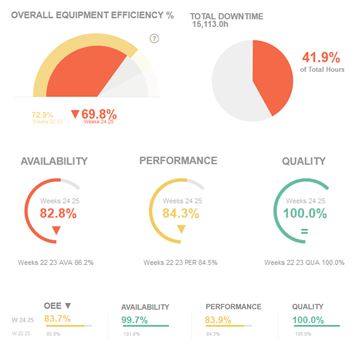
Besides the fact that all of them share the same color palette and style, and even if you haven’t notice it at a first sight, what all have in common is the chart type we picked when we created the charts. We chose a Gauge chart. Actually, all this charts are components of the new demo app called !OEE Analysis. This app is a redesign of an existing app that was created as a demonstration for the manufacturing industry.
The nature of manufacturing, coupled with the industries’ natural inclination to mimic its physical environment, drives developers to extensively use gauges and/or speedometers on dashboards. This rationale is based on the implementation of images that are familiar to engineers and people with experience using industrial machinery.
Since we started to work in the former app redesign, we had one clear goal. We wanted to keep that gauge essence in the new app, but we also needed to modernize the look of the old speedometers. To do so, we spent some time exploring different alternatives until we found how to turn them into a new set of ‘flat’ style gauges.
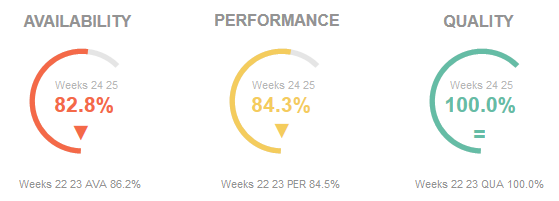
All of the new gauge styles, as in the picture above, are representing just one metric at a time (gauges don’t work well with more than one measure anyway). In addiction we are using color to emphasize the current state for each KPI so the user doesn’t really need to look for needle position to understand the data but she/he only need to identify the color code. If a color code catches the user’s attention, then she/he can spend more time looking at the details. We incorporated adjacent text objects making the whole chart much more interesting and data complete.
The result is a much cleaner data centric app which we managed to keep the gauge spirit on it.
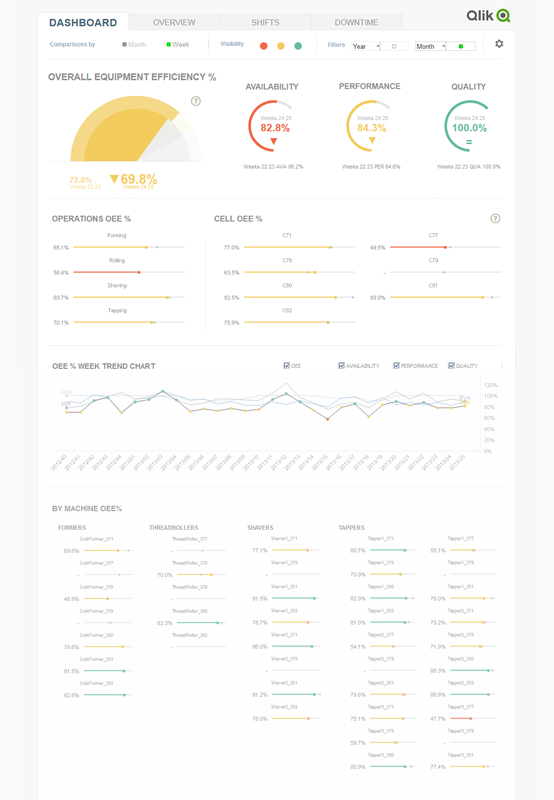
Gauge charts have gained a bad reputation as data visualization objects, sometimes because they give user too little information, at times it’s all about a weak implementation, and most of times it’s because they were designed as a real-life object rather than a data centric object. After seeing the new styles we came up with, you may want to reconsider your position and give gauge charts a second chance, won’t you?
Enjoy Qliking!
AMZ

-
Was Microsoft’s Clippy Years Ahead of its Time?
Today’s software needs just-in-time, context-sensitive knowledge "For years, consumers have been cross-sold to and up-sold to. Online storefronts recommend other products I would like based off my shopping cart. As a consumer of learning, why can’t I have that, and even better, why can’t it be contextual, intelligent, just-in-time and built into the product" written by Kevin Hanegan (Qlik VP, Knowledge and Learning)To read more from this blog ... Show MoreToday’s software needs just-in-time, context-sensitive knowledge

"For years, consumers have been cross-sold to and up-sold to. Online storefronts recommend other products I would like based off my shopping cart. As a consumer of learning, why can’t I have that, and even better, why can’t it be contextual, intelligent, just-in-time and built into the product" written by Kevin Hanegan (Qlik VP, Knowledge and Learning)
To read more from this blog visit Was Microsoft’s Clippy Years Ahead of its Time? | Qlik
-
Capability APIs 2.2 and Angularjs, disabled selections fix
Qlik Sense is getting better and better on every release!I was working on a large website using Qlik Sense 2.1 and the Capability APIs where I used the template that I had created and blogged about Creating a website with Angular and the Capabilities API. I had almost finished the project, when we decided to upgrade to 2.2. Everything was fine, I was cleaning up my code and I was ready to deliver the project when we realized that most of the ch... Show MoreQlik Sense is getting better and better on every release!
I was working on a large website using Qlik Sense 2.1 and the Capability APIs where I used the template that I had created and blogged about Creating a website with Angular and the Capabilities API. I had almost finished the project, when we decided to upgrade to 2.2. Everything was fine, I was cleaning up my code and I was ready to deliver the project when we realized that most of the charts, had no interactivity!
So, lets fix our template to work properly in 2.2.
One of the two issues was the css. In 2.1 we had to use qlikui.css and client.css. In 2.2 these were replaced by qlik-styles.css. So in index.html replace L17-L18
<link rel="stylesheet" href="http://localhost:4848/resources/autogenerated/qlikui.css">
<link rel="stylesheet" href="http://localhost:4848/resources/assets/client/client.css" media="all">
with
<link rel="stylesheet" href="http://localhost:4848/resources/autogenerated/qlik-styles.css">
Also, remove the icon fix we had in index.less and remove L134-L136. This has been fixed in the new stylesheet.
.sel-toolbar-span-icon {
    top: -10px;
}
Another issue we found is that, we have to make sure that overflow-y: auto; is in both the html and body. We had that from beginning in this template but it seems to break things in 2.2 if it is only on body and not the html.
In the js/lib/main.js I used in the grid-service in order to make angular work. This has also been fixed and you can remove L30
define( "client.services/grid-service", {} );
Now, going to my last and more important issue, on why the interactivity was broken in 2.2. I started the blog by stating that "Qlik Sense is getting better and better on every release!" and this is so true. I spend several days trying to figure out why the interactivity was broken when I was moving from pages to pages and on random times. The issue was that simply the engine got so much faster on delivering the objects, that Angular could not keep up with it! Really, when the Capability App API app.getObject() is looking for the id to replace the html with, is looking for the parent element width and height. In my case, all of the objects, most of the time, had the canvas drawn with 0 height and width due to that! So, in order to fix this, unfortunately, I had to add a 1/2 second delay on getting my objects. So in the js/services/api.js, wrap L18-L24 in a timeout function
  setTimeout(function(){
     angular.forEach(obj, function(value, key) {
        app.obj.app.getObject(value, value).then(function(model){
           app.obj.model.push(model);
           deferred.resolve(value);
        });
        promises.push(deferred.promise);
     });
  }, 500);
I would add this only if you have the interactivity issues like I have described above. In cases that you have small projects like this one and you do not have a lot of dependencies, this may not be needed at all!
Capability APIs documentation: https://help.qlik.com/en-US/sense-developer/2.2/Subsystems/APIs/Content/mashup-api-reference.htm
Happy coding!!
Yianni
-
Qlik Community Mobile App for Apple Devices is Now Available
Hello Qlik Community Members, We are happy to announce the launch of our new Qlik Community Mobile Application for Apple users. With this new mobile app you will be able to monitor content that’s the most important to you, post and update content and collaborate with other members when not at your computer. This is particularly helpful when you are travelling, have some free time in between activities or just want to stay informed. Please access ... Show More
Hello Qlik Community Members,
We are happy to announce the launch of our new Qlik Community Mobile Application for Apple users. With this new mobile app you will be able to monitor content that’s the most important to you, post and update content and collaborate with other members when not at your computer. This is particularly helpful when you are travelling, have some free time in between activities or just want to stay informed.
Please access our detailed instructions document titled: Qlik Community Mobile App for Apple Devices FAQ’s for download/installation and best practices.
You can also visit the Qlik Community Mobile App for Apple Devices launch announcement thread to see member’s reviews and feedback and share your own.
Best Regards,
The Qlik Community Management Team
-
The Qlik engine - A Forgiving Engine
Databases are usually not very forgiving. Strict rules apply, defining what’s allowed and what’s not. For example, you are not allowed to enter data unless it has the right data type and is formatted the right way. Further, you are often not allowed to enter a value for a foreign key unless this value already exists in the master table. And you are not allowed to enter the same value twice if the field is a primary key. The reason is of course ... Show MoreDatabases are usually not very forgiving.
Strict rules apply, defining what’s allowed and what’s not. For example, you are not allowed to enter data unless it has the right data type and is formatted the right way. Further, you are often not allowed to enter a value for a foreign key unless this value already exists in the master table. And you are not allowed to enter the same value twice if the field is a primary key.
The reason is of course to ensure data integrity. Without such rules, the database would soon be cluttered with bad quality data and contain a large number of errors.
The fact is that a good system is one that has a large number of rules, but at the same time is easy to use: Equipped with a user interface designed in a way so that the user doesn’t notice the rules – or at least isn’t disturbed by them.
But with the Qlik engine it is a very different situation.
QlikView and Qlik Sense should not make sure that the data is free from errors. Instead, they should do exactly the opposite: Display the source data along with all its errors. This requirement is totally different from the demands you have on a database, and as a result the Qlik engine is built in a different way:
 Data Types
There are no data types in the Qlik engine. The reason is simple: You may have data from different tables or even from different data sources in one single field. Then there is a potential risk that you have different data types in the different sources.
When loaded, all fields are converted into duals (number and text, or just text), and so one field can contain data that originally had different types.
 Formatting
A single field can have a mixed data format. Also here, the reason is simple: Different sources may have different formats. As a result, it doesn’t matter if a date is formatted as 3/31/16, 2016-03-31 or 42460. They will all three represent March 31, 2016.
Each distinct field value has its own format, and a single field may thus be displayed with different formats.
 Referential integrity
The Qlik engine does not enforce referential integrity. For example: You may have a customer ID in your fact table that does not exist in the customer table (which would be an error in the data integrity of the database). But the Qlik engine will accept this and show NULL as customer name.
 Relationship type
Often you know if you have a many-to-one or a many-to-many relationship between two entities. But this information is not loaded from the database. Instead the Qlik engine assumes worst case and is always prepared for a many-to-many relationship.
Links between tables don’t carry information about relationship type. And all calculations involve aggregations, since there is a possibility for multiple values of the referenced field.
The bottom line is that the Qlik engine is a very forgiving engine. It handles errors in all of the above cases gracefully. No matter how many such errors you have in the data, the Qlik engine will always make a best-effort attempt in evaluating and showing the loaded data.
Further reading related to this topic:
-
What is a QlikView session?
This is not easy to answer, so let me walk you through the flow in QlikView and talk about the life of the different sessions in QlikView.Let’s start at the browser. The most common way of maintaining a session in the web layer is session cookies. Session cookies is a small set of information that the browser will send with every request in a session. Session cookies is also what QlikView uses to maintain the web layer sessions. So once authentic... Show MoreThis is not easy to answer, so let me walk you through the flow in QlikView and talk about the life of the different sessions in QlikView.
Let’s start at the browser. The most common way of maintaining a session in the web layer is session cookies. Session cookies is a small set of information that the browser will send with every request in a session. Session cookies is also what QlikView uses to maintain the web layer sessions. So once authenticated, QlikView knows who you are and will assign a random set of characters, stored in a session cookie in the browser, to identify your future requests to QlikView.
The session cookie will identify your requests until you either log out or your session times out from inactivity.
The web session is the first session you will encounter using QlikView. The second session is the QlikView server session.

So what is a QlikView server session? Think of the QlikView server session as the place where QlikView keeps track of what you are doing in a document. The session is identified by a user’s access to one document. As you click in the document, your state will be recorded in the session. Your session is maintained in memory while you are active in the document and a bit longer. When a QlikView server session times out, the state is written to disc. If you come back to the same document later you can continue exploring at the same place you left off.
So when are the different sessions used?
If you use the AJAX client, both sessions are used. If you lose your web session you will have to re-authenticate to get a new session and if the QlikView server session times out you will have to reconnect.
If you use the thick client or the plugin, these talk directly to the QlikView server and therefore only use QlikView Server sessions.
The timeouts can be configured: the timeout configuration you do in the QMC is related to the QlikView Session; whereas the timeout values for the web session only are configurable in the local configuration file for the web server.
So now you know how sessions are used in QlikView. Even though this is not directly related to security, it will help you understand concepts like load balancing, web tickets and authentication in QlikView.
I hope you found this information useful, if you have any other subjects related to security that you like me to write about please leave a comment.
-
QlikView 12 - please stand up
It was back in April at Qonnections, our 10th global partner conference that we unveiled Qlik Sense 2.0 and shared our platform strategy with the world. It was also the first time we talked in detail about our plans for QlikView 12. Today I’m delighted to be able to share the news that it’s arrived! QlikView 12 will you please stand up and show yourself to the world!There is no doubt that this is an eagerly awaited release by many of our 37,000 ... Show MoreIt was back in April at Qonnections, our 10th global partner conference that we unveiled Qlik Sense 2.0 and shared our platform strategy with the world. It was also the first time we talked in detail about our plans for QlikView 12. Today I’m delighted to be able to share the news that it’s arrived! QlikView 12 will you please stand up and show yourself to the world!
There is no doubt that this is an eagerly awaited release by many of our 37,000 strong global customer base. But why? QlikView is a very mature product, it's functionally rich, and it’s undoubtedly in my opinion the product that revolutionized business intelligence and ultimately created the global data discovery market as we know it today. So what is so important about QlikView 12?
An investment in QlikView 12 is an investment in Qlik
With QlikView 12, Qlik delivers on its commitment to its proven, market-leading data discovery solution which secures our customers long term investment in the product. It also lays the foundation for our customers to partner with Qlik to build out their business intelligence strategies and meet the expanding needs of their BI consumers by addressing multiple use cases through a unique platform approach to visual analytics.
QlikView 12 now runs on the second generation QIX (Qlik Data Indexing) engine that powers the entire Qlik portfolio. With this improvement, we can more easily help customers address new use cases in Qlik Sense by allowing them to share data models across the platform.
Our investments also benefit the way our customers use QlikView today. QlikView 12 delivers a number of deployment, performance, security and connectivity enhancements along with greater accessibility through enhanced mobile touch-enabled capabilities. In addition QlikView customers will be able to now take advantage of Qlik’s strategy to deliver value added cloud services – such as Qlik’s “Data as a Service” offering, Qlik DataMarket.
(If you want to see some of this in action check out this brief presentation)
QlikView 12 - What's New Presentation
QlikView - REST Connector
QlikView - Qlik Data Market
Put simply, QlikView is a business intelligence solution with an unrivaled pedigree, functional richness and delivers the lowest cost of ownership in the market. Many customers have already delivered robust guided analytics and dashboards to knowledge workers across their organizations, and with QlikView 12, that investment is secured.
Regards,
Michael Tarallo
Senior Product Marketing Manager
Qlik
@mtarallo - follow me

-
Scaling Visual Analytics with Qlik Sense
Hello Qlik Community, in this post our resident guest blogger and Principal Enterprise Architect, Marcus Spitzmiller, introduces us to visual analyitcs scaling. Marcus is a member of the Qlik Enterprise Architecture team focusing on enterprise deployments and best practices. His areas of expertise include scalability and performance, deployment best practices, integration, and security.Scaling Visual AnalyticsWhen we talk about scalability, it i... Show More
Hello Qlik Community, in this post our resident guest blogger and Principal Enterprise Architect, Marcus Spitzmiller, introduces us to visual analyitcs scaling. Marcus is a member of the Qlik Enterprise Architecture team focusing on enterprise deployments and best practices. His areas of expertise include scalability and performance, deployment best practices, integration, and security.Scaling Visual Analytics
When we talk about scalability, it is often centered around data volumes, users, and the technology behind a given product. However, one should also consider the capabilities that a product provides which enable broad deployment and governance within an organization. It is within this context that we will look at Qlik Sense. Of course, data volumes and users matter too, so if you have a few moments, check out the Qlik Sense Performance Benchmark for that.
Instead of detailing everything in this blog I created a video presentation on this topic. In this video, we will look at Qlik Sense from the standpoint of four main topics that allow you to scale your visual analytics initiatives:
- Delivery – Qlik Sense’s platform approach to visual analytics enables authoring, self-service, and consumption with the patterns that fit to your organization, not the other way around.
- Security - Qlik Sense’s “attribute based access control” (ABAC) security model enables role and attribute based administration of the resources and content within Qlik Sense.
- Administration – Qlik Sense’s default, customizable, and delegated roles and out of the box monitoring enable simple and scalable administration.
- Infrastructure – Qlik Sense’s powerful In-Memory, Associative Data Indexing Engine and distributed architecture enables physical, virtual, and cloud based deployments with best in class performance.
Organizations are continually faced with market pressures to make decisions more quickly. The Qlik Sense platform enables visual analytics to be widely deployed within an organization so people have access to their data, with security and governance, and at scale.
Watch or download (.mp4) this video to learn more:
-
Why PowerPoint is Killing Corporate Education!
Save corporate education from death by PowerPoint!"PowerPoint should be used to aid the learning with visualizing key topics that are hard to depict in other ways. A PowerPoint deck would make a good instructor manual, but let the instructor manage the class and tell the story and keep it interactive. Keep everything tied to the learning objectives, but do not script out the entire course" Kevin Hanegan, Qlik Vice President of Knowledge and Le... Show MoreSave corporate education from death by PowerPoint!
"PowerPoint should be used to aid the learning with visualizing key topics that are hard to depict in other ways. A PowerPoint deck would make a good instructor manual, but let the instructor manage the class and tell the story and keep it interactive. Keep everything tied to the learning objectives, but do not script out the entire course" Kevin Hanegan, Qlik Vice President of Knowledge and Learning.
To read more and learn what top six things to AVOID in PowerPoint, visit Why PowerPoint is Killing Corporate Education | Qlik

-
AND and OR
In the Qlik engine, the logic of the selections is always an OR between selections in the same field, and an AND between selections in different fields. Selecting e.g. two products and one customer is very much like the WHERE clause in the following SELECT statement: SELECT … WHERE (Product='Cap' OR Product ='Tracksuit') AND Customer='ACME' ; Under some special circumstances, you can however use something called AND-mode. Read more about... Show MoreIn the Qlik engine, the logic of the selections is always an OR between selections in the same field, and an AND between selections in different fields. Selecting e.g. two products and one customer is very much like the WHERE clause in the following SELECT statement:
SELECT … WHERE (Product='Cap' OR Product ='Tracksuit') AND Customer='ACME' ;
Under some special circumstances, you can however use something called AND-mode. Read more about it in Jennell’s excellent blog post: AND-Mode. With AND-mode you can select two different products and find the customers that bought both.
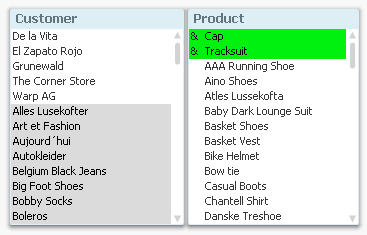
However, the AND-mode logic is quite different from a standard AND operator in a WHERE clause: And it does not work at all the same way as OR-logic. There are theoretical implications that do not exist for OR logic.
For example: If you select two products and demand an OR between them, the possible values of all other fields are immediately determined: Any field value implied by either of the products is marked as “possible”.
But if you instead demand an AND between them, it is not clear what you mean: Do you mean “Customers” that have bought both products, or do you mean “Months” when both products have been sold? Or do you mean “Countries” where both products have been sold? Just specifying the two products is not enough to determine a result. You also need to specify the field that the AND-mode refers to.
The example shows that the AND-mode demands an intermediate iterator: The AND-mode always infers a second field for which the AND-logic is relevant. This is a theoretical problem that has nothing to do with how the logic is implemented in the software.
Let’s look at SQL: In a standard SELECT statement, the conditions on either side of the AND operator almost always concern two different fields. It would not make sense to demand
SELECT … WHERE Product='Cap' AND Product ='Tracksuit' ;
since there are no individual records that fulfill that requirement: "Product" can only have one value at the time. But this is exactly the type of requirement that you have in AND-mode - but operating on a group of records instead of on a single record.
If you would implement something similar to AND-mode in SQL, you would need to join a table with a copy of itself. The following will pick out customers that have bought both a Cap and a Tracksuit:
SELECT DISTINCT Customer FROM Orders AS Orders1
INNER JOIN Orders AS Orders2 ON Orders1.Customer=Orders2.Customer
WHERE Orders1.Product='Cap' AND Orders2.Product='Tracksuit'
Again, an intermediate iterator is needed: Here it is "Customer" - the field used to join the two tables.
In QlikView we have chosen to solve this problem by demanding a two-column table for AND-mode, where the first column defines the iterator (e.g. Customer), and the second is the field where the user makes the AND selection (e.g. Product).
So, the two-column table is not just an arbitrary limitation; it is instead a framework implied by the theoretical problem.
-
How To Improve Your Design Process Working With Qlikview
I've been a designer for about 10 years, 8 of which I've been designing web sites. The fancy buzz-word way of saying you work on websites is to say that you work in "User Experience Design." The user experience is how someone (a user) might interact with something (a website, an ATM, or in this case QlikView). You consider what troubles a user might encounter, what might be helpful, how they will accomplish certain tasks, etc. From Amazon to Zapp... Show MoreI've been a designer for about 10 years, 8 of which I've been designing web sites. The fancy buzz-word way of saying you work on websites is to say that you work in "User Experience Design." The user experience is how someone (a user) might interact with something (a website, an ATM, or in this case QlikView). You consider what troubles a user might encounter, what might be helpful, how they will accomplish certain tasks, etc. From Amazon to Zappos, User Experience Design is the (not so) secret ingredient that separates the bad experiences from great experiences with loyal customers.
So what makes User Experience Design work? One of the keys is to be empathetic, to put yourself in the shoes of the user and design for them and not yourself. You design for and with others, that is you don't do it alone. Designers are just one group of people who take a website from conception to completion. Information Architects, Writers, Designers, Developers, and Usability Engineers all contribute to the process. People with specialized disciplines doing what they do best to make great experiences. If you aren't lucky enough to have a team of bright UX professionals, it probably means you will have to become a "jack of all trades" and take on all of these roles yourself.
Never fear. As a guide I've written the attached Technical Paper that walks you through how you can apply the iterative UX waterfall design process to developing QlikView applications. There is a lot of overlap between designing a website and designing a QlikView application because at the heart of both is the user experience. Designing for what is best for the user is key no matter what the final product.
Next Steps? Start small. I would recommend trying these ideas on a smaller, easier project first and then apply what works for you to larger projects over time.
-
Capabilities API error on exporting data
Working on one of our projects, the requirement was to export the object data. It seems though, 2.1 does not let you do that. I used both: app.getObject(value, value).then(function(model){ model.exportData() and qlik.table(model).exportData({download: true}) Both of them returned error Object {code: 403, parameter: "REST HTTP error", message: "Forbidden"} Until this bug is fixed, I have created a workaround. A new directive that will handle t... Show MoreWorking on one of our projects, the requirement was to export the object data. It seems though, 2.1 does not let you do that. I used both:
app.getObject(value, value).then(function(model){
model.exportData()
and
qlik.table(model).exportData({download: true})
Both of them returned error
Object {code: 403, parameter: "REST HTTP error", message: "Forbidden"}
Until this bug is fixed, I have created a workaround. A new directive that will handle the export by accepting Dimensions and Measures, passing them to the api service. This is for every Hypercube we want to create which is also for the objects like stacked bar chart that 2.1 does not have the ability to export yet. I believe this is fixed in 2.2 though!
We will use the template from Creating a website with Angular and the Capabilities API.
In controllers/dashboard.js add the Dimensions and Measures for export
  $scope.export = [
  {
     headers:['Case Owner Group', 'Avg Case Duration'],
     data:[['Case Owner Group'], ["Avg([Case Duration Time])"]]
  }
  ];
In the views/dashboard.html add a button that will use the new directive
<button class="btn btn-default pull-right" export-to-csv data="export[0].data" headers="export[0].headers" title="'myFileName'">Export</button>
git: https://github.com/yianni-ververis/capabilities-api-angular-template
Branch: Qlik Branch
-
Qlik Sense 2.2 - It just keeps getting better and better
What?!?! Another release? Come on! I thought this year's Superbowl ads were creative, but Puppy, Monkey, Baby was definitely something to see, but...this is even better. Seriously, welcome to the Qlik Community and thank you for taking a brief moment to learn what's new in Qlik Sense 2.2. We’ve done it again! Qlik Sense 2.2Powerful enhancements for both business users and developersIn the past year and a half, we have continued to deliver product... Show MoreWhat?!?! Another release? Come on!
I thought this year's Superbowl ads were creative, but Puppy, Monkey, Baby was definitely something to see, but...this is even better.

Seriously, welcome to the Qlik Community and thank you for taking a brief moment to learn what's new in Qlik Sense 2.2.We’ve done it again! Qlik Sense 2.2
Powerful enhancements for both business users and developersIn the past year and a half, we have continued to deliver product innovation at an impressive cadence. Delivering true decision support system and business intelligence software with our platform approach...yep, it's more than just a tool.
By keeping our promise to deliver three new releases every year, Qlik has proven it’s ability to deliver as an organization thereby ensuring that our customers have continuous access to an ever increasing set of capabilities. It is important to recognize however that these new capabilities extend well beyond what most people see in the product. At Qlik, we are just as committed to delivering value to the developer community as we are to business users.
Delivering capability for both the end user and the developer is critical to support our platform approach. This is because enabling one shared common platform that supports all business intelligence and analytics use cases (click to watch) is the key to seeing the whole story that lives in your data. Not only are we innovating faster than ever but our extensive open APIs ensure that others can innovate right along with us thereby multiplying the power of the platform approach.
Qlik Sense 2.2 enables business users to more freely prepare and explore data, and provides developers new, powerful tools for building custom applications and extending Qlik Sense.
Here are some of the highlights:
- Advanced data preparation
- automatic date handling, calculated fields, and a newly redesigned data manager
- automatic date handling, calculated fields, and a newly redesigned data manager
- Alternate dimensions and measures
- user can swap measures and dimensions int he same chart to answer many questions
- user can swap measures and dimensions int he same chart to answer many questions
- Powerful new developer APIs and capabilities
- new app integration API
- visualization API for programmatic creation of analytics
- new integrated developer environment (IDE) plugin for Visual Studio
- Expanded printing and exporting capabilities for stories and charts to PowerPoint, .PDF, and Excel
- Numerous user experience and enterprise management improvements
You can learn more and see these features in action here:
Then learn how to use some of these great new features on the Qlik Help Channel Playlist: What's new in Qlik Sense 2.2 - YouTube
Enjoy guys - please feel free to leave me your comments and questions, we love to hear from you.
Regards,
Mike Tarallo
Senior Product Marketing Manager
Qlik
Follow Me: @mtarallo
- Advanced data preparation
-
Full Accumulation example
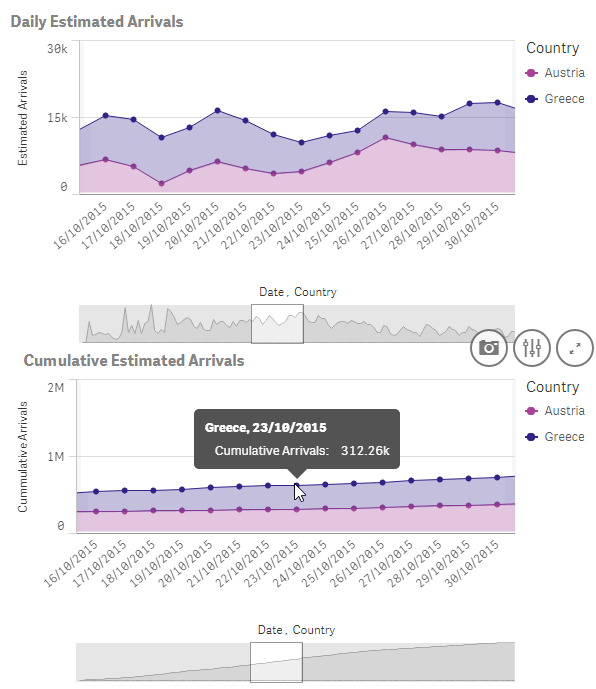
During the last days we have been working in a new visualization piece that will be live soon in The Telegraph website. We got some data with daily refugees arrivals to different countries, the goal was to visualize how many people have moved across Europe during the last few months in a map, but we also wanted to plot a line/area chart with the cumulative number of arrivals per country and per day so you can see trends and evolution over time. O... Show MoreDuring the last days we have been working in a new visualization piece that will be live soon in The Telegraph website. We got some data with daily refugees arrivals to different countries, the goal was to visualize how many people have moved across Europe during the last few months in a map, but we also wanted to plot a line/area chart with the cumulative number of arrivals per country and per day so you can see trends and evolution over time. Our data set included daily data but it didn't contain cumulative numbers so we had to calculate them.
The calculation should be something like this:
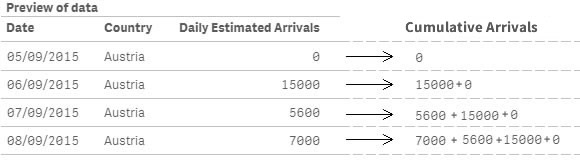
If is the first row or country is different than previous row country, then load the field value, else load the field value plus same field previous row value. Step 1 Data Load
Start by loading our data table with the daily arrival values by country.
//Load the main table
DataLoad:
LOAD
    "Date",
    Country,
    "Daily Estimated Arrivals"
FROM [lib://LibraryName/Data.qvd] (qvd);
The generated table will look like the picture below:
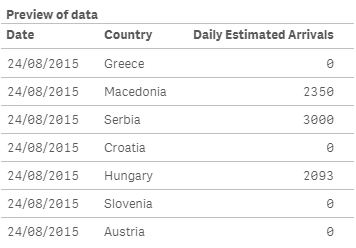
As you can notice the data is not sorted in a way that will let me successfully calculate the new field as I designed it because it will mix data from different countries, so my next move will be to sort the table by country and date.
Step 2 Sorting the table
//Sorting the table
SortLoad:
NoConcatenate Load
  "Date",
    Country,
    "Daily Estimated Arrivals"
Resident DataLoad
Order by Country, Date;

Drop table DataLoad; //Deletes the previous table no longer needed
Because I’m using a Resident Load statement to load and sort the values from the previous table, and both tables have identical field sets, I need to specify NoConcatenate before the load, otherwise both tables will be automatically concatenated. Using ‘Order By’ clause will sort the table by Country and then by Date. Finally, because the first table DataLoad will be no longer needed I’ll delete it using Drop Table.
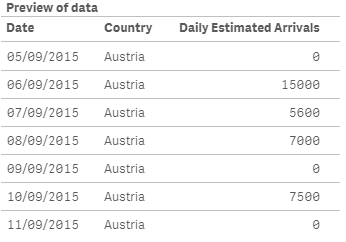
My new table will be as in the picture below
Step 3 Adding the calculated new field
Now that we have the data table ready we can finally calculate the new field to the table containing the cumulative daily estimated arrivals. To do so we will use the peek and previous script functions. Both functions are similar but they have some key differences that you should learn, please don’t miss this blog post: Peek vs Previous: when to use each
//Add cumulative data to the table
CummulativeLoad:
NoConcatenate Load
    "Date",
    Country,
    "Daily Estimated Arrivals",
    If(RowNo()=1 Or Country<>Previous(Country),
          "Daily Estimated Arrivals",
          "Daily Estimated Arrivals" +  Peek("Cumulative Daily Estimated Arrivals", RowNo()-2))
    as "Cumulative Daily Estimated Arrivals"
Resident SortLoad;

Drop table SortLoad; //Deletes the previous table no longer needed
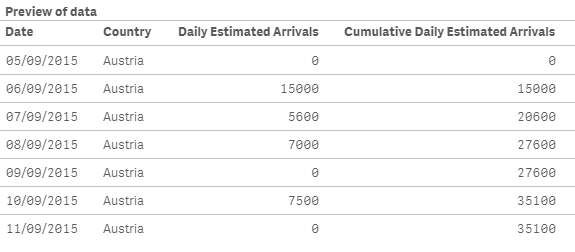
Click on the image below to see how we created the new field to match with our calculation statement.

The final result will be a data table containing the fields to support both daily and cumulative charts.
Enjoy Qliking!
AMZ
(Note: I divided this example in 3 steps so hopefully it is clearer, but step 2 and 3 can be merged in one single step)