Unlock a world of possibilities! Login now and discover the exclusive benefits awaiting you.

Analytics & AI
Forums for Qlik Analytic solutions. Ask questions, join discussions, find solutions, and access documentation and resources.
Data Integration & Quality
Forums for Qlik Data Integration solutions. Ask questions, join discussions, find solutions, and access documentation and resources
Explore Qlik Gallery
Qlik Gallery is meant to encourage Qlikkies everywhere to share their progress – from a first Qlik app – to a favorite Qlik app – and everything in-between.
Qlik Community
Get started on Qlik Community, find How-To documents, and join general non-product related discussions.
Qlik Resources
Direct links to other resources within the Qlik ecosystem. We suggest you bookmark this page.
Qlik Academic Program
Qlik gives qualified university students, educators, and researchers free Qlik software and resources to prepare students for the data-driven workplace.
Recent Blog Posts
-
Qlik Data Integration Training
Qlik Replicate training provides a comprehensive introduction to the Qlik Replicate product, implementation considerations as well as ongoing operatio... Show MoreQlik Replicate training provides a comprehensive introduction to the Qlik Replicate product, implementation considerations as well as ongoing operational know-how. This includes an overview of the product GUI, prerequisites for installation, configuring tasks, applying transformations, setting up notifications, using APIs, and monitoring the environment.
Qlik Compose training provides an introduction to the Qlik Compose product and its capabilities. This includes installation prerequisites, connection and authorization setup, reviewing the data model, defining mappings and any transformation needed. Also includes operational topics such as scheduling and monitoring.Register for the new Qlik Data Integration training which includes access to both blended learning courses.
- Course content access is immediate. No need to wait for an upcoming class!
- 12 month access to course materials and live-instructor sessions.
- Blended Courses include access to:
- Self-paced learning modules for Qlik Replicate and Qlik Compose
- Video-based learning modules with theory and lab demonstrations
- Reference guides
- Exercises
- Smart search for learning at point of need
- Recorded lessons
- Live Instructor webinars providing an opportunity to ask questions and interact with our expert instructors
- Weekly 45 min live instructor webinars for Q&A and lab reviews
- Sessions are recorded and recordings will be accessible via the Qlik Learning Portal
- Self-paced learning modules for Qlik Replicate and Qlik Compose
If you are an existing Qlik Data Integration customer and have not received your training, your training can be converted into the new Qlik Data Integration Blended Learning by emailing us at education@qlik.com. The blended training will be available to your organization for a full 12-month period starting on the date of conversion, no matter your original purchase date.
Take advantage of this offer today and get your team skilled up and start achieving your business goals now!
Register for the new Qlik Data Integration training. Happy Learning!

-
Meet one of our new Educator Ambassadors - Nassir Ibrahim!
Nassir has introduced Qlik to his final year undergraduate students on his Data Intelligence module, having heard about Qlik from a colleague and Qli... Show MoreNassir has introduced Qlik to his final year undergraduate students on his Data Intelligence module, having heard about Qlik from a colleague and Qlik Educator Ambassador. He explained “what I found from using various tools, is Qlik has an edge over other tools, because of its user friendliness and because of its training and learning materials online.”
Nassir, like many Educators, wanted to incorporate Qlik Sense into his teaching but he had not yet used it himself, “Qlik has excellent training resources, [some] of the best I have ever seen so I had to become familiar with the technology and know how to use it myself. There are the video training materials you have; they are excellent... It’s about becoming a student and learning yourself in order to help others learn.”
Many Educators who join the Academic Program are unsure of how they can incorporate Qlik sense into their teaching, Nassir found that the best way to do this was by utilizing the interactive videos we offer. “Some of your videos are quite long but generally they are 30 to 40 minutes and I think that’s perfect. We would structure our classes with breaking down some of the longer videos. They would have 20 minutes of the tutorial and then the students would do the exercises themselves, because the students benefit more from doing”.
One of Nassir's goals with implementing Qlik Sense into his teaching was to support student employability. “The job market is asking for knowledge of Qlik now and by doing well in this module [students] could show that they have a good understanding of the functionalities of Qlik. There was one student who graduated in the summer, and he is now working in a company as a software developer and they use Qlik.”
“This was a proud moment because all of the resources you shared with me, were actually required in the job market. It showed that we were preparing our students for the industry world adequately…all it takes is one student to show that the work we had done was worthwhile”.
Regardless of proud moments such as this, Nassir is still determined to reach those students who still might not be as engaged with Qlik. “In the next Academic Year I think I will they will have to present their work back to us and demonstrate how they’ve used the tool to stretch them a bit more”. Nassir wants to cover the fundamentals but then have the students explore the tool for themselves as well. “What can they discover about the tool that they had not anticipated previously? only when they start to explore and imagine some of the things that they could do with the tool will they be able to say hey, this is actually something which we could use to solve our problem in ways that we didn't think of in the beginning”.
When Nassir isn’t teaching, he likes to spend time working on his own personal development, weight training and trying to beat his best time on the racetrack!
If you are interested in learning how the Academic Program can support your students with their data analytics and employability skills, you can learn more by visiting qlik.com/academicprogram.
-
第2回 Qlikデータソン イベントレポート
2021年に引き続き、今年もデータソンを開催しました!今回のデータソンでは、参加者の皆さまのQlik Senseスキルを存分にアピールしてもらうため、”自由に”Qlik Senseのアプリを作成していただくことにしました。使用するデータは何でもOK!決められた要件や課題は無く、ビジネス価値をアピール... Show More2021年に引き続き、今年もデータソンを開催しました!今回のデータソンでは、参加者の皆さまのQlik Senseスキルを存分にアピールしてもらうため、”自由に”Qlik Senseのアプリを作成していただくことにしました。使用するデータは何でもOK!決められた要件や課題は無く、ビジネス価値をアピールするも良し、ビジュアライゼーションの美しさをアピールするも良し!かえって難しいこのお題にもかかわらず、14名(チーム)がアプリを応募してくださいました。
4月5日に結果発表のイベントは、 60名のかたにご参加いただき、昨年以上に盛り上がりました!結果発表イベントの動画は下記に公開していますのでご覧ください。
>> 第2回Qlikデータソン Qlik Senseアプリコンテスト
また受賞したアプリは、デモアプリサイト「Qlik Showcase」に公開しています。是非力作をご覧ください。
ここでは、各賞を受賞したアプリと受賞者のかたをご紹介します。
最優秀賞:川上 直人 さん
川上さんのアプリは、製造業におけるあらゆるデータを統合し、可視化したアプリです。経営KPI、設備稼働、CO2排出、消費電力、物流・納入など、16枚のシートにわたってあらゆる角度から組織のデータを分析できます。ビジュアルはシンプルですが、どのシートも実際の業務にこのまま利用できそうなアプリとなっています。業務的な価値、見た目の美しさ、技術的な観点を総合して、最も優れたアプリに送られる「最優秀賞」を受賞しました。
ビジュアライゼーション賞:セカンドインパクト さん
セカンドインパクトさんのアプリは、営業の見込み分析に特化したアプリです。このまま新人営業マンの研修に使えそうなほど、各シートの利用方法や意図がはっきりしたデザインで、美しさと機能性を兼ね備えています。Qlik Senseアプリのお手本のようなレイアウトは必見です。
テクニカル賞:岡部 遼 さん
岡部さんのアプリは、自宅を起点としたゴルフ場検索のためのアプリです。GeoAnalyticsによる距離計算や変数ボタンによる候補の保存、API、画像iframe組み込みなど、難易度の高い技術が駆使されています。また、「実際にゴルフ場検索に使用したい!」という声が挙がるほど、ユーザビリティの高いWebサービスのようなアプリとなっています。
ソーシャルイシュー賞:Satomi さん
Satomiさんのアプリは、コロナ禍における学校のオンライン授業などのICT対応について、e-Statのオープンデータを使用して開発しています。比較的活用の難しいオープンデータを、課題意識をもってさまざまな切り口で可視化することで、いろいろな示唆を得ることができるようになっています。多くの複雑なフォーマットの表計算ファイルを一括取込する工夫も素晴らしいです。
レポーティング賞:丸野 勝明 さん
丸野さんは、表計算ソフトで作成されるような複雑なPL(損益計算書)をQlik Senseで作成するためのエクステンションを開発し、GitHubで公開されています。今回はそのエクステンションを調剤薬局向けのアプリに使用しました。BIツールに不慣れなユーザーでも、表計算ソフトのような慣れ親しんだ見た目のダッシュボードでレポートを確認することができます。
リアルタイム分析賞:滝口 雄介 さん
滝口さんのアプリは、事務所に設置したIoTデバイスより取得した会議室やトイレの空室状況・温度・湿度・CO2濃度などのデータを取り込んで可視化しています。さらにクラウド版Qlik Sense新機能のアプリケーションオートメーションを使用して30秒に一回データを更新することで、IoTリアルタイム分析を実現しました。(注:Qlik Showcaseのアプリは更新されません。)
オープンデータ活用賞:R さん
Rさんのアプリは、テニスのジュニアランキングデータをもとに、若年層選手の育成方針について考察したアプリです。Qlik Senseのストーリーテリングを活用して、考察した結果が分析レポートのように丁寧にまとめられています。「若手の育成」という課題に対して、オープンデータからここまで様々な洞察を導くことができるのか!と驚きました。
受賞者のみなさまには、第2回QlikデータソントロフィーとAmazonギフト券、アプリをご提出いただいた皆様にはQlikのノベルティをお送りしました。
今回も皆様のすばらしいアイデアやビジュアライゼーションにふれ、またまた事務局の我々も興奮して楽しんでしまいました。今後もさらに、楽しく、かつ有意義なイベントを企画したいと思います。引き続きよろしくお願いします!

-
Qlik Academic Program and Penn State Partnership Promotes Student Success!
Spoiler (Highlight to read)How joining the Qlik Academic Program can enhance your university student offerings!How joining the Qlik Academic Program c... Show MoreSpoilerHow joining the Qlik Academic Program can enhance your university student offerings!The Qlik Academic Program partnered with Penn State Great Valley Campus, offering students the opportunity to succeed in the data driven workforce!
Partnering with Penn State allowed the university to address and solve the challenges they had in ensuring their students were receiving the most up to date tools and industry opportunities. By partnering with Qlik, Penn State was able to help students gain professional software and high-quality
training from industry experts, support local industry needs by providing students with data analytics skills, and broaden the university’s educational offering and student involvement.Learn more about the benefits of this partnership by visiting https://bit.ly/3r6LxWA
If you are interested in learning how the Academic Program can support you or your university you can apply as an educator or student by visiting qlik.com/us/company/academic-program

-
取り込み済みテーブルからのデータ読み取りと集計処理-Resident Load, Group By, Order By
はじめにResident Loadを使うことにより、既にQlik Sense内に取り込んだテーブル上のデータを読み取ることができます。Resident Loadは既に読み込んだデータをOrder byでソートする場合や、Crosstable, Join, Intervalmatchなどの各種の変換処... Show Moreはじめに
Resident Loadを使うことにより、既にQlik Sense内に取り込んだテーブル上のデータを読み取ることができます。Resident Loadは既に読み込んだデータをOrder byでソートする場合や、Crosstable, Join, Intervalmatchなどの各種の変換処理を実行する場合に利用されます。
準備
このエントリでは、「Qlik Senseロードスクリプトによる変換処理の基礎」が完了していることを前提に作業を進めます。もし作業をまだ実施されていなければ、以下のリンク先の手順に従って作業を実施して下さい。
>>「Qlik Senseロードスクリプトによる変換処理の基礎」
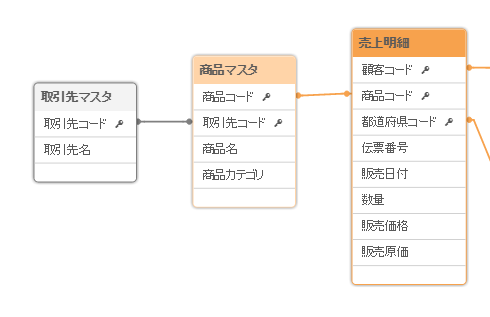
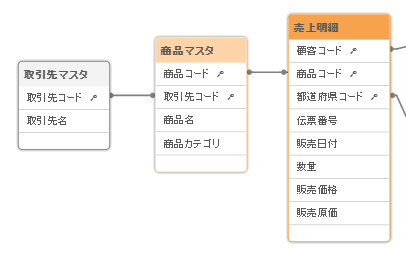
以下のデータモデルの中から「売上明細」のテーブルのデータをResident Loadで読み取り、集計などを行って別のテーブルに格納する処理を行います。
Resident Loadの基本的な使い方 – Group Byの例
ではまず、以下のスクリプトをロードスクリプトの最後尾に追加してみたいと思います。
売上集計:
Load
	商品コード,
    Sum(数量) AS 数量集計,
    Sum(販売価格) AS 売上集計
Resident 売上明細
Group By 商品コード;
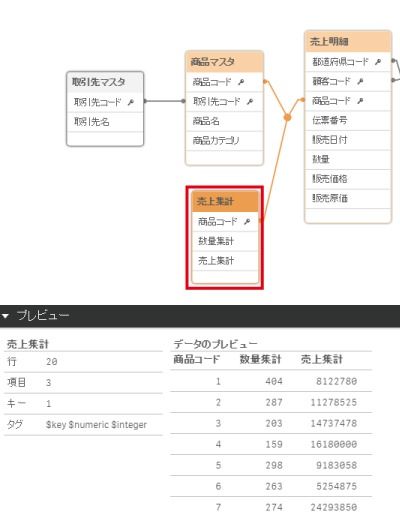
Resident句の後に「売上明細」を指定し、「売上明細」のテーブルからデータを読み取ります。また、Group By句で「商品コード」を集計軸と指定し、「数量」と「販売価格」をSumで集計してそれぞれ「数量集計」と「売上集計」の項目に格納する処理を行います。結果のデータを「売上集計」のテーブルに格納します。
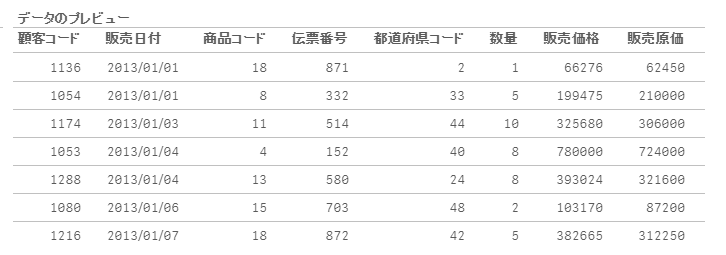
上記の処理を追加してロードを実行すると、以下の形で売上集計のテーブルが追加されます。プレビューでデータの内容を確認すると、「商品コード」をキーとして集計値が「数量集計」と「売上集計」の項目に格納されていることが確認できます。
この様に、Resident Loadを利用することで既にQlik Sense内に取り込んだテーブル上のデータを読み取って集計などの処理を施し、新たなテーブルに格納することができます。
Resident Loadを利用する際の注意点 – Order Byの例
では、次にResident Loadを利用する際の注意点を幾つかご説明したいと思います。その説明のために、今回は先ほどの処理の代わりにResident Loadを使って「売上明細」のデータを「販売日付」でソートする処理を行ってみたいと思います。
先ほど追加したスクリプトを削除し、以下のスクリプトをロードスクリプトの最後尾に追加してデータのロードを実行します。
売上明細_日付ソート済み:
Load
    伝票番号,
    販売日付,
    都道府県コード,
    顧客コード,
    商品コード,
    数量,
    販売価格,
    販売原価
Resident 売上明細
Order by 販売日付;
実行後にデータモデルビューアを開いてデータモデルを確認してみます。どの様な状況になっているでしょうか?今回はテーブルが新たに追加されていません。
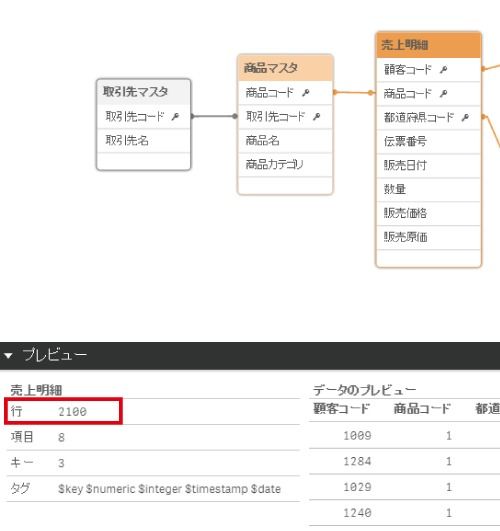
その原因は「テーブルの自動連結と強制連結-Concatenate」のエントリでご説明したように、Qlik Senseではロードされた複数のテーブルの項目名と項目数が完全に合致する場合、これらのテーブルは一つに纏めるという「自動連結」が行われることが理由です。今回のケースでは元の「売上明細」と新たにResident Loadで作成しようとした「売上明細_日付ソート済み」のテーブルの項目名と項目数が完全に一致するため、全てのデータが既存の「売上明細」に連結されて纏められてしまいました。そのため、プレビューで「売上明細」テーブルの行数を確認すると実行前の倍になっていることが確認できます。
では、新たなテーブルを作成するにはどのようにすれば良いのでしょうか?「テーブルの自動連結と強制連結-Concatenate」の最後に触れた「Noconcatenate」プレフィックスを利用すると、連結を回避することができます。
売上明細_日付ソート済み:
Noconcatenate Load
    伝票番号,
    販売日付,
    都道府県コード,
    顧客コード,
    商品コード,
    数量,
    販売価格,
    販売原価
Resident 売上明細
Order by 販売日付;
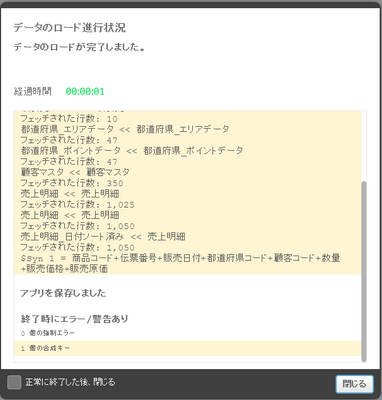
ただし、この処理を実行すると次は以下の様な合成キーの警告が表示されます。これは、今度は「売上明細_日付ソート済み」が新たなテーブルとして作成されたのですが、「売上明細」と項目名が同じなためこれらの2つのテーブル間で合成キーが作成されてしまっているからです。
この様な合成キーの作成を避けるために、最後に以下の処理を追加して再度ロードを実行します。
Drop Table 売上明細;
Rename Table 売上明細_日付ソート済み To 売上明細;
ソート済みデータが新たな「売上明細_日付ソート済み」テーブルに格納された後で、ここではDrop Tableで「売上明細」テーブルを一旦削除し、「売上明細_日付ソート済み」テーブルの名称を元の「売上明細」に戻す処理を行っています。
そうすると、結果のデータモデルは元の以下の形となっていることが確認できます。
また、データを確認すると、以下の形で「売上明細」のデータが「販売日付」でソートされていることが確認できます。
まとめ
ここでは、既にQlik Sense内に取り込んだテーブル上のデータを読み取って集計処理などを行うことができるResident Loadの利用方法と、利用する上での注意点についてご説明しました。
-
テーブルの自動連結と強制連結-Concatenate
はじめに年や月単位で売上データを同じフォーマットで別々のファイルで管理している場合などには、それらのファイルのデータを一つのテーブルに纏める必要があります。Qlik Senseではこれらの複数のファイルの項目名と項目数が完全に合致する場合には自動的に一つのテーブルに連結して纏めてくれます。また、項目... Show Moreはじめに
年や月単位で売上データを同じフォーマットで別々のファイルで管理している場合などには、それらのファイルのデータを一つのテーブルに纏める必要があります。Qlik Senseではこれらの複数のファイルの項目名と項目数が完全に合致する場合には自動的に一つのテーブルに連結して纏めてくれます。また、項目が異なる場合でも指定を行えば強制的に一つのテーブルに連結することも出来ます。このエントリではそれらのテーブル連結についてご説明します。
準備
このエントリでは、「Qlik Senseロードスクリプトによる変換処理の基礎」が完了していることを前提に作業を進めます。もし作業をまだ実施されていなければ、以下のリンク先の手順に従って作業を実施して下さい。
>>「Qlik Senseロードスクリプトによる変換処理の基礎」
また今回、追加で「売上明細_追加1.xlsx」、「売上明細_追加2.xlsx」の2つのファイルを利用します。以下からダウンロードして下さい。
自動連結
Qlik Senseではロードされた複数のテーブルの項目名と項目数が完全に合致する場合、これらのテーブルは一つに纏められます。これを「自動連結」と呼びます。ここでは、既にロード済みの「売上明細」テーブルと同じ項目定義の「売上明細_追加1.xlsx」のファイルを読み込み、データを連結して追加したいと思います。
まず、「データモデルビューア」を開いて「売上明細」テーブルを選択し、行数を確認します。1,000行格納されていることが確認できます。
ダウンロードした「追加データ」を解凍して保存し、「Qlik Senseロードスクリプトによる変換処理の基礎」でご説明した手順に従って解凍したフォルダをデータ接続先として追加します。
データ接続定義~「追加データ」の「データを選択」アイコンをクリックして「売上明細_追加1.xlsx」のファイルを選択し、「売上明細_追加1.xlsx」のファイルを読み込むスクリプトを「自動生成セクションタブ」の最後尾に追加します。そしてデータのロードを実行します。
ロードの完了後、「データモデルビューア」で再度「売上明細」テーブルの行数を確認します。1,025行に増えていることを確認して下さい。この様に同じ項目名と項目数を持つファイルは自動的に連結されます。
尚、ここでは実際に実行は行いませんが、以下の形でファイル名に「*(ワイルドカード)」を使うことで複数のファイルを一度にロードすることも可能です。この様にして、同様のフォーマットのファイルはまとめて取り込んで一つのテーブルに連結することも可能です。
強制連結
「売上明細_追加2.xlsx」のファイルを同様の手順で追加します。既存の「売上明細」テーブルには「都道府県コード」の項目が含まれていますが、このファイルにはこの項目が含まれていません。まずはこのような場合にそのままデータを取り込むとどのようになるかを確認してみます。
先ほどと同様の手順で「売上明細_追加2.xlsx」のファイルを読み込むスクリプトを「自動生成セクションタブ」の最後尾に追加し、データのロードを実行します。
データロードを実行すると、以下のように「合成キー」が作成された警告が表示されます。
「データモデルビューア」を確認すると「売上明細」とは別に「売上明細-1」というテーブルが作成され、こちらに先ほどロードしたデータが格納されてしまっていることが確認できます。またそのため、「合成キー」が作成されてしまっています。Qlik Senseでは同名の項目をキーとして自動で紐付けますが、テーブル間で複合キーの関係が存在する場合にはこの「合成キー」が作成されます。(合成キーの詳細については「合成キーと循環参照」のエントリをご参照ください。)
Qlik Senseでは2つのテーブルが全く同じ項目の構造を持たない場合でも、「Concatenate」プレフィックスを利用することで2つのテーブルの結合を強制することができます。先ほど追加したスクリプトに以下の赤字の部分を追加してデータのロードを再度実行します。
Concatenate(売上明細) LOAD
    伝票番号,
    販売日付,
    顧客コード,
    商品コード,
    数量,
    販売価格,
    販売原価
FROM [lib://追加データ/売上明細_追加2.xlsx]
(ooxml, embedded labels, table is 売上明細);
「データモデルビューア」を確認すると先ほどのテーブルが追加されておらず、売上明細のテーブルにデータが追加されて行数が1,050行となっていることが確認出来ます。
この時データを確認すると、追加した「売上明細_追加2.xlsx」のデータは「売上明細」テーブルに強制的に結合されていますが、「都道府県コード」を含まないためヌル値となっていることが確認できます。この様に項目が異なる場合でも強制的にテーブルを連結して纏めることが可能です。
連結の回避
上記のケースとは逆に、「Noconcatenate」プレフィックスを使うことで項目名と項目数が完全に合致する複数のテーブルの結合を回避することも出来ます。
まとめ
以上、Qlik Senseでの複数ファイルの自動連結および強制連結についてご説明しました。
-
合成キーと循環参照
■はじめにQlik Senseでは取り込んだ複数テーブルに同じ名称の項目が存在する場合、自動的にこれらの項目をキーとして関連付けてデータモデルを作成します。この時、「合成キー」や「循環参照」が発生した場合にはデータモデルに問題がある可能性が高いため警告が出力され、データ分析で正しい結果を得るためには... Show More■はじめに
Qlik Senseでは取り込んだ複数テーブルに同じ名称の項目が存在する場合、自動的にこれらの項目をキーとして関連付けてデータモデルを作成します。この時、「合成キー」や「循環参照」が発生した場合にはデータモデルに問題がある可能性が高いため警告が出力され、データ分析で正しい結果を得るためにはこれらの発生を解消するようデータロードの処理内容を修正する必要性がある場合があります。ここでは「合成キー」や「循環参照」がどのようなものか、またこれらを発生しないようにするにはどうすればよいかの対応方法をご説明します。
■データロード時に発生する警告
データロード実行に発生する代表的な警告として「合成キー」や「循環参照」の2つが挙げられます。
合成キー
合成キーが作成された場合、データロード実行時に以下の様な警告が出力されます。
この警告が発生した場合には、データモデルビューアーを確認すると以下の様に「$Syn」で始まるテーブルが作成されています。以下の例では2つのテーブルが「製品コード」と「製品名」の2つの項目をキーとして関連付けられており、このように2つ以上の項目がキーとなっているものを「合成キー」と呼びます。この合成キーは取り込んだテーブルに共通の項目が2個以上ある場合に発生します。
2つのテーブルが複数のキーで関連付けられるべき場合がありますので、合成キーは必ずしも問題であるわけではありませんが、例えば上記の場合ではキーに「製品コード」と「製品名」の2つが含まれてしまっており、データモデル上問題となっています。このような場合にはデータロードの処理内容を修正して合成キーの発生を解消する必要があります。
循環参照
循環参照が発生した場合には、データロード実行時に以下の様な警告が出力されます。
「循環参照」とは以下の形でテーブル間の関連付けがループしてしまう状態を指します。この様な形でデータモデルの関連付けがループしている場合には正しく処理されませんので、データモデルを修正する必要があります。
■まずはテーブルを1つずつ取り込んでみる
複数テーブルを一度に取り込んで、合成キーや循環参照が複数個所で発生しまっている場合には、どこが原因でこれらが発生しているのか特定するのが難しい場合があります。その場合には一度に複数のテーブルを取り込むのではなく、一つずつテーブルを追加していって問題個所を特定するアプローチを取るのが最善です。
■データモデルの修正方法
その上で、データモデルを修正して「合成キー」や「循環参照」を解消するには、状況や要件に応じて以下の様なアプローチがあります。
項目の削除
まず一つ目は、項目を取り込み対象外とすることで項目の削除を行う方法です。先ほど合成キーの例では、「製品名」が「製品マスタ」と「売上伝票」両方に含まれてしまっており、冗長となってしまっていました。
この場合には「販売伝票」の「製品名」を削除することで以下の様な形で「製品コード」のみで2テーブル間が正しく紐付けられる形となります。
項目の名称変更
次に以下の様な形で「単価」が「製品マスタ」と「売上伝票」の両方に含まれているケースを見てみたいと思います。ここで、先ほどと同様な形で「単価」の項目を一方のテーブルで削除して対応することも可能ですが、ここでは製品マスタでは「仕入単価」、売上伝票では「売上単価」をそれぞれ指しており、同じ名称で異なる内容のデータが含まれているため両方のデータを残したい場合があります。
この様な場合は、以下の様な形で項目の名称を変更することで対応が可能です。
複合キーの作成
以下の例では、「売上伝票」と「顧客マスタ」が「国コード」と「顧客コード」で紐付いています。ここで、顧客が「国コード」と「顧客コード」で一意に特定される場合には、データの紐付きとしては問題なく、集計は正しく行われます。
ただし、データモデルとしてより洗練化するアプローチとしては、複合キーを作成する方法があります。
複合キーは以下の形で複数のキー項目を区切り文字(以下の例では「|」を利用)で連結して一つのキー項目に纏めたものを指します。
LOAD
    顧客コード & '|' & 国コード AS 顧客キー,
    顧客名
FROM [lib://顧客データ/顧客マスタ.csv]
(txt, codepage is 932, embedded labels, delimiter is ',', msq);
そうすると以下の形で複合キーが一つのキー項目に纏められます。
また、上記の形の複合キーは文字列となっているため、キー項目としては処理効率が良くありません。ベストプラクティスとしては、以下の形でAutoNumber関数を利用すると一意な数値に置き換えられるため、パフォーマンスの観点から最適化されます。
LOAD AutoNumber(顧客コード & '|' & 国コード) AS 顧客キー, 顧客名 FROM [lib://顧客データ/顧客マスタ.csv] (txt, codepage is 932, embedded labels, delimiter is ',', msq);テーブルの結合(Join,ApplyMap)
また、上記の複合キーで取り上げた例に対応するもう一つのアプローチとして、ApplyMapやJoinを利用してテーブルを結合する方法があります。先ほどの例と同様顧客が「国コード」と「顧客コード」で一意に特定されることを前提に、これらをキーとしてJoinでテーブルを結合した結果が以下の形となります。
ApplyMapやJoinの手順についての詳細は「テーブルの結合–ApplyMap, Lookup, Join, Keep」のエントリをご参照ください。
Concatenate句を利用したテーブルの強制連結
Qlik Senseではロードされた複数のテーブルの項目名と項目数が完全に合致する場合、これらのテーブルは一つに纏められます。これを「自動連結」と呼びます。
ただし、以下のケースでは一方のテーブルには「都道府県コード」の項目が存在しますが、他方のテーブルには存在しないため、2つのテーブルに分かれてしまっているものの複数の共通項目を持っているために合成キーが作成されています。
この様な場合にはConcatenate句を利用してテーブルを強制連結するアプローチが有効です。手順の詳細については「テーブルの自動連結と強制連結-Concatenate」をご参照ください。
リンクテーブルの作成
売上実績データと、予算データなど、集計と対象となるテーブルが複数存在するようなデータモデルを一般的に「マルチファクト」と呼びますが、それらのテーブルは多くの場合は複数の共通項目を持つため、取り込むと以下の形で合成キーが発生します。
そのような場合に対応する方法として挙げられるのがLink Tableです。Link Tableは複数のファクトテーブルを紐付ける全てのキー項目を格納したテーブルで、このLink Tableを中心としてファクトテーブルとディメンションテーブル(マスタテーブル)を紐付ける役割を担います。
LinkTableの詳細は「複数のファクトテーブルのリンク-Link Table」で紹介していますので、そちらをご参照ください。
■まとめ
このエントリでは、「合成キー」や「循環参照」についてご説明し、これらを解消するための幾つかのアプローチについてご説明しました。
-
複数のファクトテーブルのリンク-Link Table
■はじめに売上の分析などを行う場合、売上の実績データと、別にファイルで管理している予算・計画のデータを組み合わせて分析を行う場合があります。このような形で集計と対象となるテーブルが複数存在するようなデータモデルを一般的に「マルチファクト」と呼びますが、ここではLink Tableを利用したそのような... Show More■はじめに
売上の分析などを行う場合、売上の実績データと、別にファイルで管理している予算・計画のデータを組み合わせて分析を行う場合があります。このような形で集計と対象となるテーブルが複数存在するようなデータモデルを一般的に「マルチファクト」と呼びますが、ここではLink Tableを利用したそのようなデータモデルの扱いについてご説明します。
■シンプルな複数ファクトテーブルの扱い
では、まずシンプルな例から始めていきたいと思います。以下のロードスクリプトで予算と実績のデータをそれぞれ「予算データ」と「実績データ」テーブルに格納します。
[予算データ]:
Load * Inline [
年月,支店ID,製品ID,予算
201501,1,1,200
201501,1,2,120
201501,2,1,220
201501,2,2,230
201502,1,1,120
201502,1,2,130
201502,2,1,200
201502,2,2,80
201503,1,1,120
201503,1,2,90
201503,2,1,150
201503,2,2,170
];


[実績データ]:
Load * Inline [
年月,支店ID,製品ID,顧客ID,実績
201501,1,1,1,120
201501,1,1,2,120
201501,1,2,1,100
201501,2,1,1,100
201501,2,1,2,90
201501,2,2,2,260
201502,1,1,1,90
201502,1,2,2,140
201502,2,1,1,100
201502,2,1,2,130
201502,2,2,1,30
201502,2,2,2,60
201503,1,1,2,130
201503,1,2,2,80
201503,2,1,1,80
201503,2,1,2,90
201503,2,2,1,90
201503,2,2,2,100
];
このケースでは、「予算」と「実績」が別々のテーブルに格納されていますが、両データとも共通で「年月」「支店ID」「製品ID」を持っており、それらをキーとして「予算」と「実績」を紐付けることができます。
上記のスクリプトを実行すると、以下のデータモデルが作成されます。「年月」「支店ID」「製品ID」が複合キーとなってしまっていますが、問題なく「予算」と「実績」のデータは紐付いています。
また、データモデルをもう少し改善させるには、以下の形でJoinを使って2つ目のテーブルを一つ目のテーブルに結合させれば、テーブルが一つに纏まってデータモデルがよりシンプルで分かり易くなります。(Joinの詳細については「テーブルの結合–ApplyMap, Lookup, Join, Keep」のエントリをご参照ください。)
Join([予算データ])
Load * Inline [
年月,支店ID,製品ID,顧客ID,実績
201501,1,1,1,120
201501,1,1,2,120
201501,1,2,1,100
201501,2,1,1,100
201501,2,1,2,90
201501,2,2,2,260
201502,1,1,1,90
201502,1,2,2,140
201502,2,1,1,100
201502,2,1,2,130
201502,2,2,1,30
201502,2,2,2,60
201503,1,1,2,130
201503,1,2,2,80
201503,2,1,1,80
201503,2,1,2,90
201503,2,2,1,90
201503,2,2,2,100
];
■複数ファクトテーブルの扱いにおける課題
上記の形で予算や実績といった複数のファクトテーブルを纏めることができれば手順として非常にシンプルですが、実際のケースではよりデータモデルが複雑となってしまってなかなか上手くいかないケースもあります。
例えば以下のロードスクリプトを実行してみます。
[実績データ]:
Load * Inline [
年月,支店ID,製品ID,顧客ID,実績
201501,1,1,1,120
201501,1,1,2,120
201501,1,2,1,100
201501,2,1,1,100
201501,2,1,2,90
201501,2,2,2,260
201502,1,1,1,90
201502,1,2,2,140
201502,2,1,1,100
201502,2,1,2,130
201502,2,2,1,30
201502,2,2,2,60
201503,1,1,2,130
201503,1,2,2,80
201503,2,1,1,80
201503,2,1,2,90
201503,2,2,1,90
201503,2,2,2,100
];

[支店マスタ]:
Load * Inline [
支店ID, 支店名
1,関東支店
2,関西支店
];

[製品マスタ]:
Load * Inline [
製品ID, 製品名, 製品カテゴリID
1,製品A,1
2,製品B,2
];

[製品カテゴリマスタ]:
Load * Inline [
製品カテゴリID,製品カテゴリ名
1,製品カテゴリA
2,製品カテゴリB
];

[顧客マスタ]:
Load * Inline [
顧客ID,顧客名
1,顧客A
2,顧客B
];
そうすると、以下のような形でデータモデルに循環参照などが作成されてしまっており、正しく集計がされない状態となってしまっています。これは、「予算データ」は「製品カテゴリID」の項目を含んでいますが、「実績データ」は「製品ID」の項目を含んでおり、「製品カテゴリマスタ」を介してデータモデルがループしてしまう構造となってしまっています。
この様に、予算では月、支店、製品カテゴリレベルでデータを持っているが、実績では年月、営業担当、顧客、製品レベルでデータを持っている等、持っているデータの粒度が異なるなどの理由で、先ほど挙げたシンプルな例の様に上手くデータを紐付けれないことがあります。
また、さらに予算、実績、速報、見込み等といった形でファクトテーブルの数が増えたり、マスタテーブルが多くなったりするとデータモデルが複雑となり、なかなか求める形のものが作成できないケースも起こります。
そのような場合に活用できるのがここでご紹介するLink Tableです。Link Tableは複数のファクトテーブルを紐付ける全てのキー項目を格納したテーブルで、このLink Tableを中心としてファクトテーブルとディメンションテーブル(マスタテーブル)を紐付ける役割を担います。
■Link Tableを使った複数テーブルのリンク
では、実際にLink Tableを作成したいと思います。Link Tableは以下の3つのステップを踏んで作成します。
- 共通の項目を含んだ複数のファクトテーブルをロード
- 複数のファクトテーブルから一意な共通項目の値を抽出してLink Tableを作成
- ディメンションテーブル(マスタデータ)をロード
また、上記作業を完了してデータが問題なく紐付けられたことを検証した上で、ベストプラクティスの観点から以下の作業を行うことが推奨されます。
- 複合キーへのAutoNumberの追加
尚、ここで作成するアプリのサンプルは以下からダウンロードが可能です。
共通の項目を含んだ複数のファクトテーブルをロード
まず複数のファクトテーブルをロードします。この時、以下の2つのことを行う必要があります:
- データの粒度が異なる場合にはその粒度も合わせる必要があります。先ほどの例では「予算データ」は「製品カテゴリID」、「実績データ」は「製品ID」とそれぞれ異なる階層の項目で集計されていたため、ここではより上位階層の「製品カテゴリID」に粒度を揃えます。
- 複数ファクトテーブル間を紐付ける共通のキー項目を複合キーとして一つの項目に纏めます。
まず、予算データをロードします。予算データは「製品カテゴリID」を含んでいるため粒度を揃える作業は不要で、共通キーを複合キーとして纏める処理のみを行います。「|」で区切って「年月」「支店ID」「製品カテゴリID」の項目を連結して「Key」という名前の項目に格納しています。
//「年月」「支店ID」「製品カテゴリID」の複合キーを作成して予算データをロード
[予算データ]:
Load
    年月 & '|' & 支店ID  & '|' &  製品カテゴリID AS Key,
    予算
Inline [
年月,支店ID,製品カテゴリID,予算
201501,1,1,200
201501,1,2,120
201501,2,1,220
201501,2,2,230
201502,1,1,120
201502,1,2,130
201502,2,1,200
201502,2,2,80
201503,1,1,120
201503,1,2,90
201503,2,1,150
201503,2,2,170
];
尚、複合キーには以下の様な形でデータが格納されます。
次に実績データをロードしますが、その前にApplyMapを使って「製品ID」を「製品カテゴリID」に変換するための「Mapping_Product」という名称のMapping Tableを作成します。(ApplyMapの詳細については「テーブルの結合–ApplyMap, Lookup, Join, Keep」のエントリをご参照ください。)
//「製品ID」を「製品カテゴリID」に変換するためのMapping Tableを作成
Mapping_Product:
Mapping Load
	製品ID,
    製品カテゴリID
Inline [
製品ID, 製品名, 製品カテゴリID
1,製品A,1
2,製品B,2
];
そして、実績データをロードします。ここでも先ほど同様に共通項目を複合キーとして「Key」という項目に格納していますが、「製品カテゴリID」は「製品ID」を引数として「Mapping_Product」のMapping Tableから取得している点に注意して下さい。また、共通項目とは別に、この実績データのみが持っている「製品ID」と「顧客ID」を残しておくことができます。
//「製品カテゴリID」はApplyMap関数を使ってMapping Tableより取得
//「年月」「支店ID」「製品カテゴリID」の複合キーを作成して実績データをロード
[実績データ]:
Load
    年月 & '|' & 支店ID  & '|' &  ApplyMap('Mapping_Product',製品ID) AS Key,
    製品ID,
    顧客ID,
    実績
Inline [
年月,支店ID,製品ID,顧客ID,実績
201501,1,1,1,120
201501,1,1,2,120
201501,1,2,1,100
201501,2,1,1,100
201501,2,1,2,90
201501,2,2,2,260
201502,1,1,1,90
201502,1,2,2,140
201502,2,1,1,100
201502,2,1,2,130
201502,2,2,1,30
201502,2,2,2,60
201503,1,1,2,130
201503,1,2,2,80
201503,2,1,1,80
201503,2,1,2,90
201503,2,2,1,90
201503,2,2,2,100
];
複数のファクトテーブルから一意な共通項目の値を抽出してLink Tableを作成
ここではLink Tableを作成します。Link Tableは全てのファクトテーブルとディメンションテーブル(マスタテーブル)の間の共通項目をキーとして紐付を行う役目を果たします。そのために、このテーブルには以下のデータをファクトテーブルから格納します:
- 共通項目を1つの項目に纏めて作成した複合キー(ここでの例では「Key」の項目)
- 全ての共通の項目(ここでの例では「年月」「支店ID」「製品カテゴリID」)
全てのファクトテーブルから上記データの一意な組み合わせを全てLink Tableに格納すれば、Link Tableを介して全てのファクトテーブルとディメンションテーブル(マスタテーブル)を紐付けることができるということになります。
予算データと実績データの上記の項目を以下の形でロードします。今回はLink Tableに対してDistinctを指定してロードを行います。
//予算データの一意な共通項目の値ををLink Tableに格納
LinkTable:
Load Distinct
	年月 & '|' & 支店ID  & '|' &  製品カテゴリID AS Key,
    年月,
    支店ID,
    製品カテゴリID
Inline [
年月,支店ID,製品カテゴリID,予算
201501,1,1,200
201501,1,2,120
201501,2,1,220
201501,2,2,230
201502,1,1,120
201502,1,2,130
201502,2,1,200
201502,2,2,80
201503,1,1,120
201503,1,2,90
201503,2,1,150
201503,2,2,170
];

//実績データの一意な共通項目の値ををLink Tableに格納
LinkTable:
Load Distinct
	年月 & '|' & 支店ID  & '|' &  ApplyMap('Mapping_Product',製品ID) AS Key,
    年月,
    支店ID,
    ApplyMap('Mapping_Product',製品ID) AS 製品カテゴリID
Inline [
年月,支店ID,製品ID,顧客ID,実績
201501,1,1,1,120
201501,1,1,2,120
201501,1,2,1,100
201501,2,1,1,100
201501,2,1,2,90
201501,2,2,2,260
201502,1,1,1,90
201502,1,2,2,140
201502,2,1,1,100
201502,2,1,2,130
201502,2,2,1,30
201502,2,2,2,60
201503,1,1,2,130
201503,1,2,2,80
201503,2,1,1,80
201503,2,1,2,90
201503,2,2,1,90
201503,2,2,2,100
];
上記スクリプトを実行すると以下の内容を含むLink Tableが作成されます。
ディメンションテーブル(マスタデータ)をロード
最後にディメンションテーブル(マスタデータ)をロードします。ここで注意が必要なのは、共通項目としてLink Tableに紐付くマスタテーブルと、個別に特定のファクトテーブルに紐付くマスタテーブル間でキーの紐付きがなされないようにする必要があります。今回の例では個別に実績データのみに紐付く「製品マスタ」に「製品カテゴリID」を含んだままにしてしまうと、共通項目の「製品カテゴリマスタ」とも紐付いてしまうため、循環参照が発生してしまいます。そのため、「製品マスタ」から「製品カテゴリID」を削除してロードしています。
[支店マスタ]:
Load * Inline [
支店ID, 支店名
1,関東支店
2,関西支店
];

[製品マスタ]:
Load
    製品ID,
    製品名
Inline [
製品ID, 製品名, 製品カテゴリID
1,製品A,1
2,製品B,2
];

[製品カテゴリマスタ]:
Load * Inline [
製品カテゴリID,製品カテゴリ名
1,製品カテゴリA
2,製品カテゴリB
];

[顧客マスタ]:
Load * Inline [
顧客ID,顧客名
1,顧客A
2,顧客B
];
上記スクリプトを実行すると、最終的に以下の形のデータモデルが作成されます。
複合キーへのAutoNumberの追加
これまでの作業で「年月」「支店ID」「製品カテゴリID」の3つの項目を纏めて「Key」という名称の1つの項目を作成しました。このように複数のキー項目を一つにまとめたキー項目を「複合キー」と呼びます。
この複合キーは区切り文字で連結しているため、以下の様な文字列のデータとなっており、キー項目としては処理効率が良くありません。
そこで、以下の様な形で複合キーを作成する処理にAutoNumberを追加します。
AutoNumber(年月 & '|' & 支店ID & '|' & 製品カテゴリID)
AutoNumberでは、引数として与えられた値が同一であれば同一アプリ内であれば同じ値で連番を作成します。つまり、キー項目の文字列を以下の形で数値に置き換えることができます。
この様な形で、複合キーについては全てAutoNumberを追加して数値に置き換えることが推奨されます。
■まとめ
予算データと実績データでは持っているデータの粒度が異なるなどの理由で、これらのマルチファクトのデータを上手くデータを紐付けれないことがありますが、そのような場合に活用できるLink Tableの手法をご説明させて頂きました。
-
テーブルの結合–ApplyMap, Lookup, Join, Keep
■はじめにQlik Senseでは取り込んだ複数テーブル間は共通の名称を持つ項目をキーとして自動的に紐付けられ、以下の様な形でデータモデルが作成されます。 ただ、演算や変換処理を行うためや管理性を高める目的、もしくはパフォーマンス上の効率化の観点から複数のテーブルを一つのテーブルに結合する処理を行う... Show More■はじめに
Qlik Senseでは取り込んだ複数テーブル間は共通の名称を持つ項目をキーとして自動的に紐付けられ、以下の様な形でデータモデルが作成されます。
ただ、演算や変換処理を行うためや管理性を高める目的、もしくはパフォーマンス上の効率化の観点から複数のテーブルを一つのテーブルに結合する処理を行う場合があります。
ここではそういったことを行うためのApplyMap, Lookup, Join, Keepといった処理をそれぞれ見ていきたいと思います。ではまず準備として、以下の国データを含んだテーブルを作成します。
国テーブル:
Load * Inline [
  国ID,国コード,国名
  1,JP,日本
  2,US,アメリカ合衆国
  3,CN,中国
  4,GB,イギリス
];
■値のルックアップ
ApplyMap
ApplyMapはいわゆるルックアップを行うために利用します。「キー」と「値」の2列を含んだMappingテーブルを事前に作成し、「キー」を持つ他のテーブルデータの取込み時にこのMappingテーブルを参照して「値」を取得することができます。
ここでは、追加する顧客テーブルに「国ID」を含んでおり、この値を「国名」に置き換える例を扱います。では、既に作成済みの「国」テーブルから、「国ID」と「国名」の列をそれぞれ「キー」と「値」としたMappingテーブルを以下の形で作成します。
Map_Country:
Mapping Load 国ID, 国名
Resident 国テーブル;
Loadステートメントの先頭に「Mapping」を付加することでMappingテーブルを作成することができます。このテーブルはルックアップを行うために一時的に作成されるテーブルで、ロード処理が完了すると自動的に消去されます。
次に、以下の形で顧客テーブルを追加します。
顧客テーブル:
Load
  ID,
  顧客,
  ApplyMap('Map_Country',国,Null()) AS 国名
Inline [
  ID,顧客,国
  1,顧客A,1
  2,顧客B,3
  3,顧客C,6
  4,顧客D,2
];
Drop Table 国テーブル;
ここで、ApplyMapの関数を使い、作成したMappingテーブルを参照して、国のキーから国名を取得する処理を行っています。
- ApplyMap(‘Mappingテーブル名’, キー名, デフォルト値)
Mappingテーブル名は「’ (シングルクオート)」で囲み、キー名はクオートで囲まずにこのテーブル自身のキー名(ここでは「顧客テーブル」の「国」)を指定します。また、マッチするキーが無かった場合のデフォルト値としてここでは「Null(ヌル値)」を指定しており、必要に応じて文字列などの指定が可能です。(デフォルト値を指定しない場合にはキー名がそのまま返されます。)
これらの処理を実行すると、以下の内容の「顧客テーブル」が作成され、国のコード値から国名に変換されていることが確認できます。
このApplyMapはこの後ご説明しますLookupやJoinなどの処理と比べてパフォーマンスに優れますので、ApplyMapで対応できる処理についてはApplyMapの利用が推奨されます。
Lookup
先ほどのApplyMapでは、「国テーブル」から「キー」と「値」の2列を含んだMappingテーブルを作成して参照しましたが、このLookupを利用すると直接「国テーブル」を参照することができます。
顧客テーブル:
Load
  ID,
  顧客,
  Lookup('国名','国ID',国,'国テーブル') AS 国名
Inline [
  ID,顧客,国
  1,顧客A,1
  2,顧客B,3
  3,顧客C,6
  4,顧客D,2
];

Drop Table 国テーブル;
Lookupの引数については以下となり、「参照元テーブルのキー名」のみは「’ (シングルクオート)」で囲まない点に注意が必要です。
- Lookup(‘参照先テーブルの取得値を含む列名’ ,’参照先テーブルのキー名’, 参照元テーブルのキー名, ‘参照先テーブル名’)
Join
次に、2つのテーブルの結合を行うのがJoinになります。Joinを行うには、以下の形でLoadステートメントの先頭に「Join(結合先のテーブル名)」を指定します。
Join(国テーブル)
顧客テーブル:
Load * Inline [
  ID,顧客,国ID
  1,顧客A,1
  2,顧客B,3
  3,顧客C,6
  4,顧客D,2
];
この処理を実行すると、以下の形で結合された一つのテーブルが作成されます。結合のキーは両テーブルに存在する同名の項目が利用され、複数の項目をキーとして結合することも可能です。(結合を行ったキー項目の「国ID」は不要となるため、上記処理後に「Drop Field 国ID;」のステートメントで削除することができます。)
Joinに特に指定を行わない場合には、「Outer Join」として処理され、2つのテーブルに存在する全ての行が結合後のテーブルに含まれます。その他に、以下のJoinの方式を指定することが可能です。
- Inner Join: 両方のテーブルに共通して存在する行のみが結合後のテーブルに含まれます。
- Left Join: 左側(1つ目)のテーブルに存在する行のみが結合後のテーブルに含まれます。
- Right Join: 右側(2つ目)のテーブルに存在する行のみが結合後のテーブルに含まれます。
Keep
KeepもJoinと同様にOuter, Inner, Left, Rigftを指定して利用し、同様の考え方で行が残されます。Joinと異なる点は、Joinではテーブルが結合されましたが、Keepではテーブルは分割されたままとなります。
例えば、以下の形でRight Keepを指定します。
Right Keep(国テーブル)
顧客テーブル:
Load * Inline [
  ID,顧客,国ID
  1,顧客A,1
  2,顧客B,3
  3,顧客C,6
  4,顧客D,2
];
その結果、Joinと異なり以下の形でテーブルは2つ作成されます。
ただし、Right Joinと同様に右側(2つ目)のテーブルに当たる「顧客テーブル」に存在する行がのみが残されます。
[顧客テーブル]
[国テーブル]
■まとめ
ここでは、複数のテーブルを一つのテーブルに結合するために利用される、ApplyMap, Lookup, Join, Keepの処理をご説明しました。
-
集計関数の活用-Sum,Total,Count,Distinct,Avg
はじめにこれまでの「10分で試すQlik Senseでデータ分析」などのチュートリアルでは主にSumを使ったシンプルな集計を扱ってきました。ここではSum,Total,Count,Distinct,Avgなどの集計関数やオプションを使って、様々な集計の要件に対応するための方法をより細かくご説明します... Show Moreはじめに
これまでの「10分で試すQlik Senseでデータ分析」などのチュートリアルでは主にSumを使ったシンプルな集計を扱ってきました。ここではSum,Total,Count,Distinct,Avgなどの集計関数やオプションを使って、様々な集計の要件に対応するための方法をより細かくご説明します。
軸を跨った合計の算出-Total
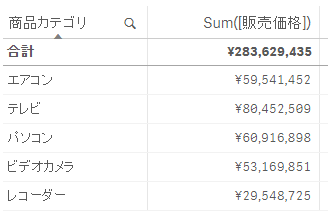
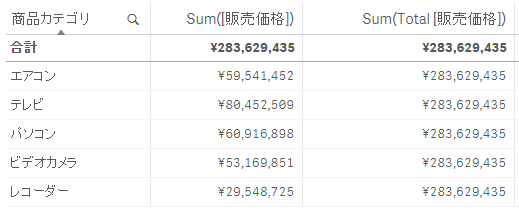
以下は基本的なSum関数の使い方となり、軸に設定した「商品カテゴリ」毎の売上を集計しています。
では、ここで「全体の売上に対する各商品カテゴリの売上構成比」を算出したい場合にはどうすれば良いでしょうか?この様な時に利用するのがTotal句となります。以下の形でSum()の中にTotalを利用すると、軸に設定されている「商品カテゴリ」を跨って全体の売上合計を出力します。
Sum(Total [販売価格])
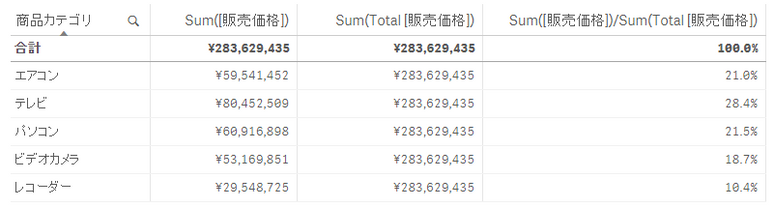
そして、以下の形とすると、全体の売上に対する各商品カテゴリの売上構成比を算出することができます。
Sum([販売価格])/Sum(Total [販売価格])
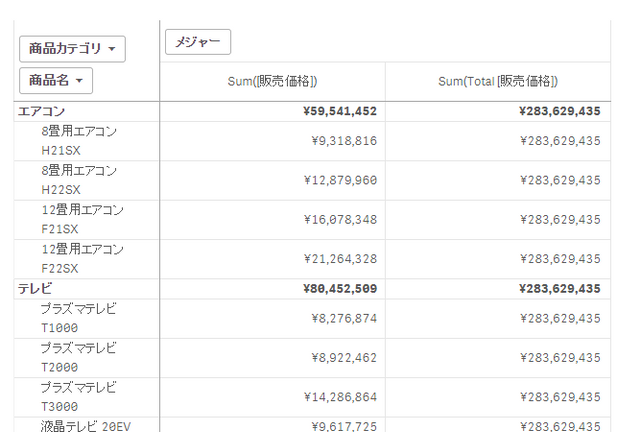
また、以下の様に「商品カテゴリ」>「商品名」という形で2軸となっている場合を見てみましょう。ここで先ほどのTotalを使うと、先ほど同様に全体の売上が集計されます。ただ、このような2軸で集計を行った場合、全体の売上ではなく「商品カテゴリの売上合計に対する、カテゴリに含まれる各商品の売上構成比」を算出したい場合があると思います。
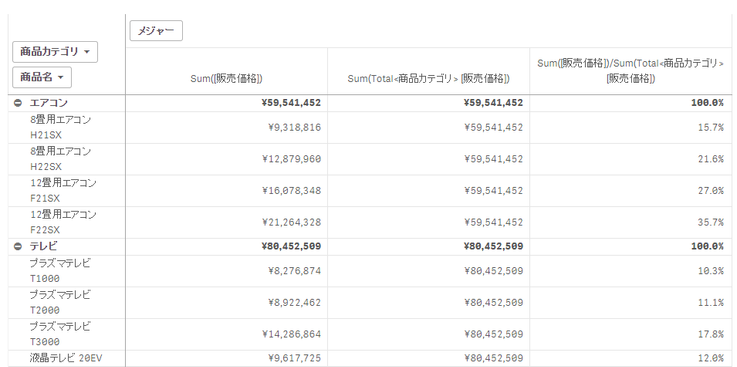
そのような場合は以下の形でTotalの後に集計を行う単位の軸の名前を<>で括って指定します。そうすると以下の様な形で全体ではなく「商品カテゴリ」ごとの合計を計算して、各商品カテゴリの中での各商品の売上構成比を算出することができます。
Sum(Total<商品カテゴリ> [販売価格])
選択を無視した合計の算出 – SET分析の活用
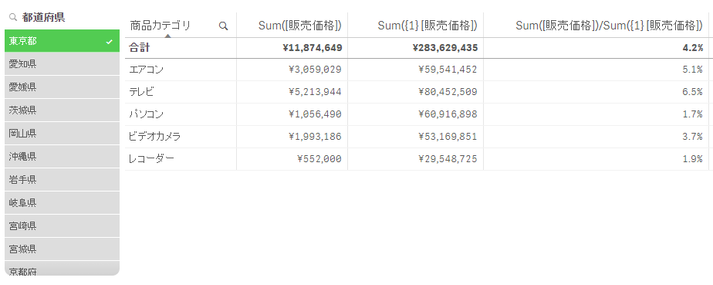
次にSET分析を活用して、選択を無視した合計の算出を行う以下の例を見てみます。ここでは、SET分析の「{1}」を指定しており、現在の選択範囲を無視して常に全体のレコードセットを対象として集計を行います。(SET分析については「思い通りのチャート集計を実現–Qlik SenseのSET分析」のエントリをご参照ください。)
Sum({1} [販売価格])そうすると、例えば上記の例では「都道府県」で「東京」のみの絞り込みを行っており、「Sum([販売価格])」にはその選択が適用されますが、「Sum({1} [販売価格])」には適用されないため、「商品カテゴリ毎の東京都での売上」を算出することができます。
同様に他の項目で絞り込みを行うと、軸に設定した「商品カテゴリ」単位で、全体のレコードに対する選択で絞り込まれたレコードの売上割合を出力することができます。
レコード数のカウント – Count, Count Distinct
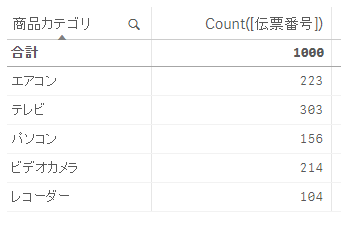
レコード数のカウントはCount関数を使い、例えば以下の形で「伝票番号」の数をカウントして「商品カテゴリ」毎の取引数を集計することができます。
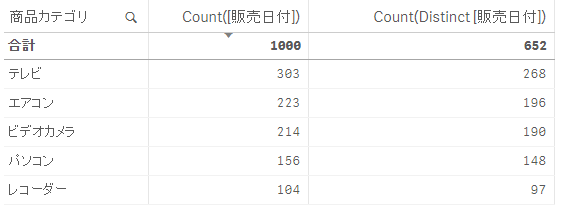
ただ、Count関数を利用するときには「延べ数」をカウントするのか、「ユニーク数」をカウントするかを意識することが必要な点に注意する必要があります。以下の例では、「Count([販売日付])」とすると延べ数をカウントしているので上記の「伝票番号」をカウントした値と同じになっていますが、「Count(Distinct [販売日付])」とすると重複が排除されてユニークな日付数がカウントされています。
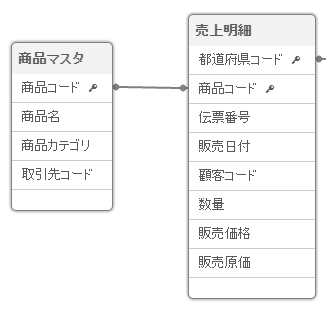
ただここで注意が必要なのは、キーとなっている項目に対するCount関数の利用する場合です。例えば以下の様なデータモデルで「Count([商品コード])」で集計した場合、どの様な集計が行われると期待するでしょうか?「商品コード」がキーとして「商品マスタ」と「売上明細」の両テーブルに含まれているため、数式の定義があいまいになってしまっています。
このように集計の定義があいまいになってしまうため、このような形でキーとなっている項目をCount関数で利用する場合には、求めていない値が算出されないように常にDistinctを付けた数式で利用することが基本的には推奨されます。
Count(Distinct [商品コード])
平均値の算出 – Avg, Sum()/Count(), Aggr
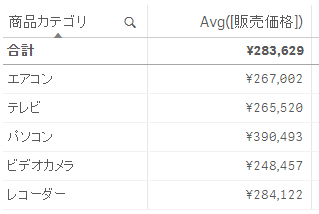
平均値の算出にはAvg関数が用意されており、以下の形で利用します。
ここで注意が必要なのは「何の平均値を算出しているか?」で、このような形で売上明細テーブルの販売価格に対してAvg関数を利用すると「取引(=伝票番号)毎の平均値」を算出します。
ただ、多くの場合では取引単位ではなく、例えば月や商品単位などの平均値を算出するようなことを行います。そのような場合には以下の様な数式を利用します。この例では、商品カテゴリでグループ化して、商品毎の平均売上高を算出しています。
Sum([販売価格])/Count(Distinct [商品名])
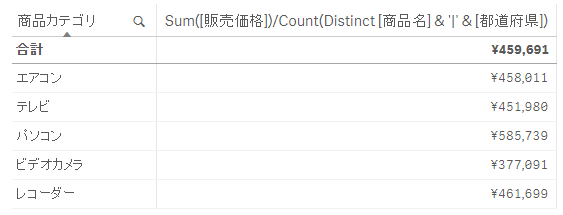
また、商品毎といった形で1層での平均ではなく、商品と都道府県といった形で複数層での平均を算出する場合には、以下の形で文字列を結合することで可能です。
Sum([販売価格])/Count(Distinct [商品名] & '|' & [都道府県])
尚、以上の計算はAggr関数を利用して行うことも可能で、それぞれ以下の形となります。(Aggr関数は「Qlik SenseのAggrによる高度な集計処理」で詳細をご紹介しています。)
Avg(Aggr(Sum([販売価格]),[商品名]))
Avg(Aggr(Sum([販売価格]),[商品名],[都道府県]))
まとめ
以上、Sum,Total,Count,Distinct,Avgなどを使った集計の方法をご説明しました。
-
Qlik Showcase(日本語版デモアプリサイト)のご利用について
■ Qlik Showcaseとは?『Qlik Showcase』はユーザー登録を行って頂くことで、公開された数多くのQlik Sense及びQlikViewの日本語版デモアプリをご自由に試して利用頂くためのパブリックサイトです。 ■ 利用開始方法以下の手順でQlik Showcaseへサインイン... Show More■ Qlik Showcaseとは?
『Qlik Showcase』はユーザー登録を行って頂くことで、公開された数多くのQlik Sense及びQlikViewの日本語版デモアプリをご自由に試して利用頂くためのパブリックサイトです。
■ 利用開始方法
以下の手順でQlik Showcaseへサインイン・ログオンを行います。
① Qlik Showcaseのサイトへのアクセス:以下のURLをクリックしてサイトにアクセスします。
https://qtjsc.ap.qlikcloud.com/
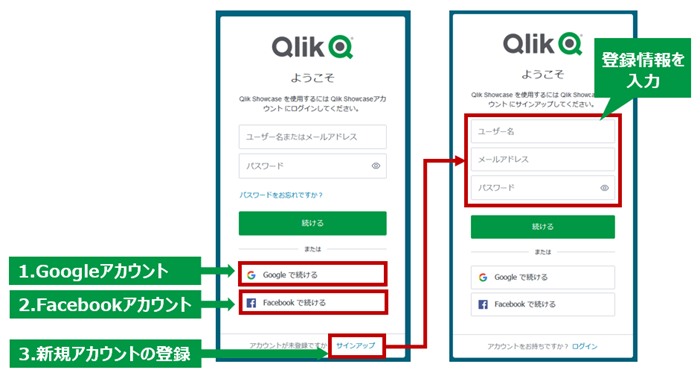
② サイトへのサインアップ:サインアップは以下のいずれかの方法で行うことができます。
- Googleアカウントによるログイン
- Facebookアカウントによるログイン
- 新規アカウントの登録(ID、パスワードの登録)
■ サイト利用における基本操作
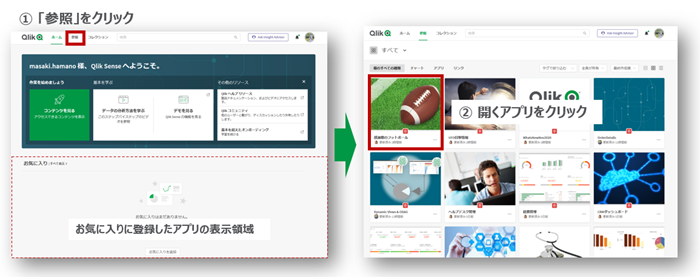
アプリを開く
以下の手順でアプリを開きます。
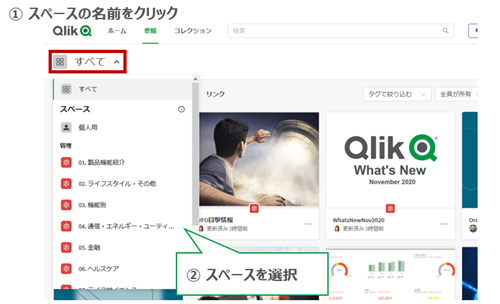
スペースの切り替え
アプリはスペースと呼ばれる単位で、アプリの業界別・目的別にカテゴリ分けされており、スペースを切り替えることでアプリ表示の絞り込みを行うことができます。
アプリの検索
検索ボックスでキーワードを入力して[Enter]を押すことで、アプリの検索を行うことができます。
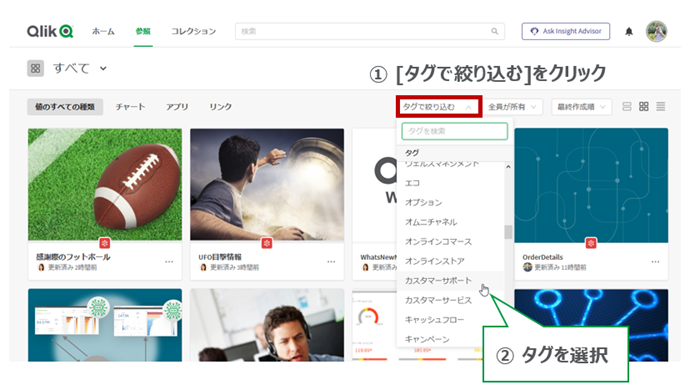
タグでの絞り込み
アプリにはタグが付加されており、タグでアプリの絞り込みを行うことができます。
コレクション(お気に入り)へのアプリの追加
アプリをコレクションに追加し、ホーム画面やコレクション画面に整理して表示させることができます。
■ サイト利用における注意点
- サイトの設定上、アプリ上でデータストーリーテリングやブックマークを作成することが可能となっています。ただし、他の利用者の迷惑にならないように他ユーザーへの共有などは控えてください。
- サイトでのメール送信の機能は無効としていますので、メール送信機能を利用するチャート画像のメール共有などの機能はご利用いただけません。
- Qlik Showcaseは複数の利用者で共有して利用するコミュニティサイトとなっています。他の利用者の迷惑になる行為や違法行為は行わないでください。当サイト利用における規約や行動規範については利用規約をご参照ください。
■ 公開デモアプリの募集
当サイトで公開するデモアプリを募集しています。当サイトのご利用者ご自身が作成されたデモアプリの中で公開可能なアプリをお持ちの場合、当ページ下部の連絡先までぜひご連絡ください。
■ 利用規約
当サイトはQlikTech, Inc.の日本法人が運用するQlikコミュニティサイトとして位置付けれ、以下のQlikサイトの利用規約に従って運営されています。
■ 連絡先
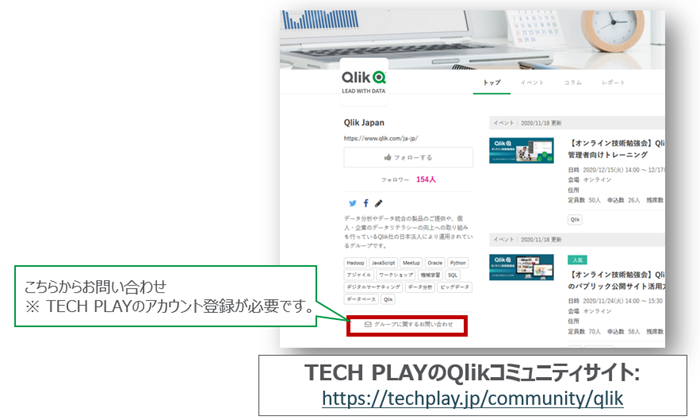
Qlik社の社員に直接ご連絡頂くか、以下イベントコミュニティサイトの[グループに関するお問い合わせ]よりご連絡ください。(TECH PLAYのアカウント登録が必要です。)
https://techplay.jp/community/qlik
-
日本語サンプルアプリ3
Qlik Sense の日本語サンプルアプリを公開します。 添付のqvfファイルをダウンロードし、Qlik Sense Desktopで開くか、Qlik Sense Businessにアップロードしてご覧いただくことができます。アプリの追加方法は下記をご参照ください。>>Qlik Senseへのアプ... Show MoreQlik Sense の日本語サンプルアプリを公開します。 添付のqvfファイルをダウンロードし、Qlik Sense Desktopで開くか、Qlik Sense Businessにアップロードしてご覧いただくことができます。
アプリの追加方法は下記をご参照ください。
Qlik連想技術
Qlikの連想技術はどのようにビジネスにおいて役立つのでしょうか。クエリーベースのツールと比較しながら、連想技術の特長を確認します。動画もご参照ください。
消費者販売の分析
消費者向け製品の販売会社の分析です。営業員、地域、製品などで分析します。
環境マネジメント(CSR)
事業活動が地球環境に与える影響を常に認識していなければなりません。企業は、持続可能な社会の実現に向けて、社会的責任を意識した活動を推進することが求められています。そのため、サプライチェーンを含めた環境マネジメントが求められています。本アプリでは、グローバルに拠点を持つ日本の機械メーカーの環境経営について解説します。
サプライチェーンリスクマネジメント
製品の共有を滞らせないためのサプライチェーンリスクを管理するためのアプリケーションです。部品調達、製造フロー、地理的リスクを分析します。
-
日本語サンプルアプリ2
Qlik Sense の日本語サンプルアプリを公開します。 添付のqvfファイルをダウンロードし、Qlik Sense Desktopで開くか、Qlik Sense Businessにアップロードしてご覧いただくことができます。アプリの追加方法は下記をご参照ください。>>Qlik Senseへのアプ... Show MoreQlik Sense の日本語サンプルアプリを公開します。 添付のqvfファイルをダウンロードし、Qlik Sense Desktopで開くか、Qlik Sense Businessにアップロードしてご覧いただくことができます。
アプリの追加方法は下記をご参照ください。
調達
組織が支出と契約を分析する方法を示しています。ユーザーは、発注書、契約範囲、支払いパターンなどを使用して調達を分析し、組織のどの部分が期限内に支払いを行い、残高があるかを判断し、契約のステータスと重要な契約日をモニターできます。
保険金請求の分析
このアプリにより、ユーザーは自動車保険会社の請求ポートフォリオを分析できます。請求の概要、コスト、期間及び不正請求を発見するための分析を行うサンプルとなっています。
医療のばらつき分析
さまざまなタイプの医療のばらつきに注目し、不当な医療のばらつきを削減するために何ができるかに焦点を当てています。医療提供者にサービス改善の重要な追加情報を提供する、洗練されたアプローチの可能性を強調しています。
患者費用分析
このアプリケーションは、患者記録、財務、および運用医療システムから取得したデモデータで開発しました。このアプリを使用すると、医師の費用プロファイルを確認し、個々の患者レベルとそれらの患者の治療に使用されたリソースにドリルダウンできます。 [行動]タブでは、個々のDRG別処置を選択し、臨床医毎の経費と在院期間のばらつきを確認できます。
-
Meet our newest Educator Ambassador César Brochero Castel!
Today I would like to introduce César Brochero Castel, an Academic Program Educator Ambassador for 2022!Cesar lives in Argentina where he is an Educat... Show MoreToday I would like to introduce César Brochero Castel, an Academic Program Educator Ambassador for 2022!
Cesar lives in Argentina where he is an Educator and has been teaching for 7 years at both the Universidad de Palermo and the Universidad Católica. He was inspired to join the Academic Program after discussing with his colleague the difficulties he had using other analytics solutions. During his first several years he taught QlikView and then he migrated to Qlik Sense and has been using that ever since! In addition to Qlik Sense, he also incorporates the Data Literacy training he is provided as part of his membership. Throughout his course the students are required to develop an analytical application using Qlik Sense in which each student freely explores the data with the aim of finding insights and sharing it with others. To help them, they use the social network connector available in Qlik Sense and other resources to go beyond normal dashboard reporting. During his time teaching Cesar has seen several students decide to use Qlik Sense during their employment which gives him great satisfaction to know that he has helped them out in their professional careers.
Cesar is also the Founder of QuAlytics SpA Chile which provides analytics solutions to South American companies using Qlik Sense.
When asking Cesar where he believes the industry is going, he replies “I feel that analytical skills are required today more than ever. Today's world requires people trained in data literacy to face the challenges that the world demands. The data is there today, but we must be able to understand it and get something good out of it. We must all go in that direction.”
When Cesar is not teaching or building his business, he spends time with his family who just welcomed baby Olivia!
Educators and students looking for free analytics software and training can apply to the Academic Program today by visiting qlik.com/us/company/academic-program
-
日本語サンプルアプリ1
Qlik Sense の日本語サンプルアプリを公開します。 添付のqvfファイルをダウンロードし、Qlik Sense Desktopで開くか、Qlik Sense Businessにアップロードしてご覧いただくことができます。アプリの追加方法は下記をご参照ください。>>Qlik Senseへのアプ... Show MoreQlik Sense の日本語サンプルアプリを公開します。 添付のqvfファイルをダウンロードし、Qlik Sense Desktopで開くか、Qlik Sense Businessにアップロードしてご覧いただくことができます。
アプリの追加方法は下記をご参照ください。
CRMダッシュボード
CRMデータを分析するダッシュボードです。顧客や商談、営業担当者のパフォーマンスまで分析し、受注金額トップ10の案件や、案件のステータス、顧客の数と案件の規模と受注数の相関関係などを見ることができます。
ヘルプデスク管理
社内の従業員がIT部門に依頼した用件のデータを可視化しています。これには、コンピューターのアップグレードの要求や、携帯電話の故障などが含まれます。各用件はIT担当に割り当てられますが、ITマネージャーは、どの用件が優先度が高いか、またはどの用件がまだ担当に割り当てられていないかを認識する必要があります。
財務ツールキット
このアプリケーションでは、Qlikで解決できる、為替換算、キャッシュフロー、損益分岐点など財務チーム向けの10種類の分析をご紹介します。
人材管理
従業員の人口統計、離職率、新入社員、退職、給与を分析できます。このアプリのデータのほとんどは人事管理システムから取得されていますが、給与・報酬システム、採用システム、Active Directory(LDAP)、学習管理システム、その他のローカルソース(XLS、CSVなど)などの他のソースからのデータも含まれます。
-
Qlik Senseへのアプリの追加方法
■ はじめに別の環境で開発されたアプリや、Communityサイトからダウンロードしたサンプルアプリなどを、自分の Qlik Sense 環境に追加して使用することができます。Qlik Senseのアプリケーションは、拡張子 qvf のファイルとして格納されますが、このファイルを自分のQlik Se... Show More■ はじめに
別の環境で開発されたアプリや、Communityサイトからダウンロードしたサンプルアプリなどを、自分の Qlik Sense 環境に追加して使用することができます。Qlik Senseのアプリケーションは、拡張子 qvf のファイルとして格納されますが、このファイルを自分のQlik Sense環境に取り込む方法をご説明します。
■クラウド版 Qlik Sense の場合
ハブ画面右上の[+新規作成]>[アプリをアップロード]をクリックします。
qvfファイルをドラッグアンドドロップするか、フォルダからファイルを指定して、追加先のスペースを指定して、[アップロード]をクリックします。
複数同時に追加することもできます。
■Qlik Sense Desktop の場合
ローカルフォルダの「C:\Users\%username%\Documents\Qlik\Sense\Apps」にダウンロードした.qvfファイルを配置することで、Qlik Senseのハブ上にアプリが追加されます。
-
Qlik アドボケイトのオンラインミートアップ開催報告
3月16日に Qlik アドボケイトのオンラインミートアップが開催されました。当日は Qlik Luminary も含め、16名の方にご参加いただきました。まず、Qlik より最新の製品アップデートをご紹介しました。 続いて「Qlik 愛を社内外に発信していただく」というアドボケイトに対する Ql... Show More3月16日に Qlik アドボケイトのオンラインミートアップが開催されました。当日は Qlik Luminary も含め、16名の方にご参加いただきました。
まず、Qlik より最新の製品アップデートをご紹介しました。
続いて「Qlik 愛を社内外に発信していただく」というアドボケイトに対する Qlik からの期待を表明いたしました。
また、多くの皆さんが抱えている課題を提示いたしました。
- 社内で効果的かつ使ってもらえるアプリとは?
- Qlik を使ってどのようにビジネスを改善・向上できるか?
- 社内でどうしたら Qlik ユーザーが広がるか?
- 質の高い分析のためにはデータ基盤はどうあるべきか?
続いて、「アプリ開発(技術)」「教育・拡張」「データ基盤」の3つの分科会に分かれ、Qlik 社員を交えて意見交換を行っていただきました。
さらに、それぞれのトピックにとどまらず、以下のような課題やストプラクティスも共有されました。
- データセキュリティに関して技術部門と非技術部門で温度差がある
- 必要なデータを部門が出したがらないサイロ問題
- 閲覧されたダッシュボードのランキングを公開、上位にはプレゼント提供などでモチベーションアップ
- アプリを作る際には、現場と要件を固めて一緒に作るようにする
今後も継続的なミートアップを開催し、意見交換を通じてノウハウを蓄積し、ユーザーのみなさまへフィードバックできる機会も設けていきます。ご期待ください。
-
Qlik Senseロードスクリプトによる変換処理の基礎
■ はじめにQlik SenseではGUIでのウィザードベースの操作によるデータ追加や管理を行えますが、それに加えてロードスクリプトによる処理も可能です。実際のビジネスの現場では、分析する前に多岐に渡る複雑な変換処理が求められることが多いですが、ロードスクリプトによりそのような要求に対応することが出... Show More■ はじめに
Qlik SenseではGUIでのウィザードベースの操作によるデータ追加や管理を行えますが、それに加えてロードスクリプトによる処理も可能です。実際のビジネスの現場では、分析する前に多岐に渡る複雑な変換処理が求められることが多いですが、ロードスクリプトによりそのような要求に対応することが出来ます。
ここでは、まずQlik Senseでのデータ管理のコンセプトをご紹介した上で、ロードスクリプトの基本をご説明したいと思います。
■事前の準備
このエントリでは、「10分で試すQLIK SENSEでデータ分析」の手順に従って、Qlik Sense Business(SaaS版)の無料トライアルを開始、またはQlik Sense Desktopのインストールを行い、アプリの作成(「売上分析」アプリ)が完了していることを前提に作業を進めます。もし作業をまだ実施されていなければ、以下のリンク先の手順に従って作業を実施して下さい。
また今回、追加で「顧客マスタ.xlsx」のファイルを利用します。以下からダウンロードして下さい。
■Qlik Senseのデータ管理のコンセプト
Qlik Senseでは、取り込むデータの管理方法としては大きく2つの方法があります。
「データマネージャー」による管理
GUIでのウィザードベースの操作でデータの追加などを行える管理方法です。技術に精通しないユーザーでも簡単にデータの取り込みなどを行うことができ、これまでのチュートリアルの作業で主に利用してきた方法となります。ファイルのドラッグ&ドロップによるデータの追加(クイックデータロード)もこの方法に含まれます。
「データマネージャー」へはナビゲーションバーの準備タブからアクセスすることが可能です。
以下の画面上でデータ追加のウィザードを呼び出したり、データの削除を行うことが可能です。
「データロードエディタ」による管理
Qlik Senseでは複雑な変換処理などを実装できる強力なロードスクリプトが提供されています。ロードスクリプトはこの「データロードエディタ」で管理を行うことができます。
「データロードエディタ」はナビゲーションバーの準備タブから呼び出すことが可能です。
「データマネージャー」でデータが追加された場合には、それに対応するデータ追加のスクリプトが自動的に生成されます。これまで「データマネージャー」で行ったデータの取り込み、変換などの処理が、以下の形でスクリプトとして記述されていることが確認できます。
また、アプリ作成直後に以下の様なメニューが表示されていたかと思いますが、右側の「ファイルおよびその他のソース」が「データマネージャー」による管理、下段の「データロードエディタ」が「データロードエディタ」による管理をそれぞれ選択する形となります。「データカタログ」はクラウド版のみの機能で、ここからもデータの追加が行えます。
「データマネージャー」から「データロードエディタ」への管理切り替え
「データマネージャー」でデータが追加された場合には、「自動生成セクション」タブに対応するスクリプトが追加され、このタブはデータマネージャーの管理下に置かれます。この「自動生成セクション」はロックされ、編集が出来ない状態となっています。
これまでのチュートリアルでは別のタブを追加してスクリプトを追加しましたが、この「自動生成セクション」を編集しない限りでは「データマネージャー」と「データロードエディタ」の両方での管理を併存して行うことが可能です。
また、「自動生成セクション」のロックを解除して「データロードエディタ」上で編集を行うことも可能です。ただし、一旦ロックを解除するとデータマネージャーを使用してこの「自動生成セクション」に含まれていたデータの管理やこれらのデータに対するプロファイリングが出来なくなりますので注意が必要です。
ここでは、「自動生成セクション」のロック解除を行って編集をしていきたいと思います。「自動生成セクション」タブを選択し、「ロック解除」ボタンをクリックします。警告が表示されますので、再度「ロック解除」ボタンをクリックします。
■データロードエディタでの基本作業
顧客マスタのアップロード
ダウンロードした「顧客マスタ」を新たにクラウド上にアップロードして追加します。まず、「自動生成セクション」タブを開いて「商品マスタ」のロード文の最後尾を改行してカーソルを合わせます。
そして「データロードエディタ」右側の「データ接続」欄の DataFiles フォルダのテーブルアイコンをクリックします。
「ファイルを選択」画面の下部、「ここにファイルをドロップするか、ファイルをクリックして選択します。」欄に、「顧客マスタ」をドラッグアンドドロップします。
データがアップロードされました。
データロードのスクリプト追加
次に同じ画面で一覧から「顧客マスタ」を選択し「選択」をクリックします。
「スクリプトを挿入」をクリックします。
データロードのスクリプトが挿入されました。
■ロードスクリプトによる変換処理
ロード文での変換処理
追加されたスクリプトには先頭にLOAD文が含まれています。このLOAD文に変換処理を追加することで、FROM以下で定義されたファイルから取り込まれたデータに対してQlik Sense内で様々な変換処理を行うことが出来ます。
先ほど取り込んだ顧客マスタのデータ形式は以下の様になっています。
ここでは、このデータに対して以下の変換処理を行います。
- 「顧客登録番号」の項目名を「顧客コード」に変換
- 「顧客登録番号」に含まれるデータの先頭の「CU-」の部分を削除
- 「生年月日」の項目を削除
これらの変換処理の実装後のスクリプトは以下になります。
顧客マスタ:
LOAD
    SubField(顧客登録番号, '-', 2) AS 顧客コード,
    氏名,
    性別,
    //生年月日,
    年齢,
    血液型
FROM [lib://DataFiles/顧客マスタ.xlsx]
(ooxml, embedded labels, table is 顧客マスタ);
ここでは以下の様な処理を行っています。- SubFieldでは区切り文字を指定してサブストリングを取得することが出来ます。ここでは「-」を区切り文字に指定し、2番目のサブストリング(入力値が「CU-1001」の場合は「1001」の部分)を取得しています。
- ASにより項目名の指定・変更を行えます。ここでは1項目の名称として「顧客コード」を指定しています。
- 「生年月日」は「//」でコメントアウトすることで取り込み対象から外しています。
また、先頭に「顧客マスタ:」を追加していますが、これにより格納先のテーブル名を明示的に指定できます。(既定ではファイル名がテーブル名に設定されます。)スクリプトの修正が完了したら右上の「データのロード」ボタンをクリックし、ロードを実行します。
ロードの完了後、「データモデルビューア」を開いて取り込まれたデータを確認します。以下の形で「顧客コード」で「売上明細」と自動的に関連付けがなされ、想定通りに変換されたデータが格納されていることがプレビューから確認できます。
先行ロード文
ここまでロード文に変換処理を追加してきましたが、さらに先頭にロード文を追加し、下のロード文の出力データを入力として数珠つなぎでさらに変換処理を継続することができます。ここでは以下の変換処理をさらに追加したいと思います。
- 「顧客連番」の項目を追加し、1からの連番を格納
- 「顧客コード」と「氏名」をハイフンで連結した「顧客コード・氏名」の項目を追加
以下の赤字の部分が追加されたスクリプトになります。
顧客マスタ:
LOAD
    *,
    RowNo() AS 顧客連番,
    顧客コード & '-' & 氏名 AS 顧客コード・氏名
    ;
LOAD
    SubField(顧客登録番号, '-', 2) AS 顧客コード,
    氏名,
    性別,
    //生年月日,
    年齢,
    血液型
FROM [lib://DataFiles/顧客マスタ.xlsx]
(ooxml, embedded labels, table is 顧客マスタ);
追加された部分では以下の様な処理を行っています。- 「*(ワイルドカード)」により下のロード文から入力として受け取った全ての項目をそのまま出力しています。
- 読み取られているレコードの行数を1から始まる整数で返すRowNo()関数を使い、「顧客連番」の列を生成しています。
- 「&」で顧客コード、ハイフン、氏名の文字列の連結を行った新たな項目を生成し、「顧客コード・氏名」の項目名称としています。
再度ロード処理を実行します。実行後データを確認すると、以下の形で項目が追加されていることが確認できます。
■まとめ
Qlik Senseでは複雑な変換処理などを実装できる強力なロードスクリプトが提供されており、このエントリでは基本的なロードスクリプトの利用と変換処理の追加方法をご説明しました。
-
Free Live Webinar - Welcome to the Qlik Continuous Classroom
This introductory webinar explores the Qlik Learning Portal and the different ways to locate and access our content.With over 300 courses, personalize... Show MoreThis introductory webinar explores the Qlik Learning Portal and the different ways to locate and access our content.
With over 300 courses, personalized learning plans and qualifications, let us help you start to become familiar with all the Qlik Continuous Classroom has to offer!
Host: Kristina Parks
Language: English
Session duration: 45 minutesAccess a recorded session now or register for a 45-minute live sessions held monthly on first Tuesday of the month at 11:00am EDT. Sessions are recorded; register to receive the on-demand recording.
Happy Learning!
-
Delivering Explainable BI – Qlik expands lineage capabilities
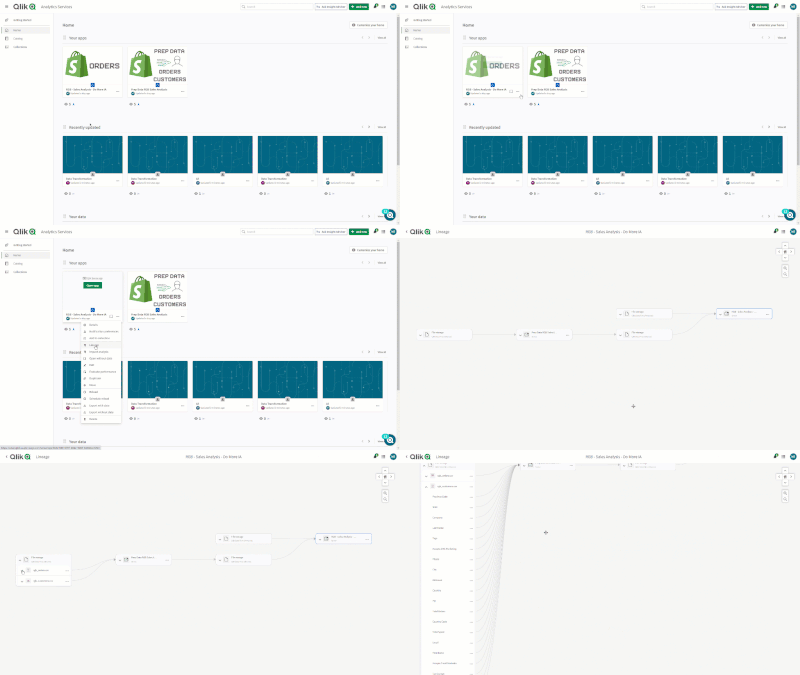
We expanded our lineage capabilities to not only visually show data history by table but also the specific field within a table - starting with end-us... Show MoreWe expanded our lineage capabilities to not only visually show data history by table but also the specific field within a table - starting with end-user applications all the way back to the original source.
This enhancement also means that if you are using the Qlik Lineage Connectors, you will now be able to see field-level lineage for content within Qlik Sense Client-managed, Tableau, PowerBI and various on-premise data repositories. Remember that any Qlik Sense SaaS customer can use the Qlik Lineage Connectors for free with Qlik-related sources.
Since being able to provide field-level lineage helps users establish more trust in the data, we’ve also added a new chart option that enables any user to select a data lineage summary that shows the origin of all related dimensions and measures.Finally, we’re also making a distinction between Impact Analysis and Lineage. Lineage is more focused on looking upstream (ex. “where did this data in the app come from?”) while Impact Analysis is more about looking downstream (ex. “which apps are using this data field?”). There are now selections for both “Impact Analysis” or “Lineage” within the app drop-down menu. Selecting “Impact Analysis” (which initially will only be available to Tenant Admins) produces a new screen that shows which databases, apps, files or links are directly or indirectly impacted if the value of a particular field was changed.
To learn more, visit help.qlik