With the design work to introduce Spaces, available in Qlik Sense cloud-based editions and discussed in Part 1 of this series....todayFredrik Lautrup is back with Part 2 - sharinghow his team wants to evolve the life-cycle for content in Qlik. Observing and talking to our customers we have seen that there are often two needs that the customer wants to cater for with their Qlik platform.
The ad-hoc flow where you develop concepts and explore data. Here it is important that you can be agile and collaborate on content quickly.
The governed flow where quality and control are important to create trust with the users who want to make decisions based on the data.
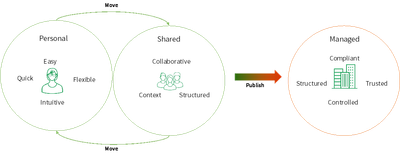
So, we set out to create the two flows. In the ad-hoc flow we have personal spaces as a starting point where you can do experimentation and exploration of your data and the shared spaces where you can continue your collaboration around with others on the data. Both these space types are targeted for self-management allowing users to quickly and in an agile/collaborative way work to author content. But once we have content that we want to move into production for consumers and self-service users to explore and make decisions on we have a different set of requirements targeted at creating trust. Here we have the managed spaces which introduce a more controlled release process allowing users to trust the quality of content.
With two flows, ad-hoc and governed, we need a way to bridge them. This is publishing.
The publish workflow allow developers to continue developing while consumers and self-service users can start using the content to make data driven decisions. This is achieved by the publish workflow by creating a copy and move one of the items to the managed space locking it for changes. While maintaining a linked copy in the ad-hoc flow to continue building on. When a new version of the app is ready the content can be moved in a controlled manner into the managed space again.
With the publishing as a bridge we have been able to evolve the content life-cycle to both support an ad-hoc flow for the agile/collaborative work and bridge this with the managed flow to maintain the trust in the data.
But even if this default life-cycle has evolved there are always more advanced use cases that we would like to support, so in the next post I will walk through some of the more advanced capabilities that will be built out to support things like data movement and release management of content.
If you have questions or ideas, please do not hesitate to put a comment below.
For more information on spaces and our cloud editions of Qlik Sense check out this 2 part videos series plus bonus video on Spaces.
Take a Tour of our cloud editions of Qlik Sense
Spaces
...View More
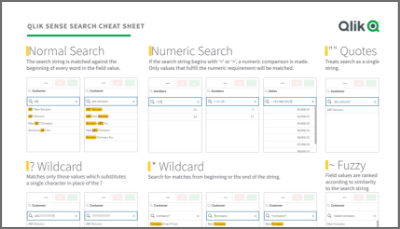
It was back in 2015 when I first published the original Qlik Sense Search Cheat Sheet. Since then, and thanks to lots of individual contributors here in the Community, the Search Cheat Sheet has suffered several transformations to make it more complete and truthful.@afurtadowrote me an email a few weeks ago because he was interested in getting the document localized for the Brazilian folks out there. In addition to thank him for his contribution and sending him the file I decided that it was about the time to get the Search Cheat Sheet an update.Today I want to introduce a new version of the document. I added the compound search section to it (@jayanttibhe thanks for the tip), and I redesigned and rationalized the position of each element for better comprehension.As an extra, I made the document multilanguage ready. So, if someone wants to translate the Cheat Sheet to other language (currently available in English, Spanish and Portuguese) please let me know in the comments section and I'll gladly tell you how to help us.LanguageURLContributor(s)English - USAhttps://webapps.qlik.com/search-cheat-sheet/Qlik+Sense+Search+Cheat+Sheet+en-US.pdfPortuguese - Brazilhttps://webapps.qlik.com/search-cheat-sheet/Qlik+Sense+Search+Cheat+Sheet+pt-BR.pdf@afurtadoSpanish - Spainhttps://webapps.qlik.com/search-cheat-sheet/Qlik+Sense+Search+Cheat+Sheet+es-ES.pdfGermanhttps://webapps.qlik.com/search-cheat-sheet/Qlik+Sense+Search+Cheat+Sheet+de-DE.pdf@g_mitschkeRussianhttps://webapps.qlik.com/search-cheat-sheet/Qlik+Sense+Search+Cheat+Sheet+ru-RU.pdf@martynovaItalianhttps://webapps.qlik.com/search-cheat-sheet/Qlik+Sense+Search+Cheat+Sheet+it-IT.pdf@AntonioCostantinoFrenchhttp://webapps.qlik.com/search-cheat-sheet/Qlik+Sense+Search+Cheat+Sheet+fr-FR.pdf@arychenerHope you like it, and please share it.ArturoUpdates:Feb 28: French version thanks to@arychenerFeb 25: Italian added thanks to@AntonioCostantino. Russian translation updatedFeb 13, 2020: Cheat sheet includes now the ^ Wildcard to be consistent with Qlik Help. Russian language added thanks to the contribution of@martynovaJan 29, 2020: German language added thanks to the contribution of@g_mitschke
...View More
Hi guys – I have some great news to share in preparation for our annual customer and partner conference, Qlik World, formerly known as Qonnections. For the first time, you will now be able to immediately join the discussion with those attending QlikWorld - including Qlik’s team of experts - on event-related content and events – all via our Qlik Community forum.
We have created a new forum in the Qlik Community where you can post questions, view Qlik World documents and learn more about the informative sessions you may want to attend. You will have inside access to many of the Qlik World key topics and themes to be presented, giving insight into our 2020 direction. There will be a selection of Qlik employees available to “Qonnect” with – whether they are product specific or event related, who will have the answers for you! . You can also subscribe to boards in the Qlik World forum to be notified of content that is published.
Areas available: • Data Analytics Platform • Data Integration Platform • Data Literacy • Customer Success & Use Cases • Customer Success & Data Literacy • Technical Training & Certifications • Event Info • Panel & Round Table Sessions • Partner Success & Integration
So get connected, be involved and share your ideas with your peers and Qlik’s data and analytics experts who are passionate about Qlik's platform, transforming business processes and driving data-driven insights. This forum will get you energized and ready for Qlik’s largest customer and partner event of the year. Let’s start a discussion.
Join me in the QlikWorld forum today.
Check it out!
Register for QlikWorld here.
BTW - here is a shameless plug - check out what I'll be up to at QlikWorld- have a question? Let us know, we'll do our best to answer.
Hope to see you there!Regards,Mike Tarallo - TwitterQlik
...View More
Hi Guys
Recently, we've had some communication in regards to the registration process for a Qlik Sense Business tenant. Though, it is fairly simple and straightforward, some people prefer to see it in action first before actually attempting to do it. So I decided to show you the steps needed to register the tenant both with or without a Qlik Account.
I have also created a quick video showing how quickly you can create your first Qlik Sense app and add data to it. (Sample data file attached below). Note these videos can be quickly used in situations where you just need to get started as quickly as possible and don't necessarily have the time to watch a longer product tour (also available). Please see link below for other detailed resources and let me know if you have any comments or question.
Also - don't forget to enter the #QlikHighlights2019 $100 Amazon Giveaway for your chance to win a $100 Amazon gift card. Official rules and more information available here:https://community.qlik.com/t5/Qlik-Design-Blog/The-QlikHighlights-100-Gift-Card-Giveaway-Starts-Today/ba-p/1663495
Regards,
Mike TaralloQlik
Register Your Qlik Sense Business Tenant
Create Your First App
Resources
Topics You Need to Knowhttps://community.qlik.com/t5/Qlik-Sense-Documents-Videos/New-to-Qlik-Sense-Topics-You-Need-to-Know/ta-p/1530582
...View More
Almost two years ago, in February of 2018, the Qlik Demo Team (Qdt) publicly released qdt-components (GitHub, npm). We originally built Qdt-components as an internal library designed to help us create demos to showcase Qlik Sense Enterprise. We opened up the library to help others use the new Qlik APIs and create interesting mashups with their data. Since that initial release, we've written over a dozen blog posts to the Qlik Community Design Blogdetailing how to use the various Qlik Sense and Picasso.js charts available via Qdt-components. In 2019, we hit 50 stars on GitHub, putting us in the top 1% of all open-source projects on GitHub. We've recently made some updates to our documentation and we wanted to re-introduce Qdt-components, show off our new logo, and highlight this powerful library's practical uses and recently added features.Qdt-components is designed to be a library-agnostic method of connecting to Qlik Sense and displaying visualizations. Whether that is bringing in entire Qlik Sense charts and objects or building your own visualizations, Qdt-components is an easy-to-setup wrapper that can be used in a number of different ways. We've written in the past on this blog about the pros and cons of using the various APIs to connect to Qlik Sense (Getting Started with Qlik APIs, Integrating Qlik Sense into your Web App), an area that developers can easily get tripped up on. With Qdt-components, the question of whether to use the Capability API or incorporating Enigma.js has already been handled. You just need to answer one simple question: do I want to use charts and objects directly from my Qlik Sense app? If so, then you want access to the Visualization API; otherwise, the Engine API is sufficient.Bringing in Qlik objects with the Visualization API means that it'll have the appearance you'd see in a Qlik Sense app. If you don't need to customize the look of your objects for your web app, then you can just build the charts / toolbars / etc. in Qlik Sense and bring them into your mashup using their object id's. If you want to skip all that, you can use our pre-built components by simply specifying the dimensions, measures, columns, etc. you need. Here are the available components as of 01/01/2020, the appropriate Qlik API required for the configuration object, and links to documentation to get you started:QdtVizThese are used to bring in Qlik Sense objects exactly as they are in Qlik Sense. QdtViz components require the Visualization API (vizApi: true) and are one of the easiest to implement; you just need the object's id.Visualization API: yesEngine API: noBlog Posts:qdt-components - A Components Library that can be used in simple Html, Angular 5 and ReactDocumentationQdtCurrentSelectionsLike QdtViz, QdtCurrentSelections requires the Visualization API and appears as it is from Qlik Sense. It can be used to show your user's current selections in the familiar, Qlik-styling. The only property you need to specify is its height.Visualization API: yesEngine API: noDocumentationQdtFilterUsing the Engine API, QdtFilter is a simple dropdown based on a column from your data.Visualization API: noEngine API: yesDocumentationQdtSelectionToolbarThis component displays a toolbar with the current app selections.Visualization API: noEngine API: yesDocumentationQdtPicassoThe QdtPicasso component actually comprises several Picasso.js charts; fifteen (15) as of January 10, 2020. Picasso.jsis a charting library streamlined for building interactive visualizations for the Qlik product suites. With Qdt-components, connecting to and using Picasso.js is super easy because it's already built in...no need to import Picasso.js yourself.Visualization API: noEngine API: yesBlog Posts: qdt-components - Horizontal Barchart by Picasso.js & Selection Toolbar,Qdt-components & Picasso.js - More Charts!,Qdt-components - custom charts with Qlik's Open Source picasso.js,Creating custom charts with qdt-components,DocumentationQdtSearchThe QdtSearch component is a simple text input field that can be used to search a dimension of your data.Visualization API: noEngine API: yesDocumentationQdtMapBoxWe've recently added our MapBox integration with the QdtMapBox component. You'll just need a MapBox API key and desired styling to create a map showcasing your data.Visualization API: noEngine API: yesBlog Posts:Creating a Geo Map with qdt-components and MapBoxDocumentationQdtTableBuild a sortable table of your data using QdtTable.Visualization API: noEngine API: yesDocumentationGetting started with Qdt-components is easy but we've created several templates to make it even easier:HTML / Vanilla JavaScript Template,HTML Documentation, DemoReact Template,React Documentation, DemoAngular Template,Angular Documentation, DemoAnd lastly, do you have an idea for a feature, bug fix, or chart to add? You can open an issue on GitHub or contribute!
...View More
Hey guys – it’s that time of year again for my annual #QlikHighlights contest which showcases the passion you have for Qlik and the interesting solutions created with our products. This is your chance to share an awesome, or memorable, Qlik moment from 2019 - such as a partner or customer success story, a personal experience enriched by Qlik, a global event where we made an impact, or a product feature that transformed your business.
Normally, we run this on Twitter, but this time I’m opening it up to our LinkedIn followers as well. This means we will have one Twitter winner (ha ha - say that 3 times fast) AND one LinkedIn winner. Oh, and the Amazon Gift Card prize has increased from $50 to $100!
All you need to do is post your memorable Qlik related piece of content or memorable moment with the hashtag #QlikHighlights2019 and tag me @Anonymous on Twitter or @Michael_Tarallo on LinkedIn to be entered and so I am aware and so I can re-share your Qlik awesomeness.
For example – did Qlik Insight Bot provide you with a unique, AI powered conversational analytics experience? Did the acquisition of Attunity introduce you to a new breed of enterprise data management capabilities? We want to know!
Or you could share your success stories on the use of our multi-cloud architecture, AI capabilities, the associative difference, and other great features that have solved your business problems! We want to hear from you on how Qlik has made a difference and how we have helped transform your business over the past year. Be creative and get posting, I will announce the winner in March. See below for official contest rules.
Regards,
Mike TaralloLinkedInTwitter
#QlikHighlights2019 Giveaway Official Rules
Winner will be selected and announced on Twitter and LinkedIn by Michael Tarallo on March 3rd, 2020 in the Tuesday edition of the Qlik Design Blog. Only one unique winner per social media platform. Entries will be randomly selected by a hashtag selection app. Entries must be an interesting or valid Qlik highlight or discovery - which can include screen shots, pictures, videos and links. Only one entry per participant. If multiple entries are submitted they will be considered and the best one judged. Non-qualifying entries will be discarded and the next entry will be selected at random. Contest starts Tuesday, Jan 8, 2020 and ends on February 28th 2020. Amazon Gift cards / codes are only valid to participants where Amazon services are available.
Previous Winners:
2017 - Greg Anderson:https://community.qlik.com/t5/Qlik-Design-Blog/and-the-winner-is/ba-p/1467553
2018 - Chris Lofthouse:https://twitter.com/mtarallo/status/1096457870722457600
...View More
I recently rebuilt our custom table in the qdt-components library that we use on the demo team here at Qlik. You can check out an example athttps://qdt-apps.qlik.com/qdt-components/react/#/table-engine. Perhaps the trickiest part to get just right was sorting. When a user clicks on a column header, the sorting needed to update to sort by that column, and that part is pretty straightforward, just patch the objects qInterColumnSortOrder and move that column's index to the front of the array. But how do I know to display to the user in the column header whether that column is sorting by descending or ascending? And what if the user clicks on that same column header again to reverse the sort order of that column? Then I learned about the qSortIndicator and qReverseSort sort properties.You can find the values of the qSortIndicator and qReverseSort properties in the qDimensionInfo and qMeasureInfo structs in qLayout. Basically, qSortIndicator just returns either 'N' for no sort, 'A' for ascending sort, or 'D' for descending sort, and qReverseSort indicates with true or false whether the sort order is actually reversed. And you can set the qReverseSort to reverse the sort order inside the qDef of the dimension or measure. With these properties in hand, I was able to correctly display in the column header of the active sorted column whether the sort was ascending or descending, as well as handle reverse sorting of a column with relative ease. Let's take a look at it.First thing I do is grab all the information I need for each column. That looks like this.const columns = useMemo(() => (
qLayout
? [
...qLayout.qHyperCube.qDimensionInfo.map((col, index) => ({
Header: col.qFallbackTitle,
accessor: (d) => d[index].qText,
defaultSortDesc: col.qSortIndicator === 'D',
id: col.qFallbackTitle,
qInterColumnIndex: index,
qPath: `/qHyperCubeDef/qDimensions/${index}`,
qSortIndicator: col.qSortIndicator,
qReverseSort: col.qReverseSort,
})),
...qLayout.qHyperCube.qMeasureInfo.map((col, index) => ({
Header: col.qFallbackTitle,
accessor: (d) => d[index + qLayout.qHyperCube.qDimensionInfo.length].qText,
defaultSortDesc: col.qSortIndicator === 'D',
id: col.qFallbackTitle,
qInterColumnIndex: index + qLayout.qHyperCube.qDimensionInfo.length,
qPath: `/qHyperCubeDef/qMeasures/${index}`,
qSortIndicator: col.qSortIndicator,
qReverseSort: col.qReverseSort,
})),
]
: []
), [qLayout]);I'm just looping through all of the qDimensionInfos and qMeasureInfos, grabbing the header name, and storing information such as the column header text in addition to the qSortIndicator and qReverseSort. I also set a property called defaultSortDesc which is true if qSortIndicator is 'D', and false otherwise. This property is what is used by the react-table library, which I used to build the table, to display whether the column header displays whether the sort is descending or ascending.Next, I need a function to handle sorting change. The callback for clicking on a column header in react-table provides a newSorted prop, which includes the new direction of the sort, and a column prop, which includes the column data for the header clicked. I apply two patches when a user clicks on a header, one which sets the qReverseSort correctly if needed, and one that updates the qInterColumnSortOrder to move that columns qInterColumnIndex to the first position in the array. That looks like this.const handleSortedChange = useCallback(async (newSorted, column) => {
setLoading(true);
await applyPatches([
{
qOp: 'replace',
qPath: `${column.qPath}/qDef/qReverseSort`,
qValue: JSON.stringify((newSorted[0].desc !== column.defaultSortDesc) !== !!column.qReverseSort),
},
{
qOp: 'replace',
qPath: '/qHyperCubeDef/qInterColumnSortOrder',
qValue: JSON.stringify([...qLayout.qHyperCube.qEffectiveInterColumnSortOrder].sort((a, b) => (a === column.qInterColumnIndex ? -1 : b === column.qInterColumnIndex ? 1 : 0))), //eslint-disable-line
},
]);
setPage(0);
}, [applyPatches, qLayout]);Now i can simply display the table using react-table like so.<ReactTable
manual
data={qData ? qData.qMatrix : []}
columns={columns}
onSortedChange={handleSortedChange}
multiSort={false}
/>And that's it. You can check out the example athttps://qdt-apps.qlik.com/qdt-components/react/#/table-engineand the full code for the table athttps://github.com/qlik-demo-team/qdt-components/blob/master/src/components/QdtTable/QdtTable.jsx
...View More
Hi Guys! It's time for another Tuesday Edition of the Qlik Design Blog. Today I have the pleasure of introducing a special guest blogger, Fredrik Lautrup.Fredrik is a long time Qlikkie, leadingour product designers in our Product Design Group. Fredrik’s BI and analytics experience stems from working with many customers in areas of product design, security and licensing. He has worked with numerous enterprises in different roles - from IT, security to strategic information systems and is responsible for design and workflow of our products.
Today Fredrik is sharing a 2 part series that will introduce you to our new content management paradigm, available with the cloud editions of Qlik Sense, known as Spaces. In this entry he will discuss what Spaces are, the types of Spaces available and why they are important and should be used. He also elaborates on additional attributes known as Favorites and Collections which adds a personal touch to your Qlik Sense app organization and navigation experience. Allowing you to access and manage content that is most important to you.
Take a look at the PDF attachment (1 - Why the need for spaces, favourites and collections.pdf) to get started learning about Spaces.
Thank you Fredrik for your valuable contribution.
For more information on spaces and our cloud editions of Qlik Sense check out this 2 part videos series plus bonus video on Spaces.
Take a Tour of our cloud editions of Qlik Sense
Spaces
------ QlikWorld 2020 ------
DON' FORGET - QlikWorld 2020 will be here sooner than you think. Discover how to get the most from your data
Register by Dec 31 to save $400.
...View More