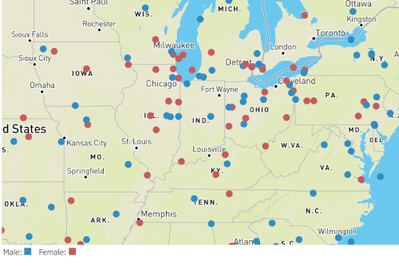
Qdt-components is a library that we build in the Demo & Innovation Team to facilitate most of our needs by communicating with Qlik Servers and displaying visualizations in websites. This can happen with either the Capability API where we just supply the object id and show the visualization that we have already created in Qlik Sense or, by the Engine API where we only get the data and then decide on how we want them displayed on the page. To achieve the second, we have added great libraries like Picassojs and now MapBox.If you have not used qdt-components before, we have setup integration guides for the top 3 most popular frameworks like React, Angular and Vue and one for no framehork, just simple html.https://github.com/qlik-demo-team/qdt-components#usageWe had a task for a live event that we needed to show data from around the US as a voting was taking place. We thought of trying out MapBox since it was a vary light and fast library that utilizes the latest in OpenGL technologies. We tried it with qdt-components and the results are amazing. Below is a simple example on how to use it and the one that loads over a million rows of data (examples are in ReactJs).Code example:<QdtComponent
type="QdtMapBox"
props={{
cols: ['ID', 'lat', 'lon', 'gender'],
height: 400,
qPage: {
qTop: 0,
qLeft: 0,
qWidth: 4,
qHeight: 2500,
},
}}https://qdt-apps.qlik.com/qdt-components/react/#/mapboxSwipe Night example with over a million rows of dataIn order to get all 'swipe night' data, I passed the number of seconds that I want the library to loop through and then a callback to get the qData in my browser and calculate the percentages to display on the screen.<QdtComponent
type="QdtMapBox"
props={{
mapToken: 'pk.xxx',
style: 'mapbox://styles/xxx',
center: [-97.531708, 39.305878],
zoom: 4.3,
interactive: false,
circleRadius: 2,
cols: ['ID', 'lat', 'lon', 'gender'],
height,
getData: callback,
getAllDataInterval: 1, // Get data In Seconds
qPage: {
qTop: 0,
qLeft: 0,
qWidth: 4,
qHeight: 2500,
},
legend: false,
}}const callback = (qData, qLayout) => {
totalRows = qLayout.qHyperCube.qSize.qcy;
currentRows += qData.qMatrix.length;
data = [...data, ...qData.qMatrix];
console.log(`${currentRows}/${totalRows}`);
const _labels = labels;
qData.qMatrix.map((value) => {
if (value[3].qText) {
counter[value[3].qText] += 1;
_labels[value[3].qText] = (counter[value[3].qText] / data.length) * 100;
_labels[value[3].qText] = `${Number(_labels[value[3].qText].toFixed(2))}%`;
}
return true;
});
setLabels(() => ({ ...labels, ..._labels }));
};This is it!! Happy Coding!!!Yianni
...View More
Hey Guys - happy Friday!! - You can see by my greeting I am genuinely excited to share with you all what I learned when diving into the world of Attunity. Yes, you heard me right, Attunity. In February 2019 -Qlik acquired Attunity, a leader in data integration and data management solutions. Since then I have been chomping at the bit to get my hands on the software so I could learn what it is and potentially start showcasing how awesome it is. Remember, you guys know me for almost everything Qlik Sense - but as a technology evangelist, I need to expand my video portfolio as we grow and acquire new technologies in order to share all of the amazing software capabilities and solutions available from Qlik.When preparing for our Qlik Products November 2019 What's New video - I had the pleasure of working with Senior Solutions Engineer Thiago Bruch, whom generously shared his knowledge with me on the Attunity platform. To start - I created a video that provides a "Hello World" so to speak of one of the products available in the Attunity platform, Attunity Replicate. I hope to follow with more videos on other pieces and use cases in the future as I continue to learn more.Note - we are opening a new section in the Qlik Community dedicated to Attunity where myself and other Attunity experts will be contributing - so stay tuned to learn more.OK - enough talk - on to the video.The video is much longer than I normally make but stick around - you will see everything in action in real-time. It will even give you some ideas on how you can demonstrate it as well if necessary.Send me your questions, happy to help.Regards,Mike Tarallo
...View More
Hey Guys, we are excited to share with you a new capability available in the cloud-based editions of Qlik Sense. You can now upload, view, organize and share QlikView documents - (.qvw) files right along with your QlikSense apps in Phase 1 of this 2 phased approach. Once uploaded the QlikView documents can be secured and managed just like any app. You can set access roles for users and organize them in spaces and even add them to your favorites and collections. Ourvision is to provide a common platform to create a unified analytics experience, so you can simplify your deployment and make progress toward alleviating entitlement management burdens.
Watch this 60 second video to learn more an check out our latest entry in our Innovation Blog here.
Have a comment or question? We want to hear from you. Leave them below.
Regards,Mike Tarallo
...View More
When I was growing up, I used to love those books where you could make choices for the characters, shaping the story as you read it.A few months ago, a popular streaming service came up with same idea for one of its titles, and it was a serious blast. Probably because, for the first time (that I’m aware of), it flipped the experience from passive tv watching to active engagement with the characters.We had the opportunity to play an exciting role in Tinder Swipe Night. The Swipe Night experience is a first-person adventure narrative where people can make choices, each decision leads to a different adventure that can lead to matches.Tinder's Swipe Night is, in my opinion, a brilliant implementation of the self driven adventure.We built two visualizations for their opening night showing event at Tinder corporate office headquarters in Los Angeles. The pieces where design to be displayed in a big tv wall as you can see in the picture belowWe produced two main pieces, the Generation Insights Map is an interactive visualization that showed user engagement during the opening night. The dots provided insight on popularity of Swipe Night within two different age groups.The second piece tracked which endings users were generating based on their critical decisions and how the numbers changed over time.We published both pieces in our demo site https://qdt-apps.qlik.com/swipe-night/for you to explore.I hope you enjoy it, and if dating is your thing, happy matching!Arturo
...View More
You want to integrate Qlik Sense into your web app, but you're not sure where to begin. Don't worry, I've got you covered. We'll take a look at different ways to integrate Qlik Sense into your web app, which one to choose, and how to get started with each.
Hi guys! I'm super excited to invite you to our next Qlik Insider Webinar. In this video I give youthe rundown on what to expect to see on our next webinar focusing on our September and November 2019 releases.
Register HERE Now
We keep innovating — so you can too. Register for the Qlik Insider Webinar Series to stay connected on our latest releases, and learn how you can benefit from the newest features in our platform.
Our next Qlik Insider Webinar is on November 20th.
...View More
I have done many inline loads before, but I was not aware of the delimiter option until recently so I thought I would share what I learned in my blog today. When loading data that is typed in the script or added manually via the Data Manager, an inline load is used. Below is an example - it is a simple load script that includes the Inline keyword as well as square brackets to load data directly from the script versus a file or external data source.Looking at the data in the square brackets, the first line indicates the fields that will be loaded – in this case Name and Age. Each line after that and before the ending square bracket, is a new row of data. Each row is on its own line in the script. This example will load four rows of data with two fields: Name and Age.By default, the field data is separated by commas in the load script – comma is the default delimiter. I recently ran into an issue where the data I needed to load via the inline load script included commas. For example, assume that Name needed to be loaded with the last name first like this:This script would load the last name in the Name field and the first name in the Age field and the actual ages would not be loaded at all. This is because there are only two fields listed to be loaded Name and Age so the script ignores the second comma and the age because a third field was not defined (on the line after the open square bracket). There are a few ways to handle this as seen below: 1) “delimiter is” can be used to define a delimiter other than the default comma; 2) double quotes and 3) single quotes. My preference is to use the “delimiter is” option and to use a delimiter that is not part of the data I am loading. All three of these options load the data correctly. If changing the delimiter, be sure to change it on the row with the column names as well as the rows of data.Using “delimiter is” with the inline load is not required but is useful in certain situations. The delimiter can be any character such as a comma, semi-colon or pipe. The key is to use a character that is not found in the data that is being loaded. Inline can be used to load data as seen in this blog but is can also be added to the script manually via Qlik Sense Data Manager. To learn more about using the Data Manager to load data manually, read my blog titled Manual Entry – Adding data manually in Qlik Sense.Thanks,Jennell
...View More
Hi guys - in my recent post - Take a Tour of Our New Cloud-based editions of Qlik Sense- I gave you a tour of the various interface components and sections of our cloud-based editions of Qlik Sense. If you have not watched Part 1 and Part 2 yet, I suggest you do before watching this BONUS video. To recap, in the tour video I briefly touched on the topic of Spaces. Spaces are the way you secure, organize, manage and publish your Qlik Sense apps. I explained that there is waaaaay...more to be discussed on this topic and that it would be better if it had its own video. Well, that is what we have here today - this is your BONUS video that dives in a bit deeper to Shared and Managed Spaces.
Within the cloud-based editions of Qlik Sense we have not only introduced a new user experience with the Hub, but we also added new content management capabilities directly in the Hub where apps are stored, shared and published to what we call - Shared and Managed Spaces. Please note that this video is a bit longer than my normal videos, but well worth the watch as I cover Spaces, roles, permissions and demonstrate the results using various user accounts. Thanks for watching and please post your comments and questions below.
Regards,
Mike Tarallo
...View More
Quickly learn how Qlik unlocks analytics for more types of users with Natural Language Processing.Natural Language processing is an analytics feature available with our Insight Advisor – it is more than just a search box..watch the video to learn more. Comments, questions? Leave them below. I want to hear from you.
...View More
All these years when I needed a nested data object to create something like a pivot table, I had to get multiple HyperCubes and then refactor them to have one big object with all of the data so we can display them in a webpage.Few weeks ago I came across the newGetHyperCubeTreeData method (note that it has a stability index of Experimental). This basically retrieves data in a nested tree with qNodes. Each qNode represents a Dimension with an array of all the values and the qValues is an array of all of the Measures values.In this example I am connecting to the general Helpdesk app and I will try to create a simple Pivot Table.The first level of data will come from 'Status' and the seconds level from 'Case Owner Group'. The measure will be '=Count([Case Count])'.First, let build the TreeData propconst qProp = {
qInfo: { qType: 'data' },
qTreeDataDef: {
qDimensions: [
{
qDef: {
qFieldDefs: ['Status'],
},
qSortCriterias: [{ qSortByAscii: -1 }],
qValueExprs: [
{ qDef: { qDef: '=Count([Case Count])' } },
],
qShowAll: false,
qTotalLabel: 'Totals',
},
{
qDef: { qFieldDefs: ['Case Owner Group'] },
qSortCriterias: [{ qSortByAscii: -1 }],
qValueExprs: [
{ qDef: { qDef: '=Count([Case Count])' } },
],
qNullSuppression: true,
qShowAll: false,
qTotalLabel: 'Totals',
},
],
qInterColumnSortOrder: [0, 1],
qOpenFullyExpanded: true,
qTitle: 'Pivot Table',
},
};Then , get the tree data by using theGetHyperCubeTreeData methodconst qObject = await qDoc.createSessionObject(qProp);
const qData = await qObject.getHyperCubeTreeData('/qTreeDataDef');The results should be likeAs you see above we have each dimension values nested under qNodes.Now that we have all the data in one object, we can create the pivot table.Here is the live examplehttps://qdt-apps.qlik.com/qdt-components/react/#/pivot-table-engineMore reading:https://help.qlik.com/en-US/sense-developer/June2019/APIs/EngineAPI/services-GenericObject-GetHyperCubeTreeData.htmlhttps://help.qlik.com/en-US/sense-developer/June2019/APIs/EngineAPI/definitions-TreeDataDef.htmlhttps://help.qlik.com/en-US/sense-developer/June2019/APIs/EngineAPI/definitions-NxTreeDimensionDef.htmlhttps://help.qlik.com/en-US/sense-developer/June2019/APIs/EngineAPI/definitions-NxTreeDataOption.htmlHappy Coding!!Yianni
...View More