Unlock a world of possibilities! Login now and discover the exclusive benefits awaiting you.

- Qlik Community
- :
- All Forums
- :
- QlikView App Dev
- :
- Maximum Date
- Subscribe to RSS Feed
- Mark Topic as New
- Mark Topic as Read
- Float this Topic for Current User
- Bookmark
- Subscribe
- Mute
- Printer Friendly Page

- Mark as New
- Bookmark
- Subscribe
- Mute
- Subscribe to RSS Feed
- Permalink
- Report Inappropriate Content
Maximum Date
Dear all,
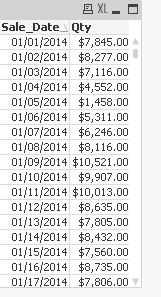
i have date wise sale qty. how can i find sales qty with maximum date.
Regards,
Masba
- Tags:
- date
- new_to_qlikview
- « Previous Replies
-
- 1
- 2
- Next Replies »
Accepted Solutions

 morgankejerhag
- Mark as New
- Bookmark
- Subscribe
- Mute
- Subscribe to RSS Feed
- Permalink
- Report Inappropriate Content
Hello again,
Should it only have one bar? Then you can simply change chart type.

 anbu1984
- Mark as New
- Bookmark
- Subscribe
- Mute
- Subscribe to RSS Feed
- Permalink
- Report Inappropriate Content
=Firstsortedvalue(Qty,-Sales_date)
- Mark as New
- Bookmark
- Subscribe
- Mute
- Subscribe to RSS Feed
- Permalink
- Report Inappropriate Content
In case you want in Text box , you can use set expression i.e. sum({$<Sale_Date ={$(=max(Sale_Date))} >}Qty)
morgankejerhag
- Mark as New
- Bookmark
- Subscribe
- Mute
- Subscribe to RSS Feed
- Permalink
- Report Inappropriate Content
How will you be using the value? If it is in a table with Date as a column then you could do:
if(Date=max(total Date),sum(Qty),0)
See attached example
- Mark as New
- Bookmark
- Subscribe
- Mute
- Subscribe to RSS Feed
- Permalink
- Report Inappropriate Content
hey masba,
vSaleDate=max(sale_date)
=only({<sale_date={"$(vSaleDate)"}>}qty)
cheers,
kunal bhattacharjee
 jagan
jagan
- Mark as New
- Bookmark
- Subscribe
- Mute
- Subscribe to RSS Feed
- Permalink
- Report Inappropriate Content
Hi,
Check this expression
sum({$<Sale_Date ={'$(=Date(Max(Sale_Date)))'} >}Qty)
Note: Sale_Date and Today() date format should be in the same format.
Regards,
Jagan.

 ashfaq_haseeb
- Mark as New
- Bookmark
- Subscribe
- Mute
- Subscribe to RSS Feed
- Permalink
- Report Inappropriate Content
Try this
=sum({$<Sale_Date={'$(=max(Sale_Date))'} >}Qty)
Regards
ASHFAQ
- Mark as New
- Bookmark
- Subscribe
- Mute
- Subscribe to RSS Feed
- Permalink
- Report Inappropriate Content
Dear Morgan ,
Thnx for ur reply.. your suggestion is working simple table .. but my problem is that in my chart X axis will display maximum date and Y axis will show sum(qty)..
Regards,
Masba
ashfaq_haseeb
- Mark as New
- Bookmark
- Subscribe
- Mute
- Subscribe to RSS Feed
- Permalink
- Report Inappropriate Content
You can change the chart type?
What chart type are you using?
Regards
ASHFAQ
- Mark as New
- Bookmark
- Subscribe
- Mute
- Subscribe to RSS Feed
- Permalink
- Report Inappropriate Content
assign max(sales_date) to a variable then only{$ <Vsals_data>qty}
- « Previous Replies
-
- 1
- 2
- Next Replies »