Unlock a world of possibilities! Login now and discover the exclusive benefits awaiting you.

- Qlik Community
- :
- All Forums
- :
- QlikView App Dev
- :
- Remove characters
- Subscribe to RSS Feed
- Mark Topic as New
- Mark Topic as Read
- Float this Topic for Current User
- Bookmark
- Subscribe
- Mute
- Printer Friendly Page

 gautik92
- Mark as New
- Bookmark
- Subscribe
- Mute
- Subscribe to RSS Feed
- Permalink
- Report Inappropriate Content
Remove characters
I have a field containing records lik this
ID
10000-ABC
ABC123
123NBA
I want to remove all alphabets and show olny nos
Expected Output
ID
10000
123
123
- « Previous Replies
-
- 1
- 2
- Next Replies »

 MK_QSL
- Mark as New
- Bookmark
- Subscribe
- Mute
- Subscribe to RSS Feed
- Permalink
- Report Inappropriate Content
KeepChar(ID,'0123456789') as ID
gautik92
- Mark as New
- Bookmark
- Subscribe
- Mute
- Subscribe to RSS Feed
- Permalink
- Report Inappropriate Content
i tried it already but not working
 Chanty4u
- Mark as New
- Bookmark
- Subscribe
- Mute
- Subscribe to RSS Feed
- Permalink
- Report Inappropriate Content
Hi,
Adding to Manish,
One more solution
a:
LOAD * INLINE [
ID
10000-ABC
ABC123
123NBA
];
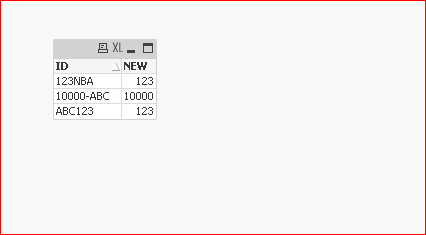
Result:
LOAD *,
PurgeChar(ID,'ABCDEFGHIJKLMNOPQRSTUVWXYX-') AS NEW
Resident a;
MK_QSL
- Mark as New
- Bookmark
- Subscribe
- Mute
- Subscribe to RSS Feed
- Permalink
- Report Inappropriate Content
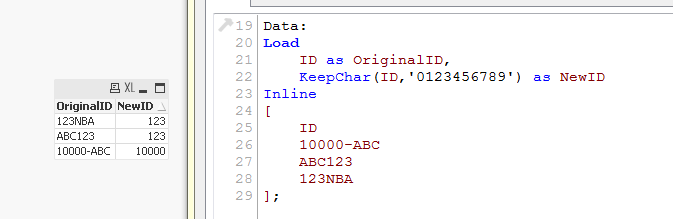 check this..
MK_QSL
- Mark as New
- Bookmark
- Subscribe
- Mute
- Subscribe to RSS Feed
- Permalink
- Report Inappropriate Content
In case we have other special characters apart from - we need to add them in PurgeChar which is not a good idea.
Chanty4u
- Mark as New
- Bookmark
- Subscribe
- Mute
- Subscribe to RSS Feed
- Permalink
- Report Inappropriate Content
yeah manish you are right  . but instance he can use this for this case
gautik92
- Mark as New
- Bookmark
- Subscribe
- Mute
- Subscribe to RSS Feed
- Permalink
- Report Inappropriate Content
but what if i Have a record lik this
123-abc123
i want only 123
MK_QSL
- Mark as New
- Bookmark
- Subscribe
- Mute
- Subscribe to RSS Feed
- Permalink
- Report Inappropriate Content
You mean 1st 123?
What if you have
234-DEF-222
What is the result you are looking for?
Chanty4u
- Mark as New
- Bookmark
- Subscribe
- Mute
- Subscribe to RSS Feed
- Permalink
- Report Inappropriate Content
use subfield function for this
From Help file
subfield(s, 'delimiter' [ , index ] )
In its three-parameter version, this script function returns a given substring from a larger string s with delimiter 'delimiter'. index is an optional integer denoting which of the substrings should be returned. If index is omitted when subfield is used in a field expression in a load statement, the subfield function will cause the load statement to automatically generate one full record of input data for each substring that can be found in s.
In its two-parameter version, the subfield function generates one record for each substring that can be taken from a larger string s with the delimiter 'delimiter'. If several subfield functions are used in the same load statement, the Cartesian product of all combinations will be generated.
Examples:
(For three parameters)
subfield(S, ';' ,2) returns 'cde' if S is 'abc;cde;efg'
subfield(S, ';' ,1) returns NULL if S is an empty string
subfield(S, ';' ,1) returns an empty string if S is ';'

- « Previous Replies
-
- 1
- 2
- Next Replies »