Unlock a world of possibilities! Login now and discover the exclusive benefits awaiting you.

- Qlik Community
- :
- All Forums
- :
- QlikView App Dev
- :
- Splitting Targets
- Subscribe to RSS Feed
- Mark Topic as New
- Mark Topic as Read
- Float this Topic for Current User
- Bookmark
- Subscribe
- Mute
- Printer Friendly Page

- Mark as New
- Bookmark
- Subscribe
- Mute
- Subscribe to RSS Feed
- Permalink
- Report Inappropriate Content
Splitting Targets
HI All
I Have a targets table and I want to split the Week target equally between each date
Actual Table
| Branch | Week Target | StartDate | EndDate |
| 101 | 5510.00 | 03/09/2015 | 07/09/2015 |
| 102 | 2270.00 | 03/09/2015 | 07/09/2015 |
| 103 | 650.00 | 03/09/2015 | 07/09/2015 |
| 104 | 1945.00 | 03/09/2015 | 07/09/2015 |
| 105 | 1620.00 | 03/09/2015 | 07/09/2015 |
| 106 | 2595.00 | 03/09/2015 | 07/09/2015 |
| 107 | 1135.00 | 03/09/2015 | 07/09/2015 |
Expected table
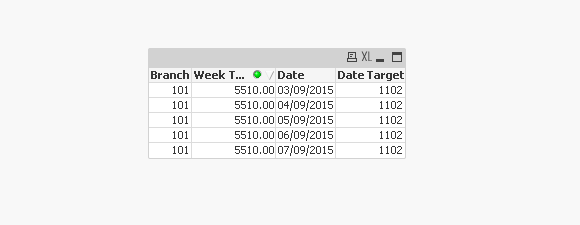
| Branch | Daily Target | Date | StartDate | EndDate |
| 101 | 1102.00 | 03/09/2015 | 03/09/2015 | 07/09/2015 |
| 101 | 1102.00 | 04/09/2015 | 03/09/2015 | 07/09/2015 |
| 101 | 1102.00 | 05/09/2015 | 03/09/2015 | 07/09/2015 |
| 101 | 1102.00 | 06/09/2015 | 03/09/2015 | 07/09/2015 |
| 101 | 1102.00 | 07/09/2015 | 03/09/2015 | 07/09/2015 |
.102
103
Please Suggest how to do this
- Tags:
- new_to_qlikview
Accepted Solutions

 Clever_Anjos
- Mark as New
- Bookmark
- Subscribe
- Mute
- Subscribe to RSS Feed
- Permalink
- Report Inappropriate Content
So, this can solve your needs
t:
LOAD Branch,
     [Week Target],
     StartDate,
     EndDate
FROM [https://community.qlik.com/thread/190466]
(html, codepage is 1252, embedded labels, table is @1);


t2:
load
  Branch,
  [Week Target],
  Date(StartDate + IterNo() - 1) as Date,
  [Week Target]/(EndDate-StartDate+1) as [Date Target],
  StartDate,
    EndDate
Resident t
While  StartDate + IterNo() - 1 <=  EndDate;
drop Table t;
- Mark as New
- Bookmark
- Subscribe
- Mute
- Subscribe to RSS Feed
- Permalink
- Report Inappropriate Content
Is it going to be fixed i.e 5 times for each?
Clever_Anjos
- Mark as New
- Bookmark
- Subscribe
- Mute
- Subscribe to RSS Feed
- Permalink
- Report Inappropriate Content
t:
LOAD Branch,
     [Week Target],
     StartDate,
     EndDate
FROM [https://community.qlik.com/thread/190466]
(html, codepage is 1252, embedded labels, table is @1);


load
  Branch,
  [Week Target],
  Date(StartDate + IterNo() - 1) as Date,
  [Week Target]/5 as [Date Target],
  StartDate,
     EndDate
Resident t
While  IterNo() <=  5;
drop Table t;
Final result
- Mark as New
- Bookmark
- Subscribe
- Mute
- Subscribe to RSS Feed
- Permalink
- Report Inappropriate Content
HI Balraj
it has to pick up the number of days between star Date and End Date
Clever_Anjos
- Mark as New
- Bookmark
- Subscribe
- Mute
- Subscribe to RSS Feed
- Permalink
- Report Inappropriate Content
Does your week´s number of days change?

 andrespa
- Mark as New
- Bookmark
- Subscribe
- Mute
- Subscribe to RSS Feed
- Permalink
- Report Inappropriate Content
Hi John, I'm afraid it's not possible to put conditions with join statements. But you can do something like this:
TARGETS:
LOAD Branch,
[Week Target],
StartDate,
EndDate
FROM
(biff, embedded labels, table is Target$);
LEFT JOIN(TARGETS)
SALES:
LOAD Branch,
Sales,
Date
FROM
(biff, embedded labels, table is Sheet1$);
NoConcatenate
FINAL_TABLE:
LOAD * RESIDENT TARGETS
WHERE Date>StartDate AND Date<EndDate;
DROP TABLE FINAL_TABLE;
If I understand your requirement right, this should be one solution. Hope it helps.
Best regards,
Andrés
- Mark as New
- Bookmark
- Subscribe
- Mute
- Subscribe to RSS Feed
- Permalink
- Report Inappropriate Content
HI Clever Anjos
the number of days between start Date and End Date varies
Most of them have 5 days
but some have only 4
In that case of 5 your script works correctly
but the day targets differs when t is 4 days
Clever_Anjos
- Mark as New
- Bookmark
- Subscribe
- Mute
- Subscribe to RSS Feed
- Permalink
- Report Inappropriate Content
So, this can solve your needs
t:
LOAD Branch,
     [Week Target],
     StartDate,
     EndDate
FROM [https://community.qlik.com/thread/190466]
(html, codepage is 1252, embedded labels, table is @1);


t2:
load
  Branch,
  [Week Target],
  Date(StartDate + IterNo() - 1) as Date,
  [Week Target]/(EndDate-StartDate+1) as [Date Target],
  StartDate,
    EndDate
Resident t
While  StartDate + IterNo() - 1 <=  EndDate;
drop Table t;
- Mark as New
- Bookmark
- Subscribe
- Mute
- Subscribe to RSS Feed
- Permalink
- Report Inappropriate Content
HI Clever Anjos
Thanks for your help