Unlock a world of possibilities! Login now and discover the exclusive benefits awaiting you.

- Qlik Community
- :
- All Forums
- :
- QlikView App Dev
- :
- Testing Pivot Dimension
- Subscribe to RSS Feed
- Mark Topic as New
- Mark Topic as Read
- Float this Topic for Current User
- Bookmark
- Subscribe
- Mute
- Printer Friendly Page

- Mark as New
- Bookmark
- Subscribe
- Mute
- Subscribe to RSS Feed
- Permalink
- Report Inappropriate Content
Testing Pivot Dimension
Hi,
I have a 'Target' dimension within my pivot which is a numeric value.
Depending on the ID number of the 'row' I need to replace this numeric Target with some text :
=if(match([ID],82,114,558),'Monitor',Target)
which works fine.
The only issue I have is some ID's have blank 'Target' values and because I have the following pivot settings to show Null values as 0 :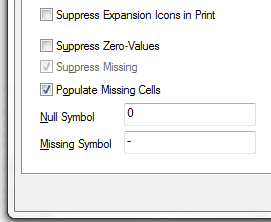
Any null Target values are showing as 0. Can the expression be altered to show a blank space where the Target value is null - but I still need my Pivot calculated values to show 0 rather than null??
Many thanks for you help!!
- Mark as New
- Bookmark
- Subscribe
- Mute
- Subscribe to RSS Feed
- Permalink
- Report Inappropriate Content
Modify the expression of the Target:
=if(match([ID],82,114,558),'Monitor',
if(not isnull(Target),Target,'SomeText'))