Unlock a world of possibilities! Login now and discover the exclusive benefits awaiting you.

- Qlik Community
- :
- All Forums
- :
- QlikView App Dev
- :
- Trellis
- Subscribe to RSS Feed
- Mark Topic as New
- Mark Topic as Read
- Float this Topic for Current User
- Bookmark
- Subscribe
- Mute
- Printer Friendly Page

 johnan
- Mark as New
- Bookmark
- Subscribe
- Mute
- Subscribe to RSS Feed
- Permalink
- Report Inappropriate Content
Trellis
Hi folks!
Ok, i have a Trellis with gauges. And now i want to present the amount in percent in the Trellis:

So i want a second expression with text. Is that possible?
Br
John
- Tags:
- trellis
- « Previous Replies
-
- 1
- 2
- Next Replies »


- Mark as New
- Bookmark
- Subscribe
- Mute
- Subscribe to RSS Feed
- Permalink
- Report Inappropriate Content
Chances are high using Dual('Text' & Sum(Sales)/Count(Name), Sum(Sales))
johnan
- Mark as New
- Bookmark
- Subscribe
- Mute
- Subscribe to RSS Feed
- Permalink
- Report Inappropriate Content
Alright, to my added expression?
sum(if(match(Status, 'FS','PK',), (Antal/Cs*KrtVikt)))/Sum(Distinct Vikt)

 sergio0592
- Mark as New
- Bookmark
- Subscribe
- Mute
- Subscribe to RSS Feed
- Permalink
- Report Inappropriate Content
Misplaced comma :
sum(if(match(Status, 'FS','PK',), (Antal/Cs*KrtVikt)))/Sum(Distinct Vikt)
johnan
- Mark as New
- Bookmark
- Subscribe
- Mute
- Subscribe to RSS Feed
- Permalink
- Report Inappropriate Content
Yeah, thanx, but i can't get the dualfunction to work with my expression:
Dual('Text' & Sum(if(match(Status, 'FS','PK'),Sum(Antal/Cs*KrtVikt) / sum(DISTINCT Vikt))
ORG:
sum(if(match(Status, 'FS','PK'), (Antal/Cs*KrtVikt)))/Sum(Distinct Vikt)
- Mark as New
- Bookmark
- Subscribe
- Mute
- Subscribe to RSS Feed
- Permalink
- Report Inappropriate Content
Why not like this?
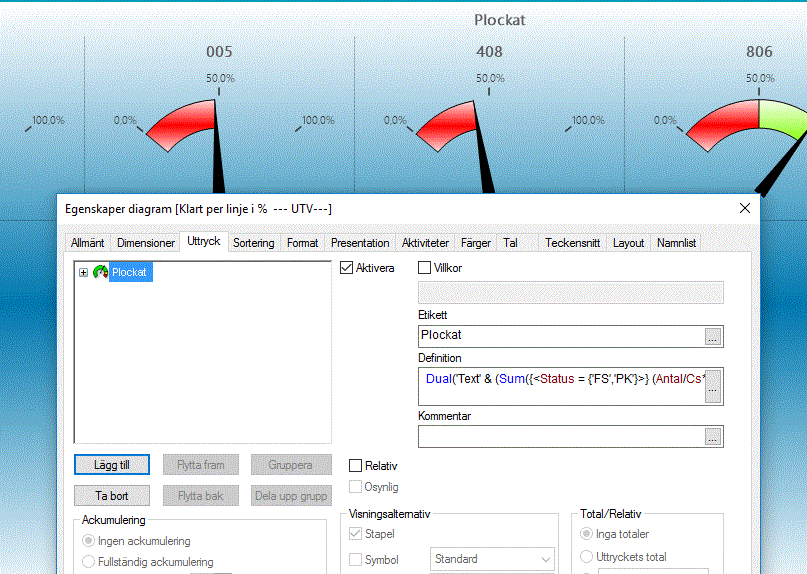
Dual('Text' & (Sum({<Status = {'FS','PK'}>} (Antal/Cs*KrtVikt))/Sum(DISTINCT Vikt)), (Sum({<Status = {'FS','PK'}>} (Antal/Cs*KrtVikt))/Sum(DISTINCT Vikt)))
johnan
- Mark as New
- Bookmark
- Subscribe
- Mute
- Subscribe to RSS Feed
- Permalink
- Report Inappropriate Content
Yes, working, but where can i see the "text" 
Sorry, never use trellis before..
johnan
- Mark as New
- Bookmark
- Subscribe
- Mute
- Subscribe to RSS Feed
- Permalink
- Report Inappropriate Content
Hi maybe I was not clear enough?
i just want a text on my gauge that show the result in text in the gauge directly.
Now i have to sweep over with mouse to se the result
Br
John
- Mark as New
- Bookmark
- Subscribe
- Mute
- Subscribe to RSS Feed
- Permalink
- Report Inappropriate Content
No, I am pretty clear about your intention. Fortunately i missed this conversation.
Anyway, Continuation is could be space is not enough though. Can you use Ctrl+Shift to check space enough for that text. If so, please elapse the space using mouse.
Second thought came to my mind, using "Text in chart" option from presentation tab
johnan
- Mark as New
- Bookmark
- Subscribe
- Mute
- Subscribe to RSS Feed
- Permalink
- Report Inappropriate Content
Hey, thanx but if i use text in chart it's only shows in the first gauge in my trellis

- « Previous Replies
-
- 1
- 2
- Next Replies »