Unlock a world of possibilities! Login now and discover the exclusive benefits awaiting you.

Announcements
ALERT: QlikView server communication interruptions following Microsoft Windows Domain Controller security updates
- Qlik Community
- :
- All Forums
- :
- QlikView
- :
- Waterfall chart using a stacked bar chart
Options
- Subscribe to RSS Feed
- Mark Topic as New
- Mark Topic as Read
- Float this Topic for Current User
- Bookmark
- Subscribe
- Mute
- Printer Friendly Page
Turn on suggestions
Auto-suggest helps you quickly narrow down your search results by suggesting possible matches as you type.
Showing results for

Anonymous
Not applicable
2018-11-19
07:00 AM
- Mark as New
- Bookmark
- Subscribe
- Mute
- Subscribe to RSS Feed
- Permalink
- Report Inappropriate Content
Waterfall chart using a stacked bar chart
Hi,
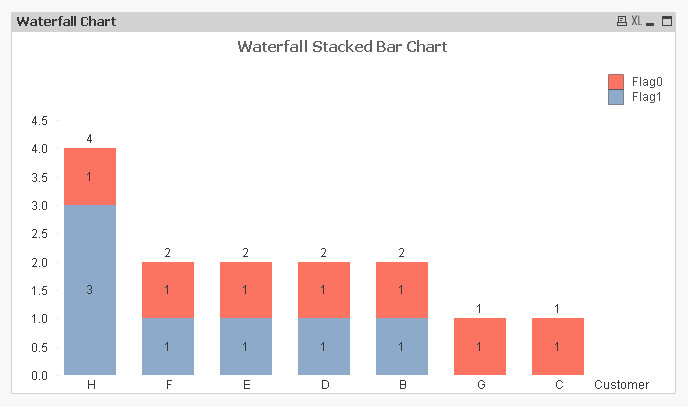
I need to create a waterfall chart using a stacked bar chart that shows me two categories of customers - Flag 1 and 0. The objective is to achieve a result like showed in the image below. But I’m trying to use the offset option with a stacked bar chart but I’m not getting any results.
I need help to arrange the bars to look like waterfall using bar offset. Please do help.
Attached my sample file and dataset.
1,910 Views
3 Replies

 jobsonkjoseph
Creator III
2018-11-20
04:21 AM
- Mark as New
- Bookmark
- Subscribe
- Mute
- Subscribe to RSS Feed
- Permalink
- Report Inappropriate Content
Hi, Would you mind sharing the expressions used in the chart. I'm not table to open the qvw file.
Anonymous
Not applicable
2018-11-20
05:57 AM
Author
- Mark as New
- Bookmark
- Subscribe
- Mute
- Subscribe to RSS Feed
- Permalink
- Report Inappropriate Content
Hi,
Expression1 = Count(DISTINCT {<Customer=E(Customer),Field=P(Field),Flag={"1"}>} Field)
Expression2 = Count(DISTINCT {<Customer=E(Customer),Field=P(Field),Flag={"0"}>} Field)
Thanks,
1,822 Views
Anonymous
Not applicable
2018-11-21
01:08 AM
Author
- Mark as New
- Bookmark
- Subscribe
- Mute
- Subscribe to RSS Feed
- Permalink
- Report Inappropriate Content
1,778 Views