Unlock a world of possibilities! Login now and discover the exclusive benefits awaiting you.

- Qlik Community
- :
- All Forums
- :
- QlikView
- :
- Accumulation per invoice number
- Subscribe to RSS Feed
- Mark Topic as New
- Mark Topic as Read
- Float this Topic for Current User
- Bookmark
- Subscribe
- Mute
- Printer Friendly Page

 thanhphongle
- Mark as New
- Bookmark
- Subscribe
- Mute
- Subscribe to RSS Feed
- Permalink
- Report Inappropriate Content
Accumulation per invoice number
!Hello Community,
is it possible to define the accumulation per invoice number?
Example
| invoice_no | payments | accumulation |
|---|---|---|
| 1 | 10 | 10 |
| 1 | 20 | 30 |
| 1 | 30 | 70 |
| 2 | 100 | 100 |
| 2 | 200 | 300 |
| 2 | 300 | 700 |
This is what QV returns when I set the accumulation active in the expression tab
| invoice_no | payments | accumulation |
|---|---|---|
| 1 | 10 | 10 |
| 1 | 20 | 30 |
| 1 | 30 | 70 |
| 2 | 100 | 170 |
| 2 | 200 | 370 |
| 2 | 300 | 770 |
- « Previous Replies
-
- 1
- 2
- Next Replies »
Accepted Solutions

 sunny_talwar
- Mark as New
- Bookmark
- Subscribe
- Mute
- Subscribe to RSS Feed
- Permalink
- Report Inappropriate Content
 sunny_talwar
- Mark as New
- Bookmark
- Subscribe
- Mute
- Subscribe to RSS Feed
- Permalink
- Report Inappropriate Content
Try using an expression like this
RangeSum(Above(Sum(payments), 0, RowNo()))
I am assuming that you have more than 1 dimension in your chart because how else will you see repeated invoice_no

- Mark as New
- Bookmark
- Subscribe
- Mute
- Subscribe to RSS Feed
- Permalink
- Report Inappropriate Content
Perhaps this
RangeSum(Above(Sum(payments), 0, RowNo(TOTAL)))
sunny_talwar
- Mark as New
- Bookmark
- Subscribe
- Mute
- Subscribe to RSS Feed
- Permalink
- Report Inappropriate Content
I don't think TOTAL is needed within RowNo() here
thanhphongle
- Mark as New
- Bookmark
- Subscribe
- Mute
- Subscribe to RSS Feed
- Permalink
- Report Inappropriate Content
It still continues to accumulate in a recursive way through all invoice number
thanhphongle
- Mark as New
- Bookmark
- Subscribe
- Mute
- Subscribe to RSS Feed
- Permalink
- Report Inappropriate Content
I mean it doesnt restart the accumulation for the next invoice numeber
sunny_talwar
- Mark as New
- Bookmark
- Subscribe
- Mute
- Subscribe to RSS Feed
- Permalink
- Report Inappropriate Content
What all dimensions do you have in your chart?
thanhphongle
- Mark as New
- Bookmark
- Subscribe
- Mute
- Subscribe to RSS Feed
- Permalink
- Report Inappropriate Content
invoice_no and start_date
I added the expression dual(invoice_no, start_date) in the dimension, so i can see duplicated invoice numbers, as every invoice number has another payment
sunny_talwar
- Mark as New
- Bookmark
- Subscribe
- Mute
- Subscribe to RSS Feed
- Permalink
- Report Inappropriate Content
May be this
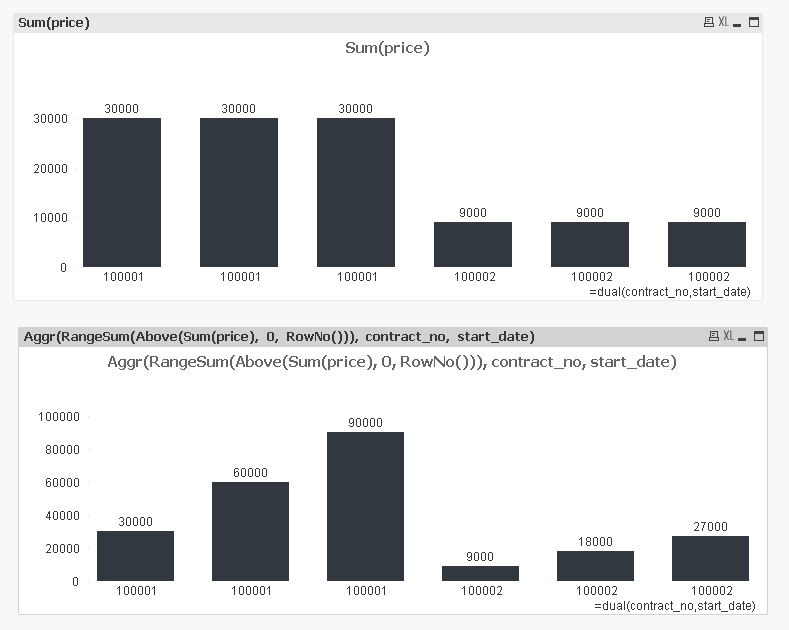
Aggr(RangeSum(Above(Sum(payments), 0, RowNo())), invoice_no, start_date)
thanhphongle
- Mark as New
- Bookmark
- Subscribe
- Mute
- Subscribe to RSS Feed
- Permalink
- Report Inappropriate Content
I shared my qv-file to you !

- « Previous Replies
-
- 1
- 2
- Next Replies »