Unlock a world of possibilities! Login now and discover the exclusive benefits awaiting you.

Announcements
Want to see what's currently in public preview? We've pulled it all together in one place. Check it out here
- Qlik Community
- :
- All Forums
- :
- QlikView
- :
- Bar chart Expression
Options
- Subscribe to RSS Feed
- Mark Topic as New
- Mark Topic as Read
- Float this Topic for Current User
- Bookmark
- Subscribe
- Mute
- Printer Friendly Page
Turn on suggestions
Auto-suggest helps you quickly narrow down your search results by suggesting possible matches as you type.
Showing results for

Anonymous
Not applicable
2017-04-21
10:18 AM
- Mark as New
- Bookmark
- Subscribe
- Mute
- Subscribe to RSS Feed
- Permalink
- Report Inappropriate Content
Bar chart Expression
Guys,
As per my requirement, I have a customer which has two mappings that I need to show as exactly below,
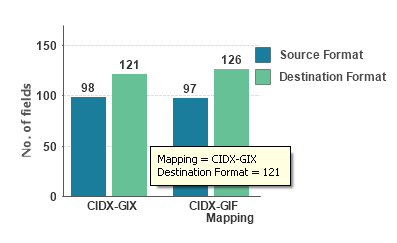
But I have a dimension as customer, which is mapped to two values in the dimension "Mapping". I couldn't achieve this chart, Plz help me how to achieve this or how to load data according to this.
Now I have the data loaded in the below format,

624 Views
1 Reply
 neelamsaroha157
Specialist II
2017-04-21
10:48 AM
- Mark as New
- Bookmark
- Subscribe
- Mute
- Subscribe to RSS Feed
- Permalink
- Report Inappropriate Content
Dimension: Mapping
Expression 1: Count({<Mapping = {'CIDX'}>}SourceFormat)
Expression 2: Count({<Mapping = {'GIF', 'GIX'}>}DestinationFormat)
Change the Mapping parameters as per you requirement.
570 Views