Unlock a world of possibilities! Login now and discover the exclusive benefits awaiting you.

- Qlik Community
- :
- All Forums
- :
- QlikView
- :
- Count Registers By Date
- Subscribe to RSS Feed
- Mark Topic as New
- Mark Topic as Read
- Float this Topic for Current User
- Bookmark
- Subscribe
- Mute
- Printer Friendly Page

- Mark as New
- Bookmark
- Subscribe
- Mute
- Subscribe to RSS Feed
- Permalink
- Report Inappropriate Content
Count Registers By Date
Hello,
I have the next fields:
Date, Field1 and Field2 (not Count)
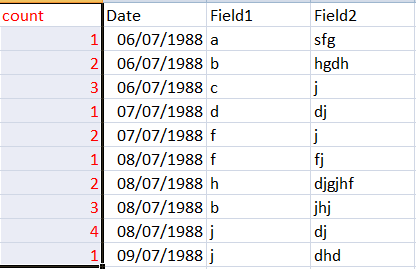
And I need a table like that:

The issue is that I dont have the field count in my data model.
Is it possible somehow build a table like this without calculate this count field in the script?
Thank you,
Sara
- « Previous Replies
-
- 1
- 2
- Next Replies »
Accepted Solutions

 sunny_talwar
- Mark as New
- Bookmark
- Subscribe
- Mute
- Subscribe to RSS Feed
- Permalink
- Report Inappropriate Content
sunny_talwar
- Mark as New
- Bookmark
- Subscribe
- Mute
- Subscribe to RSS Feed
- Permalink
- Report Inappropriate Content
May be create the Count field like this:
LOAD Date,
Field1,
Field2,
AutoNumber(Field1, Date) as Count
FROM Source;
or
LOAD Date,
Field1,
Field2,
AutoNumber(Field1&Field2, Date) as Count
FROM Source;
- Mark as New
- Bookmark
- Subscribe
- Mute
- Subscribe to RSS Feed
- Permalink
- Report Inappropriate Content
Thank you, It works. But there is another way to build this table without scripting?
sunny_talwar
- Mark as New
- Bookmark
- Subscribe
- Mute
- Subscribe to RSS Feed
- Permalink
- Report Inappropriate Content
You can probably add a calculated dimension, but will have to test it out. Can you share a sample?
sunny_talwar
- Mark as New
- Bookmark
- Subscribe
- Mute
- Subscribe to RSS Feed
- Permalink
- Report Inappropriate Content
Try this as dimension:
=Aggr(RowNo(), Date, Field1)

- Mark as New
- Bookmark
- Subscribe
- Mute
- Subscribe to RSS Feed
- Permalink
- Report Inappropriate Content
I attached the qvw example. Thank you.
sunny_talwar
- Mark as New
- Bookmark
- Subscribe
- Mute
- Subscribe to RSS Feed
- Permalink
- Report Inappropriate Content
I assume this was in moderation and just went through? The issue is resolved right?
- Mark as New
- Bookmark
- Subscribe
- Mute
- Subscribe to RSS Feed
- Permalink
- Report Inappropriate Content
That was it. Thank you
- Mark as New
- Bookmark
- Subscribe
- Mute
- Subscribe to RSS Feed
- Permalink
- Report Inappropriate Content
Hello,
One doubt, my real data model contains dates with hours, I try with that :
=Aggr(RowNo(), floor([Date]), Field )
But it doesnt work.
Thanks
sunny_talwar
- Mark as New
- Bookmark
- Subscribe
- Mute
- Subscribe to RSS Feed
- Permalink
- Report Inappropriate Content
There could be another issue unrelated to the date field. Not sure what it can be without take a look. Can you share a more comprehensive sample where it isn't working?
- « Previous Replies
-
- 1
- 2
- Next Replies »