Unlock a world of possibilities! Login now and discover the exclusive benefits awaiting you.

- Qlik Community
- :
- All Forums
- :
- QlikView
- :
- Date Format returns NULL value
- Subscribe to RSS Feed
- Mark Topic as New
- Mark Topic as Read
- Float this Topic for Current User
- Bookmark
- Subscribe
- Mute
- Printer Friendly Page

- Mark as New
- Bookmark
- Subscribe
- Mute
- Subscribe to RSS Feed
- Permalink
- Report Inappropriate Content
Date Format returns NULL value
Hi, i have a question. I have a data like this before formatting
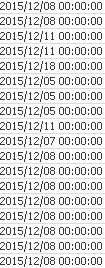
I want to change the date format into 'MM/dd/yyyy' by using this function in load script
date(SHIP_DATE,'MM/dd/yyyy') as SHIP_DATE
But when data load is finished it returns null like this:
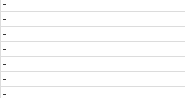
I also do this to another fieldname and it runs perfectly, only "SHIP_DATE" field returns null.
Anybody know what's the problem ?
really appreciate your help
Thanks
- Tags:
- new_to_qlikview
- « Previous Replies
-
- 1
- 2
- Next Replies »
Accepted Solutions

 tresB
tresB
- Mark as New
- Bookmark
- Subscribe
- Mute
- Subscribe to RSS Feed
- Permalink
- Report Inappropriate Content
May be your date field is having text. Try something like:
Date(Floor(Date#(Trim(SHIP_DATE), 'YYYY/MM/DD hh:mm:ss')), 'MM/DD/YYYY') as SHIP_DATE

 Chanty4u
- Mark as New
- Bookmark
- Subscribe
- Mute
- Subscribe to RSS Feed
- Permalink
- Report Inappropriate Content
=Date(Timestamp#(ship_date,'MM/DD/YYYY ') as ship_date
 tamilarasu
- Mark as New
- Bookmark
- Subscribe
- Mute
- Subscribe to RSS Feed
- Permalink
- Report Inappropriate Content
Hi Lejours,
Try,
Date(Floor(Date#(SHIP_DATE,,'YYYY/MM/DD hh:mm:ss')),'MM/dd/yyyy') as SHIP_DATE;
 avinashelite
- Mark as New
- Bookmark
- Subscribe
- Mute
- Subscribe to RSS Feed
- Permalink
- Report Inappropriate Content
Try like this:
Date(Date#(ship_date,'MM/DD/YYYY ')
- Mark as New
- Bookmark
- Subscribe
- Mute
- Subscribe to RSS Feed
- Permalink
- Report Inappropriate Content
the Ship_date may be coming as text. you required to use date(Date#(SHIP_DATE,'yyyy/MM/dd'),'MM/dd/yyyy')
Chanty4u
- Mark as New
- Bookmark
- Subscribe
- Mute
- Subscribe to RSS Feed
- Permalink
- Report Inappropriate Content
i think the date fileds are not same names...as u wil give new fieldname
tresB
- Mark as New
- Bookmark
- Subscribe
- Mute
- Subscribe to RSS Feed
- Permalink
- Report Inappropriate Content
May be your date field is having text. Try something like:
Date(Floor(Date#(Trim(SHIP_DATE), 'YYYY/MM/DD hh:mm:ss')), 'MM/DD/YYYY') as SHIP_DATE
Chanty4u
- Mark as New
- Bookmark
- Subscribe
- Mute
- Subscribe to RSS Feed
- Permalink
- Report Inappropriate Content
Tmp:
Load *, Date(Date#(SHIP,'YYYYMMDD'),'MM/DD/YYYY') as NewShiftDate,
Timestamp(Timestamp#(CLOCK_IN_OUT,'MM/DD/YYYY hh:mm'),'DD/MM/YYYY hh:mm') as NewClockInOut,
Num(Timestamp(Timestamp#(CLOCK_IN_OUT,'MM/DD/YYYY hh:mm'),'DD/MM/YYYY hh:mm')) as NewClockInOutNum;
- Mark as New
- Bookmark
- Subscribe
- Mute
- Subscribe to RSS Feed
- Permalink
- Report Inappropriate Content
change your date fomat to
Date(SHIP_DATE,'MM/DD/YYYY') as SHIP_DATE

 engishfaque
- Mark as New
- Bookmark
- Subscribe
- Mute
- Subscribe to RSS Feed
- Permalink
- Report Inappropriate Content
Dear Lejours88,
Please use listed below script,
Date(Floor(Timestamp#(SHIP_DATE, 'YYYY/MM/DD hh:mm:ss')), 'DD/MM/YYYY') as SHIP_DATE,
Time(Frac(Timestamp#(SHIP_DATE, 'YYYY/MM/DD hh:mm:ss')), 'hh:mm:ss') as SHIP_TIME
Kind regards,
Ishfaque Ahmed
- « Previous Replies
-
- 1
- 2
- Next Replies »