Unlock a world of possibilities! Login now and discover the exclusive benefits awaiting you.

- Qlik Community
- :
- All Forums
- :
- QlikView
- :
- Dimension Limits
- Subscribe to RSS Feed
- Mark Topic as New
- Mark Topic as Read
- Float this Topic for Current User
- Bookmark
- Subscribe
- Mute
- Printer Friendly Page

 mphekin12
- Mark as New
- Bookmark
- Subscribe
- Mute
- Subscribe to RSS Feed
- Permalink
- Report Inappropriate Content
Dimension Limits
Hello,
I have a small issue with dimension limits not working properly. I have two stright tables and I'm trying to show the Top 5 and Bottom 5 dimensions based on Sales. The dimension is a cycle group that has Branch, Major, Customer Name and Sales Rep within it. The Top 5 table always works but the Bottom 5 doesn't. There are times that it displays the Bottom 5, there are times that only the Bottom 3 are displayed or nothing is displayed at all. There is a screenshot below with some data that shows my issue.
Has anyone else experienced this issue? Does anyone have a work around?
Any information would be appreciated!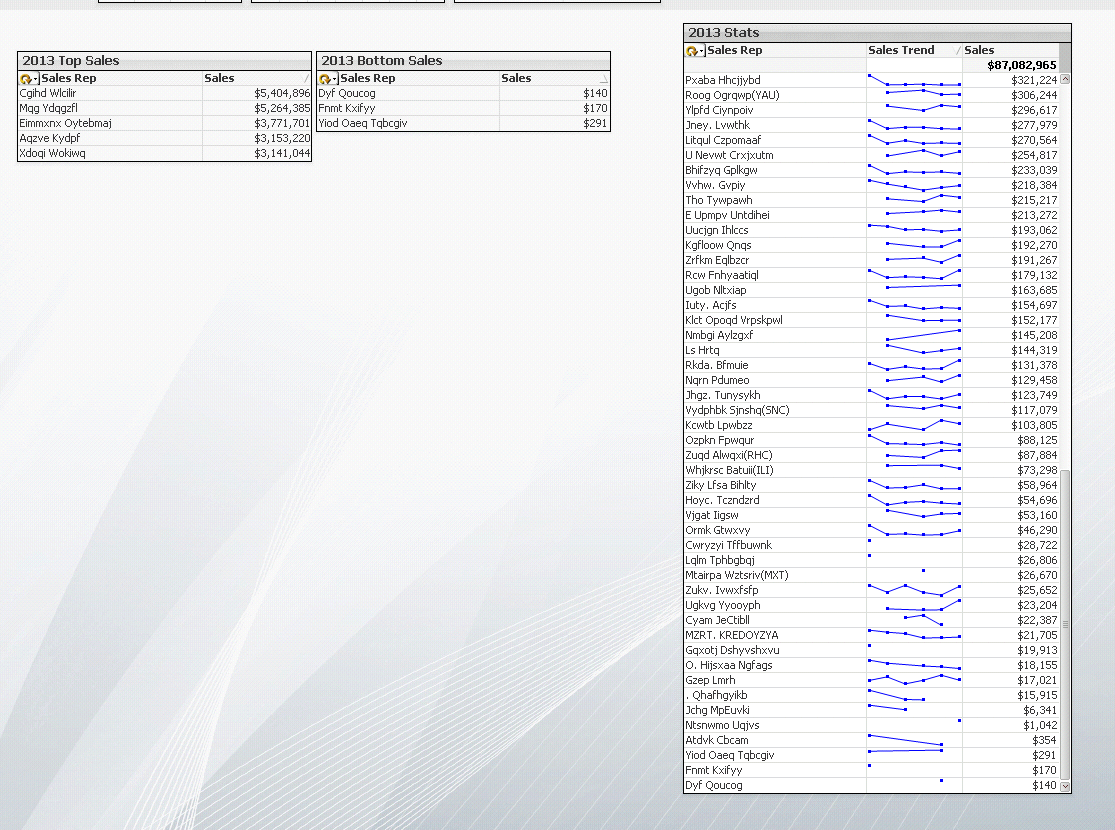
Accepted Solutions

 Gysbert_Wassena
- Mark as New
- Bookmark
- Subscribe
- Mute
- Subscribe to RSS Feed
- Permalink
- Report Inappropriate Content
You probably have Sales Reps with no sales. Same for the other dimensions. Try disabling the Suppress Zero-Values on the Presentation tab. See attached example.
talk is cheap, supply exceeds demand
Gysbert_Wassena- Mark as New
- Bookmark
- Subscribe
- Mute
- Subscribe to RSS Feed
- Permalink
- Report Inappropriate Content
You probably have Sales Reps with no sales. Same for the other dimensions. Try disabling the Suppress Zero-Values on the Presentation tab. See attached example.
talk is cheap, supply exceeds demand
 preminqlik
- Mark as New
- Bookmark
- Subscribe
- Mute
- Subscribe to RSS Feed
- Permalink
- Report Inappropriate Content
as G Wassenaar said u have null values ,
once take salesrepID as dimension and observe,
these null values basically arise due to improper data model .
mphekin12
- Mark as New
- Bookmark
- Subscribe
- Mute
- Subscribe to RSS Feed
- Permalink
- Report Inappropriate Content
Thank you G Wassenaar! It looks like that was the issue.
