Unlock a world of possibilities! Login now and discover the exclusive benefits awaiting you.

Announcements
ALERT: QlikView server communication interruptions following Microsoft Windows Domain Controller security updates
- Qlik Community
- :
- All Forums
- :
- QlikView
- :
- How to enable CHART PLOT AREA
Options
- Subscribe to RSS Feed
- Mark Topic as New
- Mark Topic as Read
- Float this Topic for Current User
- Bookmark
- Subscribe
- Mute
- Printer Friendly Page
Turn on suggestions
Auto-suggest helps you quickly narrow down your search results by suggesting possible matches as you type.
Showing results for

Anonymous
Not applicable
2016-03-19
09:23 PM
- Mark as New
- Bookmark
- Subscribe
- Mute
- Subscribe to RSS Feed
- Permalink
- Report Inappropriate Content
How to enable CHART PLOT AREA
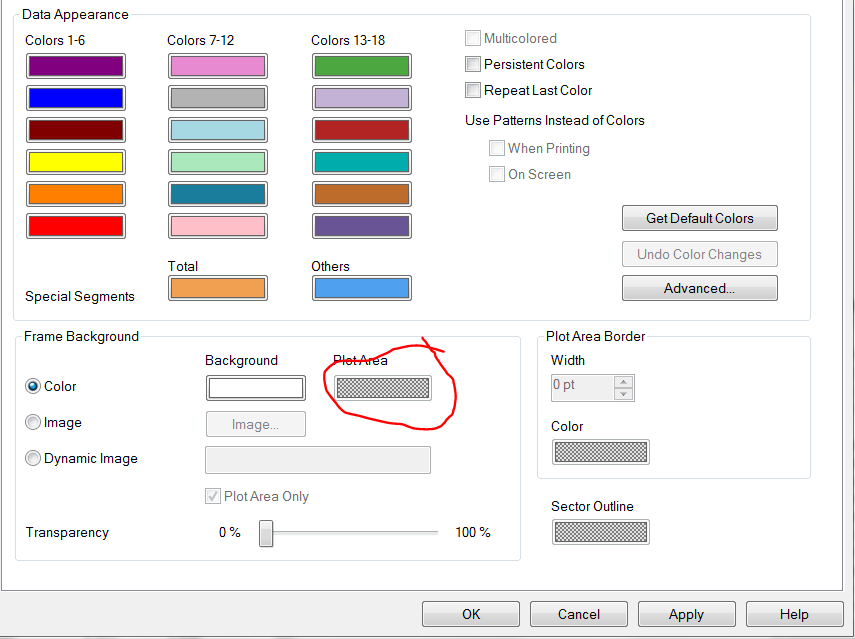
From the pic below: I want to have the plot area of my Line chart diff from the back ground color. I am using an image saved externally to have this effect. Instead I want to use the plot area feature in the COLOrs tab. But it seems its not being enabled. how to do that.
1,339 Views
1 Solution
Accepted Solutions

 swuehl
Champion III
2016-03-19
10:02 PM
- Mark as New
- Bookmark
- Subscribe
- Mute
- Subscribe to RSS Feed
- Permalink
- Report Inappropriate Content
Try setting the 'Plot Area Background Style' to 'Frame' on Style tab of chart properties.
3 Replies
Anonymous
Not applicable
2016-03-19
09:30 PM
Author
- Mark as New
- Bookmark
- Subscribe
- Mute
- Subscribe to RSS Feed
- Permalink
- Report Inappropriate Content
I am using more than 10 expressions. read some where multicoloring coption is not avail in charts with more than single expns.
1,016 Views
swuehl
Champion III
2016-03-19
10:02 PM
- Mark as New
- Bookmark
- Subscribe
- Mute
- Subscribe to RSS Feed
- Permalink
- Report Inappropriate Content
Try setting the 'Plot Area Background Style' to 'Frame' on Style tab of chart properties.
Anonymous
Not applicable
2016-03-19
10:06 PM
Author
- Mark as New
- Bookmark
- Subscribe
- Mute
- Subscribe to RSS Feed
- Permalink
- Report Inappropriate Content
the Magic of Swuehl twinkles again! that was it.
Thank you Stephan
1,016 Views