Unlock a world of possibilities! Login now and discover the exclusive benefits awaiting you.

- Qlik Community
- :
- All Forums
- :
- QlikView
- :
- Installing QVS 11 on a Domain Controller
- Subscribe to RSS Feed
- Mark Topic as New
- Mark Topic as Read
- Float this Topic for Current User
- Bookmark
- Subscribe
- Mute
- Printer Friendly Page

 cmatcovich
- Mark as New
- Bookmark
- Subscribe
- Mute
- Subscribe to RSS Feed
- Permalink
- Report Inappropriate Content
Installing QVS 11 on a Domain Controller
I'd like to know if it is possible to install Qlikview Server on a Windows 2008 R2 Domain Controller.
On the Qlikview Server Reference Manual there isn't any information about this issue ...
Thank's
- Tags:
- qlikview_server
Accepted Solutions

 rwunderlich
- Mark as New
- Bookmark
- Subscribe
- Mute
- Subscribe to RSS Feed
- Permalink
- Report Inappropriate Content
The answer is no. Here's a snip from the QV11 release notes:
"It is not possible to install the QlikView 10 (and later) Server on a domain controller"
-Rob
rwunderlich
- Mark as New
- Bookmark
- Subscribe
- Mute
- Subscribe to RSS Feed
- Permalink
- Report Inappropriate Content
The answer is no. Here's a snip from the QV11 release notes:
"It is not possible to install the QlikView 10 (and later) Server on a domain controller"
-Rob

 Emmanuelle__Bus
- Mark as New
- Bookmark
- Subscribe
- Mute
- Subscribe to RSS Feed
- Permalink
- Report Inappropriate Content
Hello cmatcovich
As Rob Wunderlich said in the Release Notes is stablush that since QV version 10 and now 11 it's not possible to install it on a domain Controller.
Regards!!

- Mark as New
- Bookmark
- Subscribe
- Mute
- Subscribe to RSS Feed
- Permalink
- Report Inappropriate Content
If you try you will get the following info during installation:
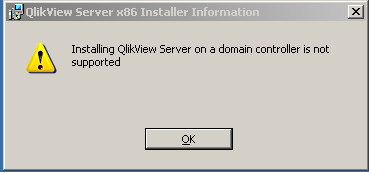
The software checks for the server role.
If it would be possible I can imagine you will get problems resolving user and group memberships.
- Mark as New
- Bookmark
- Subscribe
- Mute
- Subscribe to RSS Feed
- Permalink
- Report Inappropriate Content
And QlikView Local can normally be installed wight? - on Domain Controler...
Thanks,
Milan
Emmanuelle__Bus- Mark as New
- Bookmark
- Subscribe
- Mute
- Subscribe to RSS Feed
- Permalink
- Report Inappropriate Content
Hi Milan in the Manual is specified only for QVS not able to be installed in DC but for QV Desktop you can try and if a message as above appears then it is not possible, but if non windows like that pops us there is no problem.