Unlock a world of possibilities! Login now and discover the exclusive benefits awaiting you.

- Qlik Community
- :
- All Forums
- :
- QlikView
- :
- Issue with Y-axis dimension layout
- Subscribe to RSS Feed
- Mark Topic as New
- Mark Topic as Read
- Float this Topic for Current User
- Bookmark
- Subscribe
- Mute
- Printer Friendly Page

 neetu_singh
- Mark as New
- Bookmark
- Subscribe
- Mute
- Subscribe to RSS Feed
- Permalink
- Report Inappropriate Content
Issue with Y-axis dimension layout
Dear All,
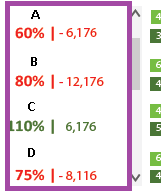
I need the Y-axis dimension layout as per the "requirement" image but in qlikview am getting like "getting" image.
Is there any way so that I can get as per the "requirement" image.
Please suggest.


- « Previous Replies
- Next Replies »

- Mark as New
- Bookmark
- Subscribe
- Mute
- Subscribe to RSS Feed
- Permalink
- Report Inappropriate Content
can you share a sample file?

 tresB
tresB
- Mark as New
- Bookmark
- Subscribe
- Mute
- Subscribe to RSS Feed
- Permalink
- Report Inappropriate Content
45910, 60910 bars are of same height? Or is it about showing the values at the bottom? If so, check my solution here: How to show data points at bottom
 its_anandrjs
- Mark as New
- Bookmark
- Subscribe
- Mute
- Subscribe to RSS Feed
- Permalink
- Report Inappropriate Content
You can create the text objects for all four dimensions with the trick and place over the chart.
Regards
Anand
neetu_singh
- Mark as New
- Bookmark
- Subscribe
- Mute
- Subscribe to RSS Feed
- Permalink
- Report Inappropriate Content
Hi Tresesco,
i tried the same but getting value "1" only.
Can you please try the same in my sample file & if possible can you please look into the left hand side dimension layout as well.
tresB
- Mark as New
- Bookmark
- Subscribe
- Mute
- Subscribe to RSS Feed
- Permalink
- Report Inappropriate Content
Number tab->Select the expression ->Set the format to 'Expression Default'
Did it for one exp. PFA
neetu_singh
- Mark as New
- Bookmark
- Subscribe
- Mute
- Subscribe to RSS Feed
- Permalink
- Report Inappropriate Content
It's not coming with in the bar nd if we try for two expression then it's overriding to the first one.
neetu_singh
- Mark as New
- Bookmark
- Subscribe
- Mute
- Subscribe to RSS Feed
- Permalink
- Report Inappropriate Content
Hi All,
Can we get the left side layout same as "getting" image.
tresB
- Mark as New
- Bookmark
- Subscribe
- Mute
- Subscribe to RSS Feed
- Permalink
- Report Inappropriate Content
Like:
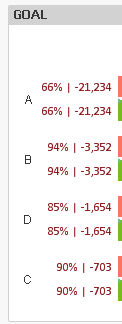 ?
?
neetu_singh
- Mark as New
- Bookmark
- Subscribe
- Mute
- Subscribe to RSS Feed
- Permalink
- Report Inappropriate Content
No, something like as shown below -
- « Previous Replies
- Next Replies »