Unlock a world of possibilities! Login now and discover the exclusive benefits awaiting you.

- Qlik Community
- :
- All Forums
- :
- QlikView
- :
- Overlapped Bar Charts
- Subscribe to RSS Feed
- Mark Topic as New
- Mark Topic as Read
- Float this Topic for Current User
- Bookmark
- Subscribe
- Mute
- Printer Friendly Page

- Mark as New
- Bookmark
- Subscribe
- Mute
- Subscribe to RSS Feed
- Permalink
- Report Inappropriate Content
Overlapped Bar Charts
Hi All,
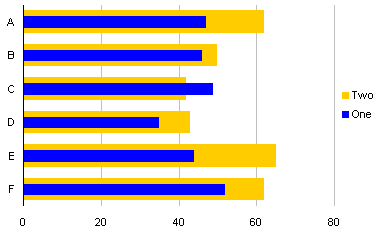
I want my bar chart to look like this.
Is this possible in qlikview?
Can anyone explain me how to do this if its possible.
Thanks in Advance,
Keerthi
- « Previous Replies
-
- 1
- 2
- Next Replies »
- Mark as New
- Bookmark
- Subscribe
- Mute
- Subscribe to RSS Feed
- Permalink
- Report Inappropriate Content
Please give me anyone Example.......
- Mark as New
- Bookmark
- Subscribe
- Mute
- Subscribe to RSS Feed
- Permalink
- Report Inappropriate Content
Hi Nag,
If you have any example please share with me..............

 qlikpahadi07
- Mark as New
- Bookmark
- Subscribe
- Mute
- Subscribe to RSS Feed
- Permalink
- Report Inappropriate Content
Hi Keerthi,
well now as you might be aware of comments that Qlikview doesn't have such options and you can go with some Extension objects which are not easy...... but for analysis point of view may be this will help you with some limitations.
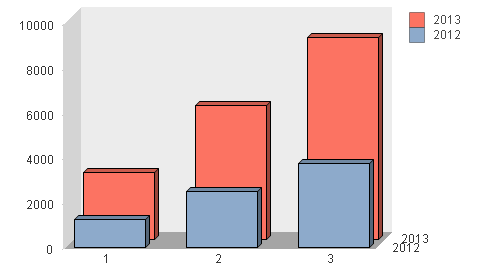
Check Style Tab in my attachment
- Mark as New
- Bookmark
- Subscribe
- Mute
- Subscribe to RSS Feed
- Permalink
- Report Inappropriate Content
HI Suresh,
Can u share the QVW so that i can implement it.
Regards,
Keerthi
- Mark as New
- Bookmark
- Subscribe
- Mute
- Subscribe to RSS Feed
- Permalink
- Report Inappropriate Content
Hi Sunil/ Keerthi,
Currently I am travelling and do not have access to licenses Qlikview app, however I have created a sample using personal edition.
And we know this kind of chart is not possible in one chart, we have to go for workarounds.
One of the workaround I have used is
>> Created a bar chart for Expression F2
>> Created a bar chart for Expression F3 with Dimension A
>> Then overlapped it, so similarly I did for all Dimension
>> I know it is not Robust, but for Client we have to give them the chart how they require
Please check and let me know in case of any difficulties
Regards,
NR
- Mark as New
- Bookmark
- Subscribe
- Mute
- Subscribe to RSS Feed
- Permalink
- Report Inappropriate Content
Thanks Nagaraj 
I will try this
Regards,
Keerthi
- « Previous Replies
-
- 1
- 2
- Next Replies »