Unlock a world of possibilities! Login now and discover the exclusive benefits awaiting you.

- Qlik Community
- :
- All Forums
- :
- QlikView
- :
- RE:Scrollbar-Container
- Subscribe to RSS Feed
- Mark Topic as New
- Mark Topic as Read
- Float this Topic for Current User
- Bookmark
- Subscribe
- Mute
- Printer Friendly Page

 Chanty4u
- Mark as New
- Bookmark
- Subscribe
- Mute
- Subscribe to RSS Feed
- Permalink
- Report Inappropriate Content
RE:Scrollbar-Container
Hi all ,
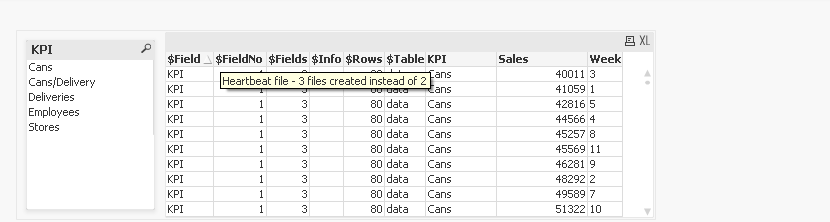
Is there any posibility of scroll bar in container object? the two objects are listbox and tablebox....chk below image?
Any suggestions
Thanks
in advance
Suresh
Accepted Solutions

- Mark as New
- Bookmark
- Subscribe
- Mute
- Subscribe to RSS Feed
- Permalink
- Report Inappropriate Content
- Mark as New
- Bookmark
- Subscribe
- Mute
- Subscribe to RSS Feed
- Permalink
- Report Inappropriate Content
Chanty4u
- Mark as New
- Bookmark
- Subscribe
- Mute
- Subscribe to RSS Feed
- Permalink
- Report Inappropriate Content
thnx balraj......but the issue in chart in container...nt with tablebox
Chanty4u
- Mark as New
- Bookmark
- Subscribe
- Mute
- Subscribe to RSS Feed
- Permalink
- Report Inappropriate Content
in stright table it is nt shwng scroll bar down

 jonas_rezende
- Mark as New
- Bookmark
- Subscribe
- Mute
- Subscribe to RSS Feed
- Permalink
- Report Inappropriate Content
Hi, sureshqv.
No.
When minimized the container is activated the scrollbar of the object contained therein.
Hope this helps!
Chanty4u
- Mark as New
- Bookmark
- Subscribe
- Mute
- Subscribe to RSS Feed
- Permalink
- Report Inappropriate Content
thnx jonas...
actually i need to show the all dimensions in container along with listbox filter....whenever we select any filter the straigh table adds the dimension.....
for that i hve created text object and same variable for bothe objects and used conditional ......
here we didnt get resize option in Stright table..
jonas_rezende
- Mark as New
- Bookmark
- Subscribe
- Mute
- Subscribe to RSS Feed
- Permalink
- Report Inappropriate Content
My suggesttion is utilize two container object with all type de formatt. So, enable the o container of show accord with selection.
Make use of variable for settings in Propertiers of the container-> area Show-> raddion button Conditional. Here insert variable for enable/disable.