Unlock a world of possibilities! Login now and discover the exclusive benefits awaiting you.

- Qlik Community
- :
- All Forums
- :
- QlikView
- :
- Show records
- Subscribe to RSS Feed
- Mark Topic as New
- Mark Topic as Read
- Float this Topic for Current User
- Bookmark
- Subscribe
- Mute
- Printer Friendly Page

- Mark as New
- Bookmark
- Subscribe
- Mute
- Subscribe to RSS Feed
- Permalink
- Report Inappropriate Content
Show records
Hi guys,
I have a straight table which I would like to only show records where a field is 5.00 or below
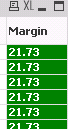
The field is called Margin.
The reason I would like to do this is because when I show all records the table says "object out of memory"
Any help would be appreciated
Thanks
- Tags:
- new_to_qlikview
- « Previous Replies
-
- 1
- 2
- Next Replies »
Accepted Solutions

 sunny_talwar
- Mark as New
- Bookmark
- Subscribe
- Mute
- Subscribe to RSS Feed
- Permalink
- Report Inappropriate Content
Have you tried this:
=If((([Discounted Price] - [Product Cost]) / [Discounted Price] * 100) <= 5, (([Discounted Price] - [Product Cost]) / [Discounted Price] * 100))
sunny_talwar
- Mark as New
- Bookmark
- Subscribe
- Mute
- Subscribe to RSS Feed
- Permalink
- Report Inappropriate Content
Replace your existing expression with this may be:
If(YourExpression <= 5, YourExpression)
- Mark as New
- Bookmark
- Subscribe
- Mute
- Subscribe to RSS Feed
- Permalink
- Report Inappropriate Content
My expression is this!  Can you help?
=(([Discounted Price] - [Product Cost]) / [Discounted Price] * 100)
sunny_talwar
- Mark as New
- Bookmark
- Subscribe
- Mute
- Subscribe to RSS Feed
- Permalink
- Report Inappropriate Content
Have you tried this:
=If((([Discounted Price] - [Product Cost]) / [Discounted Price] * 100) <= 5, (([Discounted Price] - [Product Cost]) / [Discounted Price] * 100))
- Mark as New
- Bookmark
- Subscribe
- Mute
- Subscribe to RSS Feed
- Permalink
- Report Inappropriate Content
If((([Discounted Price] - [Product Cost]) / [Discounted Price] * 100)<=5,(([Discounted Price] - [Product Cost]) / [Discounted Price] * 100))
Regards,
KKR
- Mark as New
- Bookmark
- Subscribe
- Mute
- Subscribe to RSS Feed
- Permalink
- Report Inappropriate Content
Ah that's perfect. Thanks guys.
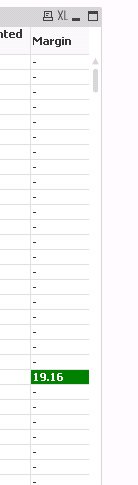
Can I exclude the values where the Margin is now "-" from my table - I set this to 20 as a test...
sunny_talwar
- Mark as New
- Bookmark
- Subscribe
- Mute
- Subscribe to RSS Feed
- Permalink
- Report Inappropriate Content
It should have already excluded them. Are there more expressions in this table?
- Mark as New
- Bookmark
- Subscribe
- Mute
- Subscribe to RSS Feed
- Permalink
- Report Inappropriate Content
Ah yes, I thought that might be the case. I have one other expression within the table..
sunny_talwar
- Mark as New
- Bookmark
- Subscribe
- Mute
- Subscribe to RSS Feed
- Permalink
- Report Inappropriate Content
Why don't you restrict the other expression like this:
If(not IsNull([Margin]), yourExpression)
Where Margin is the label of the above expression (Margin should turn blue when you use the above expression)
HTH
Best,
Sunny
- Mark as New
- Bookmark
- Subscribe
- Mute
- Subscribe to RSS Feed
- Permalink
- Report Inappropriate Content
Hi Sunny
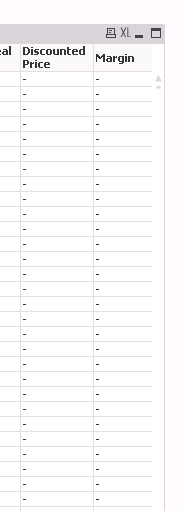
I tried this but it didn't work.. This is my other expression
=If(not IsNull([Margin]), (pricing_oplistm_price) - (pricing_oplistm_price/100)*pricing_price_deal_discount). It's also broken my margin expression too... Haha
- « Previous Replies
-
- 1
- 2
- Next Replies »