Unlock a world of possibilities! Login now and discover the exclusive benefits awaiting you.

- Qlik Community
- :
- All Forums
- :
- QlikView
- :
- Re: Vertical Label for y-axis
- Subscribe to RSS Feed
- Mark Topic as New
- Mark Topic as Read
- Float this Topic for Current User
- Bookmark
- Subscribe
- Mute
- Printer Friendly Page

- Mark as New
- Bookmark
- Subscribe
- Mute
- Subscribe to RSS Feed
- Permalink
- Report Inappropriate Content
Vertical Label for y-axis
Hi all,
I want to show the y-axis label vertically in the chart instead of showing horizontal....
can anyone tell me how to do this...
thanks in advance
- « Previous Replies
-
- 1
- 2
- Next Replies »
- Mark as New
- Bookmark
- Subscribe
- Mute
- Subscribe to RSS Feed
- Permalink
- Report Inappropriate Content
Hi Gopinath,
- Select chart properties
- Then Select Presentations Tab
- On the bottom Right in "Text in Chart" Section Add a text
- In Chart Text Popup - Add desired text in Text column, Angle Degree - 270, Alignment - Centered
- then Click Ok - then Click Apply & then OK,
- Go to the chart area and press Ctrl+Shift, you can see Chart sections highlighted in red box.
- select the added text and place at Y-Axis desired positions
Find the attachment for sample property settings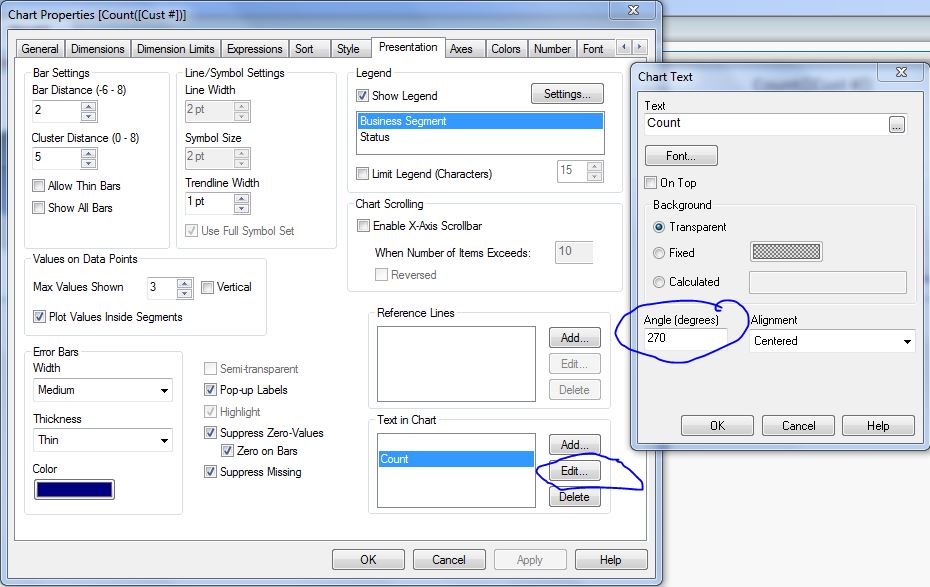
Regards,
Aswinkumar B
- Mark as New
- Bookmark
- Subscribe
- Mute
- Subscribe to RSS Feed
- Permalink
- Report Inappropriate Content
Hi,
Go to Presentation tab ----> at bottom right you need to add text in that.then add th elabel set the angle is 90 or 180 or 270 watever you want.then you will get it.
- Mark as New
- Bookmark
- Subscribe
- Mute
- Subscribe to RSS Feed
- Permalink
- Report Inappropriate Content
Hi,
it is easy.
click on axes tab and in dimensions Axis you check Prymary dimensions labels and secundary dimensions labels
see example below.

- Mark as New
- Bookmark
- Subscribe
- Mute
- Subscribe to RSS Feed
- Permalink
- Report Inappropriate Content
This works well but how to I make space on the left side to fit in the text so its visible
- Mark as New
- Bookmark
- Subscribe
- Mute
- Subscribe to RSS Feed
- Permalink
- Report Inappropriate Content
Amazing info!
- Mark as New
- Bookmark
- Subscribe
- Mute
- Subscribe to RSS Feed
- Permalink
- Report Inappropriate Content
Hi Andre,
Can you load an image example image to see more or less that you whan?
- Mark as New
- Bookmark
- Subscribe
- Mute
- Subscribe to RSS Feed
- Permalink
- Report Inappropriate Content
If I want to change the angle degrees of an expression into the axis and not the dimension into the axis?
- Mark as New
- Bookmark
- Subscribe
- Mute
- Subscribe to RSS Feed
- Permalink
- Report Inappropriate Content
If you're using QlikSense it is very simple. Go to the panel on the right hand side of the screen and under the measures section you can title the y-axis in "Label" which is directly under "Expression". The y-axis title should automatically be vertical.
- Mark as New
- Bookmark
- Subscribe
- Mute
- Subscribe to RSS Feed
- Permalink
- Report Inappropriate Content
Actually I am using Qlikview Version 12.0

 ZoeM
ZoeM
- Mark as New
- Bookmark
- Subscribe
- Mute
- Subscribe to RSS Feed
- Permalink
- Report Inappropriate Content
Super helpful to know, I was battling how to do a simple box.
- « Previous Replies
-
- 1
- 2
- Next Replies »