Unlock a world of possibilities! Login now and discover the exclusive benefits awaiting you.

- Qlik Community
- :
- All Forums
- :
- QlikView
- :
- YTD accumulation
- Subscribe to RSS Feed
- Mark Topic as New
- Mark Topic as Read
- Float this Topic for Current User
- Bookmark
- Subscribe
- Mute
- Printer Friendly Page

- Mark as New
- Bookmark
- Subscribe
- Mute
- Subscribe to RSS Feed
- Permalink
- Report Inappropriate Content
YTD accumulation
Hi All,
I am calculating YTD accumulation for current year ,previous year and showing forecast and target value for current financial year
CY calculation
=rangesum(above(SUM({<Particulars = {'Sales'},DataFlag= {1},[Strategic Code]={'C4'},ID_Mon = {$(=vIDMon)},[Time Span]={'Actual'},FiscalYear={"$(=max(FiscalYear))"},Description = {'Units sold KAM (Units)','Units sold KAM'},CalMonth=>}Data),0,vIDCount)).
But issue is while using rangesum function it is showing preceding month data in coming next month.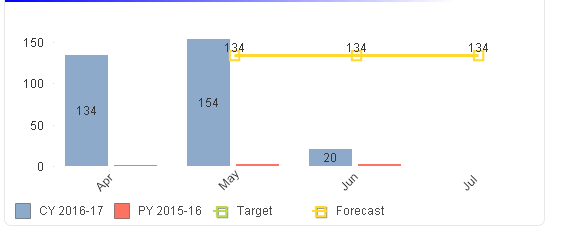
It should not show data in June month
Kindly let me know how it can resolve.
Thanks in advance
Regards
Sumita Chawla
Accepted Solutions
- Mark as New
- Bookmark
- Subscribe
- Mute
- Subscribe to RSS Feed
- Permalink
- Report Inappropriate Content

 Kushal_Chawda
- Mark as New
- Bookmark
- Subscribe
- Mute
- Subscribe to RSS Feed
- Permalink
- Report Inappropriate Content
what is vIDCount ?

 effinty2112
- Mark as New
- Bookmark
- Subscribe
- Mute
- Subscribe to RSS Feed
- Permalink
- Report Inappropriate Content
Hello,
I think the easiest way to achieve what you want is to add a YTD field in your load script.
Something like:
if(DayNumberOfYear(Date)<=DayNumberOfYear($(vToday)),1,0) as YTD
Now you can add a list box for YTD and if you select "1" any charts will give the YTD accumulations, or instead you can add this set modifier to expressions to make them show YTD values: {$<YTD = {1}>}
Cheers
Andrew
- Mark as New
- Bookmark
- Subscribe
- Mute
- Subscribe to RSS Feed
- Permalink
- Report Inappropriate Content
Hi
In vIDcount I am calculating count of months for eg. in this case value of vIDcount is 2(Apr,May)
- Mark as New
- Bookmark
- Subscribe
- Mute
- Subscribe to RSS Feed
- Permalink
- Report Inappropriate Content
Hello,
In Load script how would I calculate accumulation.
Please elaborate or provide example.
.png "sasikanth") sasikanth
sasikanth
- Mark as New
- Bookmark
- Subscribe
- Mute
- Subscribe to RSS Feed
- Permalink
- Report Inappropriate Content
hi,
Try this
Load *,
RangeSum(Sales,Peek('NewSales')) as NewSales
.
.
From Table;
Kushal_Chawda
- Mark as New
- Bookmark
- Subscribe
- Mute
- Subscribe to RSS Feed
- Permalink
- Report Inappropriate Content
I think you need to restrict your forecast expression to previous 2 months, as Forecast expression is calculated for all the months, CY accum also performed for Jun month
- Mark as New
- Bookmark
- Subscribe
- Mute
- Subscribe to RSS Feed
- Permalink
- Report Inappropriate Content
No I cant restrict forecast because I need to show forecast for current and next two months.
- Mark as New
- Bookmark
- Subscribe
- Mute
- Subscribe to RSS Feed
- Permalink
- Report Inappropriate Content
Hi,
Please find the attachment, hope this solves your problem. 
- Mark as New
- Bookmark
- Subscribe
- Mute
- Subscribe to RSS Feed
- Permalink
- Report Inappropriate Content
Thanks Payal its working