Unlock a world of possibilities! Login now and discover the exclusive benefits awaiting you.

- Qlik Community
- :
- All Forums
- :
- QlikView
- :
- date
- Subscribe to RSS Feed
- Mark Topic as New
- Mark Topic as Read
- Float this Topic for Current User
- Bookmark
- Subscribe
- Mute
- Printer Friendly Page

- Mark as New
- Bookmark
- Subscribe
- Mute
- Subscribe to RSS Feed
- Permalink
- Report Inappropriate Content
date
Hello all,
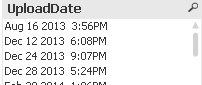
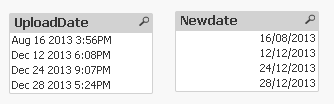
i want to remove timestamp form date field as shown in an image and convert it into proper date format ,how can i achieve this ??
- « Previous Replies
-
- 1
- 2
- Next Replies »
Accepted Solutions

 Gysbert_Wassena
- Mark as New
- Bookmark
- Subscribe
- Mute
- Subscribe to RSS Feed
- Permalink
- Report Inappropriate Content
The best way is to do this in the script:
load
...some fields...,
date(floor(UploadDate),'DD-MM-YYYY') as MyDate
from ...somewhere...;
Replace DD-MM-YYYY with the date format you really want.
edit: it looks like your timestamp is actually a string value. In that case try date#(left(UploadDate,11),'DD-MM-YYYY')
talk is cheap, supply exceeds demand

 Roop
Roop
- Mark as New
- Bookmark
- Subscribe
- Mute
- Subscribe to RSS Feed
- Permalink
- Report Inappropriate Content
There seems to be a problem with the image, but you use the date# function to convert into a date and the date function to change the format.
Hope this helps

 its_anandrjs
- Mark as New
- Bookmark
- Subscribe
- Mute
- Subscribe to RSS Feed
- Permalink
- Report Inappropriate Content
Write like
Date(Date#(UploadDate,'MMM DD YYYY hh:mmTT'),'DD/MM/YYYY')
Gysbert_Wassena- Mark as New
- Bookmark
- Subscribe
- Mute
- Subscribe to RSS Feed
- Permalink
- Report Inappropriate Content
The best way is to do this in the script:
load
...some fields...,
date(floor(UploadDate),'DD-MM-YYYY') as MyDate
from ...somewhere...;
Replace DD-MM-YYYY with the date format you really want.
edit: it looks like your timestamp is actually a string value. In that case try date#(left(UploadDate,11),'DD-MM-YYYY')
talk is cheap, supply exceeds demand
- Mark as New
- Bookmark
- Subscribe
- Mute
- Subscribe to RSS Feed
- Permalink
- Report Inappropriate Content
try Date(now(),'MMM DD YYYY')
its_anandrjs
- Mark as New
- Bookmark
- Subscribe
- Mute
- Subscribe to RSS Feed
- Permalink
- Report Inappropriate Content
Load like below script
LOAD *,Date(Date#(UploadDate,'MMM DD YYYY hh:mmTT'),'DD/MM/YYYY') as Newdate;
LOAD * Inline
[
UploadDate
Aug 16 2013 3:56PM
Dec 12 2013 6:08PM
Dec 24 2013 9:07PM
Dec 28 2013 5:24PM
];
- Mark as New
- Bookmark
- Subscribe
- Mute
- Subscribe to RSS Feed
- Permalink
- Report Inappropriate Content
Hi rohit,
use Date() and Date#()
Date(Date#(UploadDate,'MMM DD YYYY hh:mmTT'),'DD-MM-YYYY') as NewDate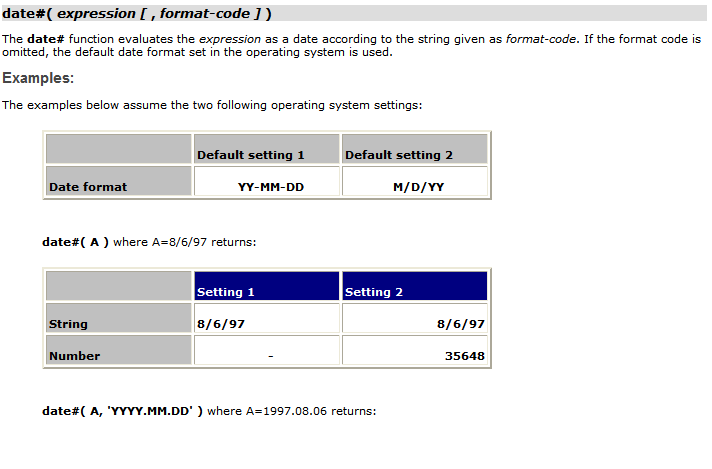
 arjunkrishnan
- Mark as New
- Bookmark
- Subscribe
- Mute
- Subscribe to RSS Feed
- Permalink
- Report Inappropriate Content
Hai Frd This One Usuful For u...
SET DateFormat='DD/MMM/YYYY';
SET TimestampFormat='DD/MMM/YYYY hh:mm:ss[.fff]';
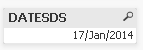
U May U Want See Only The Date Means
DATE([DateField],'$(DateFormat)') as NewFieldName,
O/P Like That
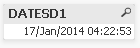
U May U Want See Only The Date & Timestamp Means
DATE([DateField],'$(TimestampFormat)') as NewFieldName,
O/P Like That
its_anandrjs
- Mark as New
- Bookmark
- Subscribe
- Mute
- Subscribe to RSS Feed
- Permalink
- Report Inappropriate Content
When using below script
LOAD *,Date(Date#(UploadDate,'MMM DD YYYY hh:mmTT'),'DD/MM/YYYY') as Newdate;
LOAD * Inline
[
UploadDate
Aug 16 2013 3:56PM
Dec 12 2013 6:08PM
Dec 24 2013 9:07PM
Dec 28 2013 5:24PM
];
You get change in date column like this
- Mark as New
- Bookmark
- Subscribe
- Mute
- Subscribe to RSS Feed
- Permalink
- Report Inappropriate Content
thanks anand ,but its only working for some dates for the rest its displaying null values
- « Previous Replies
-
- 1
- 2
- Next Replies »