Unlock a world of possibilities! Login now and discover the exclusive benefits awaiting you.

- Qlik Community
- :
- All Forums
- :
- QlikView
- :
- Re: need help on Ad-hoc report
- Subscribe to RSS Feed
- Mark Topic as New
- Mark Topic as Read
- Float this Topic for Current User
- Bookmark
- Subscribe
- Mute
- Printer Friendly Page

 Nagaraju_KCS
- Mark as New
- Bookmark
- Subscribe
- Mute
- Subscribe to RSS Feed
- Permalink
- Report Inappropriate Content
need help on Ad-hoc report
Hi Community,
I have done simple Ad-hoc report,
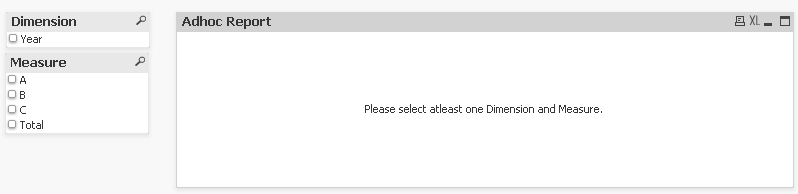
if i make selections Dimension = Year and Measure= A,B,C and Total

here total working fine 1550, total calculation A+B+C.
MY requirement, if i make single selection Measure= A and Total, i have to show my total, my total not showing because,
i have written my expression Column(1)+Column(2)+Column(3),
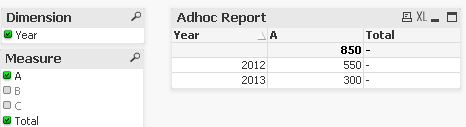
and if i'm make selections A, B and Total, i need to show based on selection Total.
same as A, C and Total
How to write expression total ?
Thanks in Advance...
- « Previous Replies
- Next Replies »

 stabben23
- Mark as New
- Bookmark
- Subscribe
- Mute
- Subscribe to RSS Feed
- Permalink
- Report Inappropriate Content
Instead of using column() it possible to use the Expression it self without the total in the column.
RangeSum([0-30],[31-60],[61-90]) is a neat way to solve this problem.

 tresB
tresB
- Mark as New
- Bookmark
- Subscribe
- Mute
- Subscribe to RSS Feed
- Permalink
- Report Inappropriate Content
I agree, that would a neater solution. However, wouldn't that be a kind of static solution? What if the values change or increase in measure field.
Nagaraju_KCS
- Mark as New
- Bookmark
- Subscribe
- Mute
- Subscribe to RSS Feed
- Permalink
- Report Inappropriate Content
Really Awesome Guys  .
.
Your BRAIN working like Machines.

- « Previous Replies
- Next Replies »