Unlock a world of possibilities! Login now and discover the exclusive benefits awaiting you.

- Qlik Community
- :
- All Forums
- :
- QlikView
- :
- pivot table issue
- Subscribe to RSS Feed
- Mark Topic as New
- Mark Topic as Read
- Float this Topic for Current User
- Bookmark
- Subscribe
- Mute
- Printer Friendly Page

- Mark as New
- Bookmark
- Subscribe
- Mute
- Subscribe to RSS Feed
- Permalink
- Report Inappropriate Content
pivot table issue
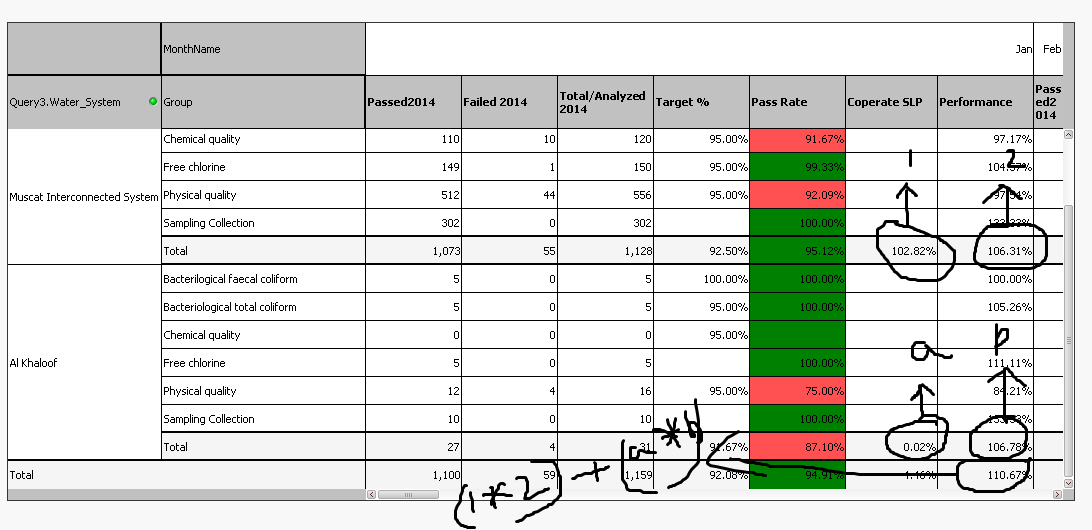
Here in this pivot table..... i want performance total as (1*2)+(a*b) how can i write expression at performance....

.png "Former Employee") JonnyPoole
JonnyPoole
- Mark as New
- Bookmark
- Subscribe
- Mute
- Subscribe to RSS Feed
- Permalink
- Report Inappropriate Content
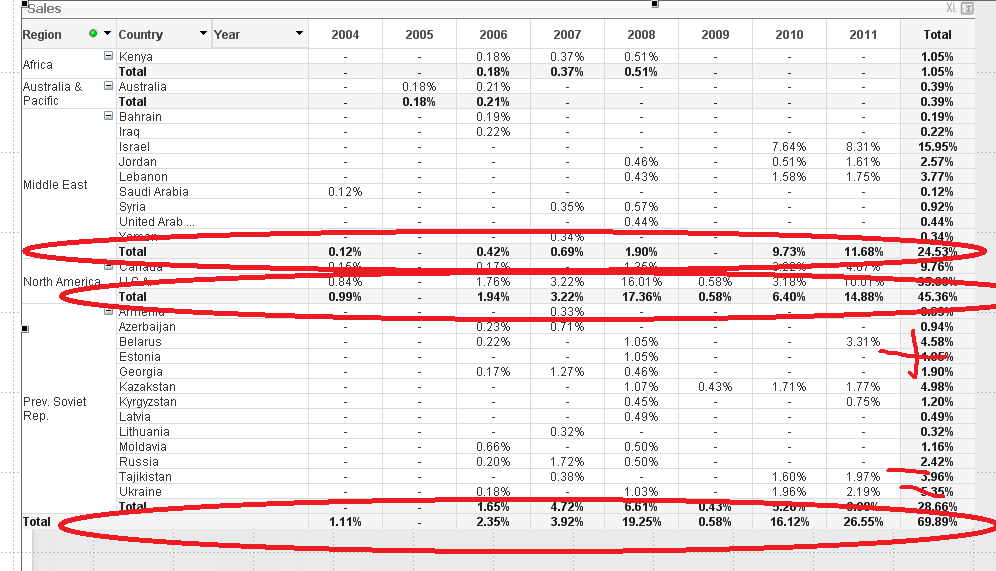
Here is an example to get you started.
In this expression i could pick up the required total cells by using the dimensionality() function which returns 1's for the row grand totals. In that case i am adding 2 different row subtotals together using SET ANALYSIS. The grand total is a straight addition of the 2 percentages in the subtotals. You can do this with any valid arithmetic.
if( Dimensionality() <> 0 , sum(Sales)/sum(total Sales) ,
sum( {<Region={'North America'}>} total <Year> Sales) / sum (total Sales)
+
sum( {<Region={'Middle East'}>} total <Year> Sales) / sum (total Sales)
)
- Mark as New
- Bookmark
- Subscribe
- Mute
- Subscribe to RSS Feed
- Permalink
- Report Inappropriate Content
ya thank you very much .if there any issues i will ping u don't mine
please.
On Mon, Dec 1, 2014 at 10:15 PM, Jonathan Poole <qcwebmaster@qlikview.com>
- Mark as New
- Bookmark
- Subscribe
- Mute
- Subscribe to RSS Feed
- Permalink
- Report Inappropriate Content
Here in the performance tab it is like this check out.