Unlock a world of possibilities! Login now and discover the exclusive benefits awaiting you.

Analytics & AI
Forums for Qlik Analytic solutions. Ask questions, join discussions, find solutions, and access documentation and resources.
Data Integration & Quality
Forums for Qlik Data Integration solutions. Ask questions, join discussions, find solutions, and access documentation and resources
Explore Qlik Gallery
Qlik Gallery is meant to encourage Qlikkies everywhere to share their progress – from a first Qlik app – to a favorite Qlik app – and everything in-between.
Qlik Community
Get started on Qlik Community, find How-To documents, and join general non-product related discussions.
Qlik Resources
Direct links to other resources within the Qlik ecosystem. We suggest you bookmark this page.
Qlik Academic Program
Qlik gives qualified university students, educators, and researchers free Qlik software and resources to prepare students for the data-driven workplace.
Recent Blog Posts
-
Getting More Connected in the Cloud
We are excited to be closing in on the first year of Qlik Sense Cloud Business!One of the main areas of focus this year for our customers and cloud de... Show MoreWe are excited to be closing in on the first year of Qlik Sense Cloud Business!
One of the main areas of focus this year for our customers and cloud development team has been the addition of a broader range of data connectivity options within Qlik Sense Cloud Business. Recently, you may have noticed the addition of direct data connectivity to the following applications:
- Bit.ly
- Facebook Insights
- Facebook Pages (expanded tables, including LikesforItem, CommentsforItem, and CommentsandReplies)
- Google Analytics (expanded tables, including MetaDataColumns, CustomMetrics, CustomDimensions, and Goals)
- MailChimp
- Microsoft Dynamics
- Slack
- SugarCRM
- SurveyMonkey
Using the New Connectors
Configuration and authentication for these newest connectors is similar to the processes for existing web connectors – after entering your basic account information for the various cloud applications, you can access an authentication code to establish the connection. Look for the new connectors in the data load editor, under Qlik Web Connectors:
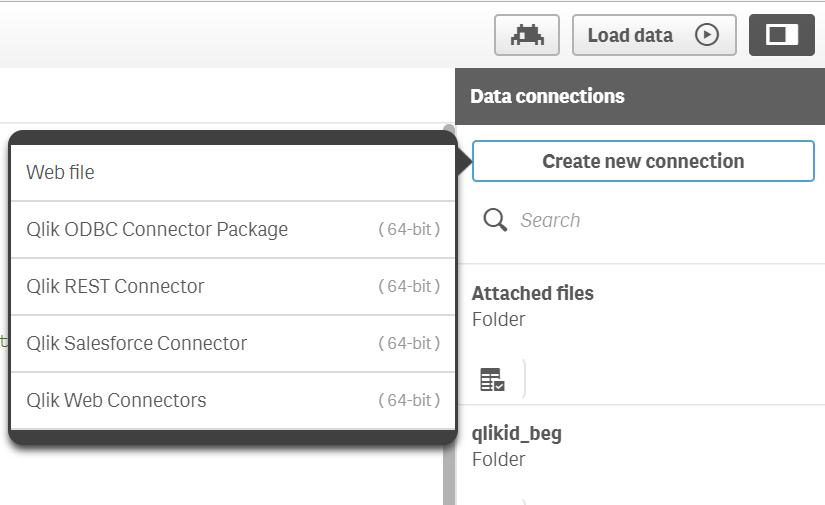
Connectors in Qlik Sense Cloud Business
These new additions help bring more of the core Qlik Sense experience to Qlik Sense Cloud Business. Qlik’s Associative Difference empowers users to easily connect to business-critical data and immediately benefit from the ease of exploring multiple data sources together, at once. That’s why we’ve ramped up connectivity to both cloud and on-premises sources, as well as more flexible options like REST, web files, and Dropbox (coming soon!). The full list of connectivity included in a Qlik Sense Cloud Business subscription now looks like this:
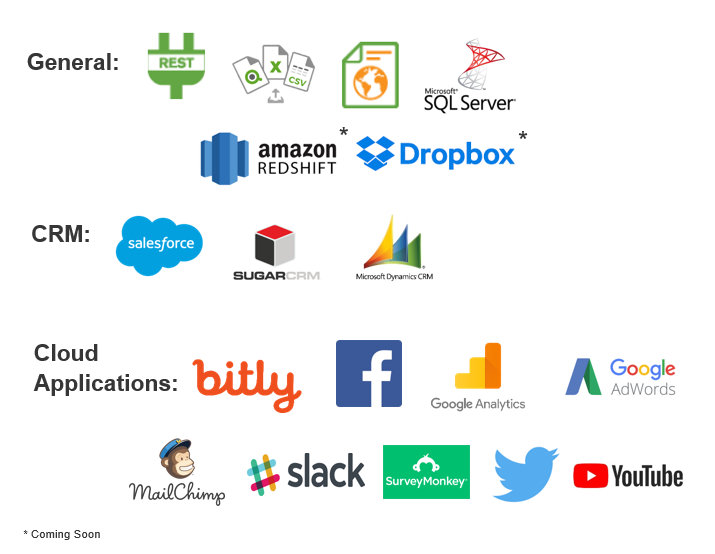
This recent release of connectors means that Qlik Sense Cloud Business now includes direct connectivity to the three of the market-leading CRM applications, so you can easily dive deeper into customer, sales and marketing data. Interested in creating a CRM dashboard or app? Head over to our demo site and explore the CRM demo app, as well as some other tips and tricks for getting the most out of your CRM data.
More Qlik Sense Cloud Business highlights:
- 30 Day Trial - The free trial period for Qlik Sense Cloud Business is now 30 days. If you have been interested in learning more about Qlik Sense or experimenting with cloud analytics, take advantage of the extended free trial period to create and share apps. Go to qlik.com/cloud to create a Cloud Basic subscription, then upgrade in-product.
- Customer Story - Curious about how other organizations use Qlik Sense Cloud? Hear from Wayne Printy, CFO, LincolnHealth - a Qlik Sense Cloud Know It All!
- Learn More - Our Cloud Success Team is always ready to help you get the most of your Qlik Sense Cloud Business subscription. Sign up to attend a live, interactive webinar with the team to get your questions answered and learn more.

-
Limited Load and the First Prefix
Have you ever had an application that takes a long time to reload and you dread making changes to the script because that would require you to wait un... Show MoreHave you ever had an application that takes a long time to reload and you dread making changes to the script because that would require you to wait until the reload is complete to make sure your changes are working correctly? Well QlikView and Qlik Sense both provide options that allow you to test your script without waiting for the entire reload to complete – Limited Load and the First prefix.
QlikView and Qlik Sense have Debug capabilities that allow you to do a Limited Load. With each product, you can enter the maximum number of records that each Load and Select statement can load. This reduces the execution time of the reload but still lets you to test that the script runs properly. Limited load can be very useful when the data sources are large or when you are testing with live data and want to keep the execution time low.
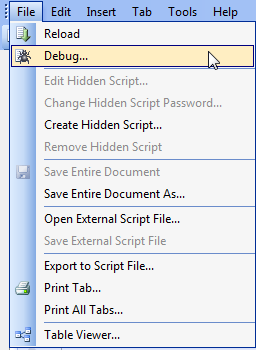
In QlikView and Qlik Sense, you can access the Debug window from the script editor. In QlikView, you can find it in the File menu or on the toolbar.

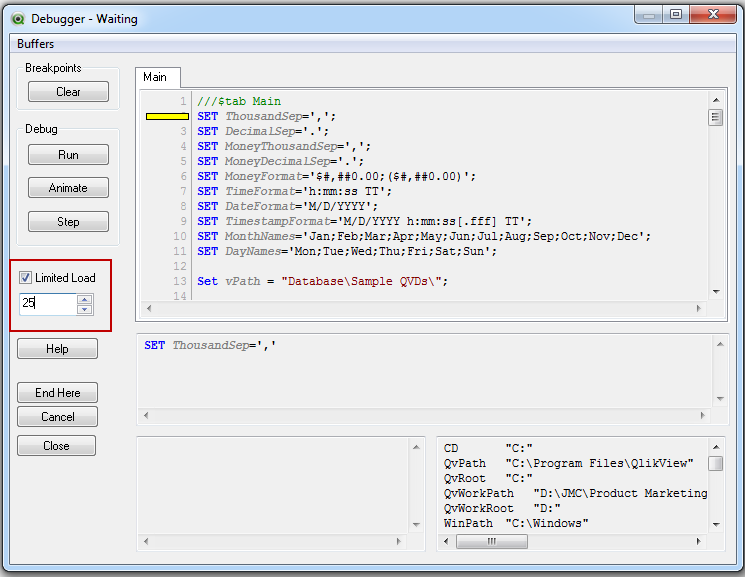
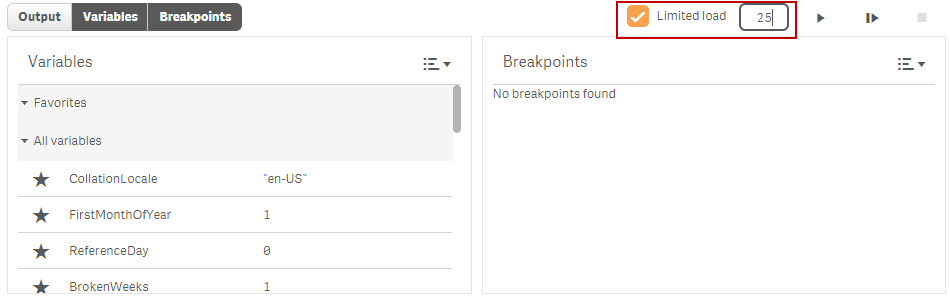
The Debug window looks like the image below. You can check the Limited Load checkbox and enter the maximum number of records you want loaded with each Load and Select statement.
In Qlik Sense, you can also access the Debug panel from the Data Load Editor.

Clicking on the Debug icon opens the Debug panel at the bottom of the page. You can check the Limited Load checkbox and then enter the maximum number of records you want loaded with each Load and Select statement.
Another option that can be used to reduce the number of records loaded is the First prefix. This can also be used with a Load or Select statement to set the maximum number of records that are loaded. The difference between the Limited Load and the First prefix is that the Limited Load will apply to all Load and Select statements in the script whereas the First prefix is manually added to each Load or Select statement that it should apply to. For example, I could run the script below to load only 10 customers from the Customers QVD.
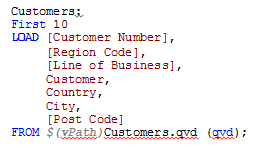
The First prefix can be written as it is above or with parenthesis like this: First (10) LOAD. If there are many Load and Select statements in the script, a Limited Load may be easier to use but if there are only a few Load/Select statements or if there is one data source in particular that has a lot of records, then the FIRST prefix may work best.
Keep in mind when using Limited Load or the First prefix that all the data may not be loaded and you may find that visualizations are not showing data or that selections are not providing the expected result. This is really noticeable if you do a Limited Load with only a few records like 5 or 10. When using Limited Load or First, the data that is loaded may not be associated so you may end up with tables in the data model with disconnected data. That is ok, once you do a full reload, everything will look as you expect.
Limited Load and the First prefix both can reduce the execution time of the reload script which can be helpful when you want to just test a script or when you are testing with a live data source. There are times when you need to load all the data in order to ensure that the script logic is working – it all depends on the specific application - but it is good to know when working with large data sources that there are options that can reduce the reload time.
Thanks,
Jennell
-
Are you in need of Data?
Searching for clean data can be difficult but the Academic Program is here to steer you in the right direction! Kaggle provides a wide range of data ... Show More
Searching for clean data can be difficult but the Academic Program is here to steer you in the right direction!
Kaggle provides a wide range of data sets for any classroom or project. If you need data we recommend visiting Datasets | Kaggle.

-
Amazing New Qlik Academic Resources FOR YOU!
We are excited to announce the Qlik Academic Program is expanding, and we have BIG news to share! Members currently receive free Qlik software, free ... Show MoreWe are excited to announce the Qlik Academic Program is expanding, and we have BIG news to share! Members currently receive free Qlik software, free training through the Qlik Continuous Classroom (QCC), and a free Data Analytics Curriculum to help professors introduce data literacy concepts to their students.
In addition, members will now receive the following:
· Qlik Sense Qualification: After learning skills in the QCC, and applying your skills using Qlik products, you can test your knowledge to earn a Qlik Sense Qualification! Two qualifications are currently available: Business Analyst Qualification and Data Architect Qualification. After passing a two-part exam, you will receive a printable certificate and a digital badge to share on your resume, LinkedIn, and other social sites.
· Data Analytics Curriculum: We have updated and expanded the curriculum!
o Students can now access on-demand videos to learn data literacy concepts at their own pace.
o UPDATED Data Visualization Course: We have added complementary videos with new activities and a real-world, interactive business use case.
o NEW Introduction to Data Analytics Course: We have created a new course which provides lecture materials for professors, handouts, activities and a real-world, interactive business use case.
· The QCC Platform: We have migrated all our resources to the QCC! Now you can access the free training, the curriculum, and the qualification exams all in one place. Simply log into the QCC using your Qlik Account username and select “Academic Program” on the menu at the top of the QCC homepage.
If you are currently an active member of the Academic Program, you will automatically receive access to these amazing new resources. If it's been more than a year since you last applied, we recommend you check us out by visiting http://www.qlik.com/us/company/academic-program. There you can apply as a professor or students and receive access to all these wonderful resources!
-
A Culture of Data Literacy
When we think of the word “culture”, or phrase “corporate culture”, many thoughts can come to our mind, some positive and some negative. In my first ... Show More
When we think of the word “culture”, or phrase “corporate culture”, many thoughts can come to our mind, some positive and some negative. In my first blog post, The Rise of Data Literacy, we spoke of the data revolution and of data literacy itself. But for organizations to succeed with data literacy, the right frame of mind and data literacy culture must exist. What does the phrase “data literacy culture” mean? How can an organization implement and put in place the proper culture to ensure it starts to grow within data literacy and progresses with the data revolution?
To read the full article visit A Culture of Data Literacy | Qlik
-
Qlik Sense September 2017 is now available
Qlik Sense September 2017 is now available from our Customer Download Site. You can also try out many of the new capabilities in Qlik Sense Cloud ... Show MoreQlik Sense September 2017 is now available from our Customer Download Site. You can also try out many of the new capabilities in Qlik Sense Cloud where you can use Qlik Sense Cloud Basic for free or try Qlik Sense Cloud Business with a free 30 day trial.
You will find many new features and capabilities in this release including:
- For Business Users
- Waterfall Chart - You can now illustrate how an initial value is affected by intermediate positive and negative values with the new waterfall chart. For example, you can show the positive and negative contributions of different accounts in an income statement.
- Recent Colors- The color picker in Qlik Sense now displays the five most recent colors selected in Qlik Sense
- Expression Driven Labels – Provides the ability to use expressions in labels for dimensions and measures in property pane. E.g. This allows you to add dynamically calculated values into the labels on your charts.
- Box Plot Chart Improvements – Addition of lasso and range selection, reference lines, and vertical orientation in the box plot chart that was introduced in June.
- Pivot Table Improvements – Ability to expand and collapse all items within a pivot table.
- Data Manager Sequential Operations - Improvements to Data manager enable you to perform sequential transformations on your tables and fields. Where previously you were limited in what transformations you could perform together, such as being able to apply a single data profiling card transformation on a single field, you can now use the data profiling cards, concatenation, calculated fields, and unpivoting data together.
- For Administrators
- Centralized Logging - With the introduction of shared persistence, all nodes now have direct access to a common database and file system. The new Qlik Logging Service allows administrators to configure logs to be centralized by collecting all the messages and inserting them into a PostgreSQL database to help find issues and analyze usage.
- Qlik Sense Mobile - This option is only available for customers who have an MDM app store hosted in-house and who have deployed Qlik Sense Enterprise. The Qlik Sense Mobile app can be downloaded fromhttps://vpp.itunes.apple.com
- For Developers
- Hierarchical Data API - A new hierarchical data API enables a definition that more closely reflects the visual representation of data. Benefits of the new API: Ensures little to no manipulation or transformation of data structure in the front end. / Simplifies the creation of charts./ Enables more powerful and dynamic charts.
- Visualization API Update – Addition of new waterfall chart.
- Extension Certification Pilot - Initial implementation of a new process for certifying extensions for Qlik Sense.. This is a limited implementation but ultimately we will offer partners the opportunity to apply for certification and to make certified extensions for sale via Qlik Market.
Attached you will find a document which outlines these features as well as an overall view of the improvements that have been released over the past 12 months.
------------
Join us in a city near you!
From October 3rd to November 16th we will be visiting cities around the world for the Visualize Your World tour. Learn how Qlik’s cloud-ready analytics platform delivers value and how Qlik is building on its unique Associative Difference to drive a new wave of analytics across all your data, people, and ideas.
- For Business Users
-
FileSize Function
In the past, I have blogged about the FileName function and how I used it to generate data for my Qlik Sense app. Today, I thought I would blog about... Show MoreIn the past, I have blogged about the FileName function and how I used it to generate data for my Qlik Sense app. Today, I thought I would blog about another file function, the FileSize function. The FileSize function is a script function that can be used to return the size of a file or table. The FileSize function returns an integer for the size, in bytes, of the file specified or a table. The file can be a QVD, a text file, an Excel file or a table. The syntax is quite simple:
Syntax:
FileSize([filename])
I have used the FileSize function to determine if a QVD exists before I load it. In the example script below, I set the size of the CustomerMaster QVD to the vSize variable. Then I check the variable to see if a size was returned. If a size was returned meaning a QVD is there, I load the QVD. If the QVD does not exist then the FileSize function will return null.
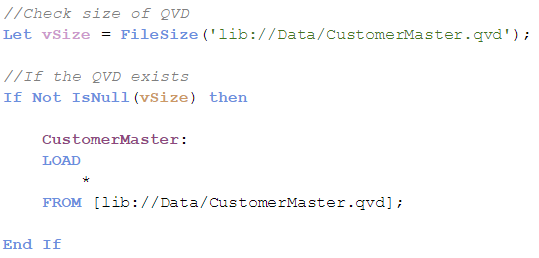
The FileSize function can also be used to return the table size of the table file being read. To do this, the FileSize function is used in the Load statement as seen in the example script below. When the filename parameter is excluded, then the FileSize function will return the size of the table currently being read. The TableSize field will store the size of the CustomerMaster table after it has been loaded.
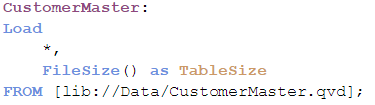
The FileSize function is another easy-to-use script file function that can be used in Qlik Sense or QlikView to provide the size of a file or a table. Use the FileSize function as a checkpoint in your script to ensure the file is available before loading, as I did in the example above, or use it ensure size requirements for files being loaded are being met in your app. Good luck scripting!
Thanks,
Jennell
-
Tips to improve your data literacy using Qlik Sense
Hello Qlik Community! Qlik's Bruno Calver is back sharing his in-the-field experiences, building upon his User Experience white paper made available l... Show MoreHello Qlik Community! Qlik's Bruno Calver is back sharing his in-the-field experiences, building upon his User Experience white paper made available last year. This time he has authored a white paper on Data Literacy. Bruno has worked with many large global enterprises, helping them discover the value in their data and how to best represent it in order to drive results. During this time he has come across many different ways of working with data. This article tries to consolidate the key take-aways within the context of data literacy. Be sure to download the attached PDF at the bottom of this post to learn more.
Introduction
Literacy skills have always been top of the bill in the education system -- and for good reason. Equally, data literacy skills are climbing the agenda in today’s competitive business environment.
Organizations will soon rely less and less on pre-processed information and their gut instincts as a decision making paradigm. It is increasingly important for everyone to apply critical thinking skills to every problem and data set in order to achieve a competitive advantage and create truly innovative solutions.
However, for many of us it is not clear what data literacy means, let alone the skills and techniques that might help drive our own data literacy level. The attached article explores these concepts and provides 5 key areas to think about when analyzing your data - including practical examples:
- Trends & Context
- Internal & External Data
- Cohorts & Cell based analysis
- Averages, Aggregation & Distribution
- Bias & Non-Causal Correlations
Increasing data literacy skills can have a profound impact on organizations in the following ways:
- Increasing user adoption and awareness of analytical tools and capabilities
- Creating data driven cultures to enhance performance
- Unlocking more value from your data investment
If this sounds interesting, then please read the article and see what new things you can discover about the language of data…!

Bruno is a Principal Solution Architect working in the UK with some of Qlik’s enterprise customers. His passion is working with business people to turn disparate and otherwise mundane data sets into insights and stories that can engage their audience, drive change and inspire new ways of thinking.

-
QlikView and Qlik Sense
As most of you have noticed – I hope – we have now released a new product.Qlik Sense.Qlik Sense is not just a new release of QlikView. Instead it is s... Show MoreAs most of you have noticed – I hope – we have now released a new product.
Qlik Sense.
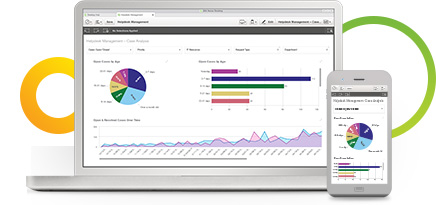
Qlik Sense is not just a new release of QlikView. Instead it is something different. But there are still so many similarities between the two products, so I thought it would be appropriate to dedicate a blog post to differences and similarities between the two.
Basically, the two products are two different user interfaces to the same analysis engine. This means that old scripts and old formulae will (almost) always work exactly the same way as before. (There are some smaller differences in that Qlik Sense uses libraries, and cannot always use relative paths for files.)
Hence, the two products both have the same Green-White-Gray logic; both use the same calculation engine; both have roughly the same response times; and you should use the same considerations for both when it comes to data modelling. This also means that many of the previous posts here on the Design Blog are just as relevant for Qlik Sense as for QlikView.
But the two products are still very different. And just as a parent cannot say that one child is better than the other, I cannot say that one product is better than the other. They are good at different things:
- QlikView is a tool for situations where you want prepared business applications, i.e. applications created by developers who put a lot of thought into the data model, the layout, the charts and the formulae; and deliver the applications to end-users who consume the applications. We call this Guided Analytics. The end-user has total freedom to explore data, select, drill down and navigate in the information, and can this way discover both questions and answers in the data. The end-user is however limited when it comes to creating new visualizations. This type of situation will without doubt be common for many, many years to come.
- Qlik Sense is a tool for situations where you don’t want to pre-can so much. Instead you want the user to have the freedom to create a layout of his own and in it, new visualizations; charts that the developer couldn’t imagine that the user wants to see. You want Self-service data discovery, which means a much more active, modern, engaged user. In addition, Qlik Sense is much easier to use when you have a touch screen, and is adaptive to different screen sizes and form factors. On the whole, Qlik Sense is a much more modern tool.
Finally, it is important to acknowledge that a piece of software is never ready. It evolves constantly:
Qlik Sense today is only the first version of something that will evolve further and get more features and functions as time goes on. Some of the features and functions of QlikView have not yet been implemented in Qlik Sense – there just hasn’t been time enough – but many of them will be implemented in coming versions.
Also QlikView is not yet a "final product". The product will be developed further, and most likely we will see some of the new functionality from Qlik Sense also in coming versions of QlikView. The goal is to use the same platform for both user interfaces.
With these two tools, we believe that we are well prepared for the future.

-
Launch of Centre of Excellence in Analytics-powered by Qlik!
Qlik in association with Vidya Jyothi Institute of Technology ( VJIT) launched its first ‘Centre of Excellence- powered by Qlik’ in IT city, also cal... Show MoreQlik in association with Vidya Jyothi Institute of Technology ( VJIT) launched its first ‘Centre of Excellence- powered by Qlik’ in IT city, also called India’s Genome Valley, Hyderabad on 11 September 2017.
This Centre was jointly inaugurated by the Chairman of VJIT and Anurag Institutions, Dr. P Rajeshwar Reddy and Qlik’s Academic Program Manager APAC, Pankaj Muthe. Dr. Reddy is also the Member of Legislative Council ( MLC) in the State of Telangana and its party Chief Whip.
This event was attended by Professors, Head of Departments of VJIT including its Director Dr. P Venugopal Reddy, Principal Dr. M. Padmaja and Dr. Siddhartha Ghosh-Professor and Training and Placement Head. Representatives from Qlik including Jaydeep Deshpande, Marketing Manager- India and SAARC and Fahad Khan, Solution Architect were also present. Support from team India and especially the Marketing, PR ( APAC) and Pre Sales team has been forthcoming for the successful launch of this Centre. Inputs at various stages were offered by these teams.
The key goal of the Centre of Excellence is to support data literacy and enable Professors and students in analytics through the resources offered under the Qlik Academic Program such as Qlik Continuous Classroom( QCC), analytics curriculum, community support etc.
This Centre would serve as a dedicated point of contact for students and also to Professors at VJIT who wish to collaborate on data analytics in areas of research and industry-academia partnerships in analytics. Professor Dr. Siddhartha Ghosh is facilitating these initiatives on behalf of VJIT.
The Centre would also serve as a point of confluence for ideas, trends and concepts in data analytics to be exchanged not just in VJIT but also for professionals, bodies and experts in analytics in the city of Hyderabad and States of Telangana and Andhra Pradesh.
A computer lab equipped with 70 hi-end computers, UPS, dedicated Server, LCD and a leased line internet connection is available to students as a part of this Centre.
More than 60 students from VJIT are already enrolled into the academic program and have begun training and accessing resources offered by the program. Many of the students dedicate a fixed time every week to train themselves using QCC. The target is to enable 180 students in analytics through the Centre every year.
Prior to the launch, 24 students participated in a hackathon conducted by VJIT and final five were selected to present their findings and demonstrate their apps built using Qlik Sense. Presentations on their apps were made on topics such as ‘The world happiness report’, ‘Analysis of students performance in pre-placement test’, ‘Hidden stories using Qlik Sense’ etc.
In addition, 20 poster presentations on various aspects of Qlik and its technologies were prepared and displayed by students at VJIT.
The Academic Program is growing at healthy pace in India and by collaborating on this initiative, engagement with Universities has moved further and the scope to work together in different activities has opened up. Also with the rapid change and introduction to newer technologies and in the world of analytics, the Centre of Excellence in Analytics is well positioned to facilitate this transition and support students and professors well.
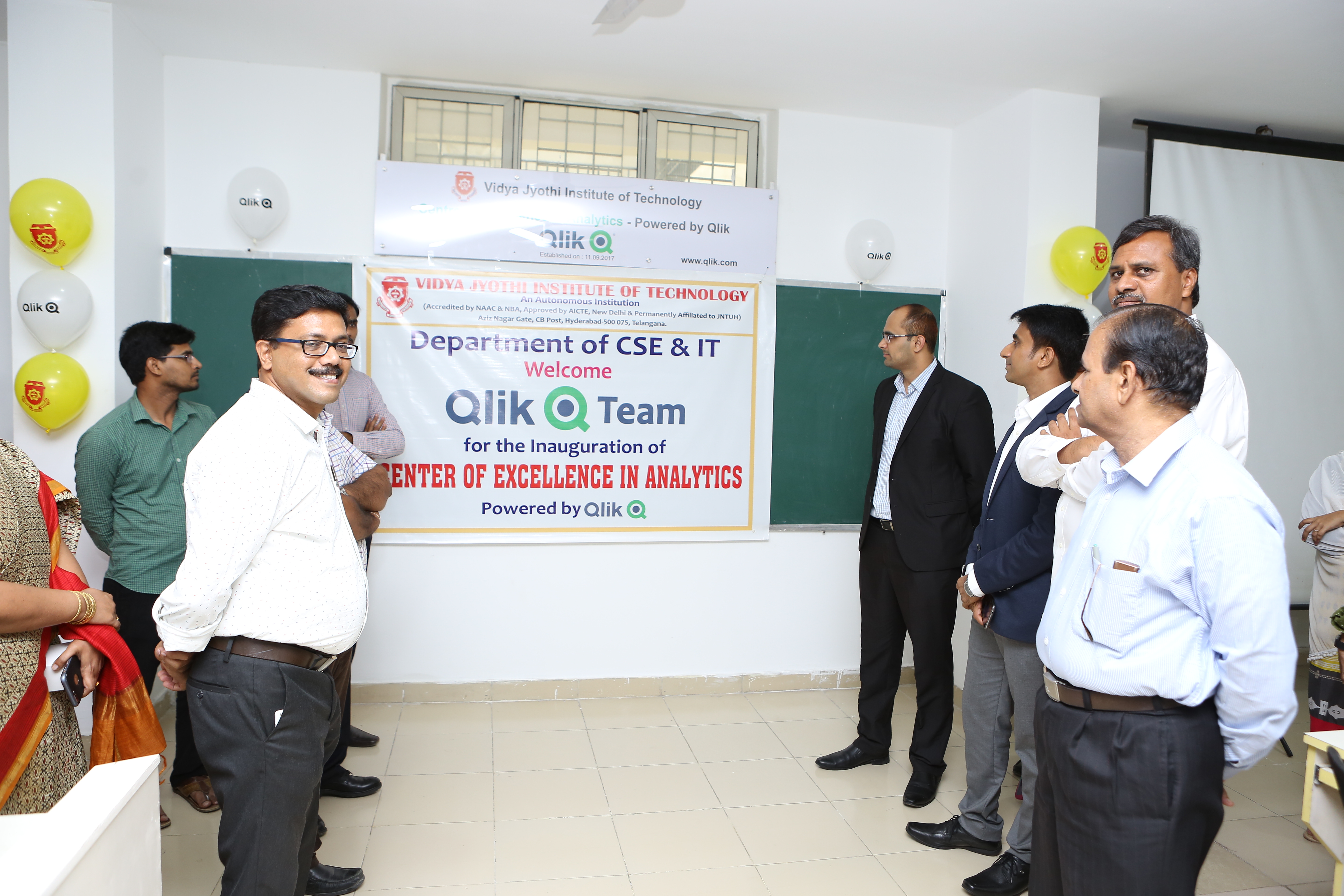
Qlik and VJIT team at the Centre of Excellence in Analytics-powered by Qlik!
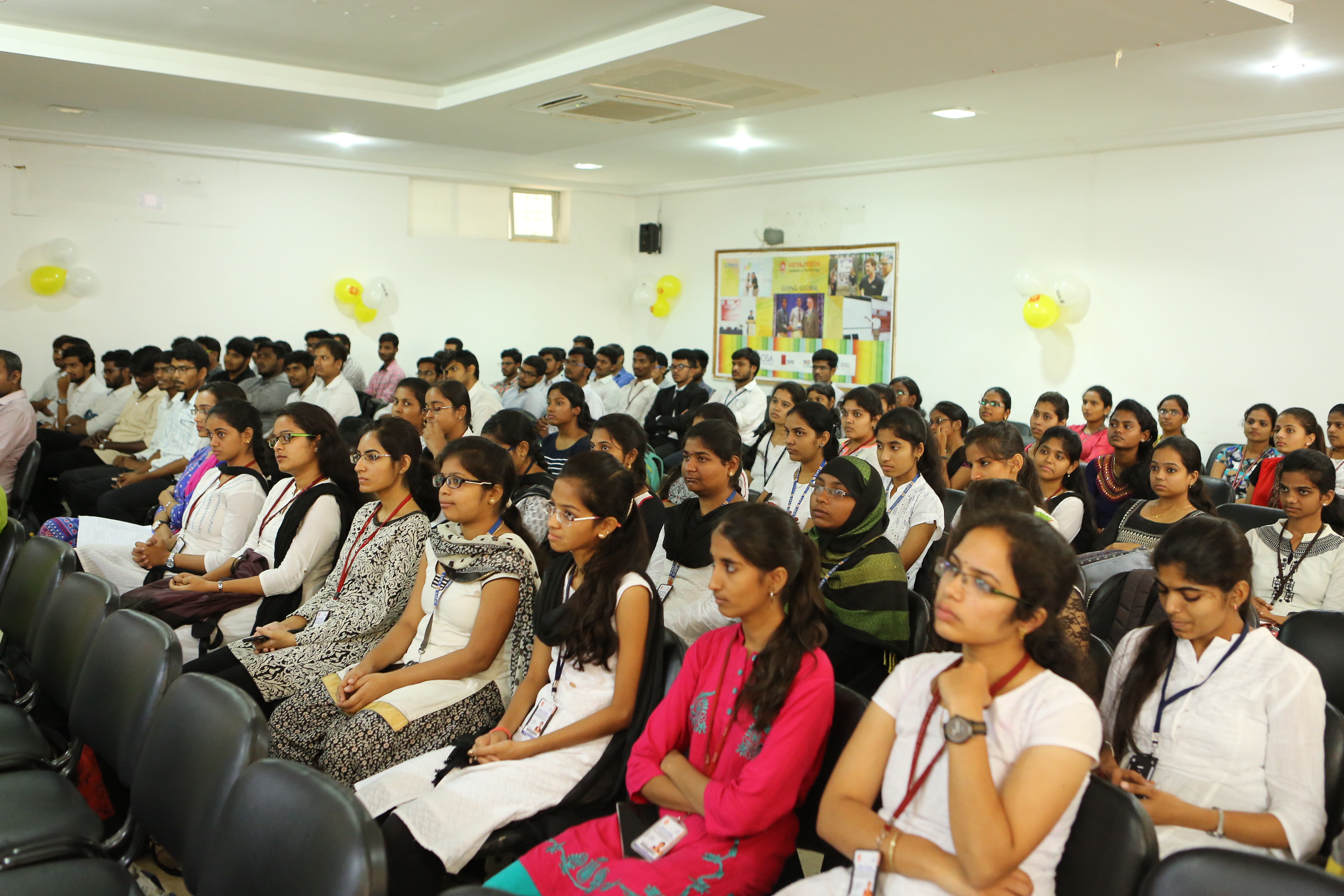
VJIT students attending the launch!
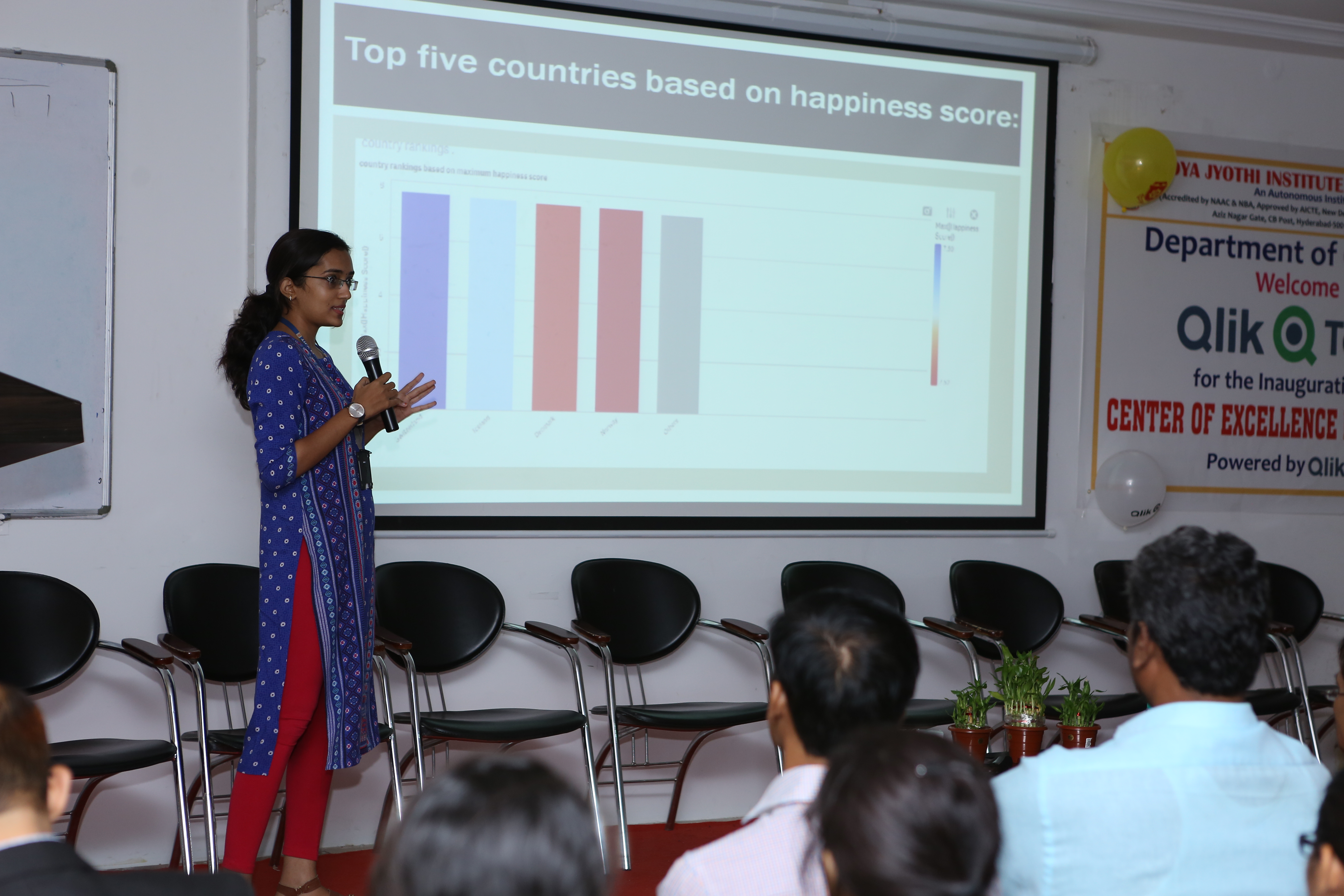
One of the students presenting her app on " The world happiness report"
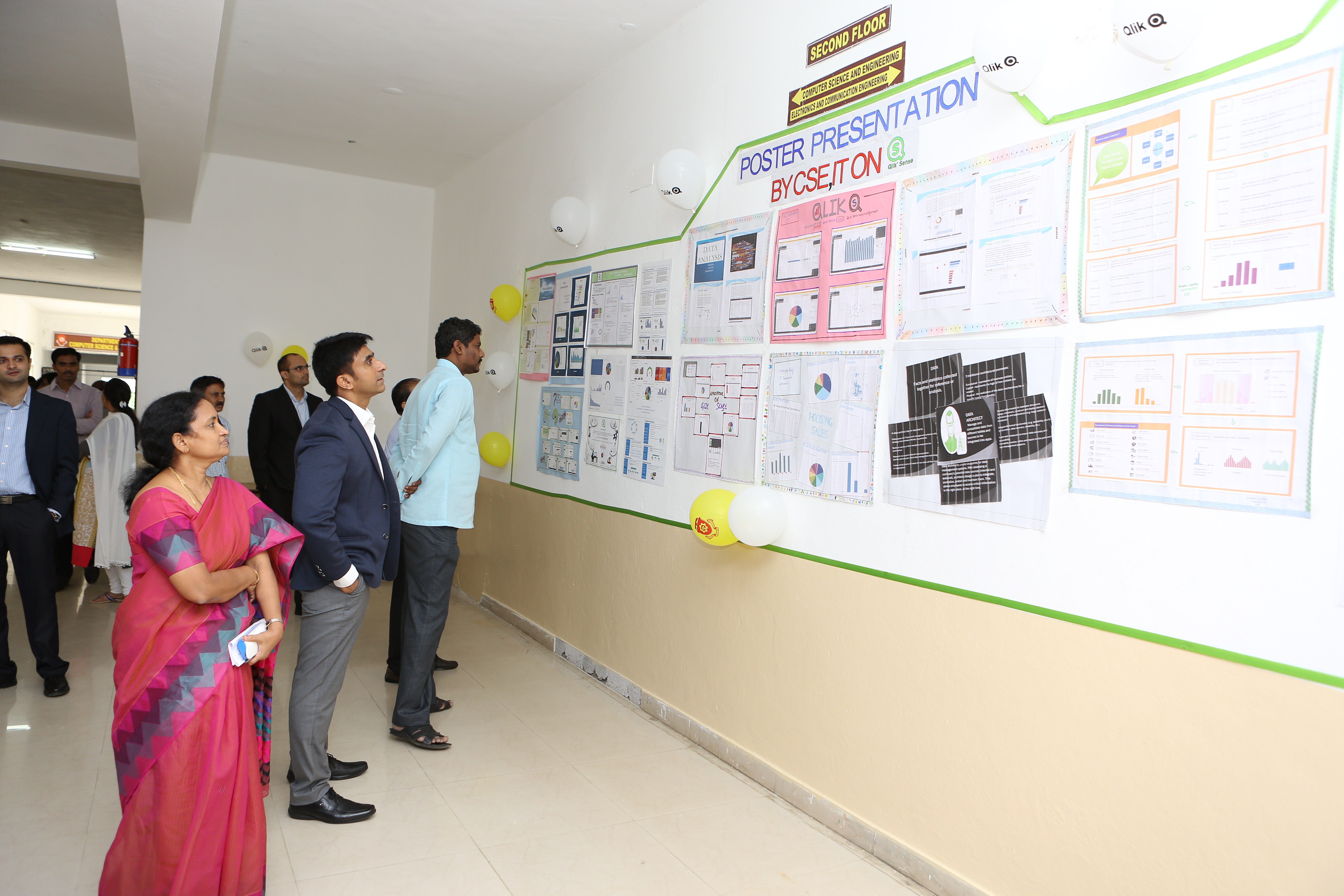
Poster presentation on Qlik by students!
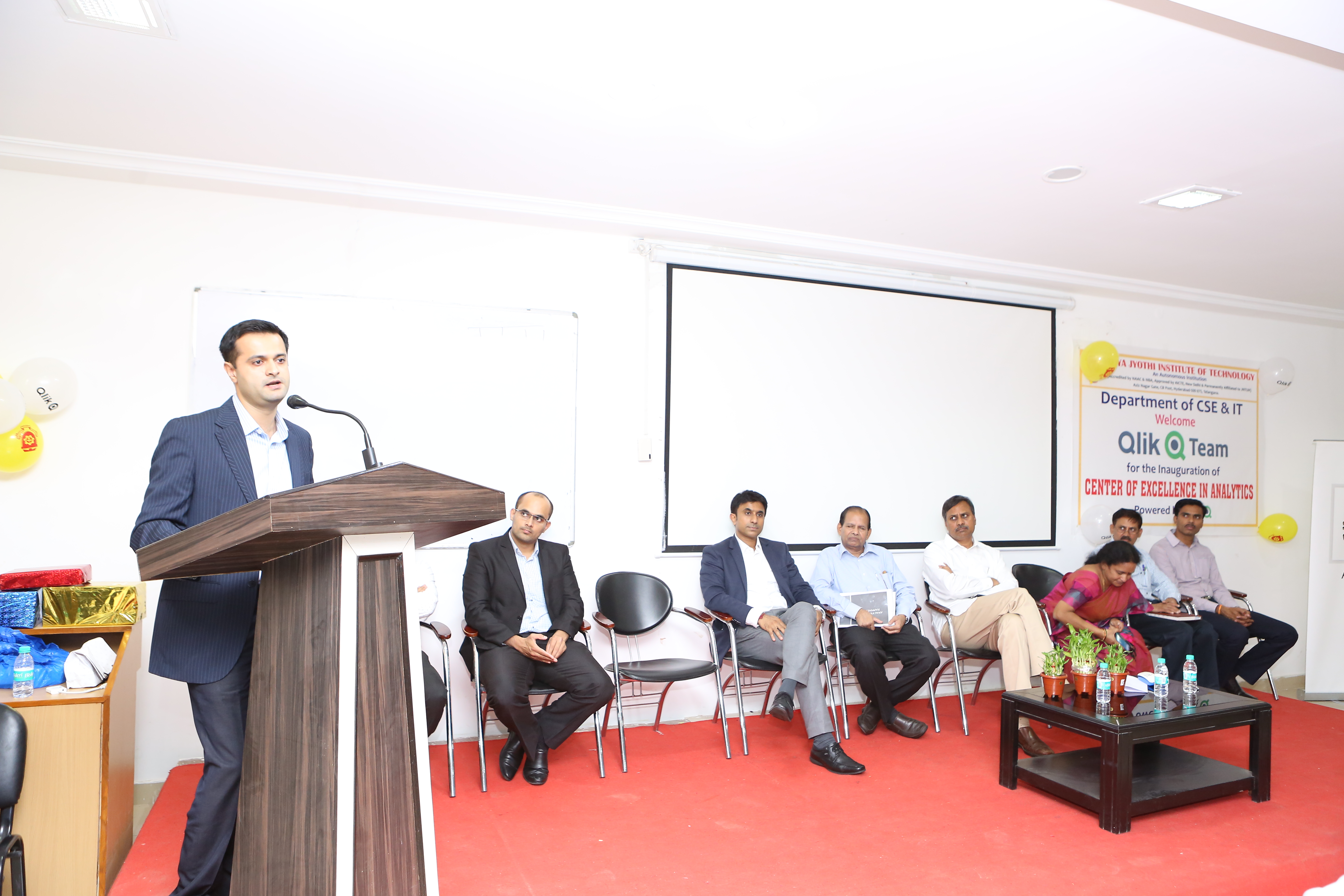
Marketing Manager-India and SAARC Jaydeep Deshpande addressing the audience
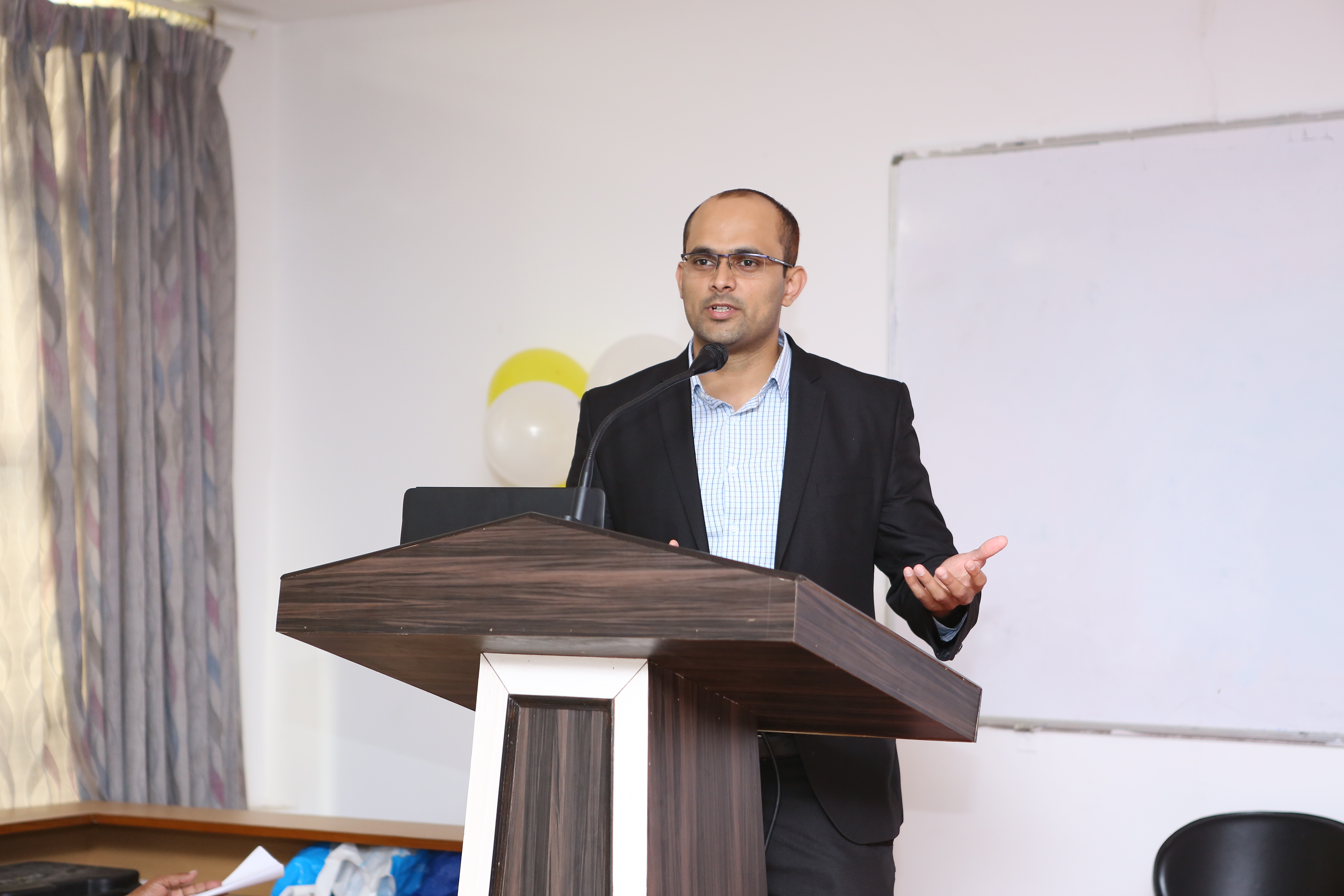
Solution Architect and Regional Champion of the Academic Program, Fahad Khan doing a demo on Qlik Sense
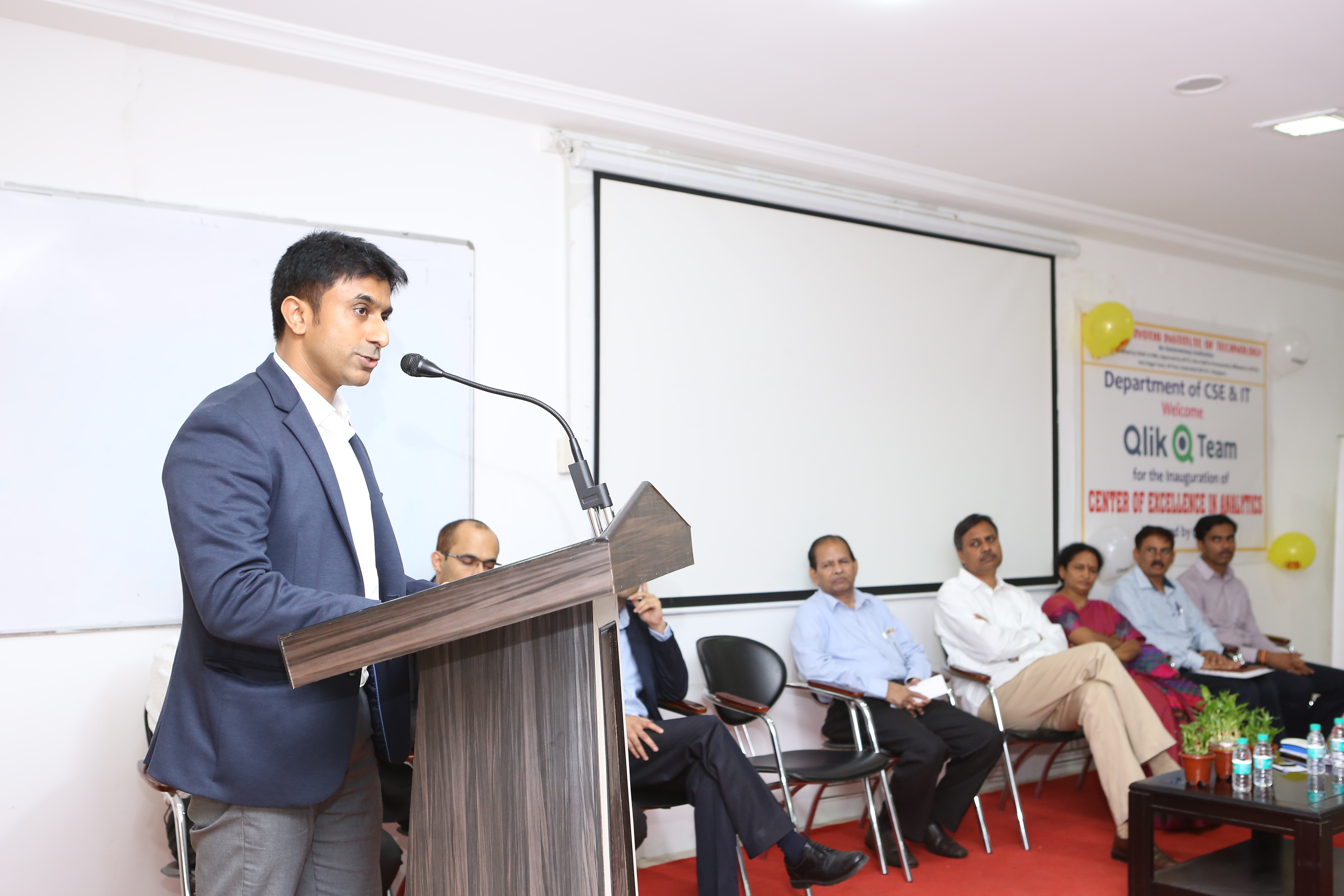
Academic Program Manager APAC, Pankaj Muthe speaking during the inauguration
One of the student shares her experience about the Academic Program and how she's benefitted using the resources available under the program.
-
It's Not What You Know, It's What You Can Do
A new blog post is available! In this blog we discuss the need for organizations to innovate and evolve their approach to learning and enablement. R... Show More
A new blog post is available! In this blog we discuss the need for organizations to innovate and evolve their approach to learning and enablement. Rather than just checking a box once learning has been completed, organizations must ensure their employees can apply the competencies and skills they learned. And at Qlik, we emphasize not just seat-time but mastery of skills.
To read the full post visit It's Not What You Know, It's What You Can Do | Qlik
-
Qlik Sense September 2017 - Coming Soon!
As we shared earlier this year, we will be releasing a new version of Qlik Sense approximately every 10 weeks. Our next release is scheduled for Sept... Show MoreAs we shared earlier this year, we will be releasing a new version of Qlik Sense approximately every 10 weeks. Our next release is scheduled for September 2017, just a few short weeks away!
Leading up to each release, we are committed to providing a release preview to ensure that you have an opportunity to check out the latest features before they go live. The technical preview for the September releases of both Qlik Sense and Qlik NPrinting can be found on the Qlik Product Insight area of community.
Below you will find a tentative list of What's New in this upcoming release.
Qlik Sense September 2017
- For Business Users
- Data Manager Sequential Operations - Improvements to Data manager enable you to perform sequential transformations on your tables and fields. Where previously you were limited in what transformations you could perform together, such as being able to apply a single data profiling card transformation on a single field, you can now use the data profiling cards, concatenation, calculated fields, and unpivoting data together.
- Waterfall Chart - You can now illustrate how an initial value is affected by intermediate positive and negative values with the new waterfall chart. For example, you can show the positive and negative contributions of different accounts in an income statement.
- Recent Colors - The color picker in Qlik Sense now displays the five most recent colors selected in Qlik Sense
- For Administrators
- Centralized Logging - With the introduction of shared persistence, all nodes now have direct access to a common database and file system. The new Qlik Logging Service allows administrators to configure logs to be centralized by collecting all the messages and inserting them into a PostgreSQL database to help find issues and analyze usage.
- For Developers
- Hierarchical Data API - A new hierarchical data API enables a definition that more closely reflects the visual representation of data. Benefits of the new API: Ensures little to no manipulation or transformation of data structure in the front end. / Simplifies the creation of charts./ Enables more powerful and dynamic charts.
- Visualization API Update – Addition of new waterfall chart.
- Extension Certification Pilot - Initial implementation of a new process for certifying extensions for Qlik Sense.. This is a limited pilot but ultimately we will offer partners the opportunity to apply for certification and to make certified extensions for sale via Qlik Market as appropriate. More about this later.
- Qlik NPrinting September 2017
- Report Cycles - Generate a separate report file for each combination of one or more dimension values. Each report will be filtered according with the combination of values that generates it.
- Report Export/Import - It is possible to export a report into a compressed file and import it into a different installation of Qlik NPrinting.
- Object filters for Qlik Sense Charts - Allows you to apply a filter to a single object like a chart without applying that filter to it objects in the report. It can also be used to block filtering of an object so that even though the rest of the report has filters applied, that object doesn't.
- For Business Users
-
New Semester, New Data!
As a new semester approaches (in Europe at least, our friends in the US are already hard at work) I have been approached by several Professors about t... Show MoreAs a new semester approaches (in Europe at least, our friends in the US are already hard at work) I have been approached by several Professors about the possibility of new data sets for their students to use in their projects for the coming year.
Despite the wealth of data sources out there, it is difficult to know what data you should start with when considering a project or problem to solve. Do you begin with the outline of your project? defining the issues to solve, only to find the data you require doesn't exist or only available on a paid database, or do you find the data you would like to use and begin to ask questions of it
Either way, I have put together 5 interesting data sets and their websites for possible data analysis;
1. Ecological - Mapping magpies and Blackbird numbers throughout Europe.
Data set - http://mei.org.uk/data-sets
2. Currency - Cryptocurrency Historical Prices.
Cryptocurrency Historical Prices | Kaggle
3. Retail - Walmart Stores Sales
Walmart Recruiting - Store Sales Forecasting | Kaggle
4. Academic - Yelp University data sets
5. All Purpose data sets
https://www.dataquest.io/blog/free-datasets-for-projects/
Try putting these into Qlik Sense and seeing what outputs you find.
Happy analysing!!
-
International Literacy Day!
Data literacy is a critical skill for students to be successful!A new blog post is available which discusses the rise of Data Literacy and what Qlik i... Show MoreData literacy is a critical skill for students to be successful!

A new blog post is available which discusses the rise of Data Literacy and what Qlik is doing to ensure you know how to read, interpret and converse with, understand and analyze data!
To read the blog visit The Rise of Data Literacy | Qlik and stay tuned to the Academic Program as will be sharing some exciting news around Data Literacy to come!
-
The Rise of Data Literacy
Data literacy is a critical skill for organizations to be successful!A new blog post is available which discusses the rise of Data Literacy and what Q... Show MoreData literacy is a critical skill for organizations to be successful!

A new blog post is available which discusses the rise of Data Literacy and what Qlik is doing to ensure you know how to read, interpret and converse with, understand and analyze data!
To read the blog and view our resources visit The Rise of Data Literacy | Qlik
-
Creating apps on the fly
Some of you may remember that I recently posted about a similar topic here When do you post to Facebook?, where I talked about creating an app that a... Show MoreSome of you may remember that I recently posted about a similar topic here When do you post to Facebook?, where I talked about creating an app that allows users to authenticate with Facebook, grab their data with Facebook APIs, use halyard.js to generate a load script, and then create a session app. But when I did this just a few months ago, one of the things I really wished I could do was use the Visualization API so I could simply create charts on the fly using Qlik Sense, but it wasn't possible then because a session app could not be created from or associated with the Capability APIs.
However, new APIs were introduced with Qlik Sense June 2017 that makes it possible to create apps on the fly using the Capability APIs, so now it is possible to create an app, load data, and create visualizations, all on the fly! This is made possible by the addition of some new methods to the Capability APIs, including the qlik.sessionApp method, the qlik.sessionAppFromApp method, the setScript method, and the getScript method.
There's already some pretty decent documentation for doing this at Qlik Sense Help - Creating apps on the fly, and I recommend you check that out, but I want to make everyone is aware of this very cool new capability of Qlik Sense June 2017, and just briefly address some issues you may run into.
First thing first, which is something I ran into while trying to create an example for this blog post -- anonymous users cannot create session apps, and this does not seem to be able to be controlled by security rules. Unless I'm missing something, it's entirely impossible. So, no anonymous users.
Next, there's been a few questions about just how to go about loading data. The simple answer is you need to set a load script using the setScript method, and then use the doReload method to load the data. But where do you get the load script from in the first place? Well you can use the getScript method on an app that already exists, or you can just write a script, though, of course, you'll need to also create the data connections you'll need somehow too if they don't already exist. And for many instances that I can think of where I would want to create an app on the fly, I'd use halyard.js. You could also create a session app from an existing app, get the load script from that app, and do some kind of search and replace on the load script which would custom tailor the data for the current user. The point is, there's a lot of possibilities, and it's really up to you and your use case how you want to go about this.
With being able to create apps, load scripts, and visualizations all on the fly, there's really a ton of potential to do some awesome stuff here. It would cool to hear about how some of you are using these capabilities!
-
Free Training!
Did you know that being a member of the Academic Program grants you a one-year FREE subscription of training through the Continuous Classroom, also kn... Show More
Did you know that being a member of the Academic Program grants you a one-year FREE subscription of training through the Continuous Classroom, also known as the QCC?! The Continuous Classroom provides training videos, assessments, take away documents, quizzes and live instructor forums!
Whether you are learning Qlik Sense or QlikView, the subscription offers both products so you can learn what you want, when you want! There is a variety of topics included in the QCC from Data Literacy, to building visualizations, to storytelling!
To take advantage of this amazing deal visit the program and The Qlik Academic Program
and apply to the student or professor applications!
-
The Layers of Qlik GeoAnalytics
Qlik GeoAnalytics is known for its powerful mapping capabilities. I had the opportunity to dig down into the layers of Qlik GeoAnalytics when working... Show MoreQlik GeoAnalytics is known for its powerful mapping capabilities. I had the opportunity to dig down into the layers of Qlik GeoAnalytics when working on a project about Indian Migration. In this project, the team wanted to illustrate which states in India migrants moved to and left from. The plan was to show this on a map. Here were the requirements:
- Use color to show the selected state (the state users move to or from)
- Use color to show the number of migrants who moved
- Use arrows to show the direction of the move
- Place dots on each state that migrants move to or from
Here is a look at one of the resulting maps. In order to build it, we used 3 GeoAnalytic layers: the Area layer, the Bubble layer and the Line layer.
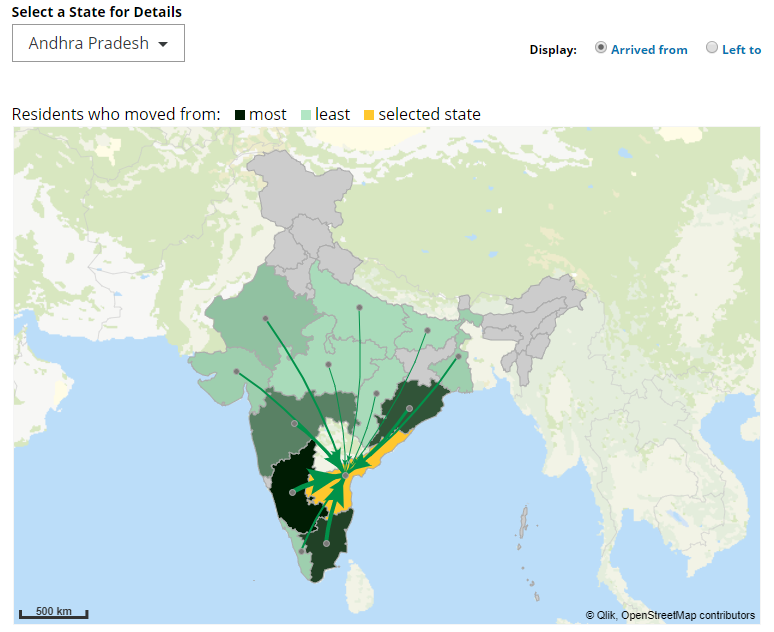
In the screenshot above, the selected state is Andhra Pradesh and it is highlighted in orange. All the states that migrants came from are colored in a shade of green using the ColorMix1 function. Darker shades of green indicate a larger number of migrants than the lighter shades of green.
Before we can begin to add the layers, we first had to add the GeoAnalytics Map to the app. Once this is done, the layers can be added. The first step was to use the Area layer to show which states users left from. The color expression (which you can see in the attached app) first checked for the selected state and colored it orange, then it checked for states where no one migrated from and colored them gray. The last part was to use the ColorMix1 function to color the states in shades of green based on the number of people who migrated from that state. The second step was to add dots or bubbles to the state. To do this the Bubble layer was used. The third step was to add the Line layer to illustrate the direction of the move. In the screenshot above, the arrows are all leading to the selected state, Andhra Pradesh. The width and size of the arrows are based on the number of migrants. The final few steps included using the Draw Order Adjustment property to indicate the order that we wanted the layers drawn – first the Area layer, then the Bubble layer and last the Line layer. We also made use of the Info Bubble so that we could provide informative data when users hover over an area, line or bubble.
Feel free to check out the attached app using Qlik Sense to see how all the pieces were put together. If you do not have Qlik Sense, you can download and try Qlik Sense Desktop for free from here. In this project, we only used 3 of the layers available with Qlik GeoAnalytics. There are other layers available as well as advanced geospatial information and geographic relationships. Learn more about Qlik GeoAnalytics and check out our Getting Started Videos.
Thanks,
Jennell
-
Replacing Null Values in Multiple Fields
In this week's Qlik Design Blog I am pleased to share some tips from our own Mitul Vadgama of our Qlik Consulting Services team. Mitul was recently w... Show More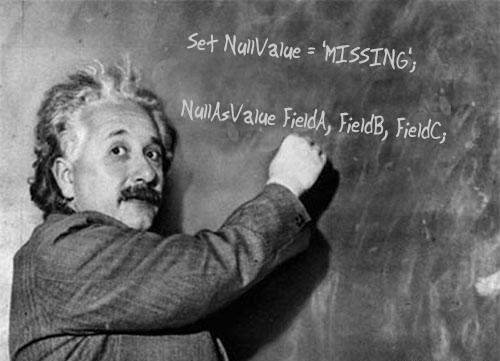 In this week's Qlik Design Blog I am pleased to share some tips from our own Mitul Vadgama of our Qlik Consulting Services team. Mitul was recently working at a customer site when he noticed something that seemed a bit off when analyzing the customer's data. On the surface after loading the data everything appeared fine - but once they started performing selections, Mitul was able to identify the specific cause with the help of Qlik's Associative Difference, the elusive <NULL> value.
The Problem
The customer's data model had about 300+ fields with a number of these fields being of a nominal data type (also known as categorical data). Put simply, I like to describe nominal data as the attributes in the data that don't carry a numerical value. Examples of nominal data are as follows:
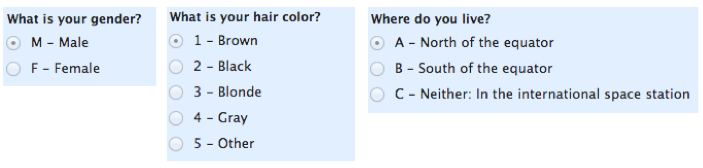
Mitul found that when business users were selecting values in a nominal field it gave the correct result, however when they performed advanced selections such as using the the Select excluded option available in a select list, the results did not match up against what was expected. Thanks to Qlik's Associative Difference they were able to quickly and easily identify that <NULL> values were being excluded when the customer performed a Select Excluded selection. Yes, I know that sounds weird, the Select excluded option excluded <nulls> from the exclusion selection. (read-on and watch the quick video so this makes more sense to you
 )
)
Click to enlarge image
The Fix
One way is to use the NullValue variable and NullAsValue statement set in the Data Load Editor settings. (Qlik Help)
Syntax:
Set NullValue='<NULL>';
NullAsValue Field1, Field2;
In our example data we have <null> values in the StateProvince and OfficeStateProvince fields both in the Customers, and Employees tables. In the image above you can see that the <null> value is also not select-able in the filter pane.
Example:
Set NullValue='<Unknown>';
NullAsValue StateProvince, OfficeStateProvince;
After adding these settings to the Data Load Editor we were able to get the correct results as the <null> values were now being taken into consideration.

Click to enlarge image
Companion Video: Replacing Null Values in Multiple Fields
NOTE: To increase resolution or size of the video, select the YouTube logo at the bottom right of the player. You will be brought directly to YouTube where you can increase the resolution and size of the player window. Look for the 'settings' gears icon in the lower right of the player once at YouTube.
We hope this post has shown you another efficient way to handle <null> values in your Qlik application.
I'd like to thank Mitul for his valuable contribution to the Qlik Design Blog.
- For further reading on null handling check out this classic blog post by Henric Cronström:
https://community.qlik.com/docs/DOC-3155. - For a full list of services offered by Qlik Consulting check out: http://www.qlik.com/us/services/qlik-consulting.

About Mitul: Mitul is a member of our Qlik Consulting Services team in the UK. He has worked on a variety of consulting projects using both Qlik Sense and QlikView with many enterprise customers. His passion is transforming data into valuable business insights, knowledge sharing, and enabling customers to get the most value out of Qlik products.
Can't see the video?
Download the .mp4 and watch from your computer or mobile device.
- For further reading on null handling check out this classic blog post by Henric Cronström:
-
Student succeeds through the Academic Program!
Recently the Academic Program interviewed one of its student members to learn about their journey through the program and how it better prepared them ... Show More
Recently the Academic Program interviewed one of its student members to learn about their journey through the program and how it better prepared them for their career outside of the University. We interviewed a student named Nicole who joined the program from the University of South Florida while she was interning at SME, one of Qlik's partners. She was so successful at learning Qlik through the program and through her internship that she was offered a full time position after graduation and she now works as a Qlik Developer for SME. Shes also passionate about the program and she returns to her alma-mater often to promote the program and the use of Qlik in the classroom!
To read her story visit the latest blog about the Academic Program! Data Literacy for Everyone | Qlik