Unlock a world of possibilities! Login now and discover the exclusive benefits awaiting you.

Analytics & AI
Forums for Qlik Analytic solutions. Ask questions, join discussions, find solutions, and access documentation and resources.
Data Integration & Quality
Forums for Qlik Data Integration solutions. Ask questions, join discussions, find solutions, and access documentation and resources
Explore Qlik Gallery
Qlik Gallery is meant to encourage Qlikkies everywhere to share their progress – from a first Qlik app – to a favorite Qlik app – and everything in-between.
Qlik Community
Get started on Qlik Community, find How-To documents, and join general non-product related discussions.
Qlik Resources
Direct links to other resources within the Qlik ecosystem. We suggest you bookmark this page.
Qlik Academic Program
Qlik gives qualified university students, educators, and researchers free Qlik software and resources to prepare students for the data-driven workplace.
Recent Blog Posts
-
【オンデマンド配信】生成 AI からエージェント AI へ:AI 戦略で今すぐ成果を出すためのロードマップ
AI は未来の技術ではなく、既に今日のビジネスに欠かせない技術として幅広い分野で貢献しています。 本 Web セミナーでは、以下を実現する実践的なヒントやワークフロー、そして AI から価値を得るための知識を共有します。また、先進的な企業の具体的な導入事例や成功事例を通して、データを主要なビジネス... Show MoreAI は未来の技術ではなく、既に今日のビジネスに欠かせない技術として幅広い分野で貢献しています。
本 Web セミナーでは、以下を実現する実践的なヒントやワークフロー、そして AI から価値を得るための知識を共有します。また、先進的な企業の具体的な導入事例や成功事例を通して、データを主要なビジネスワークフローや戦略目標を推進する AI 主導型アプリケーションへと変革する方法をご紹介します。
- AI を戦略的に展開し、確かなビジネス成果を生み出す
- エージェント AI の秘めたる可能性を最大限に引き出し、業務プロセスを変革する
- スムーズな AI 統合のために、信頼性の高いデータ基盤を構築する
※ 参加費無料。パソコン・タブレット・スマートフォンで、どこからでもご視聴いただけます。
-
爆速公開!Qlik ユーザーミートアップ開催報告
満席をいただいた今回のユーザーミートアップは、Qlik Luminary & 幹事の萬様が司会を務められました。同じく幹事の荻本様より、4月に開催された意見交換会などの活動報告がありました。なお、次回は「データガバナンス」をテーマとした意見交換会の開催が予定されています。ぜひお楽しみに! 最初は、... Show More満席をいただいた今回のユーザーミートアップは、Qlik Luminary & 幹事の萬様が司会を務められました。同じく幹事の荻本様より、4月に開催された意見交換会などの活動報告がありました。なお、次回は「データガバナンス」をテーマとした意見交換会の開催が予定されています。ぜひお楽しみに!
最初は、アステラス製薬様より「データドリブンな意思決定に Qlik Sense を ~わたしたちの 3 年間の取組み~」と題して、 BI 専任チームより Qlik アクセスのためのハブ作成、マネジャーへの NPrinting 配信などの取り組みをご紹介いただきました。
続くヒューマンアカデミー様からは、同社の学習プラットフォームのカスタマージャーニーにおける解約防止のためのキーポイントとそこで見るべきデータととるべきアクションといったビジネスプロセスなどをご紹介いただきました。
NECPC 様からは新しいプロジェクトに対応するため、短期間で Qlik Answers の検証を終え、わずか数ヶ月の導入期間・運用で問い合わせの削減という着実な成果を収めた事例を、デモを交えてご紹介されました。
前回に引き続きご登壇いただいた万葉倶楽部・コグニア様は、Qlik Sense を活用した顧客・営業分析の事例として、来館されたお客様のデータに基づき必要な施策を取ることで再訪率を高める取り組みなどをお話しされました。
ユーザー登壇の最後は学研様からの Qilk Connect 参加報告でした。Qlik の最先端に触れることのできるまたとない、かつ楽しい機会であったことを多くの写真と共に熱く語られました。
最後は Qlik より Qilk Connect で発表された数多くの新製品をご紹介しました。また、 第5回データソンが翌日 19日から始まることと、次回のユーザーミートアップと Qlik AI Reality Tour Tokyo が 10月 28日に同日開催されることが発表されました。ぜひ今からこの日は1日空けておいてください!
福岡から駆けつけた幹事松田様の乾杯で始まった懇親会では、新たに参画されたアドボケイトメンバーの紹介などもあり、いつも以上にユーザー様同士の交流が深まっていたようです。中には「次回のミートアップではぜひ登壇したい」と Qilk 社員にお声がけされたユーザー様もいらっしゃいました(ご登壇希望のユーザー様は、営業担当または Marketingjp@qlik.com までご連絡ください。ぜひよろしくお願いします!)。
本日、ご参加・ご登壇いただいた皆様、ありがとうございました!
エージェンティック AI とオープンレイクハウスという新しいソリューションを備えた今後の Qlik にぜひご期待ください。次回お会いするのを楽しみにしております。
-
Complete your Qlik Nation challenges in Qlik Community
Transformational. Innovative. Powerful. These are just a few of the inspiring terms customers use to describe Qlik and our product suite. Customer fee... Show MoreTransformational. Innovative. Powerful. These are just a few of the inspiring terms customers use to describe Qlik and our product suite. Customer feedback and input are critical to Qlik’s success, and we regularly hear directly from our most active users through Qlik Nation, our gamified customer engagement hub.
Through interactive challenges and activities, Qlik Nation members connect, learn, and engage with Qlik and with each other. By completing challenges in the platform, members can receive early notification of new product features, boost knowledge through quality educational content, and have opportunities to influence the product roadmap. Qlik Nation also allows customers to demonstrate skills, network with peers, and amplify their personal brand. All while having fun and being rewarded!
And now, Qlik Nation members will be able to complete challenges while visiting Qlik Community. Current members will see a new carousel on the Qlik Community homepage inviting them to complete challenges, making it even easier for you to engage and earn points.
Customers are at the heart of everything we do, and Qlik Nation offers an exclusive experience for our most dedicated and passionate fans (Qlik Nation is a complementary platform to Qlik Community, which has open membership). What do our members say about their experience in Qlik Nation?
- “It’s a fantastic opportunity to link up with technologists and data enthusiasts across a wide array of industries to learn and promote the best use of the Qlik product suite.” – Howard Teall, Enterprise Architect, HSBC & Qlik Luminary
- “Qlik Nation brings together all the news and knowledge in one place, keeping me up to date with Qlik and the world of data & analytics” – Mark Little, Senior Business Intelligence Specialist, Mayborn Group
- “Qlik Nation has provided me with a platform to keep me motivated and try and do better with our analytics platform and capabilities. The community joins you with like-minded individuals to share and promote everything Qlik.” - Willem Jacobs, Head of Analytics, OneLogix
If you’re a Qlik end-user and want to learn more about how to join Qlik Nation, please email QlikNation@qlik.com. We’d love to hear from you!
-
Making Better Decisions with Data (Even in the Age of AI)
Wharton Business School recently published an article that made a simple but powerful point. When working with data, don’t start by asking what data y... Show MoreWharton Business School recently published an article that made a simple but powerful point. When working with data, don’t start by asking what data you have. Start by asking what decision you’re trying to make. (Wharton, 2024 Better Decisions with Data: Asking the Right Question - Knowledge at Wharton)
Once you know what you’re trying to decide, you can figure out what kind of data is helpful. Otherwise, you may spend time analyzing numbers that don’t matter.
It’s also important to stay curious. Be willing to question what you think you know. Sometimes the real insight comes from looking at things in a new way or noticing what’s missing.
AI is powerful and fast, but it doesn’t understand your goals, context, or values. That’s why human thinking is essential; we need people to see the big picture, ask the right questions, and make ethical, responsible decisions.
The Qlik Academic Program offers free access to powerful analytics tools, training, and certifications. Students build career-ready skills, professors bring real-world tools into the classroom, researchers uncover insights faster, and universities boost innovation in data education.
It’s free and it’s about learning to think with data.
Learn more: qlik.com/academicprogram -
Upcoming Qlik Sense Client-Managed Mobile Release iOS 1.31.1: Deploying with Mic...
Updated: Release Date added (26th June 2025) and note added regarding the error users will encounter if they update before the redirect URI is configu... Show MoreUpdated: Release Date added (26th June 2025) and note added regarding the error users will encounter if they update before the redirect URI is configured.
Updated: Android Release Date added (16th July 2025)
Hello Qlik admins,
This post is intended for customers who use the Qlik Sense Client-Managed mobile app with Microsoft Intune policy management practices as described in Azure app registration for Qlik Sense Client-Managed Mobile.
Qlik anticipates the release of the Qlik Sense Client-Managed Mobile app version 1.31.1 for iOS on June 26th. With this release comes an update to the integrated Microsoft Intune version to 20.5.0, which will also update the Microsoft authentication protocol in use.
What action do I need to take?
Many devices will automatically update the mobile app build in the background. To prepare for the update and to continue utilizing Microsoft Intune/Entra policy management of the Qlik Sense Client-Managed Mobile app, pre-configure the new redirect URI msauth.com.qlik.qliksense.mobile://auth in your Azure portal.
If a client is updated and the redirect URI has not been configured, the end user will see the error Failed to authenticate using OAuth. See Qlik Sense Client Managed mobile app on iOS: Failed to authenticate using OAuth for details.
- Log in to the Azure Portal, go to App registrations and view All applications
- Locate and open the Qlik Sense Mobile app registration
- In Manage, open the Authentication menu, then scroll to Mobile and desktop application Redirect URIs
- Click Add URI and add msauth.com.qlik.qliksense.mobile://auth
- Click Save, refresh the page, and verify the new Redirect URI is recorded under iOS / macOS Redirect URIs
Qlik supports only the current mobile app version in the app store. The end user migration to the new app is at the discretion of the customer; however, it is recommended all users upgrade immediately.
It is possible for users to continue Intune governance control with old and new mobile app versions.
Note that removing the old redirect URI (qliksense-intune://com.qlik.qliksense.mobile) for the mobile app versions before 1.31.1 will result in the old app no longer retrieving a policy from the Intune/Entra tenant.
How do I set up the mobile client with Microsoft Azure and Intune?
For instructions on how to set up the Qlik Sense Client-Managed Mobile client with Microsoft Azure and Intune, see Add an Azure app registration for Qlik Sense Client-Managed Mobile | help.qlik.com. These instructions will be updated on the initial release of Qlik Client Managed mobile version 1.31.1.
What about the Android app?
The Android version of the Client-Managed Mobile app has been updated on the 16th of July.
Thank you for choosing Qlik,
Qlik Support -
Data Disign Duel - 第 5 回 Qlik データソン -
今年で 5 回目となる Qlik データソンに参加してみませんか? 今回のテーマは「デザイン」だけ!個人でもチームでも、センスとアイデアを存分に発揮して、Qlik Sense で魅せるダッシュボードを作成してください。もちろん、初心者のご参加も大歓迎です!アワード受賞者には豪華賞品も!お申し込みは... Show More今年で 5 回目となる Qlik データソンに参加してみませんか?
今回のテーマは「デザイン」だけ!個人でもチームでも、センスとアイデアを存分に発揮して、Qlik Sense で魅せるダッシュボードを作成してください。もちろん、初心者のご参加も大歓迎です!アワード受賞者には豪華賞品も!お申し込みは、7/11(金)17:00 まで受付中です。奮ってご参加ください!
詳細・お申し込みはこちら
【課題】
- Qlik Sense の豊富なビジュアライゼーション機能を最大限に活用して、色、形、サイズ、配置、効果などを工夫して、チャートなどのオブジェクトやシートを作成してください。
- Qlik が用意したサンプルアプリ、またはご自身で用意したオリジナルアプリを用いて、Qlik Sense のシートやオブジェクトをいかに効果的に「魅せる」かを競うものです。
- 今回のコンテストは会期期間中に各自で作業いただき、提出締切までに成果物を提出していただきます。
【対象者】
- Qlik ユーザー
- Qlik パートナー
- これから Qlik を利用予定の方
【開催概要】
申込締切:7/11(金)17:00
成果物締切:7/18(金)17:00
投票期間:7/23(水)- 8/1(金)17:00(参加者による Web 投票および Qlik 審査員による審査)
授賞式:8/7(木)17:00 - 19:30(東京の某会場とオンライン配信のハイブリッド式)※ 6/19(木)以降、参加申込者を順次作業用テナントにご招待します。招待メールが届いたら作業を開始いただけます。
※ 本イベントの詳しい概要・作業用テナントへのログイン方法・注意事項などは、以下「詳細・お申し込みはこちら」のリンクからご確認ください。
詳細・お申し込みはこちら -
Viz for Deck: 数字の視覚化アイデア
テーブルに軸と数値だけでは味気ないと思ったことはないですか?ちょっと工夫すると下の図のような表現が可能です。計算以外で使用する関数は、Repeat, Chr, num だけです。 メジャーの数式に3つの要素を含めています。2つ目の列の案件数には下記の数式を設定しています。 1行目の chr(... Show Moreテーブルに軸と数値だけでは味気ないと思ったことはないですか?ちょっと工夫すると下の図のような表現が可能です。計算以外で使用する関数は、Repeat, Chr, num だけです。
メジャーの数式に3つの要素を含めています。2つ目の列の案件数には下記の数式を設定しています。
1行目の chr() は、指定された整数に対応する Unicode 文字 (コード ポイントとも呼ばれる) を返します。09608 は■を示しています。Repeat関数は、指定された文字列を、2 番目の引数で指定された回数分繰り返した文字列を返しますので、案件IDの数だけの■が返ってきます。
Unicode は https://symbl.cc/ 等のサイトで調べることができます。2行目は単純にハイフンが5つ返ってきます。
3行目はハイフンのあと、実際の案件数に書式を設定しています。これらを & で連結して図のような表現になります。
3列目の案件金額は桁が大きいので、そのまま■を出すとかえってみづらいため、10,000,000で割った金額を使用しています。
あまり数値のばらつきが大きくない場合に有効な表現だといえます。
Happy Dueling !
** 過去の記事 **

-
Qlik Cloud Analytics: 'When data is refreshed' reload schedule option removed
Qlik Cloud Analytics launched enhanced self-service scheduling capabilities on April 14th, 2025. Details about the new self-service scheduling functio... Show MoreQlik Cloud Analytics launched enhanced self-service scheduling capabilities on April 14th, 2025. Details about the new self-service scheduling functionality can be found in Scheduling data refreshes with tasks.
These new capabilities allow users to create multiple tasks to schedule refreshes of apps, scripts, and data flows. This replaces a self-service scheduling system offering one schedule per analytics asset.
In addition, the When data is refreshed configuration option has been removed. This option enabled users to automatically run reload schedules when dependent datasets generated by Qlik Talend Data Integration projects were updated.
Existing reload schedules (now organized as tasks) configured with the When data is refreshed option continue to function as they normally do. However, creating new tasks with this option or configuring it for existing tasks is not currently possible.
You can read more about the original implementation of the new self-service scheduling functionality in What's New in Qlik Cloud: Self-Service Scheduling – Task Chaining & Multi-Task Support.
Thank you for choosing Qlik,
Qlik Support -
Watch Q&A with Qlik: Qlik Sense Enterprise on Windows!
Don't miss our previous Q&A with Qlik! Hear from our panel of experts to help you get the most out of your Qlik experience. SEE RECORDING HERE ... Show MoreDon't miss our previous Q&A with Qlik! Hear from our panel of experts to help you get the most out of your Qlik experience.

-
Qlik Sense SaaS Mobile app update version 1.176.0: Incorporating additional secu...
Hello Qlik admins, The Qlik Sense Mobile SaaS mobile client (version 1.176.0 and later) now incorporates additional defense-in-depth security features... Show MoreHello Qlik admins,
The Qlik Sense Mobile SaaS mobile client (version 1.176.0 and later) now incorporates additional defense-in-depth security features that help ensure mobile devices meet various compliance standards. If the operating environment is found to deviate from these standards, access may be restricted and an alert issued. Please ensure that your organization’s mobile OS and network configurations are maintained in line with industry best security practices.
If the client detection feature determines the app is being opened on a compromised device, a message will display indicating the identified condition and the mobile app will not open.
Please note that no root or jailbreak detection method can guarantee 100% accuracy, as threat techniques continue to evolve. While false positives may occasionally occur, our detection mechanisms are implemented in accordance with industry-recognized security best practices.
Thank you for choosing Qlik,
Qlik Support -
Qlik Cloud 5月の新機能
Qlik Cloud 全般に関するアップデート Qlik Cloud機能の名称更新 クラウドの 2 つのコンポーネントの名前を更新しました。機能性をより適切に反映させています。 Qlik Application Automation → Qlik Automate(自動化) Qlik Aut... Show MoreQlik Cloud 全般に関するアップデート
Qlik Cloud機能の名称更新
クラウドの 2 つのコンポーネントの名前を更新しました。機能性をより適切に反映させています。
- Qlik Application Automation → Qlik Automate(自動化)
- Qlik AutoML → Qlik Predict(予測)
移行期間中、リージョンによっては、古い名称と新しい名称の両方が表示される場合があります。
Excel および CSV ファイルへの用語集のエクスポートとインポート
xlsx または csv ファイルを使用して、用語集を Qlik Cloud にインポートできるようになりました。さらに、JSON ベースの Qlik、Atlas、Atlan の既存のインポート/エクスポート形式に加えて、これらの形式で用語集をエクスポートすることも可能になりました。詳細については、「用語集のインポートとエクスポート」を参照してください。
分析の新機能
視覚化におけるダウンロードアクセスの改善
ビジュアライゼーションのダウンロードがさらに高速化しました。ビジュアライゼーションのホバーメニューに「ダウンロード」オプションが追加されました。画像、データ、PDFを少ないクリック数で入手できます。
ラベルとシンボル付きの折れ線グラフ図形
折れ線グラフの拡張機能が強化されました。ポイントと線に加え、形状を追加できるようになりました。サイズ、色、配置のオプションも選択できます。
Direct Access Gateway 1.7.4
セットアップ時にデフォルトのWindowsサービスアカウントを上書きする機能が追加され、いくつかの問題が解決されています。アップグレード手順と解決済みの問題の一覧については、「Direct Access Gatewayインストールのアップグレード」をご覧ください。
Direct Access Gatewayバージョン 1.7.0 以降は、Windows Server 2025 へのインストールが認定されています。
データ統合に関するアップデート
Snowpipeストリーミングのサポート
Snowflakeへのデータロードはバルクロードのみでした。今後は、バルクロードまたはSnowpipeストリーミングのいずれかを使用して、Snowflakeへのデータのオンボードまたはレプリケーションを行うことができます。
バルクロードと比較したSnowpipe ストリーミングの利点は次のとおりです。
- コストが低い: Snowpipe Streaming は Snowflake ウェアハウスを使用しないため、運用コストは大幅に安くなりますが、これは具体的な使用例によって異なります。
- 待ち時間の短縮:データはステージング経由ではなくターゲット テーブルに直接ストリーミングされるため、データ ソースからターゲットへのレプリケーションが高速になります。
自動化に関するアップデート
Qlik Automateのサードパーティ超過料金の適用
Qlik アプリケーションの自動化 の新しい価格設定とパッケージが適用されました。標準実行は課金されなくなり、課金の対象はサードパーティ製の自動化実行のみとなります。毎月のサードパーティの利用分を使い切ると、超過料金が適用されます。ユーザー ベースのライセンスの場合、制限を超えると、アクティブなサードパーティ ブロックを使用した自動化を実行できなくなります。
詳細については、「Qlik アプリケーションの自動化 のサードパーティの実行へのパッケージ移行」を参照してください。
-
Partition Evolution @Iceberg
Partition Evolution Only Iceberg makes this possible Partitioning is one of the most critical aspects of optimizing query performance in big data syst... Show MorePartition Evolution
Only Iceberg makes this possible
Partitioning is one of the most critical aspects of optimizing query performance in big data systems. Traditionally, partitioning strategies are set when a table is created, and altering them later is nearly impossible without costly data migration. Apache Iceberg, however, introduces partition evolution, enabling seamless changes to partitioning strategies without rewriting existing data. This blog explores how partition evolution in Apache Iceberg revolutionizes data partitioning.
The Traditional Approach to Partitioning
When creating a table, it is essential to plan partitioning based on how the data will most frequently be queried. This helps minimize query scan times and enhances performance. For instance, if most queries filter data by year, the table should be partitioned by the year column:
CREATE TABLE sales (
id BIGINT,
amount DECIMAL(10,2),
sale_date DATE
) PARTITIONED BY (year(sale_date));
Querying a Partitioned Table Efficiently
To maximize query performance, SQL queries should include the partition column in the WHERE clause:
SELECT * FROM sales WHERE year(sale_date) = 2025;
This approach ensures that the query scans only relevant partitions instead of performing a full table scan, thereby significantly improving efficiency.
The Problem with Traditional Partitioning
As data evolves, the way it is queried can also change. Suppose the sales data initially needed only yearly partitions, but as the dataset grew, analysts began querying data on a daily basis. This requires switching from year-based partitions to day-based partitions.
With traditional data lakes (e.g., Hive, or Delta Lake), changing partitioning requires:
- Creating a new table with the desired partition strategy.
- Extracting and transforming data from the old table.
- Loading all existing and future data into the new table.
This process is cumbersome, error-prone, and resource-intensive. A more flexible solution is needed.
Apache Iceberg: Enabling Partition Evolution
Apache Iceberg eliminates the constraints of traditional partitioning by allowing partition evolution without requiring data migration. This means you can modify partitioning strategies dynamically as data and query patterns change. It’s as easy as simply ALTERing the existing table with the new partition strategy.
How Partition Evolution Works in Iceberg
With Iceberg, when a partitioning strategy changes, new data follows the updated partitioning scheme, while older data remains under the previous partitioning method. Queries against the table automatically apply the correct partitioning strategy based on the data being accessed.
Example: Changing from Yearly to Daily Partitioning
Initially, the table is created with yearly partitioning:
CREATE TABLE sales (
id BIGINT,
amount DECIMAL(10,2),
sale_date DATE
) USING ICEBERG PARTITIONED BY (year(sale_date));
Over time, as query patterns shift to daily filtering, we can evolve the partitioning without recreating the table:
ALTER TABLE sales SET PARTITION SPEC (day(sale_date));
Now, new data follows daily partitioning, while old data remains in yearly partitions. Iceberg's query engine intelligently applies the appropriate partitioning strategy:
- Queries for older data use the original yearly partitioning.
- Queries for newer data leverage the new daily partitioning.
Querying an Iceberg Table with Evolved Partitions
Since Iceberg automatically handles partition pruning, queries remain efficient without requiring any special handling:
SELECT * FROM sales WHERE sale_date = '2025-03-01';
The engine applies daily partitioning for newer data and yearly partitioning for older data, ensuring optimal query performance.
Even though the SELECT query above used “sale_date” and not Year(sale_date) or Day(sale_date) in the WHERE clause which is what was the partition scheme, iceberg intelligently is able to use the partitions correctly. This is possible owing to its Hidden Partitioning feature.
Iceberg's Hidden Partitioning
Traditionally to partition the table based on Year or Day of the sales_date, the table must have a column explicitly defined and the query must explicitly include the partition columns (year) in queries (in the WHERE clause).
CREATE TABLE sales (
id BIGINT,
amount DECIMAL(10,2),
sale_date DATE,
Year INT
) USING PARTITIONED BY Year;
SELECT * FROM sales WHERE Year = 2025;
But Iceberg has hidden partitioning, which eliminates the need for users to be aware of how data is partitioned, including eliminating the need to explicitly add columns like Year which could be inferred from sale_date. With Iceberg, partitioning is handled automatically, allowing users to simply write:
SELECT * FROM sales WHERE sale_date BETWEEN '2024-01-01' AND '2025-03-28';
Iceberg produces partition values by taking a column value and optionally transforming it. It supports transforms like Year, Month, Day, Hour, Truncate, Bucket, Identity and is responsible for converting the column (sales_date) into the specified transform (year) and keeps track of the relationship internally. There is no need for an explicit Year column.
Thus, Iceberg automatically applies partition pruning, making queries more intuitive and less error-prone. This also ensures that queries remain valid even when partitioning evolves from yearly to daily or any other strategy.
Conclusion
Apache Iceberg’s partition evolution removes the constraints of static partitioning, allowing data engineers to adapt partitioning strategies as data grows and query patterns evolve. Unlike traditional approaches that require expensive table recreation and data migration, Iceberg enables seamless partition changes while preserving historical data structures. If your workloads demand scalability and flexibility, Iceberg is the ideal solution for efficient and future-proof data management.
-
How AI is transforming Analytics
As AI transforms analytics from a retrospective, descriptive tool into a forward-looking, strategic asset, companies are now moving beyond using data ... Show MoreAs AI transforms analytics from a retrospective, descriptive tool into a forward-looking, strategic asset, companies are now moving beyond using data for operational improvements and are leveraging AI to drive strategic initiatives, create personalized customer experiences and optimize supply chains.
AI-driven analytics is not just about prediction and optimization; it also fosters innovation. By rapidly testing hypotheses and learning from data, organizations can experiment at scale, uncover new business opportunities and adapt to changing market conditions faster than ever.
To read more about this article on Forbes, visit: https://www.forbes.com/councils/forbestechcouncil/2025/01/28/how-ai-has-changed-the-world-of-analytics-and-data-science/
Qlik is a data analytics leader and is leading AI innovation with powerful data integration and responsible governance, a unique analytics engine, and cutting-edge AI solutions.
We are committed to empowering the young generation with the Qlik Academic Program which provides free software, training, qualifications, certifications etc free of cost. To know more about this program, visit: qlik.com/academicprogram -
Pivot Table Enhancements
In this blog post, I will cover some enhancements that have been made to the Pivot table. The Pivot table is like a Straight table in that it takes mu... Show MoreIn this blog post, I will cover some enhancements that have been made to the Pivot table. The Pivot table is like a Straight table in that it takes multiple dimensions and measures, but what makes it stand apart from the Straight table is that the columns and rows can be reorganized providing various views and subtotals. The Pivot table can be found in the Qlik Visualization bundle under Custom objects.
The styling option continues to improve, giving the developer flexibility in styling the header, dimension, measure, total and null values in the chart. Text and background colors can be adjusted based on an expression as well. Rows can be indented, which I like because it looks more compact and takes up less space on the left.
Indented
Not indented
As you can see in the images above, a row can be presented as a link by changing the Representation to Link and adding a URL.
Indicators can also be added to cells alongside the text to call the user’s attention to something. For example, in the image below, a red yield indicator is shown when the sales value is less than 1,000 and a green dot is shown when the sales value is greater than 20,000.
Right-to-left support is available in the Pivot table as well for those who read right-to-left.
This setting can easily be toggled in the Settings of an app in the Appearance section.
While in view mode, rows and columns can be expanded or collapsed by either clicking the – or + sign or by opening the menu and selecting collapse or expand. From the menu, the sort order, search and selections can also be set.
Another enhancement of the Pivot table is the ability to use a cyclic dimension for the rows or columns. In the Pivot table below, a cyclic dimension with 3 fields (Category Name, Product and Product Name) is used for the rows. Notice that only one field of the cyclic dimension is visible at a time.
From the Pivot table, the cyclic dimension can be changed by opening the menu and selecting the desired dimension. To learn more about cyclic dimensions, check out one of my previous blog post.
Try out the Pivot table (found in the Visualization bundle) the next time you are developing an app to make use of the new enhancements. Check out Qlik Help for more information on the Pivot table and take a look at the What’s New app to see the Pivot table used in this blog post.
Thanks,
Jennell
-
Viz for Deck: ダッシュボードの色を切り替える
Qlik Sense では自動でダッシュボードの色を変えることができます。例えば昼と夜、ダッシュボードを開く時間によって色を変更することができます。シートアクションとLocaltime関数と変数を使って簡単に設定ができます。もちろんスイッチで切り替えることもできます。アプリは Qlik Showca... Show MoreQlik Sense では自動でダッシュボードの色を変えることができます。例えば昼と夜、ダッシュボードを開く時間によって色を変更することができます。シートアクションとLocaltime関数と変数を使って簡単に設定ができます。もちろんスイッチで切り替えることもできます。
アプリは Qlik Showcase でご覧いただけます。ここでは設定方法をご説明します。1. 色を切り替えるためのスイッチとなる変数を作成します。
0 が昼モード、1 が夜モードとしています。2. シートのスタイル指定で背景画像を設定します。
3. シート全体の大きさのレイアウトコンテナを作成し、スタイル指定で背景色に[数式を使用]で if 文で色を設定します。ここでは、変数 vTime が 0 の時は透明、そうでないときは半透明の黒を指定しています。
4. 同様にチャートの背景や要素の色も if を使って設定します。
今回のアプリでは、チャートの背景は vTime が 0 の時は半透明の白、1 の時は半透明の黒を設定しています。チャートの要素はそれぞれ、明るいオレンジやブルーと、濃いめの赤や紺を設定しています。
チャートによって少し色を変えたり、ColorMix関数を使用したりしています。5. ダッシュボードを開く時間によって色を変更するために、シートアクションを設定します。
ここでは朝5時よりあと18時になるまでは vTime に 0 (昼)、そうでなければ 1 (夜)を設定しています。6. 任意に色を切り替えられるように、昼用と夜用のボタンを作成し、vTime を変更できるようにします。
フォントの色には数式が使用できないので、昼と夜のどちらのモードでも読める色にする注意が必要です。
遊び心のあるダッシュボードの作り方をご紹介しました。お試しください。
-
June is Here: Fresh Updates & Summer Vibes in the Community
Hello Qlik Community! June has arrived, ushering in the start of the beloved summer season—at least here in the States. As the days get warmer and bri... Show MoreHello Qlik Community!
June has arrived, ushering in the start of the beloved summer season—at least here in the States. As the days get warmer and brighter, we’ve got a couple of fresh updates to share in the Community this week:
Forums Renamed
We’ve aligned the forums with the new name changes:
- Application Automation is now Qlik Automate
- Qlik AutoML is now Qlik Predict
Scroll bar for board selector
Added a scroll bar to the board selector on the homepage
As we step into summer together, we’re excited for everything the season—and this community—has in store. Keep an eye out for more updates coming soon.
Your Qlik Community Managers,
Melissa, Sue, Jamie, Nicole, Tammy, Caleb and Brett
@Melissa_Potvin @Sue_Macaluso @Jamie_Gregory @nicole_ulloa @Tammy_Milsom @calebjlee @Brett_Cunningham
-
Turning Theory into Impact: How Thomas More University Empowers Students with Re...
One standout success is Lwam Teklay. Originally from Ethiopia, she studied applied computer science at Thomas More after transferring through the EU’s... Show MoreOne standout success is Lwam Teklay. Originally from Ethiopia, she studied applied computer science at Thomas More after transferring through the EU’s Erasmus+ program. It was there she encountered Qlik through a data visualization module and discovered a powerful tool that would shape her future.
“My first impression of Qlik was how easy it was to use,”
— Lwam Teklay, Data Consultant at EpicDataTeklay’s introduction to Qlik came during a project where she analyzed flight delays at Schiphol Airport using Qlik Sense. The assignment required building multi-sheet dashboards to identify causes of delays, allowing her to combine storytelling and data in a meaningful, intuitive way.
“You can use Python for visualization, but Qlik makes it faster and more accessible,” she said. “You don’t need to code everything—you can focus on insights.”
This practical approach reflects the core philosophy at Thomas More. According to lecturer Ellen Torfs, who leads the university’s Business Intelligence and Visualization module:
“It’s important to go beyond theory. Even students going into development need to understand how to present and work with data.”
All 140 IT students take the Qlik-based module, leveraging the Qlik Academic Program’s free software, training, and certifications. The learning journey is structured to grow confidence while giving students flexibility to explore complex data tasks in an approachable way.
Teklay’s journey didn’t end in the classroom. She took her skills further during an internship with EpicData, working on a project titled “Sensor to Savior”. Using open-source data from the Catalan Water Agency and additional datasets from Kaggle, she built two dashboards analyzing Catalonia’s water supply. One dashboard was designed for the general public, while the other delivered real-time operational insights for water management professionals.
“I used Qlik AutoML® to add predictive features. The fact that I could use one platform end-to-end—data integration, analysis, and prediction—was a huge advantage,”
— Lwam TeklayThe project sparked interest from government bodies and even inspired conversations with a Belgian water treatment operator. Most importantly, it led directly to a full-time job offer from EpicData, where Lwam now works as a data consultant.
“The Qlik Academic Program helps students discover their strengths—whether it's data modeling, analytics, or storytelling,”
— Frédéric Vissers, Qlik Consultant at EpicDataThis story is more than a personal win—it’s a model of what’s possible when academic institutions and industry align around data literacy. It’s also a powerful example of the Qlik Academic Program’s mission in action: equipping students with real, marketable skills that open doors and solve real problems.
👉 Want to bring these opportunities to your students? Learn more: https://www.qlik.com/academicprogram
-
Fresh Look, Same Great Community: New Artwork on Qlik Community!
As part of our ongoing commitment to enhancing your experience, we’ve introduced new artwork across the homepage and subpages of the Qlik Community. T... Show MoreAs part of our ongoing commitment to enhancing your experience, we’ve introduced new artwork across the homepage and subpages of the Qlik Community. These visual updates are designed to make your journey more engaging and reflect the vibrant, innovative spirit that drives Qlik and our incredible Community members.
What’s New?
- Dynamic and Engaging Visuals: The updated artwork captures the essence of discovery, collaboration, and innovation.
- A Modern Look and Feel: Inspired by feedback from users like you, the new artwork brings a modern and professional touch to the platform while staying true to the Qlik brand.
Why the Change?
The Qlik Community is more than a platform—it’s a place where ideas are shared, solutions are built, and connections are made. We wanted the design to better reflect the energy and creativity you bring every day. This update is part of our effort to keep the Qlik Community inspiring and welcoming.
What's Next?
-
Navigation Updates: We are working on streamlined forum names and clearer pathways to help you find the forums, resources, and groups you love—faster and more efficiently.
Explore the Updates
We encourage you to take a look around! Visit the homepage and dive into your favorite forums, groups, blogs, events and other and resources.
Let us know what you think! Your feedback has been—and always will be—an essential part of our journey. Please share your thoughts in the comments below or start a conversation in the Water Cooler.
Thank you for being part of what makes Qlik Community such a special place.
Here’s to connection, innovation, collaboration, and a vibrant Community!
– The Qlik Community Team
@Jamie_Gregory @nicole_ulloa @calebjlee @Melissa_Potvin @NicoleBoyd @jzj
-
Discovering qlik-embed: Qlik’s new library for Embedding Qlik Sense in web apps
In previous posts on the Design blog, we've explored various ways for embedding Qlik Sense analytics. These have ranged from straightforward iFrames t... Show MoreIn previous posts on the Design blog, we've explored various ways for embedding Qlik Sense analytics. These have ranged from straightforward iFrames to more complex approaches like the Capabilities API, as well as more recent tools such as Nebula.js and Enigma.js.
Today, we’re going to be taking a quick look at a new library from Qlik called qlik-embed, but before diving into it, I would like to clarify that this library is currently in public preview and at the time of writing this blog, frequent updates as well as breaking changes are prone to happen (you can read more about that on qlik.dev or follow the Changelog for updated https://qlik.dev/changelog)
So what exactly is qlik-embed?
qlik-embed is a library for easily embedding data and analytics interfaces into your web apps while overcoming some of the concerns that usually arise when embedding content from one software application to another such as third-party cookies, cross-site request forgery, content security policy etc..
The library is designed to work with web apps from simple plain HTML ones to more modern frameworks like React etc.. That is in fact made easier since whichever qlik-embed flavor you use, the configuration options, the methods, and the properties will be similar.
If you are already embedding Qlik Sense content into your web applications, you can learn about the various reasons why qlik-embed would be a better solution on qlik.dev (https://qlik.dev/embed/qlik-embed/qlik-embed-introduction#why-qlik-embed-over-capability-api-or-nebulajs)
Web Components:
qlik-embed makes use of web components which are basically custom HTML elements in the form of <qlik-embed> </qlik-embed> HTML tags that allow you to configure properties of the content you’re embedding
You can find all supported web-components here:
How to quickly get started?
Before getting started, it’s worth noting that there are several ways to connect qlik-embed web components to Qlik.
More information about Auth can be found here:
- Connect qlik-embed: https://qlik.dev/embed/qlik-embed/connect-qlik-embed
- Best Practices: https://qlik.dev/embed/qlik-embed/qlik-embed-auth-best-practice
You can connect to qlik-embed in these ways:
- Qlik Cloud API keys (cookie-less)
- Qlik Cloud OAuth2 clients (cookie-less)
- Qlik Cloud interactive login (cookies)
- Qlik Sense Enterprise Client Managed interactive login (cookies)
- None (This is a more advanced option and requires handling authenticated requests using a custom authorization backend proxy - learn more about that here: https://qlik.dev/authenticate/jwt/jwt-proxy/)
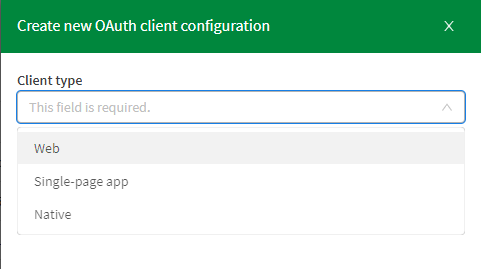
In this post, we’re going to use OAuth2 Single-page-app from the Qlik Cloud tenant Management Console under oAuth:
Example using HTML Web Components:
Reference page: https://qlik.dev/embed/qlik-embed/qlik-embed-webcomponent-quickstartFirst thing we need to do is add a <script> element in the <head> tag to configure the call to the qlik-embed library and set up the attributes relevant to the connection we choose.
<script crossorigin="anonymous" type="application/javascript" src="https://cdn.jsdelivr.net/npm/@qlik/embed-web-components" data-host="<QLIK_TENANT_URL>" data-client-id="<QLIK_OAUTH2_CLIENT_ID>" data-redirect-uri="<WEB_APP_CALLBACK_URI>" data-access-token-storage="session" > </script>- data-host is the URL to your Qlik Cloud tenant. For example https://example.us.qlikcloud.com/
- data-client-id is the client ID for the single-page application OAuth2 client registered for this web application.
- data-redirect-uri is the location of the web page the OAuth2 client will call back to when authorization requests are made from your web application to your Qlik tenant. This web page should be added to your web application.
web-component:
<qlik-embed ui="classic/app" app-id="<APP_ID>"></qlik-embed>oauth-callback.html:
<!DOCTYPE html>
<html lang="en">
  <head>
    <meta charset="utf-8" />
    <script
      crossorigin="anonymous"
      type="application/javascript"
      data-host="<QLIK_TENANT_URL>"
      src="https://cdn.jsdelivr.net/npm/@qlik/embed-web-components/dist/oauth-callback.js"
    ></script>
  </head>
</html>
You can fork the full example here and change the “Tenant URL” and the rest of the attributes to your own tenant after creating the OAuth SPA config: https://replit.com/@ouadielim/qlik-embed-HTML-Web-Components#index.html
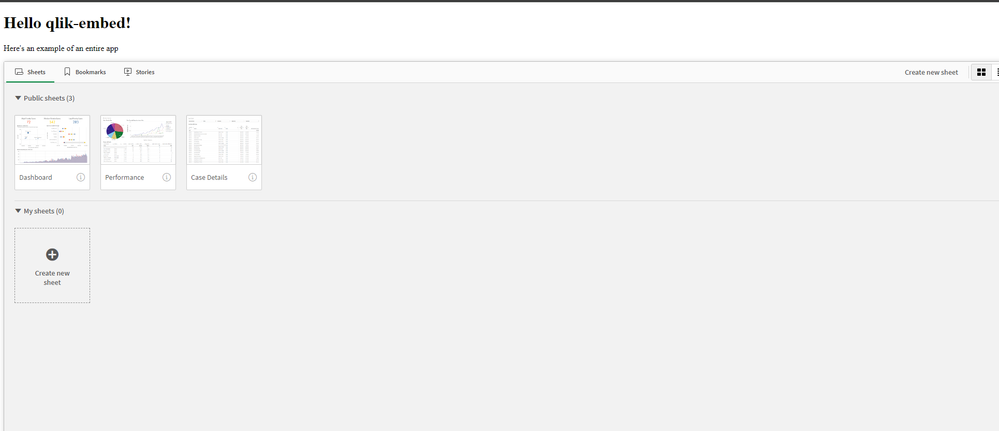
result:
Example using React:
In React, you can use qlik’s embed-react library package: npm install @qlik/embed-react (https://www.npmjs.com/package/@qlik/embed-react)
Then, you can import QlikEmbed and QlikEmbedConfig from @qlik/embed-react. React’s context is used to pass in the hostConfig that you configure to point to your Qlik Cloud Tenant (host) and use the OAuth 2 config (clientId). The redirect URI needs to point to a page which is similar to what we did above in HTML web components.
import { QlikEmbed, QlikEmbedConfig } from "@qlik/embed-react";

const hostConfig = {
  host: "<QLIK_CLOUD_TENANT>",
  clientId: "<CLIENT_ID>",
  redirectUri: "https://localhost:5173/oauth-callback.html",
  accessTokenStorage: "session",
  authType: "Oauth2",
};
const appId = "<APP_ID>";
const sheetId = ""; // sheet id or empty string

export default () => (
  <QlikEmbedConfig.Provider value={hostConfig}>
	<div className="container">
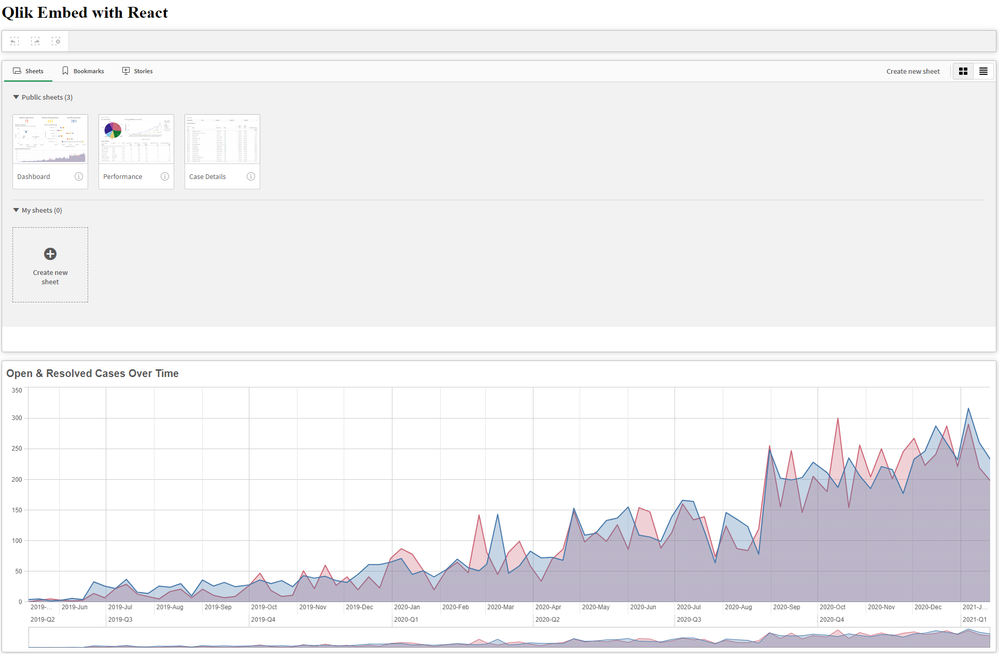
      <h1>Qlik Embed with React</h1>
	      <div className="selections-bar">
        <QlikEmbed ui="analytics/selections" appId={appId} />
      </div>
      <div className="viz">
        <QlikEmbed ui="classic/app" app={appId} sheet={sheetId} />
      </div>
      <div className="viz">
        <QlikEmbed ui="analytics/chart" appId={appId} objectId="hRZaKk" />
      </div>
	  </div>
  </QlikEmbedConfig.Provider>
);
You can clone the full React example here: https://github.com/ouadie-limouni/qlik-embed-react
result:
Limitations ?
There are a few limitations to qlik-embed as it continues to develop into a more stable and robust library - you can read more about those on qlik.dev: https://qlik.dev/embed/qlik-embed/qlik-embed-limitations
Like I mentioned at the very beginning, qlik-embed is new and evolving quickly, I invite you to test it to get familiar with it early and stay tuned for more updates and bug fixes as they come out using the Changelog page.
I hope you found this post helpful, please let me know in the comments below if you have any questions!
Thanks
- Ouadie -
Watch Q&A with Qlik: Analytics App Development!
Watch our latest Q&A with Qlik! Pull up a chair and listen to our panel of experts as they help you get the most out of your Qlik experience. Our Qlik... Show MoreWatch our latest Q&A with Qlik! Pull up a chair and listen to our panel of experts as they help you get the most out of your Qlik experience.
Our Qlik experts offer creative solutions to your analytics demands and answer your visualization questions.