Unlock a world of possibilities! Login now and discover the exclusive benefits awaiting you.

- Qlik Community
- :
- Discover
- :
- Qlik Community
- :
- Water Cooler
- :
- Re: remove date time field
- Subscribe to RSS Feed
- Mark Topic as New
- Mark Topic as Read
- Float this Topic for Current User
- Bookmark
- Subscribe
- Mute
- Printer Friendly Page

- Mark as New
- Bookmark
- Subscribe
- Mute
- Subscribe to RSS Feed
- Permalink
- Report Inappropriate Content
remove date time field
Good Morning friends.
I have a qvd file.
This field is as :
06/11/2013 08:10:28 p.m. --------> 06/11/2013
Remove date time field.
I generate the sentence "FLOOR"
DATE(FLOOR(ProductosDim),'DD-MMM-YY') AS KEY2,
¿that's right?
Date:06/11/2013
Hour:08:10:28 p.m
Please!!
thanks for the support!!
Accepted Solutions

 maxgro
- Mark as New
- Bookmark
- Subscribe
- Mute
- Subscribe to RSS Feed
- Permalink
- Report Inappropriate Content
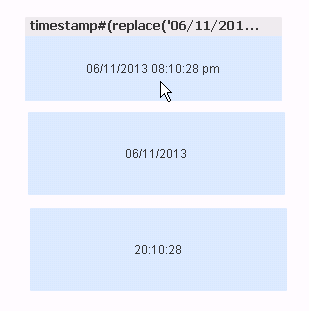
if you have a field with "p.m."
first text box
=timestamp#(replace('06/11/2013 08:10:28 p.m.', '.', ''), 'DD/MM/YYYY hh:mm:ss tt')
second
=date(floor(timestamp(timestamp#(replace('06/11/2013 08:10:28 p.m.', '.', ''), 'DD/MM/YYYY hh:mm:ss tt'))))
third
=time(frac(timestamp(timestamp#(replace('06/11/2013 08:10:28 p.m.', '.', ''), 'DD/MM/YYYY hh:mm:ss tt'))))
replace 06/11/2013..... with your field

.png "Former Employee") JonnyPoole
JonnyPoole
- Mark as New
- Bookmark
- Subscribe
- Mute
- Subscribe to RSS Feed
- Permalink
- Report Inappropriate Content
You may need timestamp() in there to ensure its first read as a datetime ... and then floor() and then date() as follows:
Date(Floor(Timestamp(ProductosDim)) , 'DD-MMM-YY') as KEY2
maxgro
- Mark as New
- Bookmark
- Subscribe
- Mute
- Subscribe to RSS Feed
- Permalink
- Report Inappropriate Content
if you have a field with "p.m."
first text box
=timestamp#(replace('06/11/2013 08:10:28 p.m.', '.', ''), 'DD/MM/YYYY hh:mm:ss tt')
second
=date(floor(timestamp(timestamp#(replace('06/11/2013 08:10:28 p.m.', '.', ''), 'DD/MM/YYYY hh:mm:ss tt'))))
third
=time(frac(timestamp(timestamp#(replace('06/11/2013 08:10:28 p.m.', '.', ''), 'DD/MM/YYYY hh:mm:ss tt'))))
replace 06/11/2013..... with your field
- Mark as New
- Bookmark
- Subscribe
- Mute
- Subscribe to RSS Feed
- Permalink
- Report Inappropriate Content
Hi Carlos
DATE(FLOOR(ProductosDim),'DD/MM/YY') as Date
DATE(FLOOR(ProductosDim),'hh:mm:ss tt') as Time
Regards
Nitha