Unlock a world of possibilities! Login now and discover the exclusive benefits awaiting you.

- Qlik Community
- :
- Forums
- :
- Archive
- :
- Archived Groups
- :
- Getting Live Census via Interconnect over HTTPS in...
- Subscribe to RSS Feed
- Mark Topic as New
- Mark Topic as Read
- Float this Topic for Current User
- Bookmark
- Subscribe
- Mute
- Printer Friendly Page

 dclark0699
- Mark as New
- Bookmark
- Subscribe
- Mute
- Subscribe to RSS Feed
- Permalink
- Report Inappropriate Content
Getting Live Census via Interconnect over HTTPS in QV
Hi all,
I've shared this macro with a few individuals before, but thought it might be worth sharing to the whole group.
The macro is a reusable function to hit Epic's Interconnect server in VB Script during a QV reload. It would in theory work with any of the SOAP web services provided with Epic. GetCurrentCensus and GetWaitTimes are the only two I've played with. I'm sure there's certainly ways to streamline this or make it better, so let me know!
The function at the top of the text file should be loaded into the Macro module. Everything below the function is a sample QV script for GetCurrentCensus that loops through and gets the current census for each department in our hospital. For each record it will create an XML file of the web service response from Interconnect and then immediately load it into the application.
In the load script, the variable vGetCensusSoap is populated with the frame of the XML request, with in my case one parameter for the department id.
Inside of each loop, I create a unique XML request with SET vSOAPRequest = $(vGetCensusSOAP($(vDeptID))) and then fire off the request to Interconnect
RESPONSE:
LOAD EpicInterconnect('$(vSOAPRequest)','$(vSOAPURL)','$(vSOAPAction)','$(vSOAPURN)','$(vSOAPURNAction)','$(vDeptID)','$(vFileLocation)','$(vFileNamingConvention)','$(vFileExtension)') as RESPONSE
AUTOGENERATE 1
;
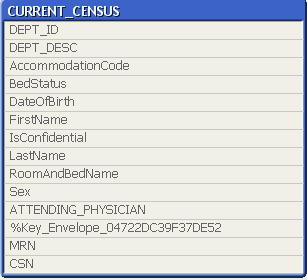
Everything below that loads the xml files and connects the data to get a single census table.
Prerequisites:
- SSL Certificate for interconnect server is on Qlikview server
- Qlikview macro is given system access
- An Epic username and password that has interconnect access. In our case we have a service account
- Update the code to include your usernames/passwords/interconnect URLS/Firleshares/certificate locations. I've scrubbed all of ours out. The components of the SOAP header for Nonce and Created may be necessary on your server, it was for us, but I don't know enough to say for sure. I was able to work with our system admins on that piece, but here's a good link for information on this:
https://www.oasis-open.org/committees/download.php/13392/wss-v1.1-spec-pr-UsernameTokenProfile-01.ht...
Resulting Table (Rename fields as needed in the script)
- Tags:
- Group_Documents
