Unlock a world of possibilities! Login now and discover the exclusive benefits awaiting you.

- Qlik Community
- :
- Forums
- :
- Archive
- :
- Archived Groups
- :
- Configuring the Governance Dashboard 2.0 (Image)
- Subscribe to RSS Feed
- Mark Topic as New
- Mark Topic as Read
- Float this Topic for Current User
- Bookmark
- Subscribe
- Mute
- Printer Friendly Page

 Tyler_Waterfall
- Mark as New
- Bookmark
- Subscribe
- Mute
- Subscribe to RSS Feed
- Permalink
- Report Inappropriate Content
Configuring the Governance Dashboard 2.0 (Image)
Here is a basic information about configuring the Governance Dashboard 2.0. These tool tips are available in the app itself by hovering over the titles above the input boxes.
If you have questions about the configuration, please post them here or even better to the main beta homepage.

- Profile Directory
- Filepath where output QVDs from the Governance Dashboard will be stored. If left blank, files will be stored in the same folder as the Governance Dashboard.qvw.
- List of Files Paths to Scan
- List here the filepaths which include QVWs and QVDs to scan. Separate multiple filepaths with vertical pipe | .
- Files & Folders to Exclude
List here the filenames (of QVWs and QVDs) and filepaths to EXCLUDE in the scan. Separate multiple exclusion patterns with vertical pipe | . For example, exclusion "govern" would exclude all files and folders containing the text "govern". This can be useful when this Governance Dashboard app is stored in a folder with other QVWs and QVDs that are to be scanned.
- Server Log Path(s)
- List here the filepaths which include Server Logs scan.
- Separate multiple log filepaths with vertical pipe | .
- Publisher Log Path(s)
- List here the filepaths which include Publisher Logs scan.
- Separate multiple log filepaths with vertical pipe | .
- Repository (QVPR) Path(s)
- List here the filepaths which include QVPR files to scan.
- Separate multiple filepaths with vertical pipe | .
- Months of History
- Select how many months of history to load in the Governance Dashboard.
- This will exclude any log files or QVWs and QVDs with filetimes older than the selected number of months back.
- Heatmap & Concurrency Days
- Select how many days of session history to load for the Session Heatmap and Session Concurrency.
- This will determine the range of history presented in both the Heatmap and Session Concurrency charts.
- Note that the more days of history chosen here, the longer initial reload is expected.
- ** To change the session concurrency interval from a previously-selected interval, the following actions must be taken:
1 - Remove the QVGD_SessionHeatmap_2.x.qvd
2 - Remove the QVGD_SessionConcurrency_2.x.qvd
3 - Reload the Governance Dashboard
- Session Concurrency Interval
- Select the interval (minutes) for which to calculate session concurrency. Options are 1-Minute, 5-Minute, or 10-Minute interval.
- Note that the shorter the interval, the more time the reload will take to generate the associated concurrency data, but the more accurate the concurrency calculations will be.
- ** To change the session concurrency interval from a previously-selected interval, the following actions must be taken:
1 - Remove the QVGD_Session*_2.x.Qvds: SessionHeatmap, SessionConcurrency, and Sessions.
2 - Remove the QVGD_SessionConcurrency_2.x.qvd
3 - Reload the Governance Dashboard
- Keep extra fields for troubleshooting?
- Selecting "Yes" will retain certain fields for troubleshooting purposes. These are not needed for regular use of the Governance Dashboard.
- User Configuration Script?
- Use the UserConfig text file to manage all configuration settings.
- Type the filename (and path) of the userconfig script.
- For example: UserConfig.txt or c:\ProgramData\QlikTech\Documents\UserConfigScript.txt
- The UserConfig script expects the following variables: (* = required)
- vInputProfilePath * (Profile directory)
- vInputFilePath (File Paths to Scan)
- vInputServerPath (Server Log paths)
- vInputPublisherPath (Publisher Log paths)
- vInputQVPRPath (QVPR paths)
- vInputMonthsOfHistory (Months of History: default = 12)
- vInputDaysOfHeatmapHistory (Heatmap & Concurrency Days: default = 30)
- QMC Note: If you want to use the UserConfig option in QMC without opening and modifying the Governance Dashboard.qvw, set the task Reload Script Parameter name to vInputUserConfigFromQMC and the Parameter Value to the filename (path included) of the User Config .txt file.
- Append custom PostScript?
- Use the PostScript option to append custom load script to the end of the Governance Dashboard script.
- Note that custom load script included here is not included in standard QlikTech support but would require Qlik Expert Services.
- Proceed with caution and enthusiasm.
- Reload
- Reload the Governance Dashboard.
- « Previous Replies
- Next Replies »

 jerrysvensson
- Mark as New
- Bookmark
- Subscribe
- Mute
- Subscribe to RSS Feed
- Permalink
- Report Inappropriate Content
We use SQL Server as our QVPR database. How do we configure that?
Tyler_Waterfall
- Mark as New
- Bookmark
- Subscribe
- Mute
- Subscribe to RSS Feed
- Permalink
- Report Inappropriate Content
Jerry - We have not enabled reading SQL QVPR database. I will add this to the improvement list for 2.x.
Thanks for the question / request.
Tyler_Waterfall
- Mark as New
- Bookmark
- Subscribe
- Mute
- Subscribe to RSS Feed
- Permalink
- Report Inappropriate Content
Just updated this configuration page w/ an updated image and text. Let me know if it is helpful - or not helpful!
Tyler_Waterfall
- Mark as New
- Bookmark
- Subscribe
- Mute
- Subscribe to RSS Feed
- Permalink
- Report Inappropriate Content
Another update (hopefully the last to the 2.0 Configuration page!).
Now with 2.0.032 you can use the "Files & Folders to Exclude" to exclude files and folders from the metadata scan (of QVWs and QVDs). Enjoy!

- Mark as New
- Bookmark
- Subscribe
- Mute
- Subscribe to RSS Feed
- Permalink
- Report Inappropriate Content
Tyler, We just downloaded Governance Dashboard today. When we try to click on 'Reload' button. It does not do anything. What need to be done?
Thanks
Tyler_Waterfall
- Mark as New
- Bookmark
- Subscribe
- Mute
- Subscribe to RSS Feed
- Permalink
- Report Inappropriate Content
Hi Lakhbir -
Some questions -
1 - Are you opening the Governance Dashboard in qv.exe desktop (with a license)?
2 - After you click the button, can you continue to click around and navigate in the app?
3 - Can you try using the file menu option? File > Reload. Does this work?
- Mark as New
- Bookmark
- Subscribe
- Mute
- Subscribe to RSS Feed
- Permalink
- Report Inappropriate Content
Tyler, Thanking for getting back to me.
Tyler, I think It's an license issue. Someone else ran it for me and reload button works but throw error (log files location not found). He had license and He was running it on his desktop.
I will get back to you as soon as I get my license. I will let you know if it works or not.
Thank a lot for your feedback.
- Mark as New
- Bookmark
- Subscribe
- Mute
- Subscribe to RSS Feed
- Permalink
- Report Inappropriate Content
Hi Tyler
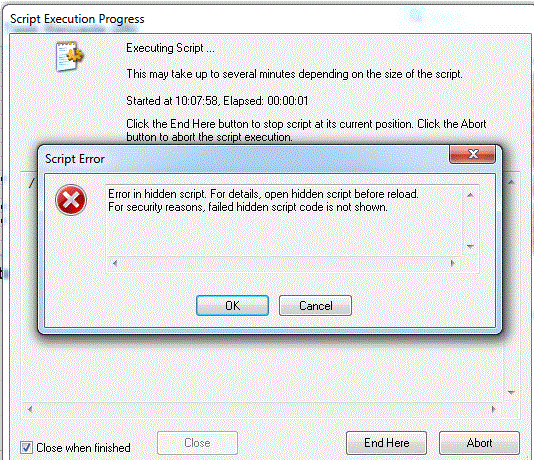
I was able to fix the license issue. When I run the dashboard it's throwing below error. I have to hit 'Ok' button 21 time to finish the process. It means, dashboard throw that error 21 times. At the end, it does give me some data back but I am not sure what this ERROR is about.
Some Facts:
I am running the dashboard on my desktop
I am Leasing the license from the server
Using UNC path to get to the files
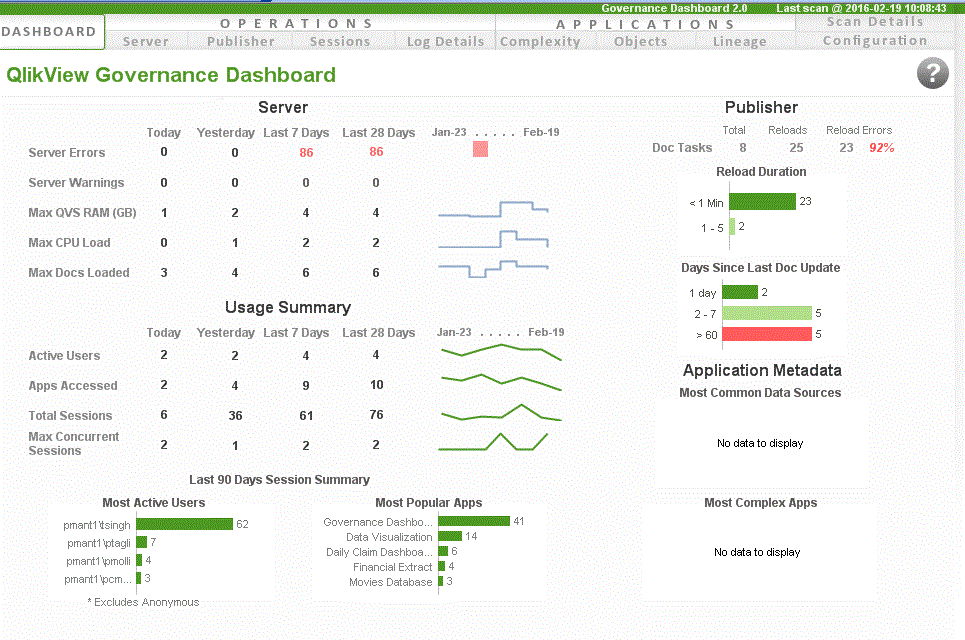
Do we suppose to get anything else?
Tyler_Waterfall
- Mark as New
- Bookmark
- Subscribe
- Mute
- Subscribe to RSS Feed
- Permalink
- Report Inappropriate Content
Check the "Scan Details" page of the app.
Does it list the 21 errors there?
Note that you can click on that box with the error message and open a text file with a little more detail.
My guess is that it is failing to read metadata from a QVW - perhaps a corrupt QVW, a really old QVW, a QVW with section access, maybe?
It might also be that you have included the folder where this Governance Dashboard.qvw is stored in the "Files to scan". Or, the Profile directory for the Governance Dashboard - is a subfolder of this "Files to Scan" folder?
- « Previous Replies
- Next Replies »