Unlock a world of possibilities! Login now and discover the exclusive benefits awaiting you.

- Qlik Community
- :
- Forums
- :
- Archive
- :
- Archived Groups
- :
- Improving Governance / Monitoring Apps in Sense (O...
- Subscribe to RSS Feed
- Mark Topic as New
- Mark Topic as Read
- Float this Topic for Current User
- Bookmark
- Subscribe
- Mute
- Printer Friendly Page

 Tyler_Waterfall
- Mark as New
- Bookmark
- Subscribe
- Mute
- Subscribe to RSS Feed
- Permalink
- Report Inappropriate Content
Improving Governance / Monitoring Apps in Sense (Operations Monitor, License Monitor)
Calling all Qlik Sense user, admins, and experts -
As the developer of the Monitoring apps (Operations Monitor and License Monitor), I am continually seeking insightful feedback and input from the field. I want the apps to provide the most value possible, so I ask your help.
For all who have installed and used Qlik Sense - specifically the QMC - what is your impression of the Monitoring (aka Governance) apps? Do you use them? If so, why? What is valuable to you?
What is missing?
What is unclear?
Anything unhelpful that could be cleaned up?
If you do not use them, why not?
I appreciate your time and thought!
Thanks! Gracias! Obrigado! Tack!
Tyler

 tonyiantorno
- Mark as New
- Bookmark
- Subscribe
- Mute
- Subscribe to RSS Feed
- Permalink
- Report Inappropriate Content
HI Tyler,
I was just getting into the Governance apps when they stopped collecting the data a week later as the scheduler shows a failure on the reload.
Any tips on getting them working again. Any help you could provide would be greatly appreciated.
Thanks,
Tony
Tyler_Waterfall
- Mark as New
- Bookmark
- Subscribe
- Mute
- Subscribe to RSS Feed
- Permalink
- Report Inappropriate Content
I recommend sending the following information to support so we can troubleshoot:
- Screen shot of the “configuration” screen of the Governance Dashboard
- Governance Dashboard.qvw.log
- fullscan.messages.log*
- fullscan.statistics.log*
- Description of how your environment is configured:
- Version of QlikView
- Where is GovernanceDashboard.exe installed?
- Where is the reload occurring?
- User account that is reloading it - does it have read/write access to the profiles and file folders?
* in [install directory]\governance_1.1\profiles\default\QVX_LastRun folder

- Mark as New
- Bookmark
- Subscribe
- Mute
- Subscribe to RSS Feed
- Permalink
- Report Inappropriate Content
Hi Tyler,
Thank you for creating this app! I would like to see the following:
- Ability to show which group / security rules / streams a user is in, regardless whether or not the user has used the system
- Ability to add more information to the user e.g. User Name, User Email. Currently we only see User Id, which is difficult to recognize.
Regards,
Muliady
Tyler_Waterfall
- Mark as New
- Bookmark
- Subscribe
- Mute
- Subscribe to RSS Feed
- Permalink
- Report Inappropriate Content
Thank you Muliady for your input.
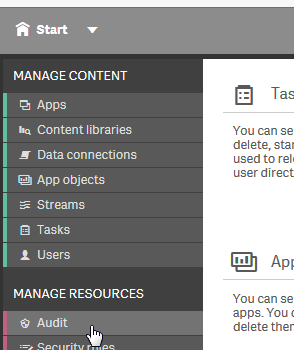
For the first one - namely seeing security rules and streams associated with users, I recommend using the newly updated Audit ability in QMC. From an app perspective, it is nearly impossible to evaluate all of the security rules for all combinations of users, rules, streams etc. to present 'statically'. Hopefully you can find what you need in the Audit of the QMC.
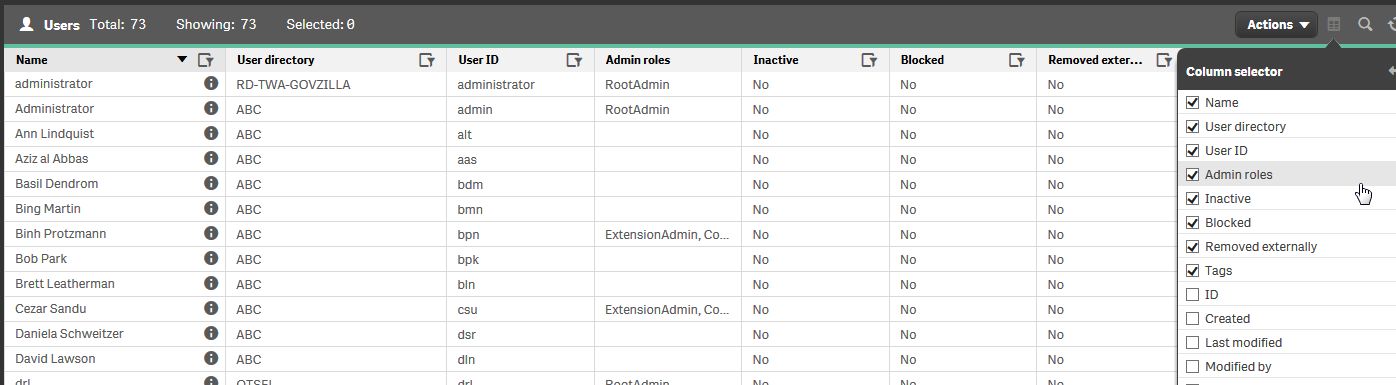
Adding more information about the user is on the list - and something I hope to add for the next release (TBD). I will have access to the same information you see in the QMC under User.
- Mark as New
- Bookmark
- Subscribe
- Mute
- Subscribe to RSS Feed
- Permalink
- Report Inappropriate Content
Hi Tyler,
Thank you for responding. I can already use the first one, and look forward to make the license monitoring app even easier to use!
Cheers,
Muliady

 zuruprem2
- Mark as New
- Bookmark
- Subscribe
- Mute
- Subscribe to RSS Feed
- Permalink
- Report Inappropriate Content
I visited Qlik Sense apps after reading your blog, I found them they are very useful in current status.
 marcohadiyanto
- Mark as New
- Bookmark
- Subscribe
- Mute
- Subscribe to RSS Feed
- Permalink
- Report Inappropriate Content
