Unlock a world of possibilities! Login now and discover the exclusive benefits awaiting you.

- Qlik Community
- :
- Forums
- :
- Archive
- :
- Archived Groups
- :
- Issues when upgrading QV9 to QV11 SR2
- Subscribe to RSS Feed
- Mark Topic as New
- Mark Topic as Read
- Float this Topic for Current User
- Bookmark
- Subscribe
- Mute
- Printer Friendly Page

 pablolabbe
- Mark as New
- Bookmark
- Subscribe
- Mute
- Subscribe to RSS Feed
- Permalink
- Report Inappropriate Content
Issues when upgrading QV9 to QV11 SR2
This week I'm upgrading a customer Qlikview environment from QV9 to QV11 SR2 and found some issues. Some QVWs failed to open with Qlikview Desktop V11 and others failed to open only in QVServer V11 AccessPoint .
We observed that QVW failed to open in QVServer AccessPoint when it contains a Hidden Script. Even removing the hidden script, the problem still persist. Those document created in V9 never had a hidden script opens correctly in Qlikview Server and Qlikview Script.
The workaround adopted was opening QVW in QV9 and copy and paste scripts and objects into a new document created with QV11.
Best Regards,
Pablo Labbe Ibaceta
Qlikview Certified Consultant

.png "Former Employee") Bill_Britt
Bill_Britt
- Mark as New
- Bookmark
- Subscribe
- Mute
- Subscribe to RSS Feed
- Permalink
- Report Inappropriate Content
Hi Pablo,
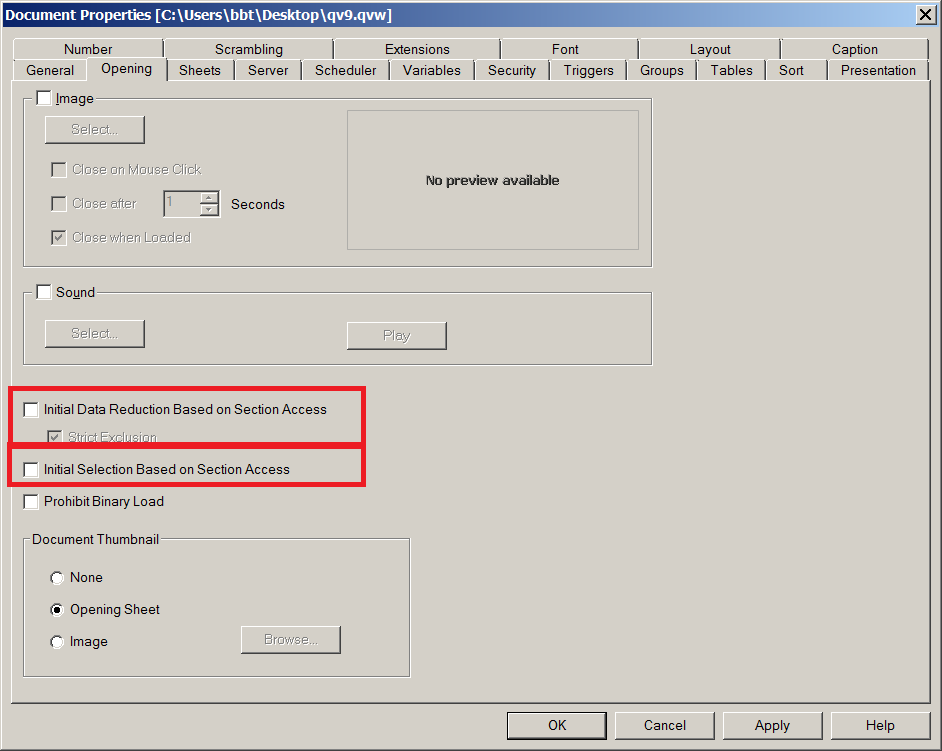
I have seen this in the past and found that if you had section access and removed it, you would get the error if you left one of the below checked.
Bill
To help users find verified answers, please don't forget to use the "Accept as Solution" button on any posts that helped you resolve your problem or question.
