Unlock a world of possibilities! Login now and discover the exclusive benefits awaiting you.

- Qlik Community
- :
- Forums
- :
- Archive
- :
- Archived Groups
- :
- Pie chart style inconsistency (QV 11)
- Subscribe to RSS Feed
- Mark Topic as New
- Mark Topic as Read
- Float this Topic for Current User
- Bookmark
- Subscribe
- Mute
- Printer Friendly Page

- Mark as New
- Bookmark
- Subscribe
- Mute
- Subscribe to RSS Feed
- Permalink
- Report Inappropriate Content
Pie chart style inconsistency (QV 11)
Does anybody know how the following pie chart state be even possible?
For pie the first look from the list on the Style tab was chosen (it does not contain gradient). But legend colors are with gradient.
And this behavior is not stable. Sometimes legend colors are shown without gradient.
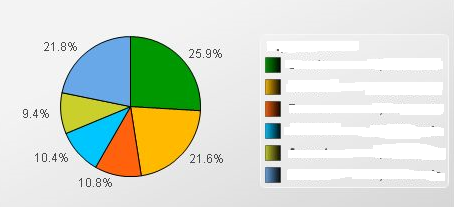
QlikView Version 11.20.11643.0 IR 64-bit Edition (x64).
Accepted Solutions

 rbecher
- Mark as New
- Bookmark
- Subscribe
- Mute
- Subscribe to RSS Feed
- Permalink
- Report Inappropriate Content
Hi Alina,
have you tried to reproduce this with the latest service release 11.2 SR4? Maybe it's fixed already..
- Ralf
- Mark as New
- Bookmark
- Subscribe
- Mute
- Subscribe to RSS Feed
- Permalink
- Report Inappropriate Content
Hi Alina ,
Can you post a qvw with sample.
rbecher
- Mark as New
- Bookmark
- Subscribe
- Mute
- Subscribe to RSS Feed
- Permalink
- Report Inappropriate Content
Hi Alina,
have you tried to reproduce this with the latest service release 11.2 SR4? Maybe it's fixed already..
- Ralf

 rwunderlich
- Mark as New
- Bookmark
- Subscribe
- Mute
- Subscribe to RSS Feed
- Permalink
- Report Inappropriate Content
That was indeed fixed, on sr2 or sr3.
Rob