Unlock a world of possibilities! Login now and discover the exclusive benefits awaiting you.

- Qlik Community
- :
- Forums
- :
- Archive
- :
- Archived Groups
- :
- QlikView Bookmark Issue Resolved
- Subscribe to RSS Feed
- Mark Topic as New
- Mark Topic as Read
- Float this Topic for Current User
- Bookmark
- Subscribe
- Mute
- Printer Friendly Page

- Mark as New
- Bookmark
- Subscribe
- Mute
- Subscribe to RSS Feed
- Permalink
- Report Inappropriate Content
QlikView Bookmark Issue Resolved
Hi QlikView Team,
Please inform all your QlikView users (End Users) to uncheck all the options in the bookmark wizard while creating bookmarks in the access point.
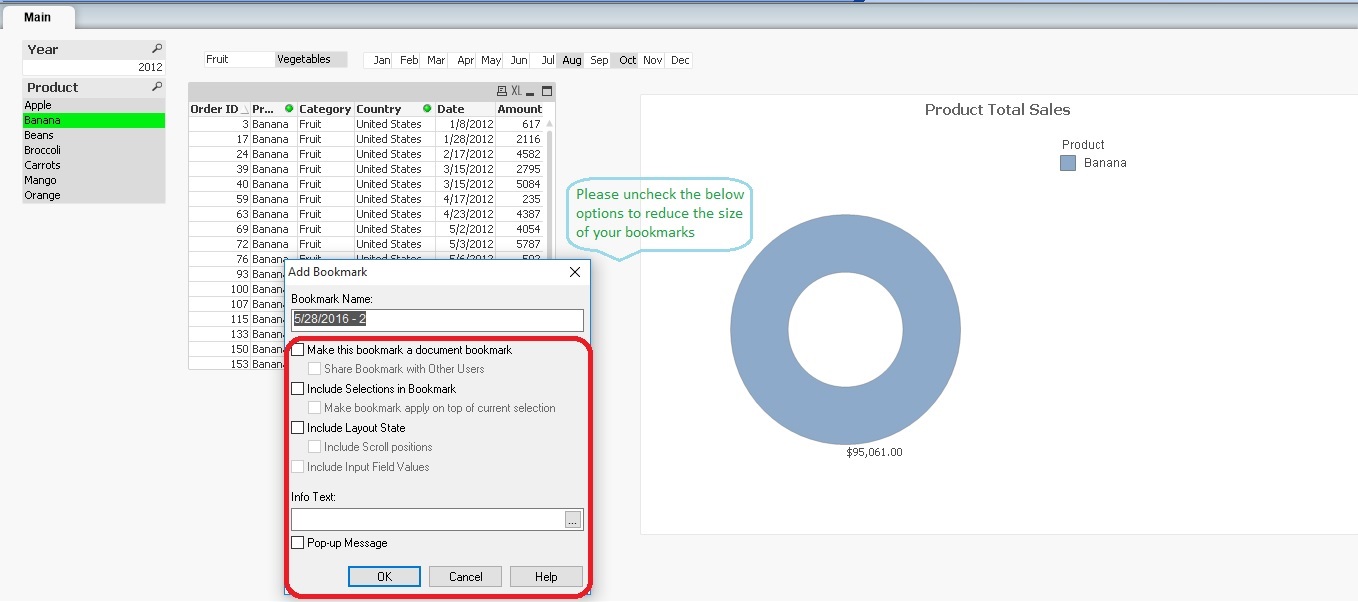
Doing this dramatically reduces the size of your server bookmarks.
The reason behind this issue is because checking the above options save all the layout properties, chart properties, font’s properties and all the other document properties including Meta data in the ".Shared File".
Un-checking these options reduces the size of the server bookmarks and avoids from the corruption within the .Shared File.
Research:
I imported few (Let us 5 to 6) high size server bookmarks XML file and then import the XML data into an excel file. In this file, you Name3 field which holds all the selections of every bookmarks. If we filter a particular bookmark in excel, we see selections of this bookmarks in Name3 field as well as Null values associated with the filter bookmark. These null values are taking more space and often gets corrupted in the .Shared File. The reason behind these nulls is checking of the above options. If Qlik End users can un-check options while creating server bookmarks via access point, they can dramatically reduce the null values, which eventually reduce the size of their server bookmarks.
I wish you all the best...
Best Regards,
Sandeep Babu S
- Tags:
- Group_Ideas

 rwunderlich
- Mark as New
- Bookmark
- Subscribe
- Mute
- Subscribe to RSS Feed
- Permalink
- Report Inappropriate Content
If you uncheck all options, what is the purpose of creating the bookmark at all?