Unlock a world of possibilities! Login now and discover the exclusive benefits awaiting you.

- Qlik Community
- :
- Forums
- :
- Archive
- :
- Archived Groups
- :
- Qlikview Script Editor greyed out
- Subscribe to RSS Feed
- Mark Topic as New
- Mark Topic as Read
- Float this Topic for Current User
- Bookmark
- Subscribe
- Mute
- Printer Friendly Page

 Siva_Sankar
- Mark as New
- Bookmark
- Subscribe
- Mute
- Subscribe to RSS Feed
- Permalink
- Report Inappropriate Content
Qlikview Script Editor greyed out
I recently installed qlikview in win 8. I couldnt able to access script editor and the icon is greyed out. I tried admin override security in qlikview document settings. Tried opening many docs without section access..i cant access script editor. Tried changing the registry editor settings. Finally uninstalled and reinstalled. But still i couldnt access script editor. Anyone resolved this kind of issue?
- « Previous Replies
-
- 1
- 2
- Next Replies »

 swuehl
- Mark as New
- Bookmark
- Subscribe
- Mute
- Subscribe to RSS Feed
- Permalink
- Report Inappropriate Content
Which version of QV have you installed?
And have you used the package for Win8 (QlikViewDesktop_Win8andUp.exe), not QlikViewDesktop_x??Desktop.exe?
Siva_Sankar
- Mark as New
- Bookmark
- Subscribe
- Mute
- Subscribe to RSS Feed
- Permalink
- Report Inappropriate Content
P


 Siva_Sankar
- Mark as New
- Bookmark
- Subscribe
- Mute
- Subscribe to RSS Feed
- Permalink
- Report Inappropriate Content
version 11.2 sr2 64 bit. yes i used win8 pkg

 sunny_talwar
- Mark as New
- Bookmark
- Subscribe
- Mute
- Subscribe to RSS Feed
- Permalink
- Report Inappropriate Content
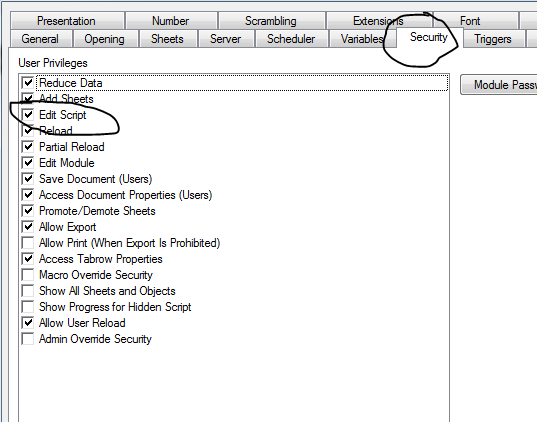
Make sure that within document properties -> security tab -> Edit Script is checked:
Siva_Sankar
- Mark as New
- Bookmark
- Subscribe
- Mute
- Subscribe to RSS Feed
- Permalink
- Report Inappropriate Content
All done.no luck
sunny_talwar
- Mark as New
- Bookmark
- Subscribe
- Mute
- Subscribe to RSS Feed
- Permalink
- Report Inappropriate Content
I actually did not read your full post initially, I guess you already tried the above suggestion. Not sure if this is something related to Win_8 installation file or is it just for you. May be somebody with Win_8 can throw some light on this.
Best,
Sunny

- Mark as New
- Bookmark
- Subscribe
- Mute
- Subscribe to RSS Feed
- Permalink
- Report Inappropriate Content
I have Win 8 on my personal laptop. QV works. But my version is SR10.
Siva_Sankar
- Mark as New
- Bookmark
- Subscribe
- Mute
- Subscribe to RSS Feed
- Permalink
- Report Inappropriate Content
Thanks Michael,
Let me try installing SR10 and check whether the issue is with the version.
Siva_Sankar
- Mark as New
- Bookmark
- Subscribe
- Mute
- Subscribe to RSS Feed
- Permalink
- Report Inappropriate Content
Unfortunately, I have no option to download other than latest versions. Any one tried installing qlikview 11.2 sr 12 in Win 8 and able to access edit script?
- « Previous Replies
-
- 1
- 2
- Next Replies »