








Do not input private or sensitive data. View Qlik Privacy & Cookie Policy.
Skip to main content

Unlock a world of possibilities! Login now and discover the exclusive benefits awaiting you.

Qlik

  • Qlik.com
  • Qlik Services
  • Qlik Help

Qlik.com | Qlik Services | Qlik Help
cancel
Turn on suggestions
Auto-suggest helps you quickly narrow down your search results by suggesting possible matches as you type.
Showing results for 
Search instead for 
Did you mean: 
Ask a Question
HelpSign In / Register
cancel
Turn on suggestions
Auto-suggest helps you quickly narrow down your search results by suggesting possible matches as you type.
Showing results for 
Search instead for 
Did you mean: 

Blogs

Announcements
Qlik and ServiceNow Partner to Bring Trusted Enterprise Context into AI-Powered Workflows. Learn More!
  • Qlik Community
  • :
  • Blogs
Options
  • Subscribe
cancel
Turn on suggestions
Auto-suggest helps you quickly narrow down your search results by suggesting possible matches as you type.
Showing results for 
Search instead for 
Did you mean: 

Design

The Design blog is all about product and Qlik solutions, such as scripting, data modeling, visual design, extensions, best practices, and more!

read more

Product Innovation

By reading the Product Innovation blog, you will learn about what's new across all of the products in our growing Qlik product portfolio.

read more

Support Updates

The Support Updates blog delivers important and useful Qlik Support information about end-of-product support, new service releases, and general support topics.

read more

Qlik Academic Program

This blog was created for professors and students using Qlik within academia.

read more

Community News

Hear it from your Community Managers! The Community News blog provides updates about the Qlik Community Platform and other news and important announcements.

read more

Qlik Digest

The Qlik Digest is your essential monthly low-down of the need-to-know product updates, events, and resources from Qlik.

read more

Qlik Learning

The Qlik Learning blog offers information about the latest updates to our courses and programs, as well as insights from the Qlik Learning team.

read more

Subprocessors List

Qlik Subprocessors General Data Protection Regulation (GDPR).

read more

Japan

Qlik Community blogs for our customers and partners in Japan.

read more

Recent Blog Posts

  • Image Not found

    Design

    Toggle Sheet Header and Toolbar On and Off

    There have been many new capabilities that give developers ways to customize and style an app. In this blog, I will review how the sheet header and toolbar can be toggled on and off and the benefits of each, as well as things to consider. The sheet header and the toolbar both appear at the top of an app. The sheet header, outlined below in yellow, includes the name of the sheet, an optional logo or image, and previous and next sheet navigation ar... Show More

    There have been many new capabilities that give developers ways to customize and style an app. In this blog, I will review how the sheet header and toolbar can be toggled on and off and the benefits of each, as well as things to consider. The sheet header and the toolbar both appear at the top of an app. The sheet header, outlined below in yellow, includes the name of the sheet, an optional logo or image, and previous and next sheet navigation arrows.

    header and toolbar - sheet header.png

    The toolbar is the row above the sheet header. It includes buttons and links to Notes, Insight Advisor, selections tool, bookmarks, sheets and edit sheet.

    header and toolbar - toolbar.png

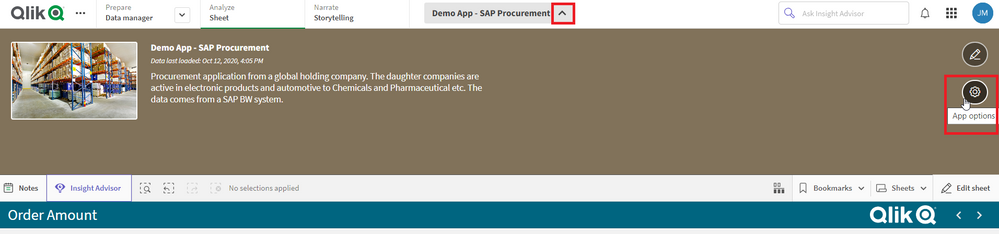
    The toggle for the sheet header and toolbar can be found in the app options section of an app. Open app options by clicking on the arrow next to the app name at the top center of the app. From there, click on the App options icon on the right.

    app options.png

     Once the app options are open, you will find the toggles for Show toolbar and Show sheet header.

    open app options.png

    One of the main benefits of removing the sheet header and toolbar is to gain more space on the sheet. The space that is used by the sheet header and toolbar become area that developers can use for additional filter panes and/or visualizations. Another benefit is developers can add custom capabilities to replace the Qlik Sense defaults. For example, a developer may want to create their own navigation buttons and have more control over the options that are available to the user. If the sheet(s) are being used to create a PowerPoint presentation, removing the sheet header and toolbar makes the presentation look more polished.

    Now let’s discuss some things to consider when removing the sheet header. If the sheet header is removed, alternative sheet navigation should be provided for the user. It is possible to use your keyboard to navigate the sheets, but many people do not know that so custom navigation should be created by the developer using buttons or links. In the image below, buttons are used.

    custom navig.png

    In the image below, buttons are used again but the highlighted button indicates the sheet the user is on. So, in this example, the developer has replaced the sheet navigation and the sheet title that was included in the removed sheet header. 

    button navig.png

    A sheet title can also be added to a sheet using a Text & image object. The custom navigation can be designed to match a theme or company brand which gives the developer a lot of flexibility and can give a company’s apps a consistence look and feel.

    When the toolbar is toggled off, features are hidden but they are not removed from the app entirely. This is great but not all users may be aware of alternative ways to access the features on the toolbar, so it is important to keep this in mind. For example, users can still create notes for a visualization or view notes for a visualization by right-clicking on a chart, selecting the eclipse (…) and then selecting Notes. Another example is users can still access bookmarks or the sheets in an app via the App Overview. Users can still ask questions via Insight Advisor, so not functionality is loss with the removal of the toolbar. Other things to consider is that while selections can still be made via filter panes and visualizations, without the selection bar, users may not be aware that selections have been made. This is why the developer needs to make sure there are filter panes or some way for users to know what has been selected. When it comes to selections, buttons can also be used to perform actions such as clearing selections and making selections in a field.

    The overall goal is not to make things harder for the user so knowing possible issues and designing for them is smart. While there are benefits in toggling off the sheet header and/or toolbar, developers must consider how this may impact their users and how their users will use the app. The user experience can be just as good with the sheet header and toolbar toggled off if the developer plans well for an intuitive user experience.

    Thanks,

    Jennell


    Show Less
    Jennell_Yorkman
  • qlik-community-blogs.jpg

    Explore Qlik Gallery

    Holiday Dashboard

    Holiday DashboardBaker Tilly N.V.The purpose of this dashboard is to highlight the customization and interactivity capabilities of Qlik through a holiday-themed travel experience. Users can explore their past trips, get useful information about their travel destinations, and organize their future travel plans by managing a personalized wishlist. The dashboard allows users to visualize historical travel data, including destinations, trip durations... Show More
    Holiday Dashboard
    Baker Tilly N.V.
    The purpose of this dashboard is to highlight the customization and interactivity capabilities of Qlik through a holiday-themed travel experience. Users can explore their past trips, get useful information about their travel destinations, and organize their future travel plans by managing a personalized wishlist. The dashboard allows users to visualize historical travel data, including destinations, trip durations, and seasonal trends, while offering real-time insights into upcoming destinations based on factors like weather, costs, and available activities. This interactive tool is designed for travel enthusiasts, frequent travelers, and anyone looking to make informed decisions about their trips. It demonstrates how Qlik’s powerful analytics can transform travel data into valuable insights, empowering users to better plan and reflect on their journeys. The dashboard showcases the flexibility of Qlik Sense in creating engaging and dynamic user experiences, making it an invaluable tool for personalized decision-making and future travel planning.

    Discoveries

    The purpose of this dashboard is to highlight the customization and interactivity capabilities of Qlik Sense through a holiday-themed travel experience. Users can explore their past trips, get useful information about their travel destinations, and organize their future travel plans by managing a personalized wishlist.

    Impact

    The dashboard allows users to visualize historical travel data, including destinations, trip durations, and seasonal trends, while offering real-time insights into upcoming destinations based on factors like weather, costs, and available activities.

    Audience

    This interactive tool is designed for travel enthusiasts, frequent travelers, and anyone looking to make informed decisions about their trips. In particular, BI analysts.

    Data and advanced analytics

    It demonstrates how Qlik Sense’s powerful analytics can transform travel data into valuable insights, empowering users to better plan and reflect on their journeys. The dashboard showcases the flexibility of Qlik Sense in creating engaging and dynamic user experiences, making it an invaluable tool for personalized decision-making and future travel planning.

    Show Less
    SterreKapteijns
  • Image Not found

    Design

    Orchestrating Talend Jobs

    This blog post will explore three different options for orchestrating Talend Jobs in the Qlik Platform.
    EdwardOst
  • Image Not found

    Qlik Digest

    Qlik Digest - November 2024

    Welcome to the November Qlik Digest, your one-stop source for the latest updates from Qlik. This month, explore significant enhancements including an exciting new file connector release, recent on-demand webinars, and don’t forget to mark your calendars for Qlik Connect 2025.
    Elizabeth-Kropp
  • Image Not found

    Design

    Enhanced File Management

    A new file management system has been added to Qlik Cloud allowing users to create folders and subfolders for their data files. This hierarchical folder structure is available in your personal space, as well as shared, managed and data spaces. Now, I can add folders to a data space in my tenant and use folders to organize my files. This is extremely helpful when I have a project that has a lot of data files. There are two ways to add folders to a... Show More

    A new file management system has been added to Qlik Cloud allowing users to create folders and subfolders for their data files. This hierarchical folder structure is available in your personal space, as well as shared, managed and data spaces. Now, I can add folders to a data space in my tenant and use folders to organize my files. This is extremely helpful when I have a project that has a lot of data files.

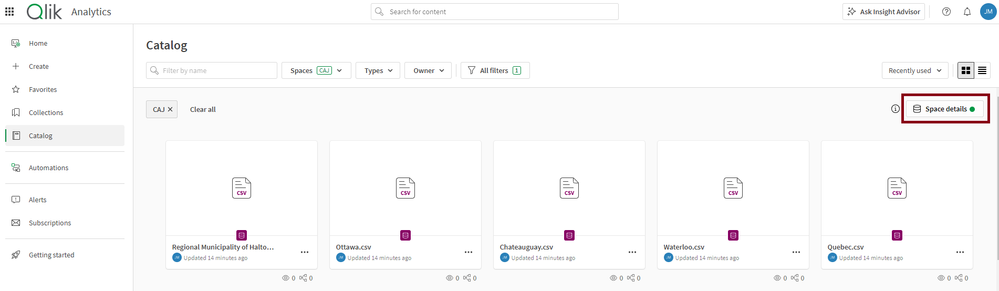
    There are two ways to add folders to a space. The first is through Space details as seen in the image below.

    Space details.png

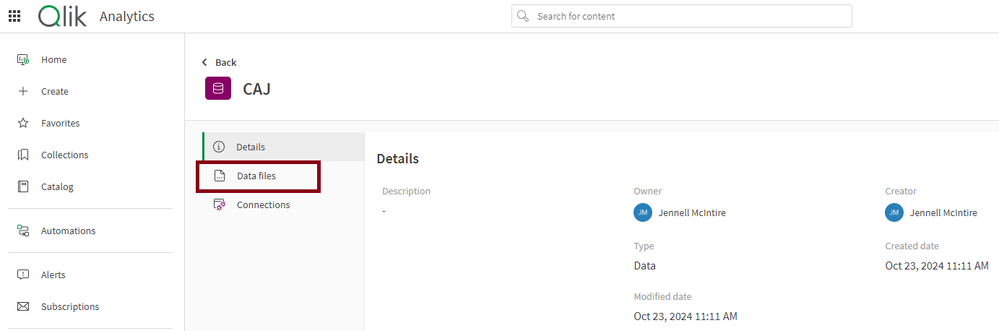
    After clicking on Space details, select Details. Then select Data files.

    data files.png

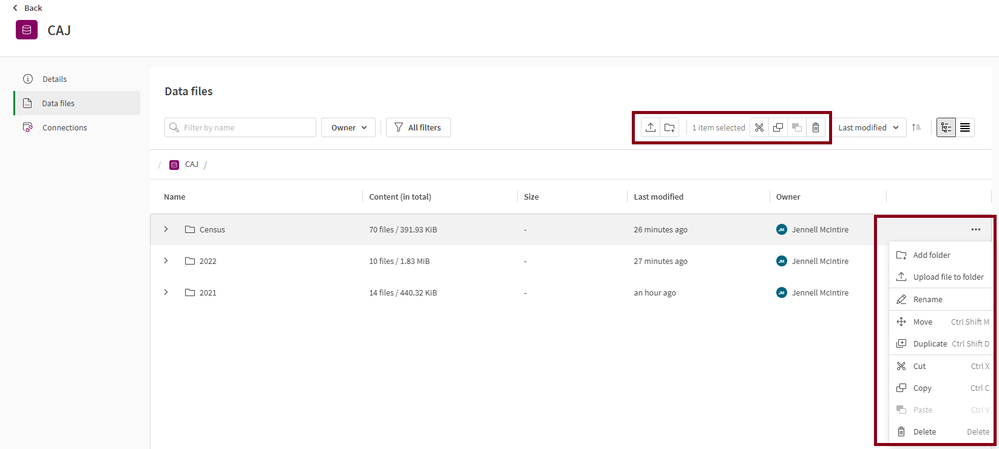
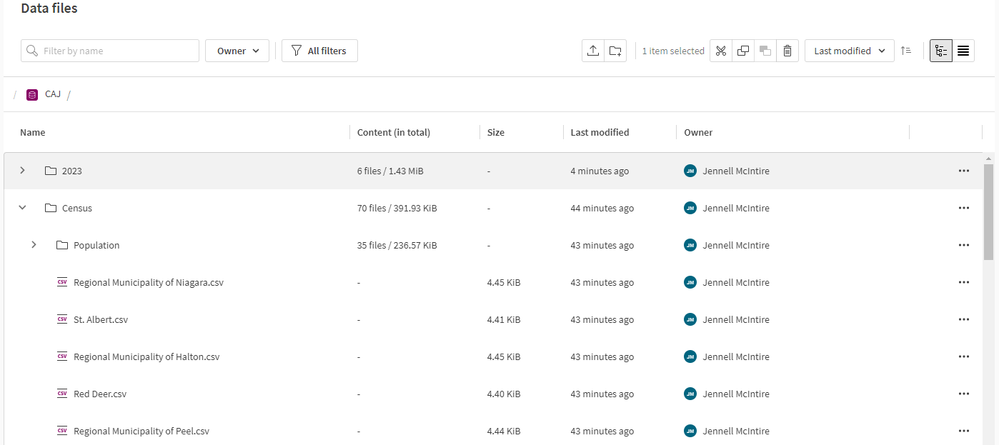
    From the screenshot below, I can use the icons at the top or click on the eclipse at the end of a folder row to:

    1. Upload files to a folder
    2. Add a folder
    3. Copy a folder
    4. Cut and paste a folder
    5. Delete a folder

    I can also use the icons and menu options to cut, copy and paste files and/or folders to somewhere else within the space or to another space. More than one file can be cut/copy/pasted by selecting the entire folder or by holding ctrl and selecting each file.

    files options.png

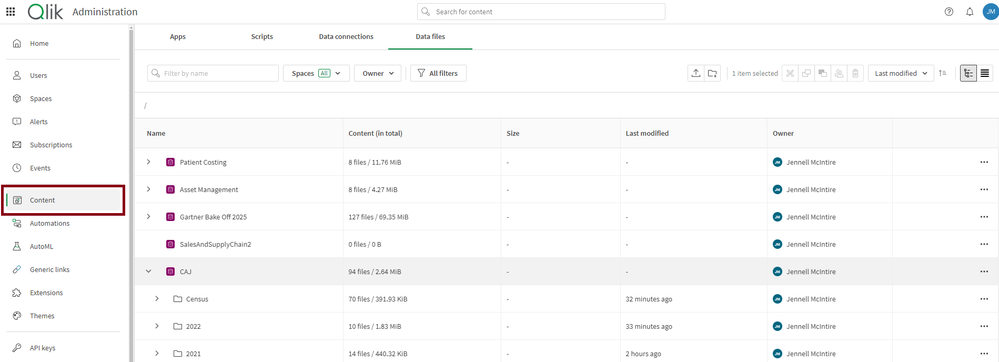
    The second way to add a folder to a space is via Administration > Content.

    content.png

    Let’s add one more folder to the CAJ space to see how it is done. To add a 2023 folder to the CAJ space, I will click on the Add folder icon and enter the name of the new folder. Be sure to confirm the path is correct. If not, select the correct path from the Path dropdown. Then click the Create button.

    add folder.pngOnce the folder is added, I can click on the eclipse for the 2023 folder and select Upload file to folder to upload files to this folder. If I used the Upload icon at the top, I would have to change the path to the 2023 folder before uploading my files.

    This enhancement also lets me create subfolders as seen in the image below. I have a Population folder in the Census folder.

    subfolders.png

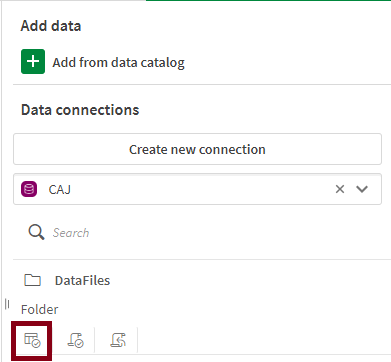
    Now, let’s look at how we can load the data files in a Qlik Sense app using the folder structure. From the script editor in Qlik Sense, I can select the CAJ space and then click the Select data icon.

    connection.png


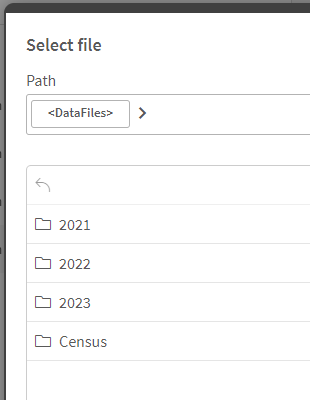
    I can see the folder structure I have set up and I can drill down into the folders to select the file I want to load.

    select file.png


    Notice that the file path in the script matches the hierarchical file structure I set up. This file structure can also be used when storing QVDs or inserting a QVS file.


    file path.png


    I love this new feature in Qlik Cloud. Sometimes I have the need to organize my files by their source or in the example I shared in this blog by the year of the project. This allows me to organize my data in a way that makes sense for development. To learn more about this enhanced file management feature, check out Qlik Help.

    Thanks,

    Jennell


    Show Less
    Jennell_Yorkman
  • Image Not found

    Product Innovation

    Exploring Talend Management Console API with Talend API Tester

    In this blog post we will explore the basics of the TMC API using the Talend API Tester by running a Task using a temporary Service Account token generated with the oAuth2 Client Credential Flow.
    EdwardOst
  • Image Not found

    Support Updates

    Watch Q&A with Qlik: New to Qlik Cloud

    Don't miss our previous Q&A with Qlik! Hear from our panel of experts to help you get the most out of your Qlik experience.     SEE THE RECORDING HERE  
    Troy_Raney
  • Image Not found

    Product Innovation

    Automate your Machine Learning with Qlik Talend Cloud Data Pipelines

    Use Qlik Talend Cloud to build a data pipeline that uses Machine Learning for real-time predictions to update data in your Qlik Sense application.
    damienedwards
  • Image Not found

    Qlik Academic Program

    India leads with the highest demand for data analytics skills globally

      India leads with 17.4% of its job postings looking for data analytics skills, followed by the US at 8.8%, positioning these countries as global hubs for data analytics expertise,” it added. Other markets with high demand for data analytics skills include UK (7.5%), New Zealand (6.7%), and Australia (6.4%).This is according to a recent report published by Cornerstone on 2024 Global State of the Skills Economy.Read more about this ... Show More
     
    India leads with 17.4% of its job postings looking for data analytics skills, followed by the US at 8.8%, positioning these countries as global hubs for data analytics expertise,” it added. Other markets with high demand for data analytics skills include UK (7.5%), New Zealand (6.7%), and Australia (6.4%).

    This is according to a recent report published by Cornerstone on 2024 Global State of the Skills Economy.

    Read more about this report here: https://www.financialexpress.com/jobs-career/india-leads-in-demand-for-data-analytics-globally-global-state-of-the-skills-economy-report-3620853/ 


    Show Less
    Pankaj_Muthe
  • Image Not found

    Design

    Let's Take a walk on the Calendar / Date Bridge: Working with Multiple Dates / ...

    This topic has been covered before, but we have a new generation of Qlik users and I found some of the content not always easily explained. Here is my spin to help you get started working with multiple dates / calendars. Sample App and data attached!
    Michael_Tarallo
  • Image Not found

    Product Innovation

    Qlik Data Integration Client Managed November 2024 General Availability Release

    November traditionally brings many celebrations, from Diwali and Guy Fawkes Day to Thanksgiving, just to name a few. Another celebration to add to that long list is the General Availability of the November 2024 releases of Qlik Replicate and Qlik Enterprise Manager. Our Qlik Replicate customers looking to empower their SAP data will especially want to celebrate, as we now support OData for sourcing data from SAP systems.
    Adam_Mayer
  • Image Not found

    Support Updates

    Introducing Qlik Cloud Tabular Reporting

    We are excited to introduce tabular reporting from Qlik Cloud. Now customers can address common, centrally managed, tabular report distribution requirements from within a Qlik Sense Application! With tabular reporting, report developers can create custom and highly formatted XLS documents from Qlik data and Qlik visualizations; Governed Report Tasks can burst reports to any stakeholder, ensuring that the Qlik platform is the source for operationa... Show More

    We are excited to introduce tabular reporting from Qlik Cloud. Now customers can address common, centrally managed, tabular report distribution requirements from within a Qlik Sense Application! With tabular reporting, report developers can create custom and highly formatted XLS documents from Qlik data and Qlik visualizations; Governed Report Tasks can burst reports to any stakeholder, ensuring that the Qlik platform is the source for operational decisions, customer communications and more.


    Some feature highlights:

    • Report template creation, using data and visualizations from a Qlik Sense App, all with the familiarity of Microsoft Office 365 using Add-in technology
    • Qlik Cloud governed report task control from within a Qlik Sense App
    • In app distribution list management to support burst report distribution to any stakeholder (internal or external)
    • Execution of Qlik NPrinting authored XLS report templates uploaded to Qlik Cloud
    • Powered by the Qlik Reporting Service, reports are delivered from a scalable cloud service that solves complex enterprise reporting jobs


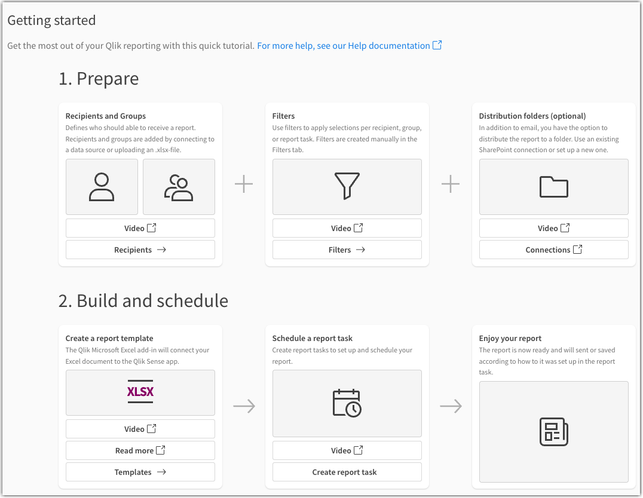
    Want to get started with your first Tabular Report?

    Access our Getting Started section in your Qlik Cloud app (available for users with Can Edit permissions). Open your app, (a) choose your activity, and select (b) Reporting.

    access reporting.png

    From here, you can begin with our introductory videos and configuration instructions:

    getting started with tabular reporting.png


    Want to know more about Qlik’s Tabular Reporting feature?

    • See the Tabular Reporting introductory videos
    • To get started see Tabular reporting in Qlik Cloud Analytics
    • (new!) The future of Qlik Cloud Reporting: STT - Qlik Cloud Reporting Evolution 
    • To access and discuss the Qlik NPrinting Technical Preview, go to Qlik's Technical Previews 
    • The Qlik Excel add-in can be deployed and installed for compatible web and desktop versions of Microsoft Excel within Microsoft 365 see Deploying and installing the Qlik add-in for Microsoft Excel and speak with your Office 365 administrator if you wish to deploy the capability
    • Generating tabular reports in Qlik Cloud Analytics is a value-add Qlik Reporting Service capability. Check with your service account owner about your Qlik Cloud subscription's included capacities. Please be aware that overage will be monitored and capped starting in 2024.
    • Adopting customers should familiarize themselves with guardrails and limits see Qlik Reporting Service specifications and limitation


    Thank you for choosing Qlik,
    Qlik Support


    Show Less
    Sonja_Bauernfeind
  • Image Not found

    Product Innovation

    Qlik Cloud Reporting's Perfect Update

    It’s been an exciting year for Qlik Cloud Reporting. Back in December 2023, we took a big step by adding tabular reporting to our dashboard-style capabilities, something many of you have been asking for. This update comes packed with features like report task management, easy imports of recipient lists from connected data sources, powerful filtering using bookmarks, and simple uploads for tabular report templates. Now, report developers can easil... Show More

    It’s been an exciting year for Qlik Cloud Reporting. Back in December 2023, we took a big step by adding tabular reporting to our dashboard-style capabilities, something many of you have been asking for. This update comes packed with features like report task management, easy imports of recipient lists from connected data sources, powerful filtering using bookmarks, and simple uploads for tabular report templates. Now, report developers can easily handle centralized tabular reporting tasks right inside Qlik Sense apps. Thanks to our incredible Qlik Cloud customers, we’re gearing up to roll out even more cool features!

    We’re putting the finishing touches on our cloud reporting capabilities for Q4:

    • Report Cycling: Developers can set up report tasks to cycle through a dimension, creating reports for each value.
    • Report Task History: Developers will have better visibility into past task runs with a new report task history feature that keeps track of up to three months of execution data. Plus, we’ll surface error and warning messages to help troubleshoot any issues.
    • PixelPerfect Authoring: We’re introducing a new template authoring feature for PixelPerfect reports! Create advanced document templates that meet strict customer or compliance needs using Qlik data, visualizations, or even a library of print-ready visuals.


    As BI leaders get ready for Qlik Answers, Qlik AutoML, and Qlik Talend Cloud, we know that having flexibility in report types and control over operations is key for keeping everyone in the loop.

    As we launch these new features, we’ll also be focusing on enhancing operational task controls, including email reporting solutions.

    Check out our free e-learning module today!

    Webinar to explore Qlik Cloud’s Reporting Evolution and get a sneak peek at everything it has to offer!

    Qlik Insider Webinar on November 13th hosted by Qlik’s VP of Analytics Portfolio Marketing, Mary Kern, this episode of Qlik Insider dives into to the role of reporting in the world of modern BI. 

    Resources:

    • Designing PixelPerfect report templates | Qlik Help YouTube
    • PixelPerfect Report Authoring | SaaS in 60
    • Course: Creating Reports with PixelPerfect Editor | Qlik Learning

    Show Less
    QlikProductUpdates
  • Image Not found

    Support Updates

    Talend 8 – Java & Camel upgrade coming early 2025

    To ensure continuous support for your data integration processes and to leverage the latest innovations, we are providing this advance notice that Java 17 and Camel 4 will become the new standard versions across Talend Data Fabric version 8. We initiated a transition process by introducing Java 17 support in October 2023, and we are now completing the last leg of this transition.  As of the February, 2025 release:  Talend Studio will perform new... Show More

    To ensure continuous support for your data integration processes and to leverage the latest innovations, we are providing this advance notice that Java 17 and Camel 4 will become the new standard versions across Talend Data Fabric version 8. We initiated a transition process by introducing Java 17 support in October 2023, and we are now completing the last leg of this transition. 

    As of the February, 2025 release: 

    • Talend Studio will perform new builds of Jobs and Services only in Java 17, and Route builds will rely on Camel 4 instead of Camel 3. 
    • Talend Runtime will only support Java 17 and will run Routes with Camel 4. 


    To make this transition smoother: 

    • In January 2025, JobServer and Remote Engine will be improved so they can optionally run each Job or Service in its corresponding Java version (8, 11 or 17) automatically, providing better support for the heterogeneity inherent to a transition period. 
    • In February 2025, Studio will also propose you opt for a version that remains on Java 8/11 and Camel 3. This version will only be supported until August 31, 2025 and for “Severity 1 Errors”. 
    • JobServer and Remote Engine will continue to support running Jobs and Services in Java 8 and 11, until December 31, 2026 


    Step-by-step guides will be made available when the new versions of these components become available. 

    For further questions please contact Qlik Talend Support and subscribe to our Support Blog for future updates. 


    Thank you for choosing Qlik, 

    Qlik Talend Global Support

    Show Less
    Katie_Davis
  • Image Not found

    Design

    Using Qlik-cli to automate workflows

    If you haven't heard about Qlik-cli you have been living under a rock, sorry! The good news is,  it’s not too late to try it. Let’s begin with the basics...
    Gertrude
  • qlik-community-blogs.jpg

    Product Innovation

    No Code Transformation Workflows For Your Data Pipelines

    Data transformations and manipulations are usually the domain of experts in SQL, Python, or other programming languages. Because data transformations were hand-coded in past, developing them was a resource intensive undertaking.  What if you could automate and build your transformation workflows with zero manual coding using a visual interface? Transformation flows from Qlik Talend Cloud help bring advanced transformation capabilities to users of... Show More

    Data transformations and manipulations are usually the domain of experts in SQL, Python, or other programming languages. Because data transformations were hand-coded in past, developing them was a resource intensive undertaking. 

    What if you could automate and build your transformation workflows with zero manual coding using a visual interface?

    Transformation flows from Qlik Talend Cloud help bring advanced transformation capabilities to users of all levels.  Transformation flow relies on a no-code graphical interface to guide the user on the data transformation.

    Show Less
    QTC_Manuel
  • Image Not found

    Product Innovation

    The Evolution of Insight Advisor – Continuing the path forward with Augmented An...

    Introducing LLM-driven language generation and automated authoring   Insight Advisor in Qlik was introduced in 2019 as a first step into AI-driven analytics.  At the time, users could auto-generate visualizations and analytics using selections and keyword search.  That kicked off a journey of rapid innovation that resulted in full natural language-driven insight generation in over 10 languages, conversational analytics through Insight Advisor Cha... Show More

    Introducing LLM-driven language generation and automated authoring


    Insight Advisor in Qlik was introduced in 2019 as a first step into AI-driven analytics.  At the time, users could auto-generate visualizations and analytics using selections and keyword search.  That kicked off a journey of rapid innovation that resulted in full natural language-driven insight generation in over 10 languages, conversational analytics through Insight Advisor Chat, natural language insights on dashboards, a variety of advanced analysis types such as correlation, clustering, forecasting, key driver analysis, etc., and predictive analytics with Qlik AutoML.  We introduced a rich business logic layer to customize natural language processing and insight generation, and a full set of augmented analytics APIs to extend and embed AI-driven capabilities.

    Show Less
    QlikProductUpdates
  • Image Not found

    Qlik Academic Program

    VJIT hosts a successful datathon

    Vidya Jyothi Institute of Technology ( VJIT), a leading educational institution in Hyderabad and one of the close Qlik Academic Program partners, hosted  a successful datathon recently. Vidya Jyothi Institute of Technology was established in 1998 by Vidya Jyothi Educational Society created by a group of committed academicians and enterprising educationists. The institute offers many programs in engineering and is one the most recognized campuses ... Show More

    Vidya Jyothi Institute of Technology ( VJIT), a leading educational institution in Hyderabad and one of the close Qlik Academic Program partners, hosted  a successful datathon recently. 

    Vidya Jyothi Institute of Technology was established in 1998 by Vidya Jyothi Educational Society created by a group of committed academicians and enterprising educationists. The institute offers many programs in engineering and is one the most recognized campuses in the State of Telangana in India. The first "Centre of Excellence in Analytics powered by Qlik" was started at VJIT and so far, many students have leveraged the academic program of Qlik along with qualifications and certifications.

    In another step to build this relationship further, VJIT organised a datathon where more than 200 students participated in a Qlik only datathon event. The departments of IT, CSE, CSE- DS  and AI participated. One of the distinct feature of this datathon was that all the student participants had completed the Qlik Sense Business Analyst Qualification. 

    Students were shared datasets and they created dashboards and presented them to the audience. The final selection of students was based on the quality of analysis using Qlik Sense, presentation and knowledge of the technology.  In the end, five teams were shortlisted for the final round and three winners were declared. 

    1.jfif2.jfif3.jfif4.jpeg

    For more information on the Qlik Academic Program free resources and many other engagement opportunities, visit qlik.com/academicprogram 


    Show Less
    Pankaj_Muthe
  • qlik-community-blogs.jpg

    Explore Qlik Gallery

    Santa's Challenge

    Santa's ChallengeBildenThe purpose of this app is to showcase the customization and interactivity capabilities of Qlik Sense through a holiday-themed simulation, where users assist Santa in optimizing his gift delivery route across Brazilian cities. The app displays a map-based route with time and weight constraints, showing how adjustments to delivery order and speed impact the journey time. It uses factors like population and distance to demons... Show More
    Santa's Challenge
    Bilden
    The purpose of this app is to showcase the customization and interactivity capabilities of Qlik Sense through a holiday-themed simulation, where users assist Santa in optimizing his gift delivery route across Brazilian cities. The app displays a map-based route with time and weight constraints, showing how adjustments to delivery order and speed impact the journey time. It uses factors like population and distance to demonstrate real-time data processing and visualization. This app is designed for BI enthusiasts, Qlik users, and potential clients, offering an engaging way to explore Qlik Sense’s flexibility in building interactive experiences beyond standard dashboards. By providing a fun, hands-on example, the app illustrates how Qlik Sense can be a powerful tool not only for data insights but also for planning and operational simulations, adding value in fields that require dynamic decision-making and strategy testing.

    Discoveries

    Optimization of Route Order: Experimenting with different city sequences reveals that the order of stops significantly affects total travel time. Users discover that planning an efficient sequence can save valuable minutes, especially with a time constraint. Real-Time Decision Making: The app demonstrates how real-time adjustments, such as changing routes or redistributing speed points, impact overall performance, mirroring the decision-making process in real logistics scenarios.

    Impact

    The app demonstrates how Qlik Sense can be used beyond traditional analytics, enabling businesses to simulate and optimize complex logistical operations in real time. By providing insights into route efficiency and resource allocation, it can help companies streamline delivery processes, reduce costs, and improve overall operational efficiency.

    Audience

    This idea of app is designed for logistics managers, BI analysts, and operations teams who would use it to explore and refine delivery strategies.

    Data and advanced analytics

    The total time calculation provides valuable insights derived from the interplay of speed points and total weight on each route. In a real-world scenario, additional variables would come into play, but this app effectively demonstrates the foundational concept of leveraging data to optimize complex logistics operations.

    Show Less
    rodrigo_martins
  • Image Not found

    Japan

    【オンデマンド配信】AI 時代に求められるデータ連携機能とその役割

    近年、AI 活用に向けたデータ基盤構築が重要視されるようになりました。さらに、ETL の近代化が求められ、データ連携ツールの選択に頭を抱えられる担当者の方も多くいらっしゃるのではないでしょうか。 本 Web セミナーでは、AI 時代に求められるデータ連携機能を徹底解説。自社のデータ戦略に沿ったデータ連携ツールを選定するためのポイントを、機能・コスト・データ信頼性などの観点からご説明します。信頼できる AI を設計するために必要な正しいデータ活用の姿や具体的な事例をご確認いただけます。<こんな方にお勧め> AI 活用に向けて情報収集中の方 データ基盤構築をする際のボトルネックを理解しておきたい方 データ連携製品の選定に課題を抱えている方 <本 Web セミナーで学べること> AI 時代に求められるデータ基盤構築のポイント ETL の近代化 - 先進的なデータ連携機能と選定観点 失敗しない AI およびデータ活用の姿と事例 ※参加費無料。パソコン・タブレット・スマートフォンで、どこか... Show More

    近年、AI 活用に向けたデータ基盤構築が重要視されるようになりました。さらに、ETL の近代化が求められ、データ連携ツールの選択に頭を抱えられる担当者の方も多くいらっしゃるのではないでしょうか。

    本 Web セミナーでは、AI 時代に求められるデータ連携機能を徹底解説。自社のデータ戦略に沿ったデータ連携ツールを選定するためのポイントを、機能・コスト・データ信頼性などの観点からご説明します。信頼できる AI を設計するために必要な正しいデータ活用の姿や具体的な事例をご確認いただけます。

    <こんな方にお勧め>

    • AI 活用に向けて情報収集中の方
    • データ基盤構築をする際のボトルネックを理解しておきたい方
    • データ連携製品の選定に課題を抱えている方

    <本 Web セミナーで学べること>

    • AI 時代に求められるデータ基盤構築のポイント
    • ETL の近代化 - 先進的なデータ連携機能と選定観点
    • 失敗しない AI およびデータ活用の姿と事例

    ※参加費無料。パソコン・タブレット・スマートフォンで、どこからでもご参加いただけます。

    今すぐ視聴する

    Show Less
    Qlik_JP_MKT2
  • « Previous
    • 1
    • …
    • 27
    • 28
    • 29
    • …
    • 143
  • Next »

Products

  • All Products
  • Qlik Cloud Platform
  • Qlik Sense
  • Qlik AutoML
  • QlikView
  • Qlik Replicate
  • Qlik Compose for Data Lakes
  • Qlik Compose for Data Warehouse
  • Qlik Enterprise Manager
  • Catalog & Lineage
  • Qlik Gold Client
  • Why Qlik

Resources

  • Resource Library
  • Qlik Partners
  • Free Trials
  • Compare Qlik
  • Glossary
  • Training
  • Support

Company

  • About Qlik
  • Press Room
  • Trust & Security
  • Accessibility
  • Privacy
  • Careers
  • Global Offices
  • Contact Sales

Qlik Community

Legal

© 1993-2026 QlikTech International AB, All Rights Reserved
  • Legal Policies
  • Privacy & Cookie Notice
  • Trademarks
  • Terms of Use
  • Legal Agreements
  • Product Terms
  • Do not share my info
  • ADA Site Compliance-Accessibility Policy