Unlock a world of possibilities! Login now and discover the exclusive benefits awaiting you.

Product Innovation
By reading the Product Innovation blog, you will learn about what's new across all of the products in our growing Qlik product portfolio.
Support Updates
The Support Updates blog delivers important and useful Qlik Support information about end-of-product support, new service releases, and general support topics.
Qlik Academic Program
This blog was created for professors and students using Qlik within academia.
Community News
Hear it from your Community Managers! The Community News blog provides updates about the Qlik Community Platform and other news and important announcements.
Qlik Digest
The Qlik Digest is your essential monthly low-down of the need-to-know product updates, events, and resources from Qlik.
Qlik Learning
The Qlik Learning blog offers information about the latest updates to our courses and programs, as well as insights from the Qlik Learning team.
Recent Blog Posts
-
When the regulator asks, your data should have the answer
Regulatory compliance depends on more than accurate data - it depends on bringing shared business context that aligns everyone. With Business Glossary for Data Products, governed business definitions travel with the data itself, helping organizations align compliance, governance, and reporting. From hierarchical glossary structures to steward-driven term verification workflows, teams can ensure the context behind regulatory data and context remai... Show MoreRegulatory compliance depends on more than accurate data - it depends on bringing shared business context that aligns everyone. With Business Glossary for Data Products, governed business definitions travel with the data itself, helping organizations align compliance, governance, and reporting. From hierarchical glossary structures to steward-driven term verification workflows, teams can ensure the context behind regulatory data and context remains visible and trusted.
Read this post by Don Pinto & Chris Ortega on how connecting business glossaries directly to data products helps close the gap between compliance intent and operational data.
-
Higher Education's 2026 Tech Trends Are Here. Is Your Campus Ready?
Technology has moved from the edge of education to its core. As Nilesh Patel, Global Solution Head for Education at TCS, argues in Higher education in 2026: Emerging tech trends, the real shift isn't just adopting new tools, it's building digital architecture that learns and scales with learners. The article also points to a wider signal: a TCS study found that 61% of universities lag in digital maturity, putting higher education at a digital cro... Show MoreTechnology has moved from the edge of education to its core. As Nilesh Patel, Global Solution Head for Education at TCS, argues in Higher education in 2026: Emerging tech trends, the real shift isn't just adopting new tools, it's building digital architecture that learns and scales with learners. The article also points to a wider signal: a TCS study found that 61% of universities lag in digital maturity, putting higher education at a digital crossroads.
The piece highlights four trends shaping higher education in 2026:
- Lifelong learning and employability. Learners now see education as a career-long continuum, focused on outcomes and employability. AI-powered adaptive systems support this by adjusting course difficulty, content, and feedback to each learner's path.
- Stackable microcredentials and flexible pathways. Education is shifting toward skill-oriented credentials that reflect what learners can do, letting them customize pace and focus while aligning with industry needs.
- Collaboration between universities, EdTech, and industry. Skill gaps and fast-moving technology make partnerships essential, institutions provide academic rigor, EdTech offers scale, and industry ensures relevance.
- Experience and engagement. AI and GenAI, immersive XR, learning analytics, and stronger cybersecurity and data governance are redefining how students learn and how institutions protect trust.
Across all four, one theme repeats: the future of higher education depends on blending technology with trust,responsible AI adoption, ethical oversight, and transparency.
This is exactly where the Qlik Academic Program supports academic communities. The program offers Qlik solutions end to end, from data integration and Qlik Cloud Analytics to Qlik Answers and agents alongside certifications, qualifications, and courses. By putting data literacy at the center of learning, students develop the ability to read, question, and explain data while working hands-on with the full analytics stack: integrating data, building insights, and understanding how AI-driven decisions are made.
Professors are supported with training and teaching resources that make it easier to embed analytics and modern data topics across disciplines, helping institutions move from static curricula toward the responsive, data-driven ecosystems the TCS article describes.
As Patel puts it, the future belongs to those who build with foresight, stay transparent, and treat technology as a partner in progress, not a replacement for purpose. Preparing students to work confidently with data, alongside AI, is central to that.
By giving students, professors, and universities free access to analytics software, learning content, and certifications, the Qlik Academic Program helps education stay aligned with the trends shaping 2026 and prepares learners for the jobs of tomorrow.
Join our global community for free: Qlik Academic Program: Creating a Data-Literate World
-
【開催報告】AI Reality Tour Tokyo 2026
去る 6月 10日(水)、有明セントラルタワーホール & カンファレンスにて「AI Reality Tour Tokyo 2026」を開催しました。「Qlik でデータを AI の原動力へ」をテーマに、米国開催の「Qlik Connect 2026」で発表したエージェンティック AI や ServiceNow との戦略的パートナーシップなどの最新情報をご紹介しました。 13:00 の開催時刻を迎え、Chief Revenue Officer の Brian Hamel の開会の挨拶からスタート。日本のお客様に直接ご挨拶するのが初めてということもあり、日本在住経験があることや日本の食べ物が大好きだという自己紹介から始まりました。日本の顧客やスポンサーパートナー企業への感謝の意と日本市場へのさらなる強いコミットメントを表明しました。 続いて、Data Business Unit, General Manager の Matthew Hayes およびクリックテック・ジャパン技術担当の中嶋... Show More去る 6月 10日(水)、有明セントラルタワーホール & カンファレンスにて「AI Reality Tour Tokyo 2026」を開催しました。
「Qlik でデータを AI の原動力へ」をテーマに、米国開催の「Qlik Connect 2026」で発表したエージェンティック AI や ServiceNow との戦略的パートナーシップなどの最新情報をご紹介しました。13:00 の開催時刻を迎え、Chief Revenue Officer の Brian Hamel の開会の挨拶からスタート。日本のお客様に直接ご挨拶するのが初めてということもあり、日本在住経験があることや日本の食べ物が大好きだという自己紹介から始まりました。日本の顧客やスポンサーパートナー企業への感謝の意と日本市場へのさらなる強いコミットメントを表明しました。
続いて、Data Business Unit, General Manager の Matthew Hayes およびクリックテック・ジャパン技術担当の中嶋によるデモを交えた基調講演をお届けしました。AIへの投資が増える一方、多くの企業が期待通りの成果を得られていない現状を指摘。Qlik は、「コンテキスト・信頼・自由」の 3 つを軸に、既存の投資を活かしながらエージェンティック AI を実現する方法を提示しました。デモパートでは、Discovery Agent / Qlik Answers® / Predict Agent / Automate Agent などの新機能をご紹介し、Qlik Open Lakehouse と データ製品による信頼できるデータ基盤の重要性を強調。Qlik MCP Server による Claude など外部 AI との連携もお見せしました。
次に、Senior Vice President, Asia Pacific & Japan のMaurizio Garavello が登場し、新カントリーマネージャーの今野芳弘を紹介。今野より新任の挨拶をさせていただきました。続いて、アマゾン ウェブ サービス ジャパン合同会社の河原氏がご登壇し、Qlik との強いパートナーシップについて語っていただきました。
基調講演の最後は、Qlik で画期的なイノベーションと卓越したビジネスを展開されていることを称える「リージョナルデータインパクトアワード授賞式」で締めくくりました。本年度は、株式会社クレハ様と株式会社Gakken 様が受賞されました。おめでとうございます!
基調講演後のコーヒーブレイクでは、参加者がホワイエに並ぶスポンサーブースを訪れ、賑わいを見せていました。コーヒーブレイク後は、2 会場でビジネス / テクノロジーセッションへと続きます。
ユーザーセッションには 3 社にご登壇いただき、Qlik の先進的な事例をご紹介いただきました。
日清ホールディングス様は、データドリブン経営を実現する基盤の整備に取り組んでおり、Qlik Cloud® Data Integration を活用して SAP データを連携し、SAP データの価値を最大化している事例をご紹介いただきました。
Gakken 様は、データ分析とアクションの促進にQlikデータ統合・分析を活用して基盤を構築。「作って終わり」ではなく、社内活用の拡大に取り組まれています。また、生成 AI や LLM の積極的な活用事例もご紹介いただきました。
BookLive 様は、Snowflake と Qlik を活用して「どんな読者が何種類いるか」を特定し、戦略的なビジネスを展開されています。また、全社的な AI エージェントの積極的な活用という新たな取り組みについてもご紹介いただきました。
さらに、本イベントのゴールドスポンサー企業であるインサイトテクノロジー からは、Qlik MCP サーバー安全な接続を確保した外部 AI の活用例とデモをご紹介いただきました。
日鉄ソリューションズからは、Qlik を活用したAI時代に最適なデータ基盤、AIエージェントの活用 例をご紹介いただきました。
日立社会情報サービスからは、“現場 DX” と “業務変革” をつなぐ取り組み、MCP による外部 AI エージェントの連携、Qlik と ServiceNow による分析とアクションの連携などをご紹介いただきました。テクノロジーセッションでは、クリックテック・ジャパン技術部門が、Discovery Agent / Qlik Answers / エージェンティック AI / Qlik MCPサーバー / Qlik Open Lakehouse など、データ統合・データ分析における Qlik の最新テクノロジーをご紹介しました。
最後は、新カントリーマネージャーの今野の乾杯の挨拶で懇親会がスタート。お酒とお食事でリラックスしながら、お客様・パートナー様・Qlik のつながりを深めていただきました。
さらにさらに!同日の午前中には、Qlik / Talend のユーザー様のみがご参加いただける「Qlik データ統合分科会」が行われていました。サッポロホールディングス様、QTnet 様、ジャトコ様の 3 社より、ここでしか聞けないユーザー事例をご紹介いただきました。また、ユーザー同士だから共感できる課題や解決策などの意見交換が行われました。
今回ご紹介した内容が、皆さまの今後の取り組みのご参考となりましたら、大変嬉しく思います。最後に、ご登壇いただいたお客様・ご参加いただいたお客様・ご協賛いただいたスポンサー各社様の支えで、本イベントを盛況のうちに終了することができました。改めて御礼申し上げます。引き続き、Qlik は皆さまのビジネスを全力でサポートいたします。ぜひ、今後のQlikにご期待ください!
最後は Qlik 社員の「Q ポーズ」でイベントの成功を締めくくりました。 -
How Talend Routes Made the Qlik Games Live Data Playground Possible
How flexible routing turned chaotic device streams into real-time analytics gold. -
Spain wins the 2026 World Cup. At least that's what the model says.
The 2026 World Cup kicks off today! A few weeks ago, I published a post on how we built Choose Your Champion 2026, a World Cup bracket app powered by Qlik. That post went into the technical details: the data model, the ML experiment in Qlik Predict, the React front end. If you haven't read it, start there. So far, 90+ brackets have been submitted. One of them wasn't filled out by a person at all. It was generated by the machine learning model we ... Show MoreThe 2026 World Cup kicks off today!
A few weeks ago, I published a post on how we built Choose Your Champion 2026, a World Cup bracket app powered by Qlik. That post went into the technical details: the data model, the ML experiment in Qlik Predict, the React front end. If you haven't read it, start there.
So far, 90+ brackets have been submitted. One of them wasn't filled out by a person at all. It was generated by the machine learning model we trained with Qlik Predict, using FIFA rankings, player ratings, and head-to-head history. The model has Spain winning it all!
Here's mine, and here's Qlik Predict's.
If you haven't filled one out yet, do it here. Once you're in, use the Compare button on the leaderboard to see where your picks differ from mine, or from the model's. Brackets get scored automatically as matches are played, so the leaderboard will keep moving all the way to the final on July 19.
We also opened up a Choose Your Champion space on Qlik Community. That's where we'll be posting leaderboard updates during the tournament, and where you can share your bracket, ask questions about the app, or make your case for why the model got it wrong.
If you're interested in the broader question of when models beat human intuition (and when they don't), take a look at Model vs. Mastery.
Enjoy the tournament!!
-
In a world obsessed with AI, don’t discount HI
The relationship value between artificial intelligence and human intelligence isn’t settled — and that’s exactly the point. Model Vs. Mastery, Watch here -
Qlik Academic Program offers complete training from data ingest to insight disco...
Qlik, the leaders in user-driven business intelligence, has developed the industry’s only end-to-end data platform combining data sourcing, data preparation, and data analysis tools in one robust toolset. With support for real-time data integration, modern data management, smart data cataloging, and AI-fueled analytics, Qlik helps you bring distributed, diverse data together fast and makes it available to users in a governed environment to transf... Show MoreQlik, the leaders in user-driven business intelligence, has developed the industry’s only end-to-end data platform combining data sourcing, data preparation, and data analysis tools in one robust toolset.
With support for real-time data integration, modern data management, smart data cataloging, and AI-fueled analytics, Qlik helps you bring distributed, diverse data together fast and makes it available to users in a governed environment to transform all your data into real value.
Qlik’s Data Integration layer helps you turn your raw data into analytics-ready information assets by enabling you to:
-
Move data at scale in real-time through streaming data pipelines with change data capture
-
Automate the design, deployment, and management of data warehouses and data lakes
-
Make trusted data easily accessible to users via a secure, enterprise data catalog
Qlik’s Data Analytics layer allows you to turn your data into valuable insights by empowering users with intuitive, AI-powered tools that let them explore your data without boundaries.
Source: qlik.com
Once students and professors sign up for the Qlik Academic Program, they receive training, qualifications and certifications on aspects of data including data integration, analytics, predictive analytics etc. Its a lot of value for the academic community and the best part? Its all free.
So if you are a student or professor looking to propel your career, you should check out this program and discover all the benefits of the industry's only end-to-end data platform. -
-
Advanced Sankey
Advanced Sankey AnyChart A Sankey for flows that outgrow the native chart: up to ten stages, richer selection, and extended visual context. See it all in action on a global supply chain demo. Discoveries Trace a global supply chain through multiple stages: source regions, materials, product lines, and end markets. Each stage is a column of nodes; the bands between them scale to the size of each flow. Click a link between two stages an... Show MoreAdvanced SankeyAnyChart A Sankey for flows that outgrow the native chart: up to ten stages, richer selection, and extended visual context. See it all in action on a global supply chain demo.
Discoveries
Trace a global supply chain through multiple stages: source regions, materials, product lines, and end markets. Each stage is a column of nodes; the bands between them scale to the size of each flow. Click a link between two stages and the chart selects both source and target dimension values at once, filtering the entire sheet to that specific flow path.
Impact
A hands-on walkthrough of all major features at work: multi-stage flows up to 10 dimensions, dual-end flow selection, gradient links, level headers, label modes, detailed tooltips, layout controls, and more.
Audience
Qlik developers and BI consultants visualizing multi-stage flows in their dashboards — budget allocation, supply chains, customer journeys, energy flows, website traffic, and conversion funnels.
Data and advanced analytics
Built with the Sankey Chart extension for Qlik Sense, released in 2026. Based on fictional global supply chain data.
-
Unlocking Qlik Open Lakehouse Access from Talend Studio
Talend Studio now connects natively to Qlik Open Lakehouse — query Iceberg-managed data directly from your existing Standard and Big Data jobs, with no manual JDBC configuration required. Learn how this integration works and what it means for your data workflows. -
Data Products - take a tour
Our Data Products Storylane has been given a revamp! TAKE THE TOUR Data Products are highly trusted, re-usable, and consumable data assets. Data elements such as raw data, transformations, data quality rules, contracts, access patterns, and infrastructure have been organized into a single cohesive unit to align with specific requirements and objectives of a business to create a Data Product. Data Products come with the Qlik Trust Score, a scor... Show MoreOur Data Products Storylane has been given a revamp!
Data Products are highly trusted, re-usable, and consumable data assets. Data elements such as raw data, transformations, data quality rules, contracts, access patterns, and infrastructure have been organized into a single cohesive unit to align with specific requirements and objectives of a business to create a Data Product.
Data Products come with the Qlik Trust Score, a score given to data products based on seven factors, Validity, Completeness, Discoverability, Usage, Timeliness, Accuracy, and Diversity. The Qlik Trust Score ™ gives you confidence in the quality and health of your Data Products so you can be empowered when using them throughout your business. You can also view the Data Product Lineage, which is a flow chart that shows you the origin of the Data Product, so you can track it down to its source. Available Data Products can be found in the Data Marketplace, a collection of Data Products that are ready for use.
If you want to learn even more about Data Products, Datasets, Data Quality and Data Validation Rules check out Mike Tarallo's video series here: Data Products for Qlik Analytics
-
Upcoming Maintenance for Talend Cloud and Talend Management Console: March, Apri...
Update March 4th, 2026: added link to How to get Talend Management Console task schedules and pause and resume during a maintenance window using the API articleUpdated April 24th, 2026: added impact on APIs (all down) and additional clarification on why tasks must be stopped and the impact on remote enginesUpdated May 7th, 2026: added additional information on how to address Remote Engine impactUpdated May 12th, 2026: the anticipated impact for t... Show MoreUpdate March 4th, 2026: added link to How to get Talend Management Console task schedules and pause and resume during a maintenance window using the API article
Updated April 24th, 2026: added impact on APIs (all down) and additional clarification on why tasks must be stopped and the impact on remote engines
Updated May 7th, 2026: added additional information on how to address Remote Engine impact
Updated May 12th, 2026: the anticipated impact for the remaining maintenance window has increased from 30 minutes to 90 minutesTalend Cloud and Talend Management Console will undergo scheduled maintenance in March, April, and May. This infrastructure modernization is a key step in unifying the Talend ecosystem with Qlik.
The alignment paves the way for a more seamless experience across both platforms. Over the coming months, you will gain access to integrated features that bridge data integration and analytics, enabling unified governance and a streamlined management experience across your entire data lifecycle.
The maintenance windows will occur per region, during off-peak hours, and are expected to have a maximum of 90 minutes of effective downtime.
What is the expected impact?
A full outage of Talend Cloud and Talend Management Console for a duration of up to 90 minutes within a preplanned 4-hour window.
The following applications will not be accessible:
- Talend Management Console (TMC)
- Talend Data Stewardship (TDS)
- Talend Data Preparation (TDP)
- Talend Data Inventory (TDC)
- Talend Pipeline Designer (TPD)
- Talend API Designer and Tester
- Talend Studio
- Talend Cloud Engines
All APIs for Talend Cloud will not be available during the outage. APIs impacted:
In detail:
- Cloud engines will not be available, and executions running on Cloud Engines will be terminated.
- Talend Studio users may be disconnected from their session, and it will not be possible to open a new Talend Studio session except in local mode.
- Executions that are already in progress during the outage will terminate correctly except on cloud engines, but all tasks or plans scheduled to start during those periods will be skipped.
- Skipped executions will not be tagged as failed, since they were never started. For this reason, check the execution status of your tasks and plans to ensure that all important ones are not skipped, or start them manually if necessary. See What do I need to do to prepare? further down in this blog post.
- Static IP addresses for Cloud Engines corresponding to Disaster Recovery regions will change during maintenance. See What follow-up actions are required? further down in this blog post.
What do I need to do to prepare?
- It is recommended to pause existing task runs during the maintenance window. Talend Remote Engines will continue processing tasks during the outage if they started before the maintenance window, but as they may have inconsistent statuses, we recommend pausing all tasks beforehand.
This concerns all jobs and plans scheduled to start or run during the maintenance window.
See Checking scheduled task runs against your maintenance timetable on how to identify these plans and jobs.Looking for information on how to identify, pause, and resume your tasks? See How to get Talend Management Console task schedules and pause and resume during a maintenance window using the API.
- If you are running Remote Engine Gen2, upgrade to the latest 2026-04. This is to prevent RE Gen2 from becoming unavailable after the maintenance. To do so:
- Upgrade your Remote Engine Gen2 to the latest 2026-04 release: Updating the Remote Engine Gen2 when installed using the execution script)
- Then re-establish the pairing: Re-establish the pairing of Remote Engine Gen2
What follow-up actions are required?
- After the maintenance window, check and monitor the execution status of tasks and plans, as well as the status of your Remote Engines.
In some instances, Remote Engines might require a restart if marked as unavailable in the Talend Management Console or if tasks cannot be executed as expected.
If restarting the Remote Engine does not resolve the complication, follow the pairing instructions in Pairing Remote Engines using a dedicated web service to reset the key and re-pair the Remote Engine.
If your Remote Engine Gen2 is unavailable or cannot execute tasks, then:
- Upgrade your Remote Engine Gen2 to the latest 2026-04 release: Updating the Remote Engine Gen2 when installed using the execution script)
- And re-establish the pairing: Re-establish the pairing of Remote Engine Gen2
- If you use a predefined static IP on Cloud Engine, you will need to allow the new Disaster Recovery Region's IP addresses, which will have changed at this point. While this does not immediately affect production, it will impact any potential Disaster Recovery process.
After the maintenance window, check your static IPs (Disaster Recovery) as documented in Using predefined static IP addresses for execution containers and update your firewalls accordingly.
No change is required for the active region's IP addresses. They will be migrated and will work as of today, ensuring no production interruption.
When will the maintenance take place?
Each region will undergo maintenance for 4 hours during off-peak hours, with a maximum of 90 minutes of effective downtime.
Region Maintenance Start Maintenance End Talend Cloud - AWS - Asia Pacific (Sydney)
au.cloud.talend.com
Wednesday 25 March 2026
22:00 AEDT (Sydney)UTC: 25/03/26 - 11:00
Thursday 26 March 2026
02:00 AEDT (Sydney)UTC: 25/03/26 - 15:00
Talend Cloud - AWS - Asia Pacific (Tokyo)
ap.cloud.talend.com
Monday 20 April 2026
22:00 JST (Tokyo)UTC: 20/04/26 - 13:00
Tuesday 21 April 2026
02:00 JST (Tokyo)UTC: 20/04/26 - 17:00
Talend Cloud - AWS - US East (N. Virginia)
us.cloud.talend.com
Monday 27 April 2026
02:00 EDTUTC: 27/04/26 - 6:00
Monday 27 April 2026
06:00 EDTUTC: 27/04/26 - 10:00
Talend Cloud - AWS - Europe (Frankfurt)
eu.cloud.talend.com
Tuesday 26 May 2026
21:00 CESTUTC: 26/05/26 - 19:00
Wednesday 27 May 2026
01:00 CESTUTC: 26/05/26 - 23:00
To identify which region your tenant is affected by, cross-reference Accessing Talend Cloud applications.
To track further updates during the scheduled Qlik Cloud Maintenance, please visit our Qlik Cloud Status page. This blog post will be updated with additional information where necessary.
Thank you for choosing Qlik,
Qlik Support -
Qlik NPrinting - New Security Patches Available Now
A security issue has been identified in Qlik NPrinting, and patches have been made available. Details can be found in the Security Bulletin High Security fix for Qlik NPrinting (CVE-pending). We've released two releases across the latest versions of Qlik NPrinting to patch the reported issues. All versions of Qlik NPrinting prior to and including these releases are impacted: Qlik NPrinting February 2025 SR5 No workarounds can be provided. Custo... Show MoreA security issue has been identified in Qlik NPrinting, and patches have been made available. Details can be found in the Security Bulletin High Security fix for Qlik NPrinting (CVE-pending).
We've released two releases across the latest versions of Qlik NPrinting to patch the reported issues. All versions of Qlik NPrinting prior to and including these releases are impacted:
- Qlik NPrinting February 2025 SR5
No workarounds can be provided. Customers should upgrade Qlik NPrinting to a version containing fixes for these issues.- Qlik NPrinting May 2026 IR
- Qlik NPrinting February 2025 SR 6
Before applying patches or upgrading Qlik NPrinting, always review the system requirements for the new version.
This issue only impacts Qlik NPrinting. Other Qlik products are NOT impacted.
All Qlik software can be downloaded from our official Qlik Download page (customer login required). Follow best practices when upgrading Qlik Sense.
Qlik provides patches for major releases until the next Initial or Service Release is generally available. See Release Management Policy for Qlik Software. Notwithstanding, additional patches for earlier releases may be made available at Qlik’s discretion.
The information in this post and Security Bulletin High Security fix for Qlik NPrinting (CVE-pending) is disclosed in accordance with our published Security and Vulnerability Policy.
Thank you for choosing Qlik,
Qlik Support -
Not All Catalogs Are Governance. Not All Governance Is a Catalog
Most governance conversations start with the wrong question. "Which catalog should we use?" treats the problem as an inventory challenge, but governance isn't just about knowing what data you have. It's about making that data trustworthy when it moves. In this article, Don Pinto & Chris Ortega break down the difference between context capture — inventorying schemas, tracing lineage, classifying assets — and context delivery: publishing trusted da... Show MoreMost governance conversations start with the wrong question. "Which catalog should we use?" treats the problem as an inventory challenge, but governance isn't just about knowing what data you have. It's about making that data trustworthy when it moves.
In this article, Don Pinto & Chris Ortega break down the difference between context capture — inventorying schemas, tracing lineage, classifying assets — and context delivery: publishing trusted data products with live trust signals, enforcing contracts, and routing governed data to the analytics and AI agents that depend on it. Both matter. They're not the same thing.
Not all catalogs are governance tools, and not all governance programs deliver outcomes. Learn the difference between context capture and context delivery — and what it takes to make governance actually work.
-
Qlik and Starburst: Turn Fragmented Enterprise Data Into Governed, AI-Ready Inte...
Qlik recently announced its partnership with Starburst, combining Qlik data integration, replication, and analytics with Starburst federated query, context, and agentic capabilities to give you more choice across hybrid data estates. For the full press release, see Qlik and Starburst Turn Fragmented Enterprise Data Into Governed, AI-Ready Intelligence. We've also prepared a set of five articles for you to help get you started: Qlik Cloud Analyti... Show MoreQlik recently announced its partnership with Starburst, combining Qlik data integration, replication, and analytics with Starburst federated query, context, and agentic capabilities to give you more choice across hybrid data estates.
For the full press release, see Qlik and Starburst Turn Fragmented Enterprise Data Into Governed, AI-Ready Intelligence.
We've also prepared a set of five articles for you to help get you started:
- Qlik Cloud Analytics and Starburst Galaxy
- Qlik Cloud Analytics and Starburst Enterprise
- Talend Studio and Starburst
- Qlik Sense Enterprise on Windows and Starburst Galaxy
- Qlik Sense Enterprise on Windows and Starburst Enterprise
Thank you for choosing Qlik,
Qlik Support -
Upcoming changes to how CSS for custom Qlik Analytics themes is handled
Edited 2nd of June, 2026: Updated Qlik Cloud date from August 18th.Edited 3rd of June, 2026: Added ?features=CLIENT_TLV_1804_LESS_CARDS,TLV_1804_NEW_DEFAULT_THEME URL for reviewing themes, which replaces the previous URL; clarified top level selector warning. Qlik Cloud will now see the changes on or after August 18th, 2026. Qlik is introducing changes to how custom themes in Qlik Analytics applications are handled, which may impact your CSS-sty... Show MoreEdited 2nd of June, 2026: Updated Qlik Cloud date from August 18th.
Edited 3rd of June, 2026: Added ?features=CLIENT_TLV_1804_LESS_CARDS,TLV_1804_NEW_DEFAULT_THEME URL for reviewing themes, which replaces the previous URL; clarified top level selector warning.Qlik Cloud will now see the changes on or after August 18th, 2026.
Qlik is introducing changes to how custom themes in Qlik Analytics applications are handled, which may impact your CSS-styled themes if they include unsupported CSS modifications. This also applies to other means of modifying the CSS, such as the sheet input box, the Multi KPI CSS input, or any other 3rd party extension that allows CSS input.
These changes will impact both Qlik Cloud Analytics and Qlik Sense Enterprise on Windows.
For more information about custom themes, see Uploading and managing themes.
Why are these changes being made?
These changes improve how theming works in Qlik Analytics applications, which will enable us to deliver better-looking dashboards and generally enhanced theming.
What is being changed?
We’re restructuring theme settings:
- Removal of base card CSS overrides
- A theme with the _cards:true setting gets the base styles imported as JSON into the theme
- Removal of extra title padding for objects without title in a cards theme
- Replace the following with theme JSON settings:
- padding: applied on object level; the gap between border and object
- margin: applied on sheet level; the gap between objects
And we are adding new themes:
- Foundation (default)
- New Horizon
How can I verify if my themes are affected?
- Open any app that uses your custom theme and append the following to the URL: ?features=CLIENT_TLV_1804_LESS_CARDS,TLV_1804_NEW_DEFAULT_THEME
This will enable the flag to run your themes with the changes before they are released. - Verify that everything looks as you expect it to
- Review your browser's developer tools for any eventual JavaScript errors
Future-proof your themes
We’ve compiled a list of supported styling options for you that can already replace the need for custom CSS. See Obsolete CSS modifications.
Additionally, see the table below for an overview of the new theme properties that you can use in your theme instead of CSS. You will first need to enable the /feature/CLIENT_TLV_1804_LESS_CARDS flag to see them in effect in the application.
Theme Option Path in theme JSON Example Sheet background sheet.backgroundColor
"sheet": { "backgroundColor": "#f2f2f2"
}Sheet margin sheet.margin
"sheet": { "margin": "10px"
}Object paddings object.padding
"object": { "padding": "20px" // or "10px 10px 5px 10px"
}Borders
object.borderWidth
"object": { "borderWidth": "1px"
}object.borderColor
"object": { "borderColor": "#d9d9d9"
}
object.borderRadius
"object": { "borderWidth": "3px"
}Shadows object.shadow.boxShadow
"object": {
"shadow": {
"boxShadow": "0px 4px 10px 0px", "boxShadowColor": "#d9d9d9"
}
}object.shadow.boxShadowColor
"object": {
"shadow": {
"boxShadow": "0px 4px 10px 0px", "boxShadowColor": "#d9d9d9"
}
}To give you more context: Document Object Model (DOM) selectors in custom CSS are not a supported pattern. While they can be helpful for customizing the look and feel of applications, the DOM is subject to change at any time. To provide your feedback, raise tickets on the Qlik Ideation portal when you need custom CSS customization. This helps prioritize supported customization options to add to the platform.
Do not use top-level selectors such as qv-client or qv-card. These selectors are planned for removal in future versions. See CSS best practices for Sense themes for more information.
An example theme selector could be:
.qv-client.qv-card #grid .qv-object-wrapper .qv-object to change the border of all objects on sheets. When the change is made, the top level .qv-card class will be removed fromt the <body> tag, which breaks the selector.
It would need to change to: .qv-client #grid .qv-object-wrapper .qv-object to work after the update.
However it still uses the top level .qv-client, that, while not removed in this update, will be removed in the future, and is not present in certain qlik-embed scenarios. Meaning we are left with #grid .qv-object-wrapper .qv-object.
In summary, if you absolutely still need to use custom css, remove the top level selectors.What action do I need to take and when?
Qlik Cloud will see the changes on or after August 18th, 2026, while Qlik Sense Enterprise on Windows will be aligned in the November 2026 release.
While we do not expect your themes to be affected, we recommend testing them at the earliest. See the How can I verify if my themes are affected? section.
If you have any questions, we're happy to assist. Reply to this blog post or take your queries to our Support Chat.
Thank you for choosing Qlik,
Qlik Support -
Circular Dendrogram
Circular Dendrogram AnyChart A circular dendrogram lays out a hierarchy as a radial tree of explicit parent-child connections — wide and deep, on a single sheet. See how it makes a large hospital's org structure readable at a glance. Discoveries Take in 8 divisions, 42 departments, 84 services, and 214 staff in one view. Each top-level branch gets its own color and passes it down to its descendants, so the structure is easy to follow.... Show MoreCircular DendrogramAnyChartA circular dendrogram lays out a hierarchy as a radial tree of explicit parent-child connections — wide and deep, on a single sheet. See how it makes a large hospital's org structure readable at a glance.Discoveries
Take in 8 divisions, 42 departments, 84 services, and 214 staff in one view. Each top-level branch gets its own color and passes it down to its descendants, so the structure is easy to follow. Click a node to light up its path to the root, with the selection cross-filtering the whole sheet.
Impact
A hands-on walkthrough of all major features in action: click selections, chain mode, label formats, coloring, grouping options, tooltips, and more.
Audience
Qlik developers and BI consultants looking to visualize org charts, product taxonomies, file structures, and any nested-category data in their dashboards.
Data and advanced analytics
Built with the Circular Dendrogram extension for Qlik Sense, released in May 2026. Based on fictional hospital organization data.
-
From Qualifications to AI: Recent Student Learning Experiences at the University...
One of the core goals of the Qlik Academic Program is to help students develop practical analytics and AI skills that complement their academic studies and prepare them for the workplace. Over the past few weeks, we had the opportunity to support two very different—but equally valuable—student learning experiences in the United Kingdom and Poland. While one focused on preparing students for the Qlik Business Analyst Qualification, the other explo... Show MoreOne of the core goals of the Qlik Academic Program is to help students develop practical analytics and AI skills that complement their academic studies and prepare them for the workplace.
Over the past few weeks, we had the opportunity to support two very different—but equally valuable—student learning experiences in the United Kingdom and Poland. While one focused on preparing students for the Qlik Business Analyst Qualification, the other explored advanced predictive analytics and AI capabilities with master's students looking to deepen their technical expertise.
Together, these sessions demonstrate the breadth of opportunities available through the Qlik Academic Program and the importance of connecting students with both industry-relevant skills and real-world technologies.
-
New Qlik Analytics mobile application release: access controls and Intune integr...
An update is being deployed to Qlik Cloud tenants starting May 28th (today), offering improved governance of the Qlik Analytics mobile app. See Setting permissions for the Qlik Analytics mobile app. What does the update include? A new version of the Qlik Analytics mobile app is now available for download (in app stores). In addition, Tenant Administrators can now manage user access using three scopes: Allowed (standard mobile app access) Not A... Show MoreAn update is being deployed to Qlik Cloud tenants starting May 28th (today), offering improved governance of the Qlik Analytics mobile app. See Setting permissions for the Qlik Analytics mobile app.
What does the update include?
A new version of the Qlik Analytics mobile app is now available for download (in app stores). In addition, Tenant Administrators can now manage user access using three scopes:
- Allowed (standard mobile app access)
- Not Allowed (mobile app access denied)
- Allowed with Intune (mobile access with mandatory Intune enrollment)
In addition to access controls, these scopes strengthen the Microsoft Intune integration through a new server-side control for MAM deployment, replacing the previously user-controlled MAM toggle.
What does this mean for me?
The update takes effect once users update to the latest version of the mobile app. For most existing users, there will be no impact, as the default scope is set to Allowed, a control point not available in the previous release.
If you use Qlik Analytics and Intune
The following two things need to be taken into consideration:
- The solution now requires Microsoft Edge as the browser for the Qlik Cloud authorization flow.
- If you have deployed the Qlik Analytics app via MDM Intune, you will need to modify the scope for those users to be Allowed with Intune.
Some users may experience authentication issues after updating to the new version of the mobile app if this configuration is not completed by the Tenant Administrator.
Reference the configuration specifications for more information:
- Setting permissions for the Qlik Analytics mobile app
- Securing and configuring the Qlik Analytics mobile app with Microsoft Intune
Thank you for choosing Qlik,
Qlik Support -
Watch Q&A with Qlik: Qlik Talend Cloud Data Integration!
Don't miss our previous Q&A with Qlik! Pull up a chair and chat with our panel of experts to help you get the most out of your Qlik experience. WATCH HERE
-
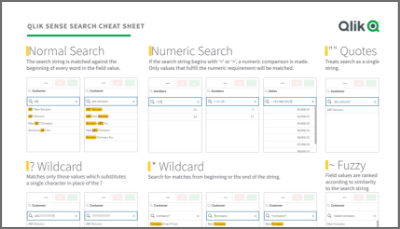
Qlik Sense Cheat Sheet version 2.0
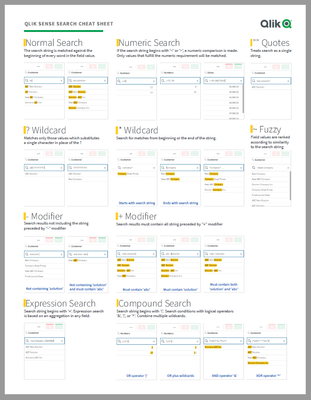
It was back in 2015 when I first published the original Qlik Sense Search Cheat Sheet. Since then, and thanks to lots of individual contributors here in the Community, the Search Cheat Sheet has suffered several transformations to make it more complete and truthful.@afurtado wrote me an email a few weeks ago because he was interested in getting the document localized for the Brazilian folks out there. In addition to thank him for his contribution... Show MoreIt was back in 2015 when I first published the original Qlik Sense Search Cheat Sheet. Since then, and thanks to lots of individual contributors here in the Community, the Search Cheat Sheet has suffered several transformations to make it more complete and truthful.
@afurtado wrote me an email a few weeks ago because he was interested in getting the document localized for the Brazilian folks out there. In addition to thank him for his contribution and sending him the file I decided that it was about the time to get the Search Cheat Sheet an update.
Today I want to introduce a new version of the document. I added the compound search section to it (@jayanttibhe thanks for the tip), and I redesigned and rationalized the position of each element for better comprehension.
As an extra, I made the document multilanguage ready. So, if someone wants to translate the Cheat Sheet to other language (currently available in English, Spanish and Portuguese) please let me know in the comments section and I'll gladly tell you how to help us.
Hope you like it, and please share it.
Arturo
Updates:
Feb 28: French version thanks to @arychener
Feb 25: Italian added thanks to @AntonioCostantino . Russian translation updated
Feb 13, 2020: Cheat sheet includes now the ^ Wildcard to be consistent with Qlik Help. Russian language added thanks to the contribution of @martynova
Jan 29, 2020: German language added thanks to the contribution of @g_mitschke