Unlock a world of possibilities! Login now and discover the exclusive benefits awaiting you.

- Qlik Community
- :
- All Forums
- :
- QlikView App Dev
- :
- Datamodel
- Subscribe to RSS Feed
- Mark Topic as New
- Mark Topic as Read
- Float this Topic for Current User
- Bookmark
- Subscribe
- Mute
- Printer Friendly Page

 Nagaraju_KCS
- Mark as New
- Bookmark
- Subscribe
- Mute
- Subscribe to RSS Feed
- Permalink
- Report Inappropriate Content
Datamodel
Hi All,
I am New to Qlikview
Modifying the databases is not allowed
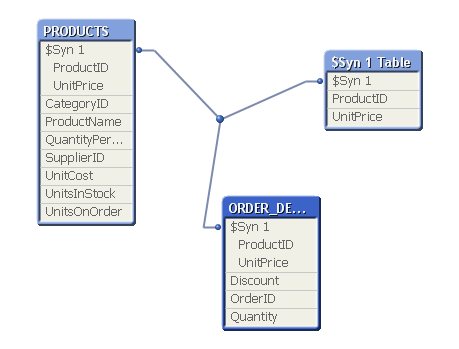
i want to resolve the Synthetic key.
Concatenate and join which one is Better..
Thanks In Advance..
- Tags:
- new_to_qlikview

- Mark as New
- Bookmark
- Subscribe
- Mute
- Subscribe to RSS Feed
- Permalink
- Report Inappropriate Content
Hi,
Plese rename the unity price with some alias so that you can remove the synthetic key.
The synthetic only forms when we have more that one table with more that one primary key and same set of fields.
Or you can use qulaify and unqualify for the unit price field. Hope it helps you
Thanks and regards,
S.Amuthabharathi
Nagaraju_KCS
- Mark as New
- Bookmark
- Subscribe
- Mute
- Subscribe to RSS Feed
- Permalink
- Report Inappropriate Content
Hi Amuthab'
I know this concept Alias name and Qualify.
Yesterday i faced this question..
but, they are asked
Modifying the databases is not allowed.
if i am give Alias name like modified right..

 er_mohit
- Mark as New
- Bookmark
- Subscribe
- Mute
- Subscribe to RSS Feed
- Permalink
- Report Inappropriate Content
just rename the untpirce feild from order table nothing to do your productid is primary key you got the solution
if your product table has large rows than to order table then try to use left keep
like
Product table:
load *
from table;
left keep
Order:
load *
from table;
- Mark as New
- Bookmark
- Subscribe
- Mute
- Subscribe to RSS Feed
- Permalink
- Report Inappropriate Content
Hi,
Modifying database is not allowed k but giving alias name and using qulaify is not modifying database based on my understanding it just for avoiding synthetic key or circular referance your database will remains as such

 tresB
tresB
- Mark as New
- Bookmark
- Subscribe
- Mute
- Subscribe to RSS Feed
- Permalink
- Report Inappropriate Content
Hello Raju,
Is there any specific reason that you want to remove synthetic keys? It is not necessary that the model with synthetic keys is a wrong one, sometimes it would even give you a better performance. Please have a look at this important discussion about synthetic keys in model
- Mark as New
- Bookmark
- Subscribe
- Mute
- Subscribe to RSS Feed
- Permalink
- Report Inappropriate Content
Hi,
To resolve the synthetic key just rename one of the columns using Alias. Aliasing does not mean that you are modifying database, it just renames the column in qlikview so that the column is not joined with any other similar named column (Which is qlikview's default attribute).
Just use UnitPrice as below along with all other fields you want:
Product table:
Load
Unitprice as UnitPrice1
From table;
This way you will just have one common column ProductID across tables on which the tables will be joined and no Synthetic key/table will be formed.
Hope this helps!
 rajeshvaswani77
- Mark as New
- Bookmark
- Subscribe
- Mute
- Subscribe to RSS Feed
- Permalink
- Report Inappropriate Content
You are modifying your QlikView table, not the database table.
thanks,
Rajesh Vaswani