Unlock a world of possibilities! Login now and discover the exclusive benefits awaiting you.

- Qlik Community
- :
- All Forums
- :
- QlikView App Dev
- :
- Re: Highlight not select
- Subscribe to RSS Feed
- Mark Topic as New
- Mark Topic as Read
- Float this Topic for Current User
- Bookmark
- Subscribe
- Mute
- Printer Friendly Page

- Mark as New
- Bookmark
- Subscribe
- Mute
- Subscribe to RSS Feed
- Permalink
- Report Inappropriate Content
Highlight not select
Hi all,
Is it possible to highlight a value i.e. today's date in a list box instead of selecting the value?
Regards
Accepted Solutions

 HirisH_V7
- Mark as New
- Bookmark
- Subscribe
- Mute
- Subscribe to RSS Feed
- Permalink
- Report Inappropriate Content
Hi Phresh,
You can write an expression like this in list box,
=if(Date=Today(),'qmem://<bundled>/BuiltIn/check_g.png')
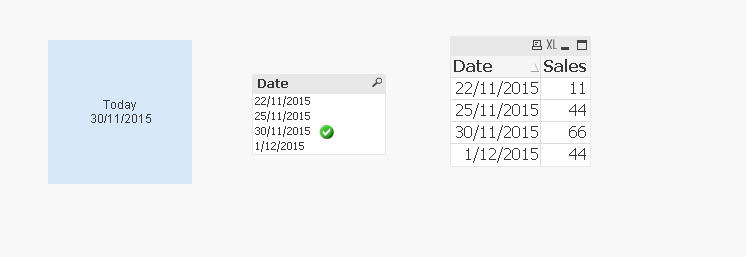
You can have a view for current date as sign preceding it.
PFA.
Hope this helps,
Regards,
HirisH

 swuehl
- Mark as New
- Bookmark
- Subscribe
- Mute
- Subscribe to RSS Feed
- Permalink
- Report Inappropriate Content
AFAIK, the styling options for values in a list box are pretty limited.
alternatives:
- Use a straight table chart's dimension instead of the list box (disable 'suppress zero values' on presentation tab and use the dimension attribute expression to format the value.
Cons: Support for selections is not as good as in a list box (e.g. selecting multiple values). Would need some more magic dimension formatting to mimic the selected values highlighting of a list box and to show the excluded values.
- Use expressions in the list box to add a text marker or one of the available mini chart / gauges representations to kind of highlight a line in the list box.
HirisH_V7
- Mark as New
- Bookmark
- Subscribe
- Mute
- Subscribe to RSS Feed
- Permalink
- Report Inappropriate Content
Hi Phresh,
You can write an expression like this in list box,
=if(Date=Today(),'qmem://<bundled>/BuiltIn/check_g.png')
You can have a view for current date as sign preceding it.
PFA.
Hope this helps,
Regards,
HirisH
- Mark as New
- Bookmark
- Subscribe
- Mute
- Subscribe to RSS Feed
- Permalink
- Report Inappropriate Content
Hi Hirish,
Thanks a lot. works perfectly well.
Regards
HirisH_V7
- Mark as New
- Bookmark
- Subscribe
- Mute
- Subscribe to RSS Feed
- Permalink
- Report Inappropriate Content
 Pleasure.
-HirisH