Unlock a world of possibilities! Login now and discover the exclusive benefits awaiting you.

- Qlik Community
- :
- All Forums
- :
- QlikView App Dev
- :
- Re: Please help regarding below example..
- Subscribe to RSS Feed
- Mark Topic as New
- Mark Topic as Read
- Float this Topic for Current User
- Bookmark
- Subscribe
- Mute
- Printer Friendly Page

 nikhilgarg
- Mark as New
- Bookmark
- Subscribe
- Mute
- Subscribe to RSS Feed
- Permalink
- Report Inappropriate Content
Please help regarding below example..
Hey,
Let say i have an input box and i entered a year. According to that year i want the sum of salary.
How can i achieve this ??
How to put input box where user can input value and how to get sum of salary according to inputed value ??
Can anyone help??
Thanks
- Tags:
- new_to_qlikview
- « Previous Replies
-
- 1
- 2
- Next Replies »
nikhilgarg
- Mark as New
- Bookmark
- Subscribe
- Mute
- Subscribe to RSS Feed
- Permalink
- Report Inappropriate Content
Hey,
I cannot get your point fully. After loading two tables above. If i made listbox and select dimension Year , then how would (sYear) matches with selected year ?? how does (sYear) mapped with value in list box ??

 khalander
- Mark as New
- Bookmark
- Subscribe
- Mute
- Subscribe to RSS Feed
- Permalink
- Report Inappropriate Content
Hi,
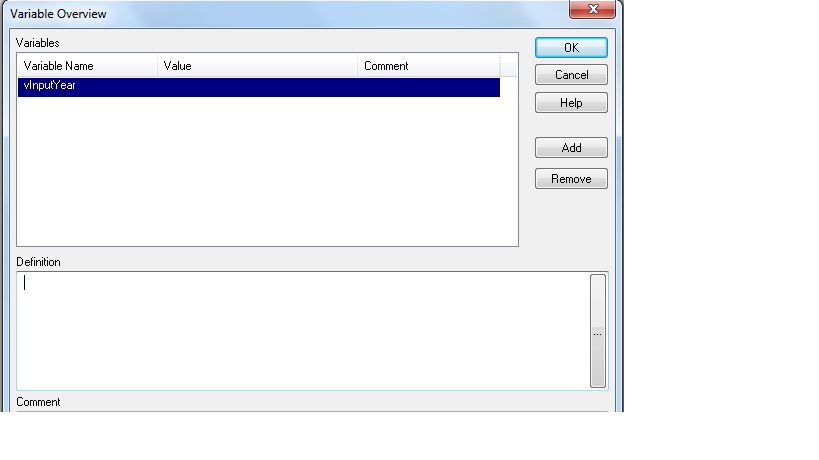
Create one empty variable like below screenshot
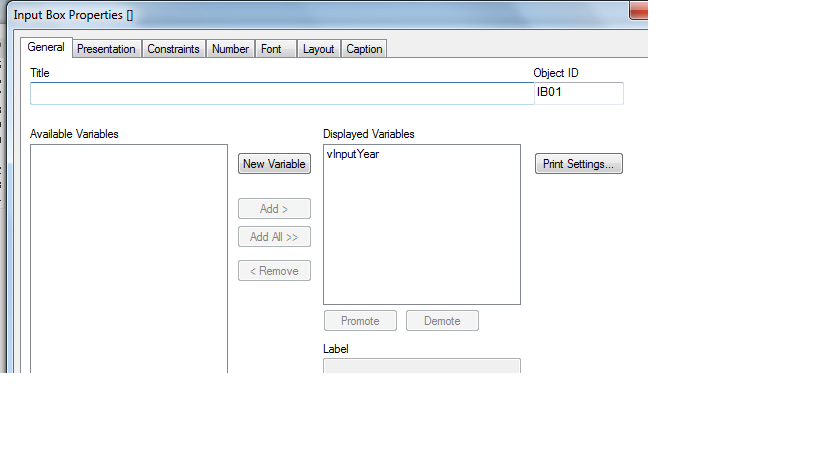
Then create new Input box and add that empty variable like below.
Then add expression as Sum({<Year={$(vInputYear)} >} Value) like below image.
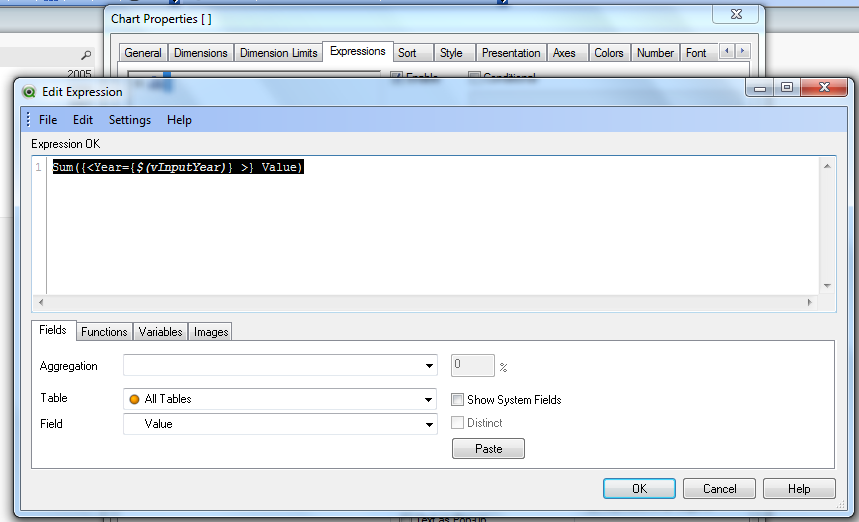
After that enter year in input box it will effect in chart also because we have given that variable in that chart also.
Regards,
khalander

- Mark as New
- Bookmark
- Subscribe
- Mute
- Subscribe to RSS Feed
- Permalink
- Report Inappropriate Content
see Screen shot of khalander
I could not make it better
nikhilgarg
- Mark as New
- Bookmark
- Subscribe
- Mute
- Subscribe to RSS Feed
- Permalink
- Report Inappropriate Content
Hey,
If i go your way den how to hide defined variable say vyear??
 senpradip007
- Mark as New
- Bookmark
- Subscribe
- Mute
- Subscribe to RSS Feed
- Permalink
- Report Inappropriate Content
PFA. Hope it will help you.


 flipside
- Mark as New
- Bookmark
- Subscribe
- Mute
- Subscribe to RSS Feed
- Permalink
- Report Inappropriate Content
It all depends on what you are trying to do. If you just want the user to see the sum of salary for their selected year, then just have a listbox or multibox for the Year field and use sum(salary) for the expression. My solution (and the solution using variables) allows the user to select a year (using the field sYear or entering data to be stored in a variable) and see the sum of salary ignoring any selections in the Year field.
nikhilgarg
- Mark as New
- Bookmark
- Subscribe
- Mute
- Subscribe to RSS Feed
- Permalink
- Report Inappropriate Content
Hey,
Thanks a lot. Thanks
khalander
- Mark as New
- Bookmark
- Subscribe
- Mute
- Subscribe to RSS Feed
- Permalink
- Report Inappropriate Content
Hi nikhil,
No need to hide variable once you/user enter the required year then it will display in chart.
Regards,
khalander
- « Previous Replies
-
- 1
- 2
- Next Replies »